Kode Sports Club
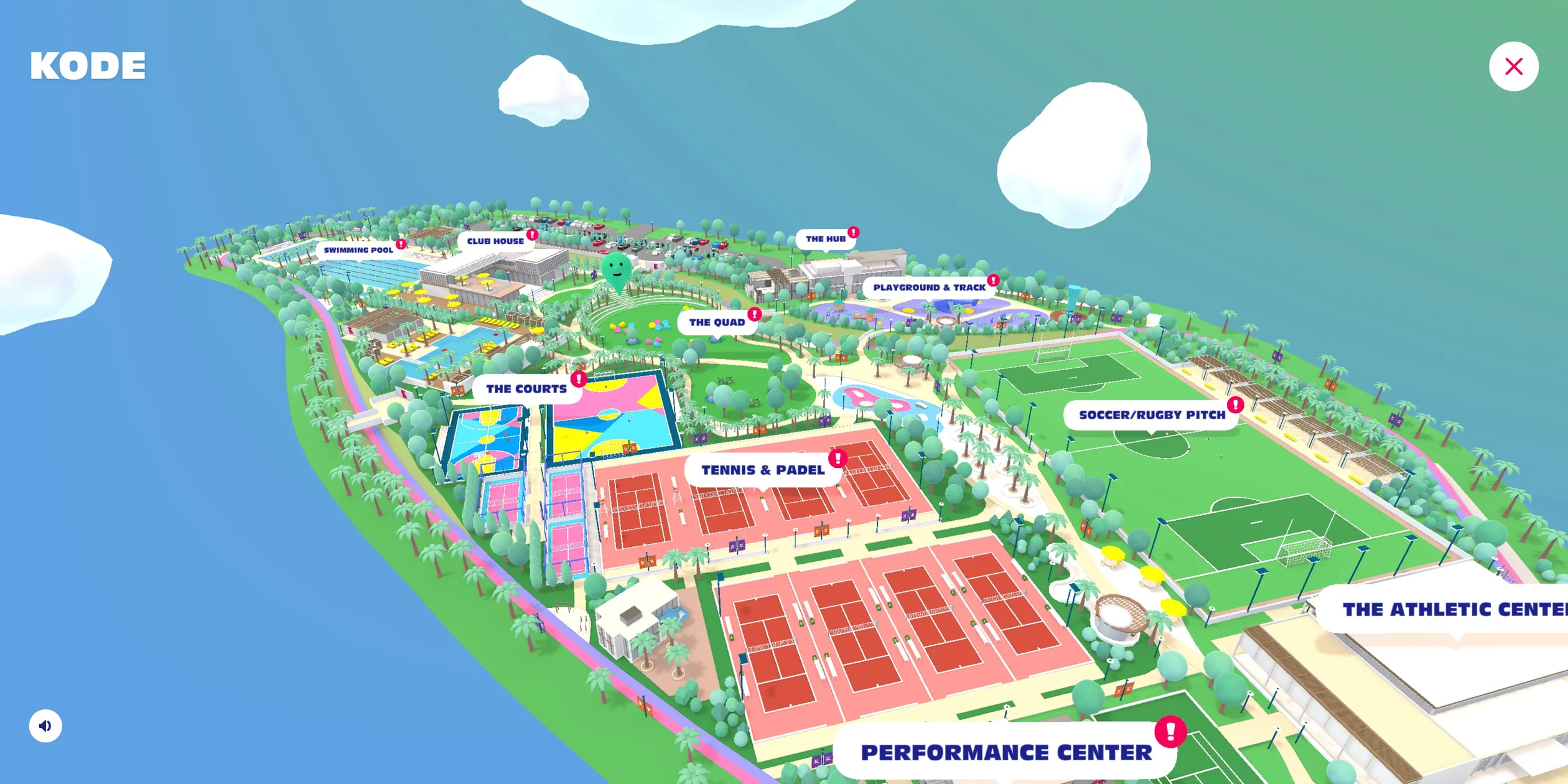
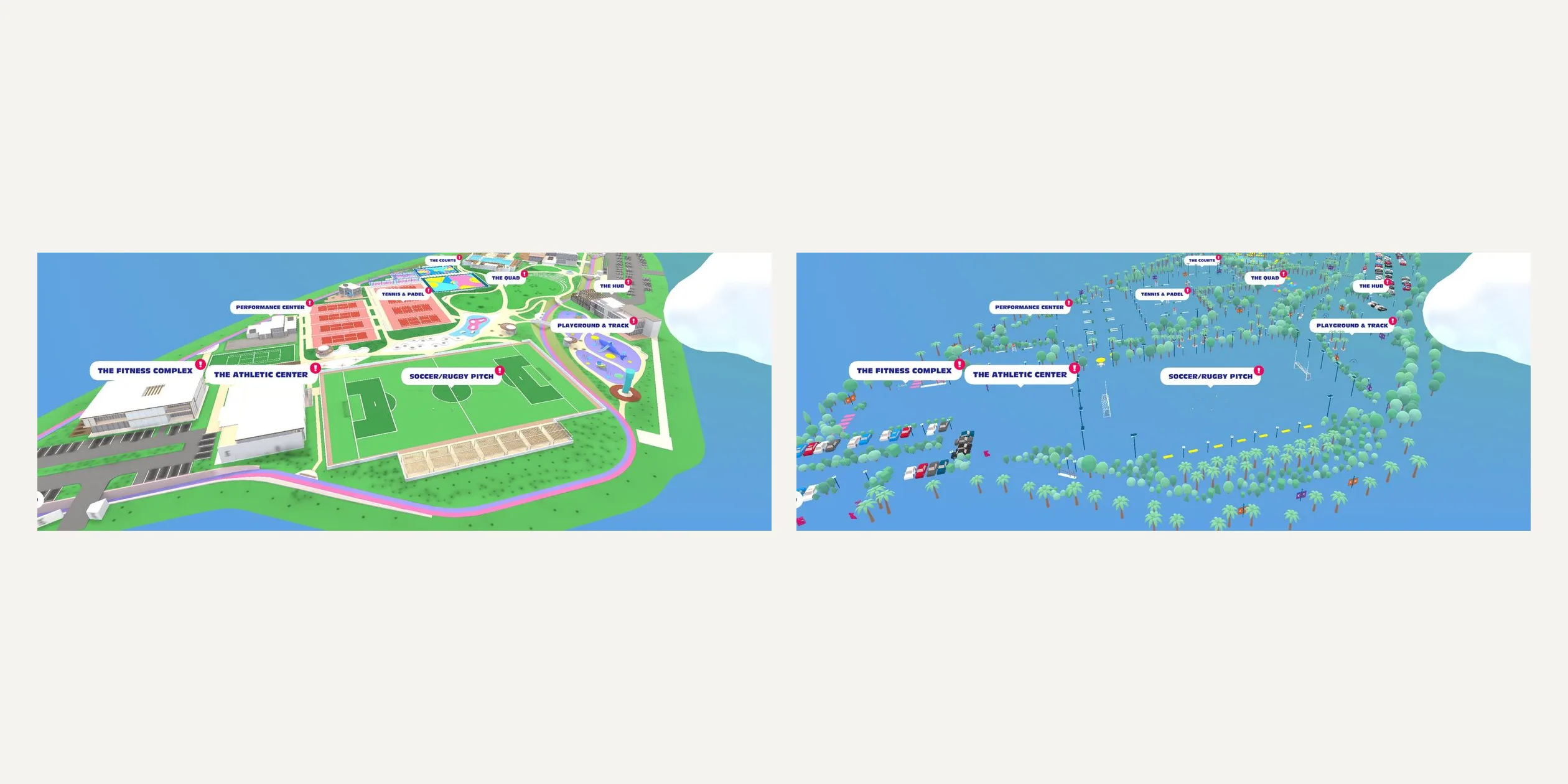
Kode Sports Club is the online tour of a private sports club in New Cairo. The club was still under construction, so the Paris studio Merci-Michel built it as a cartoon 3D island that visitors can walk into. Visitors make their own character, walk wherever they click, chat with the staff at each venue and play two mini-games. When a visitor taps the small map at the bottom of the screen, the camera rises from behind the character into the sky, the island turns into a guide map labelled with every venue, and a click on a venue brings the camera back down.
The site launched in November 2020 in place of a launch event that the pandemic had cancelled. It won Awwwards Site of the Month for November 2020 and that year's Developer Site of the Year, as well as FWA of the Day.
01Concept
Kode is the club at the heart of SwanLake Residences, a New Cairo development by Hassan Allam Properties, and it is run by Blue Ribbon. The job of this site was to introduce the club before its doors opened. In a Medium article about the making of the site, Merci-Michel says the client had planned a physical launch event that the pandemic ruled out. The client wanted a playful, unique online experience instead, one that would convey the spirit and philosophy of the club and give a glimpse of venues that were still being built. The team and the client decided together to rebuild the whole club as a cartoon, fill it with staff members to talk to, realistic renders of the buildings and video interviews with well-known athletes, and turn the visit into a game with quests and achievements.
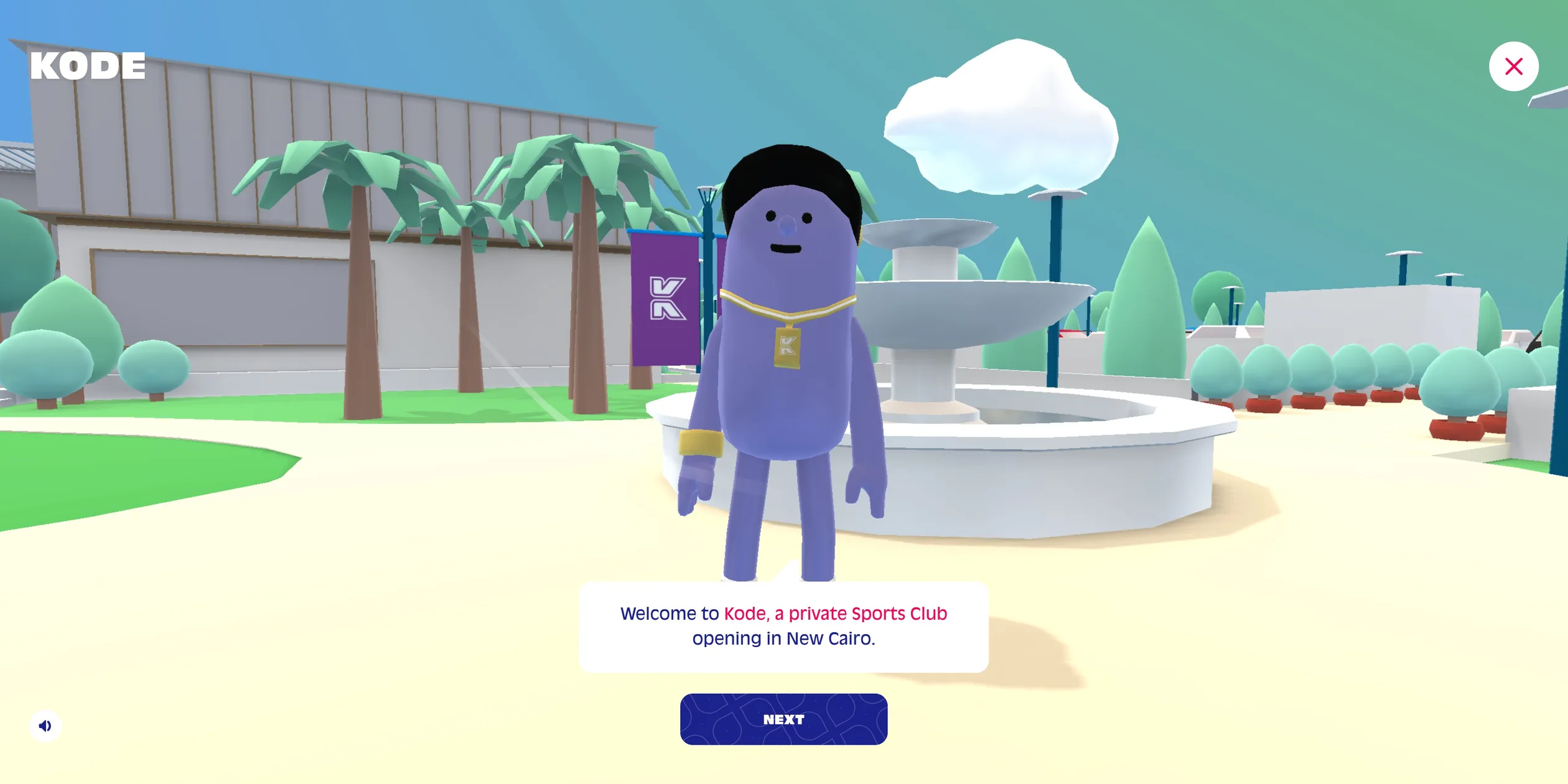
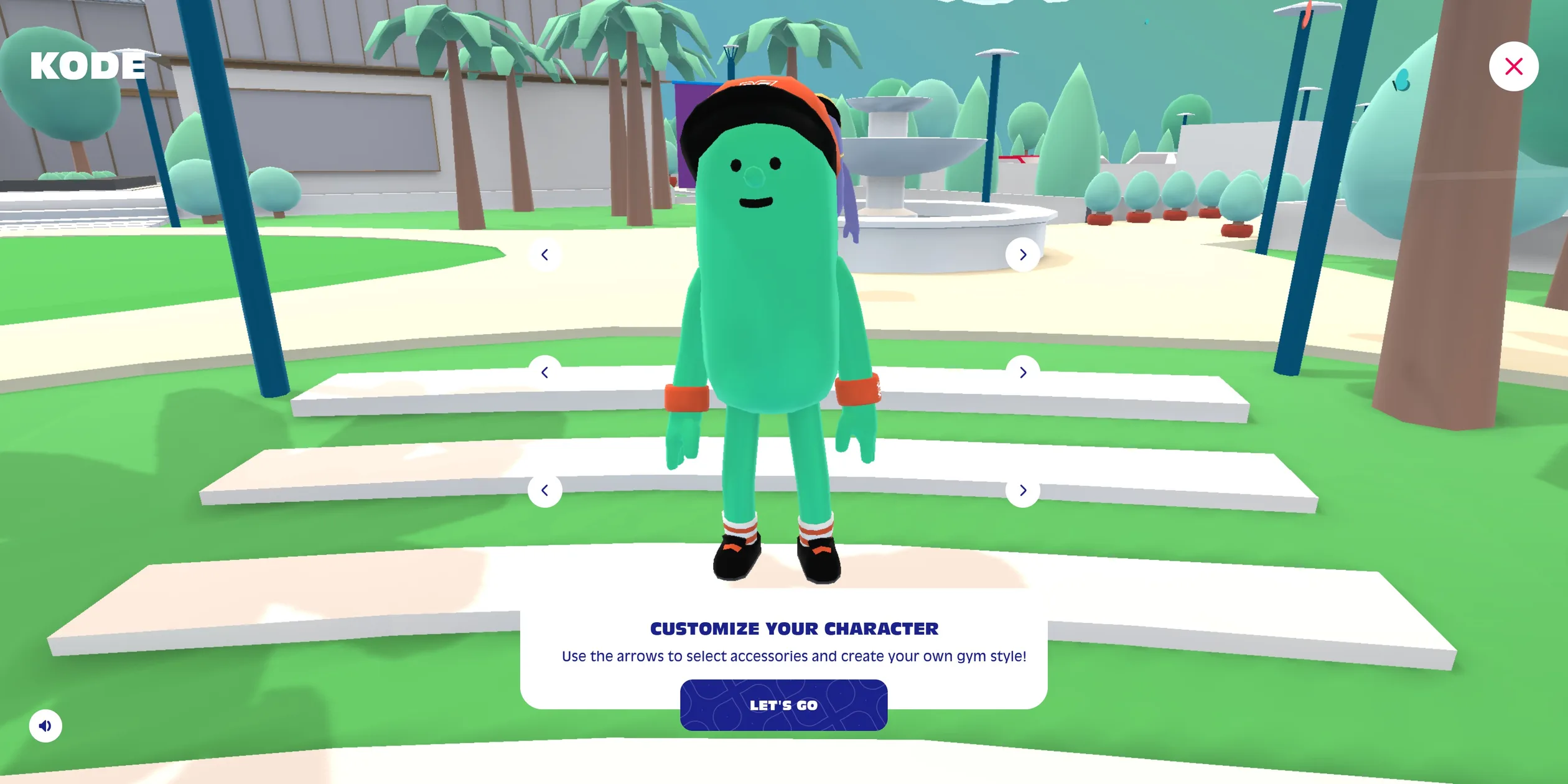
The visitor's path starts on a white loading page. The navy KODE logo and a circular progress ring sit in the middle, and when the ring fills it turns into a button that reads ENTER. After the click, the visitor first sees the whole island from above, then the camera comes down beside the fountain at the entrance, where a host introduces the club and the controls in five lines and finally asks whether the visitor would like to dress up their character first. The customiser puts three rows of left and right arrows beside the character, for headwear, body colour and socks and shoes, and once that is done the visitor is free to roam the island.
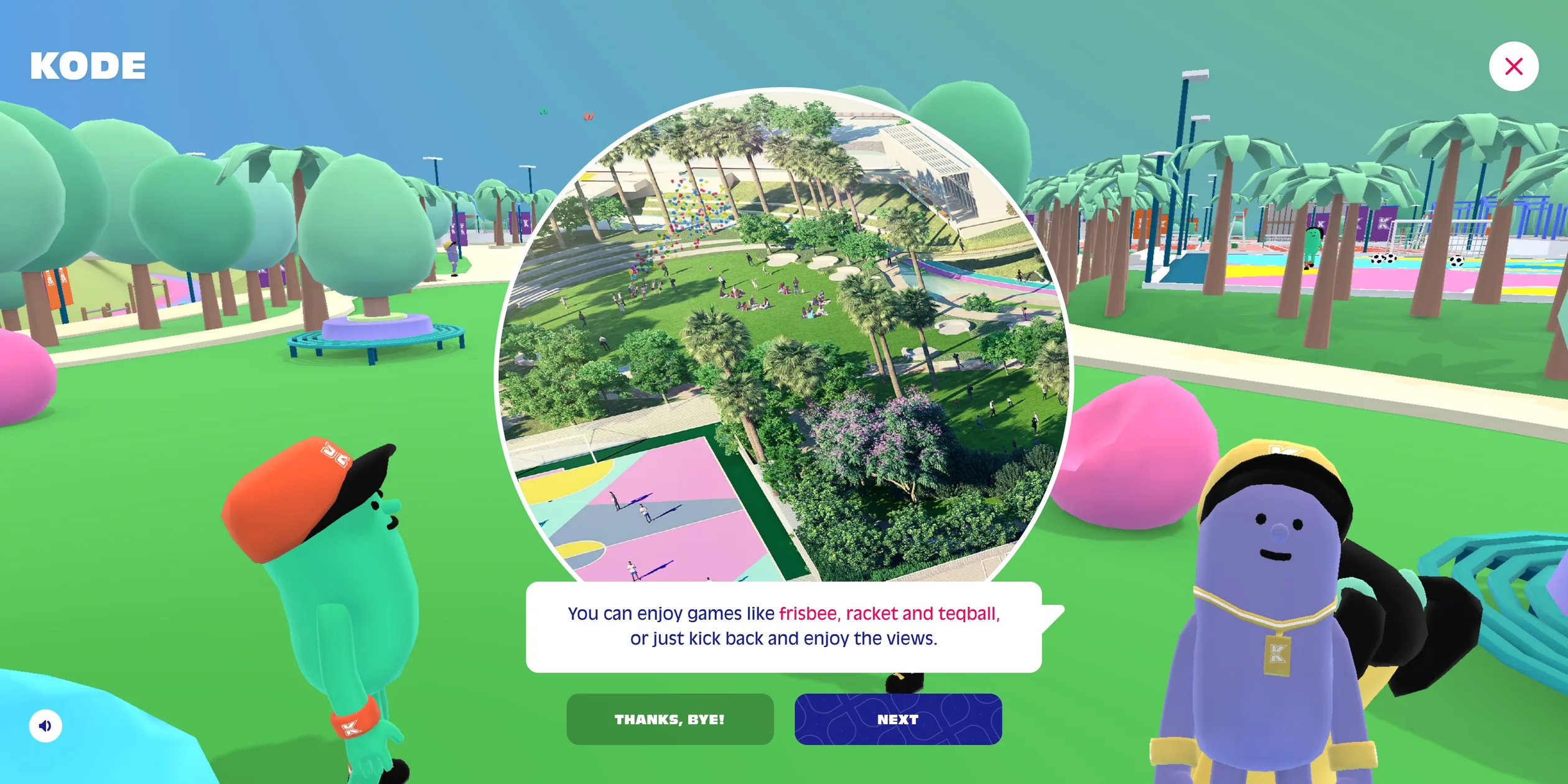
The island is divided into 11 areas, from the swimming pool, the tennis and padel courts and the football and rugby pitch to the club house, the fitness complex and the sports performance center. A staff member stands in every area. When the visitor walks up and clicks, that person describes the venue in two to seven lines. A round render of the finished building pops up above the middle lines so the visitor can see what it will really look like, and the last line is usually a fun fact about the sport. The reasoning behind this layout is that the site breaks a brochure about the venues into dozens of lines of dialogue and scatters them across the island, so visitors have to walk somewhere to read them. Once a visitor has talked to everyone in an area, the red exclamation mark over that area on the map disappears.
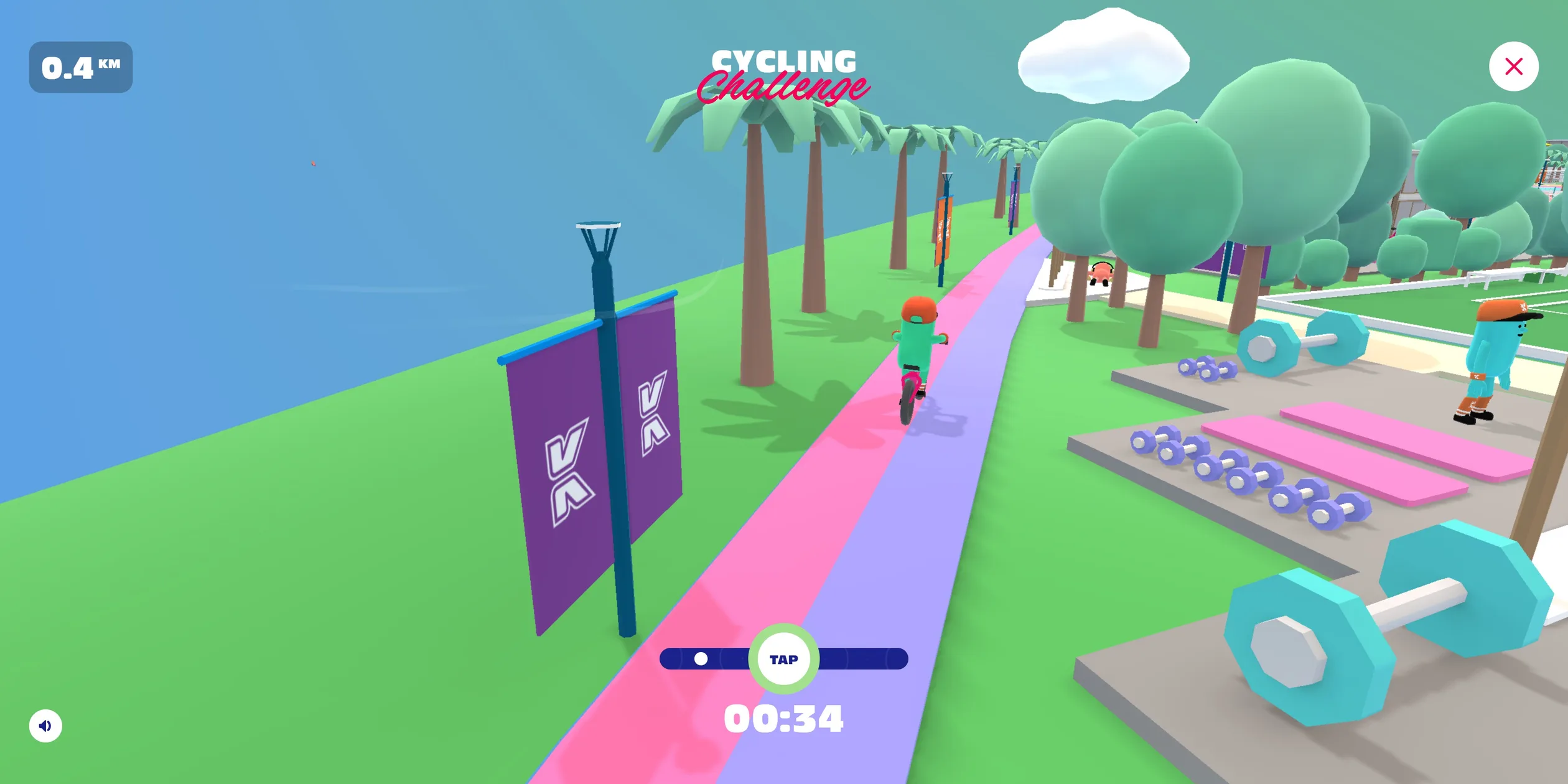
Beyond the conversations, the island has a few things that keep visitors around longer. Two staff members by the football pitch and the track each start a one-minute mini-game, a football game about timing the shot and a cycling game about clicking to a rhythm. Four other staff members each introduce a video, namely the club's brand film, its mobile app, and interviews with the squash world champion Raneem El Weleily, the sprinter Derek Redmond and the swimmer Dara Torres. The island also hides collectable water bottles, member cards and stars, 30 in all.
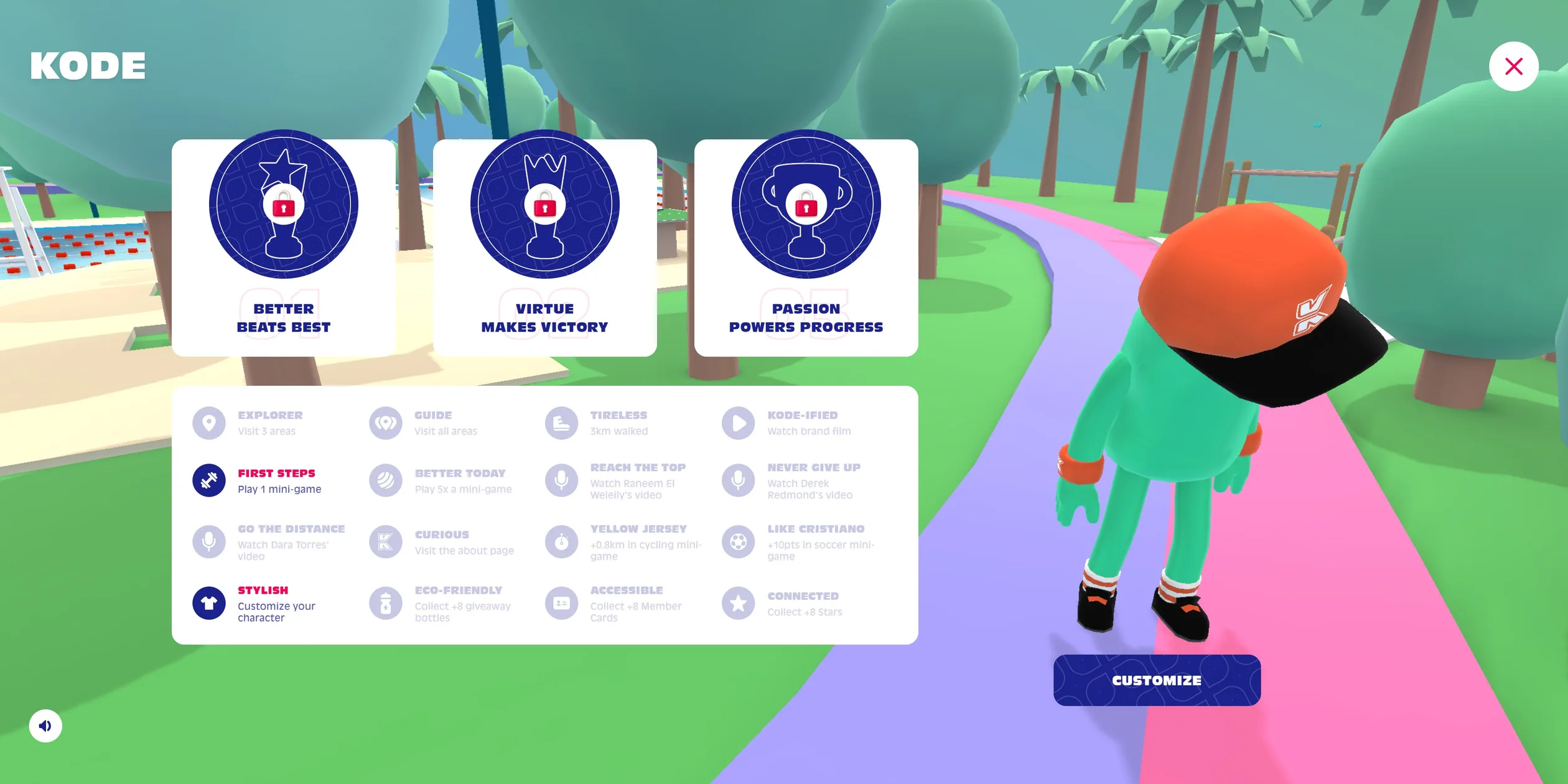
All of these activities add up to achievements and trophies. The Dashboard in the top navigation lists 16 achievements, such as visiting three areas, walking 3 km, watching the brand film, changing outfits once, and collecting eight of each kind of collectable. Above them sit three trophies that match the three mottos in the club's philosophy. Better Beats Best rewards visitors who keep beating their own score, Virtue Makes Victory goes to visitors who stop in the middle of a cycling race to help an injured runner, and Passion Powers Progress requires every achievement. One achievement does not match its own description, because Yellow Jersey promises to unlock past 0.8 km in the cycling game but actually needs 5 km, and it stayed locked after a 1.7 km ride. The second trophy can only be won one way. During the cycling game a runner lies on the track under a red HELP bubble, and the visitor has to give up the race and stop to talk to them. The club's values thus become a choice the visitor makes with their own hands, which is more than a slogan they read. All progress is saved in the browser, so a returning visitor goes straight back onto the island with their progress intact.
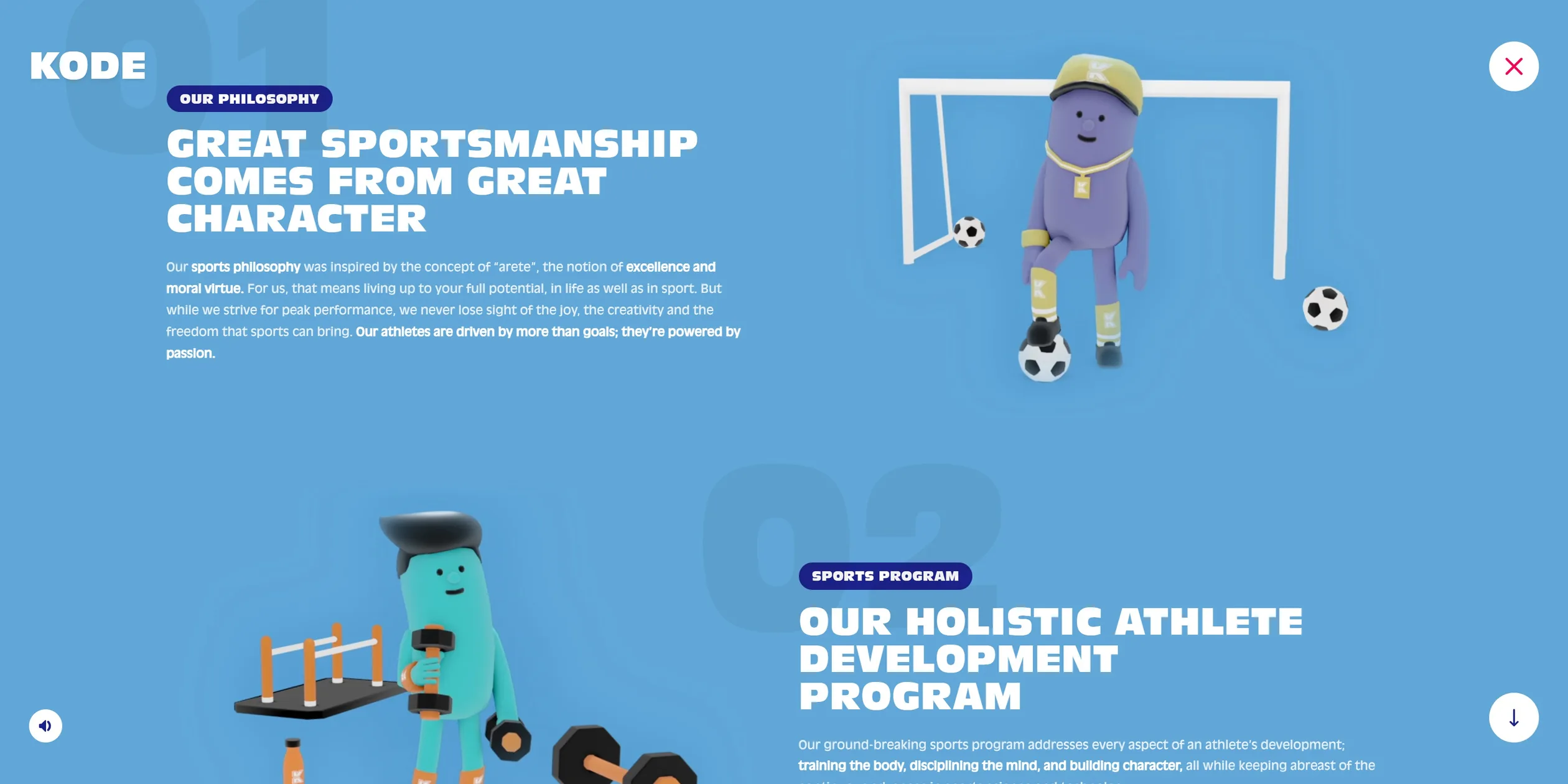
The way to membership always stays at the top of the page. A white Become a member button sits at the right of the navigation at all times, and About us is a conventional scrolling brochure about the club's philosophy and sports programme that ends with a PDF about the project. With this split, the island makes people remember the club, and the brochure and the membership button take interested visitors to the next step.
This teardown covers the live version of the site at kodeclubs.com, whose files on the server were redeployed in May 2025. A line-by-line comparison of today's home page with the Wayback Machine copy from 29 November 2020 shows the same page structure and the same copy throughout, with only a few changes. The club has opened, so every opening in Q2 2022 is gone. The Become a member button at the top used to open an on-site membership-code popup and now links to an external sign-up page. The phone number in the footer became a WhatsApp link, and the button that shared the site to Facebook became a button to download the mobile app.
02Design
The look of the site has two layers, a soft-coloured low-poly 3D toy island underneath and a flat 2D interface on top that uses only navy, magenta and white. Nothing on the island has a realistic texture. The grass is a flat bright green, the trees are rounded puffs of mint, the track is two bands of pink and lilac, every object carries a faint white glow along its edges, and the shadows are soft. Drawn this way, a club that had not been built yet looks like a carefully made model, which visitors do not compare with real photos, while the renders that the staff hold up show what the real place will look like.
The rules of the 2D interface can be reused as they are. The main colour is navy #1c228c, used for the KODE logo, headings and the main buttons. The accent is magenta #f50359, used for key words in the dialogue, achievement titles and the lettering of the membership button. The club's flags and membership card are purple #7d0e8b, a few graphics are orange #ff4000, and everything else is white. Every card is white with a 15-pixel corner radius. The Awwwards page lists three representative colours, #2779a7, #49c5b6 and #FF9398, which roughly match the sky and sea, the groves of trees and the pink track.
The type comes from two cuts of one family, Antique Olive. The narrow, heavy Antique Olive Compact is always set in capitals and handles the logo, headings, buttons and the venue labels on the map. The regular-width Antique Olive handles dialogue and descriptions. Every size on the site is set in units of the root font size, which scales linearly with the screen width. Below 1024 pixels wide the root size grows from about 10 pixels to 14 pixels, above 1024 it grows slowly from about 16 pixels, and from 1600 pixels it stays at 18 pixels. So on a 1920-wide screen the KODE logo on the loading page is 10 times the root size, 180 pixels, it shrinks to about 87 pixels on a phone, and the ratios between the type sizes never change.
The interface parts speak the same language, and most of them have clear states. Buttons are rounded rectangles, and a navy button with a pale K pattern means continue. The button that leaves a conversation is green and means stop. Each dialogue card has a small tail pointing at the speaker, with body text in navy and key words in magenta. The venue labels on the map are navy on white and switch to white on navy when the cursor rests on them, while an outline lights up round the venue, and venues that are not finished yet carry a red exclamation mark. When the visitor picks something up or wins a trophy, the card that pops up has a round navy badge at its top with a small animation of the item. The dashboard shows state through colour, with unlocked achievements in a navy icon and a magenta title and locked ones greyed out entirely.
The characters are designed so that visitors of any age will want to play. Everyone is a neckless coloured capsule with two dot eyes and a mouth that changes shape, plus caps, hairstyles, wristbands and trainers. The team writes that they wanted the characters to appeal to children and adults alike.
About us is the main page outside the island, and it puts the same rules into a conventional scrolling brochure. The background is a single field of sky blue, each section alternates a heading and an illustration from left to right, a small navy tag (OUR PHILOSOPHY, SPORTS PROGRAM and so on) sits above each heading, and a huge pale number from 01 to 04 sits behind it. The illustrations are high-resolution renders of the capsule characters from the island, one crouching in front of a goal, another lifting dumbbells, so the brochure and the game look as if they come from the same world.
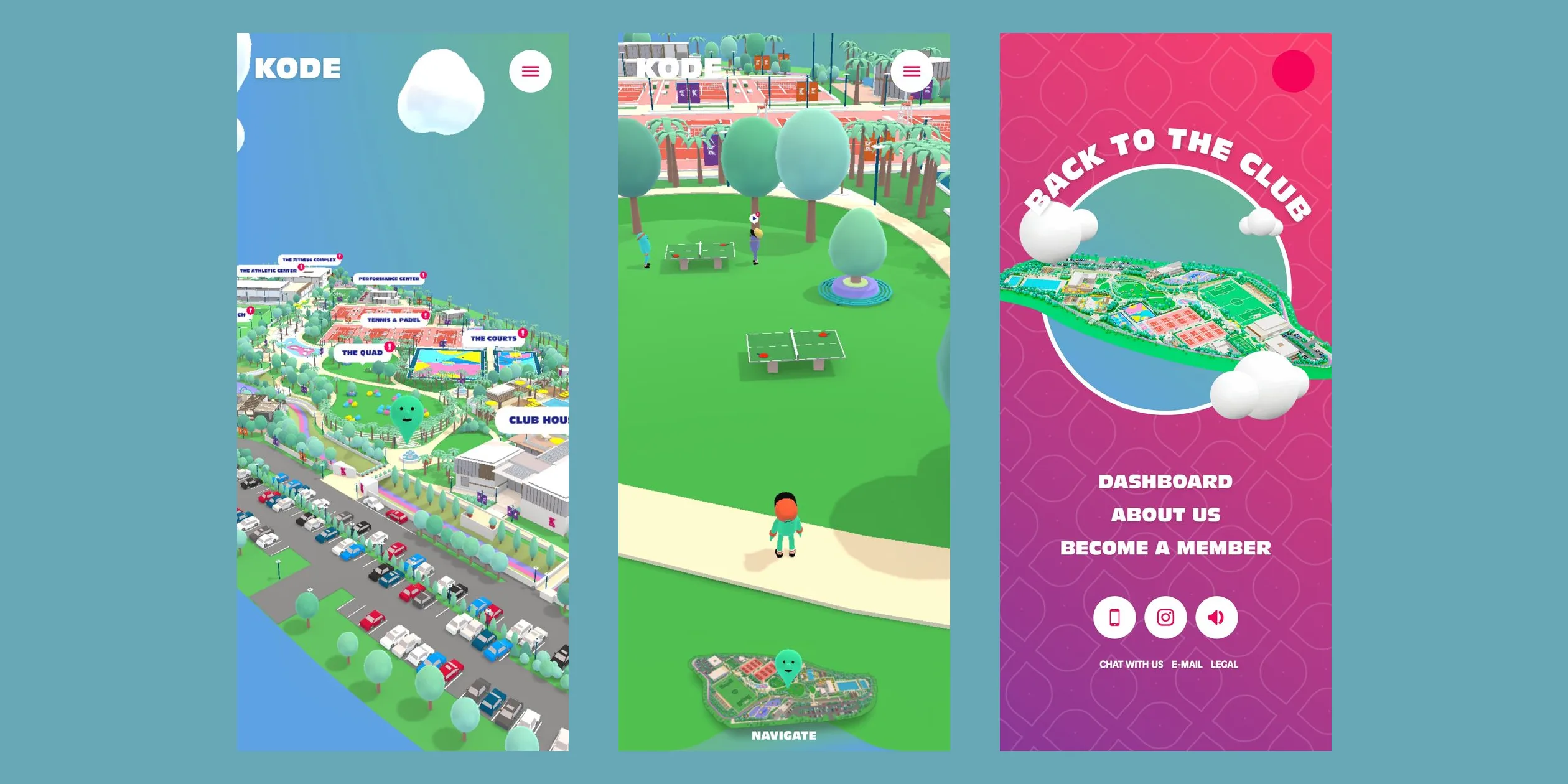
On phones the 3D island stays as it is and the interface is rearranged for portrait. The three navigation links move into a round menu button at the top right. The menu opens as a full screen of magenta-to-purple gradient, with a picture of the whole island inside a circle in the middle, the words BACK TO THE CLUB curving round the circle, and three large white links below. Dialogue cards fill the width of the screen, with the two answer buttons side by side below the card. The map works in portrait too, and tapping a venue label teleports the visitor there. When the phone is turned sideways, a Please rotate your device notice covers the whole page, because the site only accepts a phone held upright.
03Motion
The motion on this site runs at two tempos. Cards, buttons and dialogue boxes share one curve that starts slowly, speeds up and then settles over a long tail, and most of these moves last half a second. The big camera moves use a curve that is very slow at both ends and very fast in the middle, and each lasts two seconds. The interface therefore feels brisk and the camera feels unhurried, and the two never blur into each other.
The first camera move after the ENTER click shows the two-second curve in full. Within about a second of the visitor's click the white loading page fades out and the overview of the island turns slowly in place. Then the camera starts to descend. Over these two seconds it barely moves for the first half second, covers almost all of the distance in about 0.6 seconds in the middle, and finally eases to a stop beside the fountain, right in front of the host. The route lets visitors take in the layout of the whole island before they land in front of one particular person.
The jump to the map is the same move played backwards. When the visitor clicks NAVIGATE, the bottom interface tucks away first, and about a second later the camera rises from behind the character and takes the same two seconds to reach the sky above the island. On the way up every person on the island shrinks together, and by the time the camera reaches the top they have vanished, leaving only the venues and their labels. Up high, the camera circles the island slowly on its own, a visitor can press and drag to turn it to any angle, and it stays at the new angle after release. When the cursor rests on a venue the label changes colour and an outline lights up round it, and a click sends the camera straight down to that venue on the same curve, with the character already standing there.
Walking on the ground has a different feel. When the visitor presses on a point of the ground the character walks towards it, holding the button keeps the character following the cursor, and a single click sends the character a short way in that direction. The character builds up speed over a few frames, starts to slow down about four units from the target and comes to a gentle stop on it. Turning is also eased frame by frame, so the character never spins round in one go. The camera follows behind the character, swings slowly back round behind it after each turn, and a trail of small dust puffs is left at its feet. On phones the control is exactly the same, the character walks wherever a finger presses, and on the first arrival on the island a card with a tapping hand appears in the middle of the screen and disappears at the first touch. The keyboard uses only three keys, the up arrow to walk forward and the left and right arrows to step sideways.
Talking to a staff member changes both the camera and the interface. After the visitor clicks a staff member, the camera drops from behind the character and swings to the side to frame the two people at the left and right of the picture. It does most of that move in about a second and then keeps floating gently like a handheld camera. The dialogue card rises from the bottom of the screen in half a second, its small tail pops out 0.25 seconds later, and the text appears letter by letter, one letter every 10 milliseconds, so a line is usually typed out in under a second. When the text is complete the answer buttons rise one after another, each 0.1 seconds after the previous one. The staff member's mouth changes shape while they talk, and they wave when they start.
The small things on the island move too, which makes a static model feel alive. Collectable bottles and stars bob slowly up and down while they spin, and when a visitor comes within about 25 units one grows from nothing, quickly at first and then easing in, and it shrinks away again when the visitor leaves. Butterflies flap past, a few white wind streaks cross the sky now and then, and passers-by jog along the paths. When an achievement unlocks, half of the host leans in from the bottom left of the screen beside a bubble that reads Achievement unlocked.
Both mini-games turn one simple timing call into a feel. In the football game a row of white aiming marks swings left and right above the character, and pressing the mouse button freezes the aim. The longer the press lasts, the more power builds up and the higher the ball flies, and on release the character kicks, sending the ball under physics towards a round target in the goal that moves after each hit. In the cycling game a white dot swings back and forth along a bar at the bottom. A click while the dot is inside the TAP circle in the middle speeds the bike up and a mistimed click slows it down, and the faster the bike goes, the faster the dot swings, so the rhythm gets harder and harder to keep. The camera reacts to speed as well, catching up with the character faster the faster it rides, so the picture follows more tightly at speed. Both games end on a result card over a dimmed scene, showing the goals or the distance with buttons to play again or quit.
All of these moves run smoothly on a 1920-wide screen. Walking around the island and sitting on the map both hold 60 frames per second without dropped frames.
04Engineering
three.js draws everything with WebGL2 on one canvas that fills the window, and the island is made of three kinds of things. The first kind is 8 large blocks. Everything that appears only once, such as the ground, paths, pitches, pools and buildings, is merged into 8 blocks by position on the map, and blocks outside the camera's view are not drawn. The second kind is everything that repeats, namely trees, palms, cars, lamp posts, fences and flags. The team exported them as empty objects that keep only position, rotation and scale, rebuilt them in the browser and merged them into one large mesh that is drawn in a single go. The third kind is 26 characters with skeletal animation.
The team's article explains why they ended up merging the repeated objects. They first tried instanced drawing grouped in several ways, and even instancing grouped by the camera's view, but to make the island feel rich they had so many kinds of objects that the draw calls were still too many. They also wanted the camera transition between the map and the third-person view to run without a cut, so they simply merged every repeated object into one mesh. As a result the whole island takes only 40 to 60 draw calls per frame.
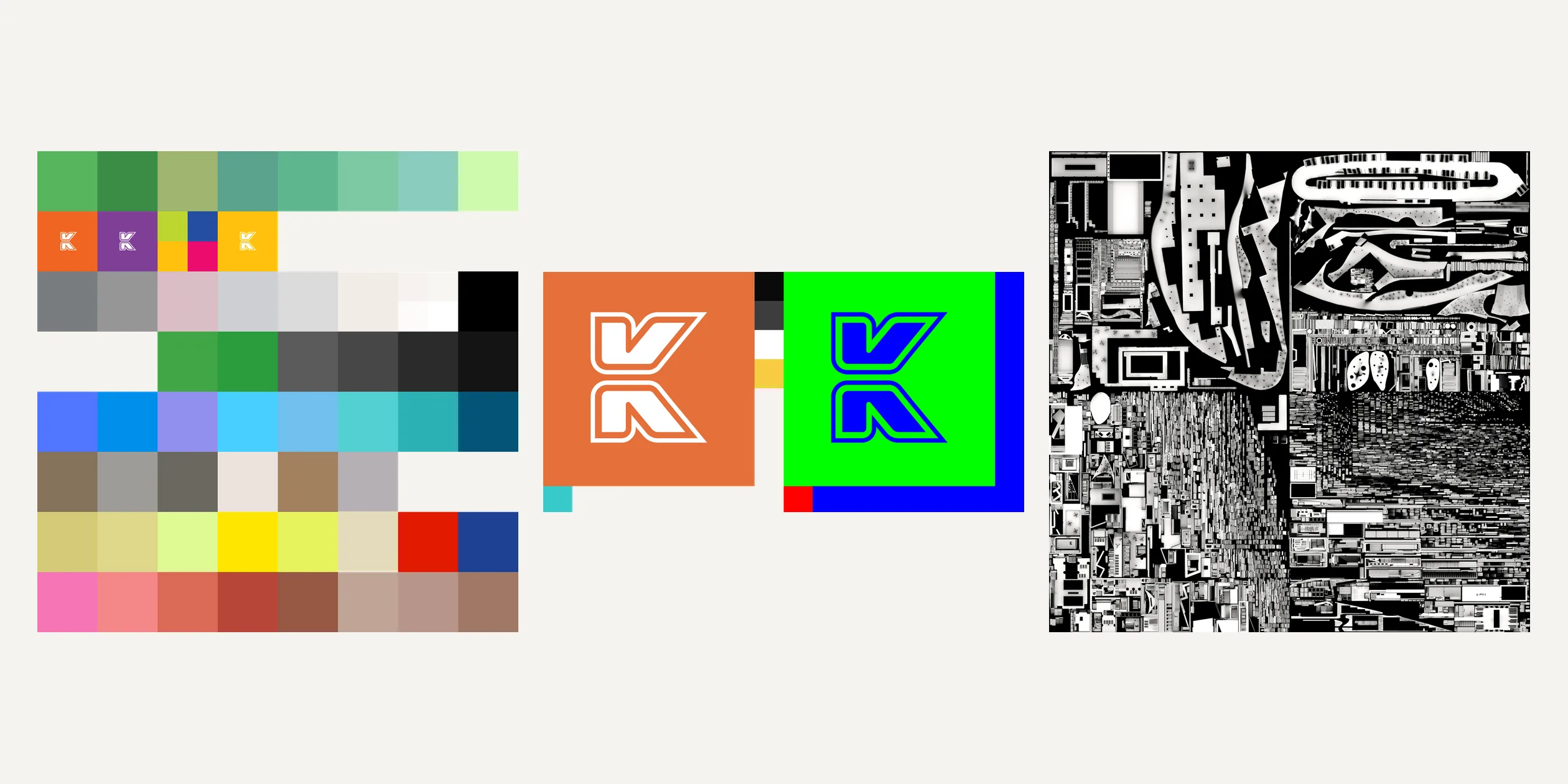
The assets follow the same rule of keeping things small. The team says the map geometry started at 12 MB, replacing the repeated objects with empty objects saved about 4 MB, and Draco compression through Cesium's gltf-pipeline brought the whole map down to 2 MB. The colour of the whole map comes from one texture, and that texture is downloaded as a 9.5 KB SVG palette of flat colour swatches that the browser draws into a 2048-pixel texture, with every model's texture coordinates pointing at one swatch. When the same object needs a different colour, the team did not move its texture coordinates but used the texture's alpha channel as a mask to shift the colour. The character texture is an SVG too, with default colours in its left half and a red, green and blue mask in its right half. The shader reads the same texture twice, once for each half, tints the red areas with a main colour and the green areas with a secondary colour and keeps the original colour in the blue areas, so one number switches between five colour schemes. What really takes up space is the baked ambient occlusion (AO). The 8 blocks each have a patch in one of two 2048-pixel atlases, and with one more for the characters and other objects, the three PNGs add up to about 2.9 MB, the largest images in the download.
The lighting uses no post-processing and builds up from a few cheap layers instead. A hemisphere light gives the scene a colour gradient from top to bottom. The team added a rim light to the three.js standard material, so the outlines of objects turn slightly white and look like glazed toys, and a touch of MatCap lighting variation and the baked AO sit on top. Shadows come from a single shadow map, and the team changed the three.js lighting code so the shadow fades out towards the edge of the area that map covers, which keeps objects beyond it from showing a hard shadow border. They ruled out baked shadows and cascaded shadow maps, the first because of the data size and a result that was not good enough, the second because of the extra draw calls. The code also sets up bloom, tilt-shift and vignette passes, but the switch is off in production, every frame renders the scene directly, the canvas runs without antialiasing, and the pixel ratio is capped at 1.5.
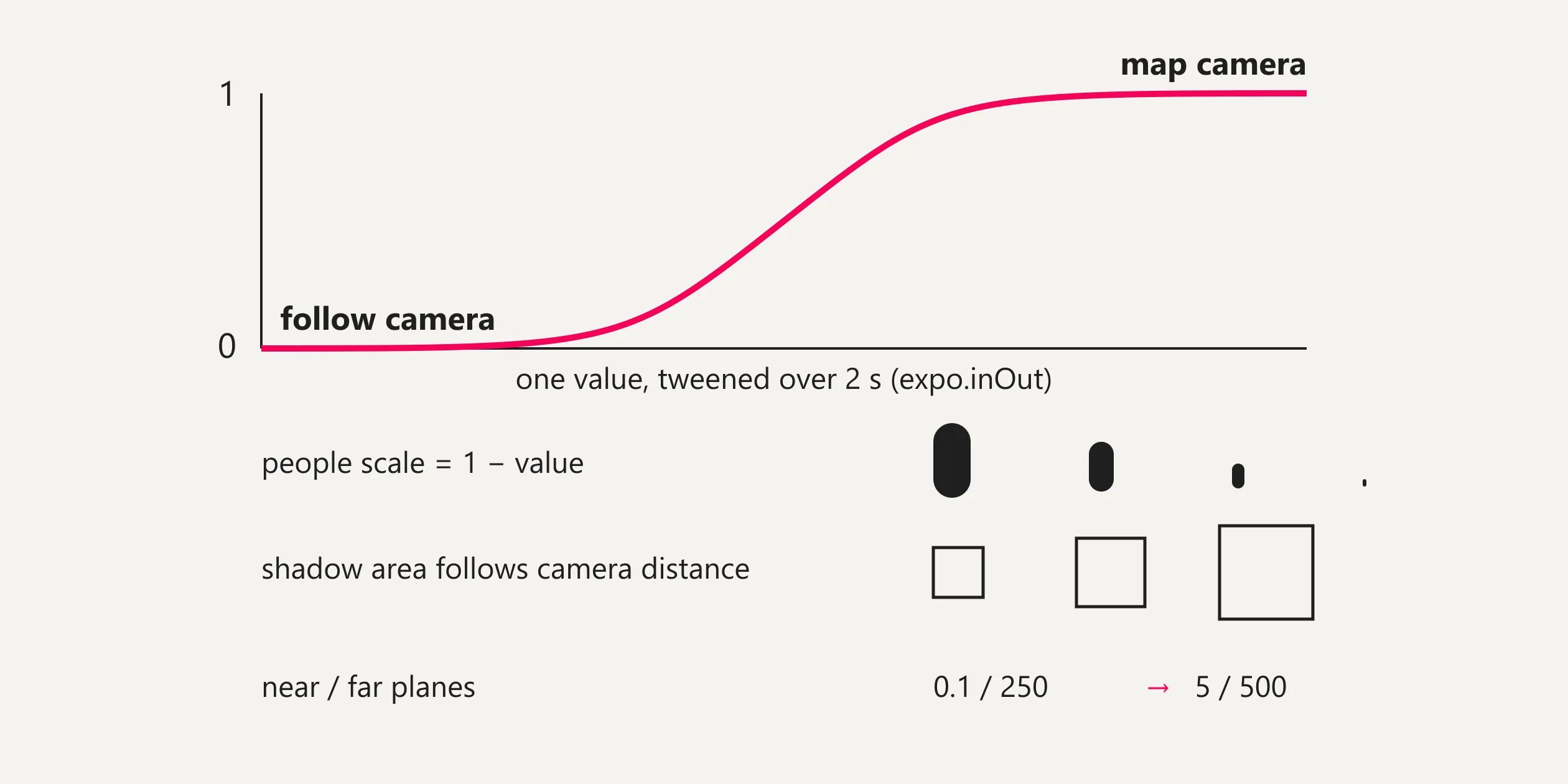
A single number from 0 to 1 drives the transition between the two camera states. At 0 the camera follows behind the character, at 1 it circles the whole island as the map camera, GSAP tweens the number over two seconds with an expo.inOut curve, and the camera position blends between the two states by that number. The same number controls three more things at once. The scale of every character equals 1 minus the number, so people shrink out of sight together as the camera climbs and never turn into a mass of flickering dots on the map. The area the shadow map covers follows the distance between the camera and the character, from just over thirty units round the character on the ground to the whole island at map height, and the team's article also mentions that the shadow camera grows in map mode. The camera's near and far planes move with the number from 0.1 and 250 to 5 and 500, which keeps depth precision good enough close up and far away. Entering, opening the map, coming back down from the map and the climb behind the About page all use this one tween.
Walking and physics both compute as little as possible. The controls changed three times during development, and the team's article tells the story. The first version was click-to-move with pathfinding on a navigation mesh, which they generated first in Blender and then in Unity, using Don McCurdy's library for the pathfinding, but the mesh was so complex that paths often came out wrong, so they dropped it. They then tried a joystick and found U-turns too hard, a second joystick would have been too complicated for non-gamers, and a fixed camera was easier to control but hid the openness of the environment. In the end they went back to clicking, without pathfinding.
In the current version a click is cast only onto an invisible horizontal plane to get the target point, and the character walks straight at it. The character's height comes from a separate, simplified navigation mesh whose triangles are sorted by their centres into a 10×10 grid, and each frame casts a ray only against the triangles in the character's cell, which is what keeps the character standing on slopes and bridges. Physics runs on cannon.js, and the same grid idea applies to colliders. The site divides the island into a 5×5 grid and only creates colliders for objects within 5 units of the character, switching them off again once the character moves away. The football in the mini-game is also a cannon.js rigid body, and each shot gives it a starting velocity from the aim direction and the charge, with the charge setting only the upward part.
A few smaller parts take the same shortcuts. Every mouth shape and the medal of each character live in one mesh, with each vertex tagged with the shape it belongs to, and the shader moves the shapes that are not in use far out of view, so talking only changes one number. The butterflies' wings fold back and forth over time in the vertex shader without any skeletal animation. On phones and tablets the 3D scene stops rendering while the menu is open, which saves the graphics card the work.
The site squeezes its loading into two packs and fetches a few small files on demand. The team's own build tool packs the files into two binary files, with app.pack holding the frame sequences for the achievement and trophy animations and canvas.pack holding the models, textures, font and 42 sound effects. The position and length of every file inside a pack are listed in a manifest on the home page, and the browser slices the files out once a pack has arrived. A first visit downloads about 7.6 MB in total, not counting the interview videos, which matches the 7.6 MB in the team's article, and canvas.pack is the largest item at about 5.3 MB compressed. Something first appears on screen in about 0.3 seconds, but the progress ring on the loading page only fills once both packs are in, and on a 1920-wide screen the ring turns into ENTER after about five or six seconds.
Sound loads by two routes as well. The three looping background tracks (ambience, the everyday music and the mini-game music) stay outside the packs and stream through audio elements. The sound effects are decoded from the pack and played by position in the 3D scene, footsteps, character voices and shots each rotate through two to four versions, and the wind and the bike grow louder with speed.
The site can only be fully played with a mouse or a touch screen. The keyboard can move between the header, the footer and the map entry and can walk with the arrow keys, but talking to staff, teleporting to venues, changing outfits and picking things up all need a pointer, and screen readers cannot read anything in the 3D world. The site does not read the system's reduced-motion setting, and the large camera flights play the same under every setting.
05Scores and Team
| Award | Source | Date | Score |
|---|---|---|---|
| FWA of the Day | The FWA | 2020-11-17 | 88 POINTS, DAYS 1 |
| Site of the Day | Awwwards | 2020-11-26 | 8.30. Design 8.21 / Usability 8.10 / Creativity 8.76 / Content 8.32 |
| Developer Award | Awwwards | 2020-11-26 | 8.25 |
| Site of the Month | Awwwards | November 2020 | Monthly winner, no separate score |
| Developer Site of the Year | Awwwards | 2020 | Yearly developer award, no separate score |
Kode Sports Club first took FWA of the Day with 88 points, won Awwwards Site of the Day nine days later and was then chosen as the Awwwards Site of the Month for November 2020. Among the four Awwwards categories Creativity is highest at 8.76, which fits a club introduction turned into a treasure hunt that people can play. Usability is the lowest, though still 8.10, perhaps because point-and-click walking and a map that is always one click away keep first-time visitors from getting lost. The developer jury gave Animations 9.33, the highest of the six, and Accessibility only 6.67, which matches the keyboard and screen readers being shut out of the 3D world described above. In the Awwwards 2020 annual awards it won the Developer Site of the Year category, not that year's overall Site of the Year. It also won Website of the Day at the CSS Design Awards.
| Credit | Role | Record |
|---|---|---|
| Merci-Michel | Interactive design and digital production studio in Paris, whose Awwwards account describes it as a digital gamification studio. On this project it handled UX and UI design, art direction, motion graphics, functional prototyping and technical development | Awwwards works 64, SOTY 2, SOTM 6, SOTD 44, HM 62. FWA 80, entered the FWA Hall of Fame in 2026 |
| Josette | Sound, listed on Merci-Michel's project page as the sound credit for this project | — |
Merci-Michel did everything from design to development in-house and brought in Josette only for the sound. Merci-Michel has won 80 FWA awards since 2012, and the FWA describes the studio as known for turning websites into richly crafted, truly playable worlds. The team writes that the project came to them as a pitch at the end of April 2020, during the French lockdown, that they had one week to prepare their proposal, and that they won.
06Archive
- Award date
- 2020-11-26
- Awards
- Awwwards SOTD 2020-11-26, Awwwards DEV 2020-11-26, Awwwards SOTM 2020-11, Awwwards Developer SOTY 2020, The FWA FOTD 2020-11-17
- Site
- https://www.kodeclubs.com/
- Credits
- Merci-Michel, sound Josette
- Design
- spatial
- Build
- realtime
- Awwwards
- 8.3 / 10. Design 8.21 / Usability 8.10 / Creativity 8.76 / Content 8.32. Developer award 8.25. https://www.awwwards.com/sites/kode
- The FWA
- 88 POINTS, DAYS 1. https://thefwa.com/cases/kode
- Stack
- three.js, cannon.js 0.6.2, GSAP, Draco, custom asset pack format, Google Cloud Storage
- Total assets
- About 7.6 MB, of which canvas.pack with the models, textures and sound effects is about 5.3 MB
- Speed
- FCP 0.30–0.34 s, LCP 0.40–0.99 s (the loading-page logo), CLS 0.005. 60 fps walking on the island and on the map