Persepolis Reimagined
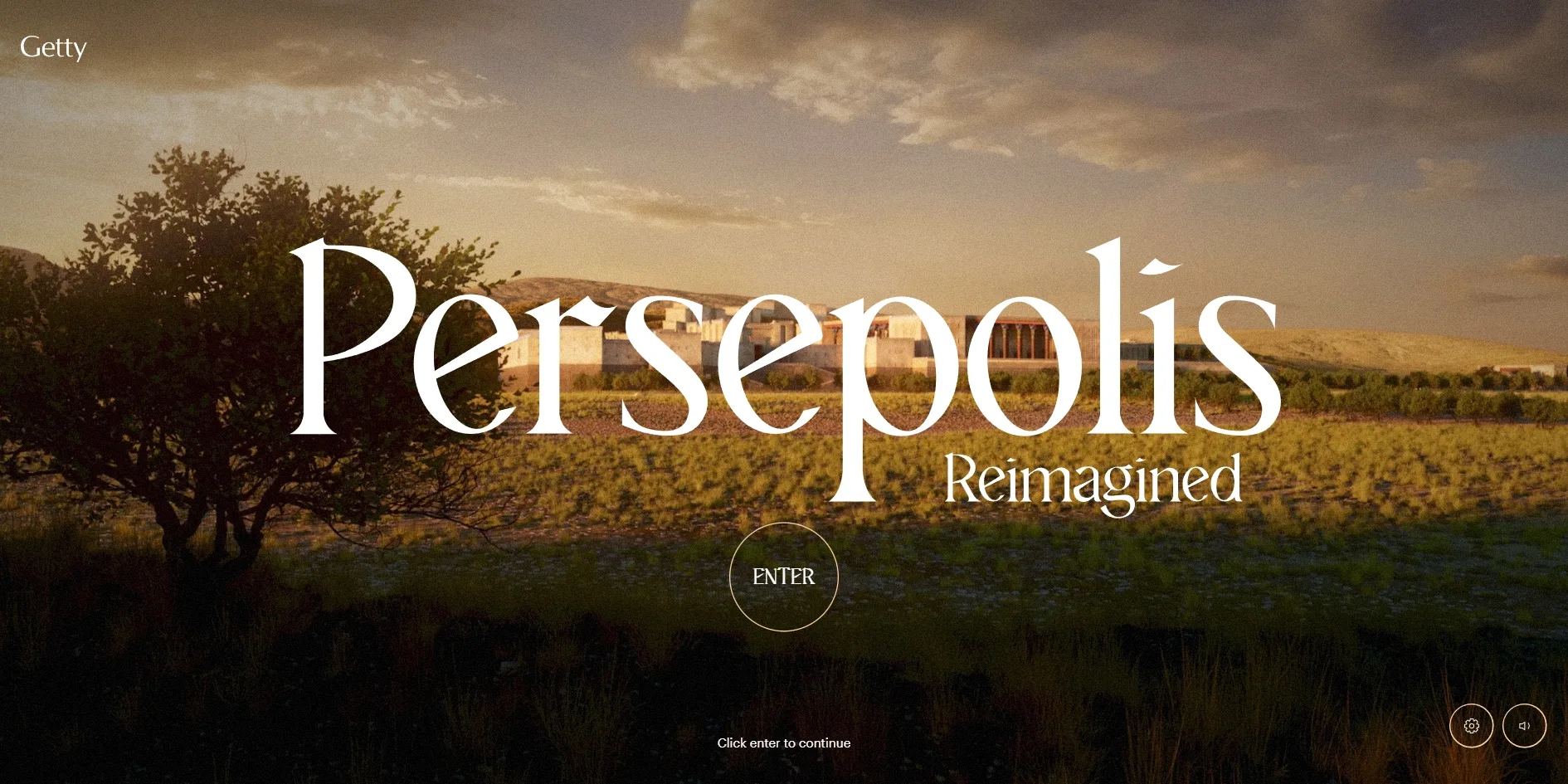
Persepolis Reimagined is an online exhibition from the Getty that rebuilds Persepolis, the ceremonial capital of the Persian Empire 2,500 years ago, as it once stood, and lets visitors walk into it stop by stop as an envoy coming to honour the king. At the start, the screen shows a misty plain at night, and as the visitor scrolls, the fog lifts, the sky turns golden and the city appears in the distance. Once the visitor clicks ENTER, the camera flies through the city gate, and from then on every stretch of scrolling moves the camera along a fixed route to the next statue or palace.
Monks made the site for the Getty over nine months. The FWA gave it FWA of the Day, FWA of the Month for June, FWA of the Year for 2022 and the visitor-voted People's Choice Award. Awwwards gave it Site of the Day, a Developer Award, Site of the Month for June and Developer Site of the Year for 2022.
01Concept
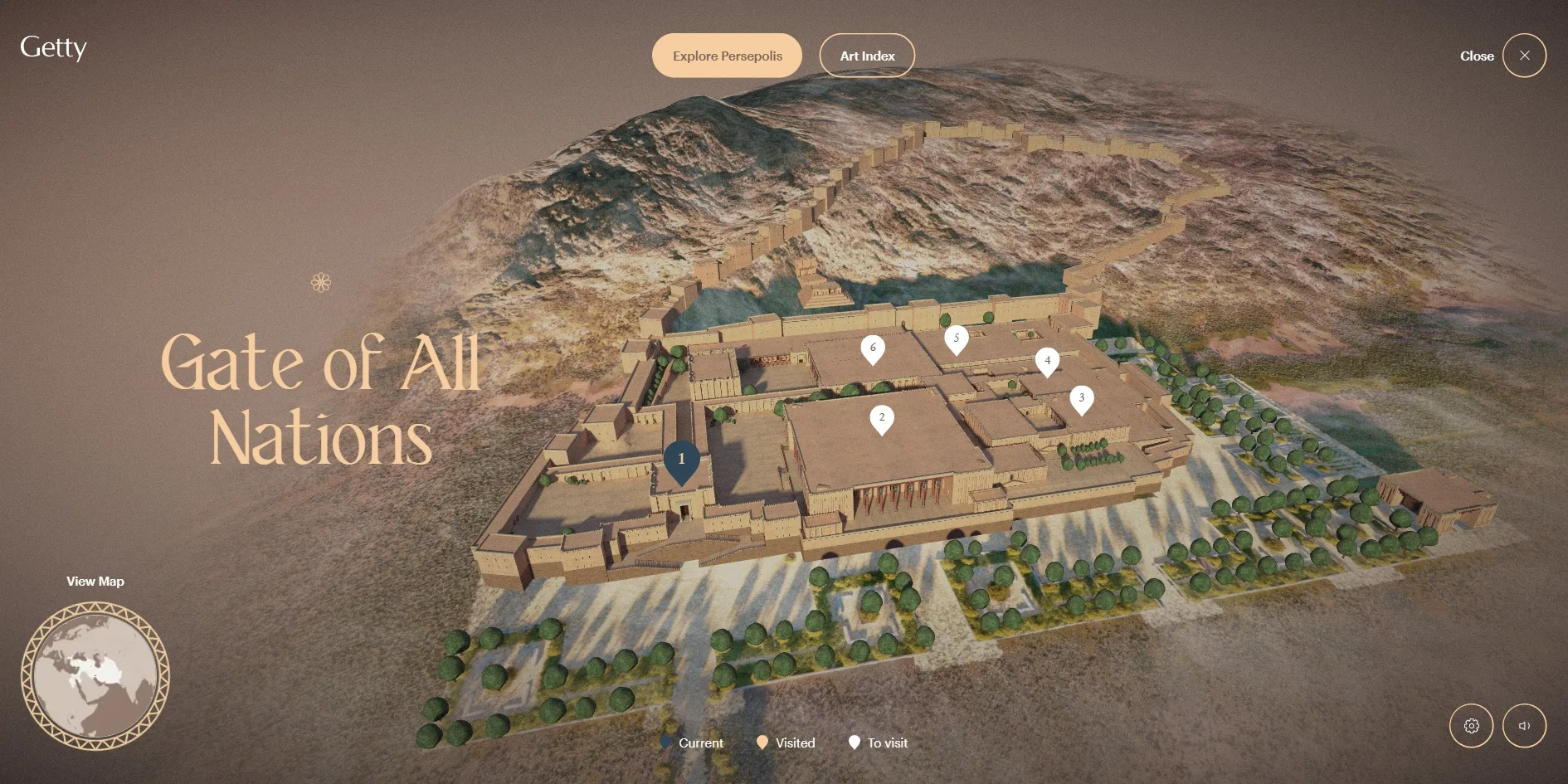
Persepolis Reimagined is the online part of a Getty Villa Museum exhibition on the Persian Empire, and the team's case study describes it as a companion to the galleries that also works on its own. A museum exhibition usually puts objects in display cases, while this site first rebuilds the whole city those objects came from and then puts the objects back where they once stood. The visitor's route follows the path an envoy would have taken into the city, through six stops in order: the Gate of All Nations, the Apadana audience hall, the Palace of Xerxes, the Southeastern Palace, the Royal Treasury and the Hall of 100 Columns.
Before the visitor enters the city, the site uses two openings to set the time and place. The first is a few lines of text shown during loading, saying that the city stood in what is now southern Iran, was built by powerful kings and served as the ceremonial capital of Achaemenid Persia, before Getty presents and the title appear. The second is a flyover film that plays after the visitor clicks ENTER. The camera flies from the plain up to the terrace where the citadel stands. Captions along the way say that Darius I founded the city around 518 BC, and the last one asks the visitor to imagine being an envoy of that time travelling to the capital to pay respects to the king. The moment the film ends, the camera stands in front of the first stop, the Gate of All Nations.
The six stops are not equally long, and the first two are the longest. The Gate of All Nations runs about 17 screens and the Apadana about 16, while each of the last four runs only 5 to 11. The best-known statues, reliefs and inscriptions are packed into the first two stops, so visitors see the most while their interest is highest, and the pace picks up after that. The end of the last stop, the Hall of 100 Columns, closes the whole site, where a line first appears saying that no empire lasts forever and that Persepolis would eventually fall. The text then tells how Alexander the Great invaded Persia in 330 BC and set the city on fire, a photograph of the ruins today follows, and the visitor finally lands on About this Project. The splendour seen all along turns into ruins here, which is the contrast the whole site has been building toward.
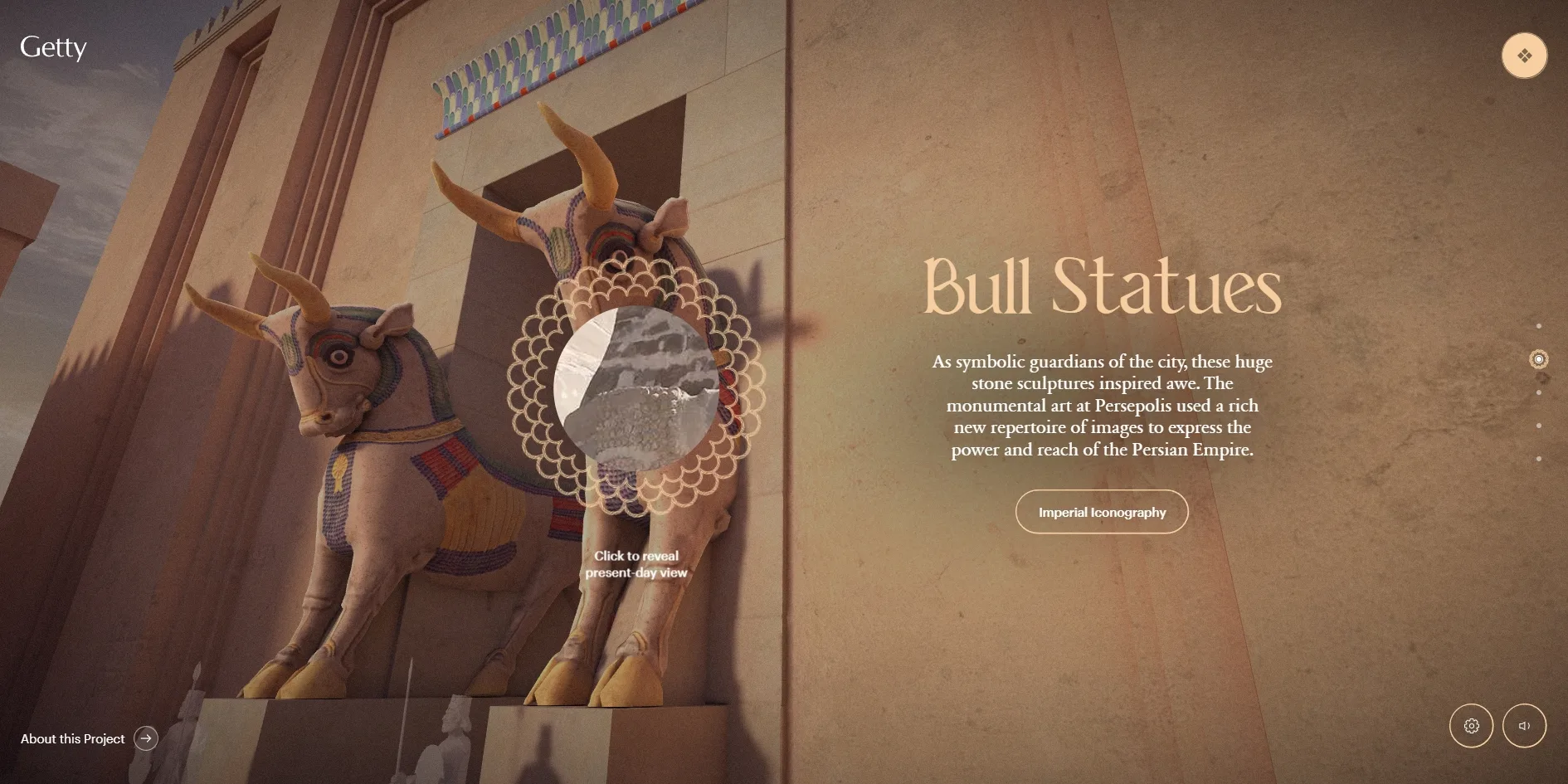
Persepolis Reimagined lets visitors choose how deep to go. Each stop along the way usually has only one short description that the visitor can read while scrolling past. The button under a description opens a feature, such as Imperial Iconography beside the bull statues, which shows real objects held by institutions such as the Louvre and the Los Angeles County Museum of Art, each with its source credited. The art index in the menu sorts these objects into five groups, sculptures, vessels, weapons, jewellery and coins and seals, and the See it in button under each one sends the visitor back to the stop where the object once stood. The two inscriptions carved on walls also come with an English reading and subtitles, so visitors can hear what they say.
Visitors do not have to walk from start to finish. The menu at the top right opens a 3D overview of the whole city, where the six places each have a numbered marker coloured by state, current, visited or not yet visited, and clicking one goes straight to that stop. A column of small dots also runs down the right side of each stop, one dot per stopping point, and clicking a dot jumps there. The site comes in eight languages: English, Arabic, Spanish, Persian, French, Hindi, and Simplified and Traditional Chinese.
02Design
The 3D scenes of Persepolis Reimagined are almost all bathed in the warm light of late afternoon or early morning, while the interface is held very much in check. The rebuilt buildings and statues are all painted, with red, yellow and blue on the bull statues, coloured glazed bricks along the lintels and coloured column capitals in the Apadana. The team's case study says these colours and materials were checked by Getty curators and a scholar of ancient materials and gathered into a material style sheet, so that the work of every artist stayed consistent. The interface uses only three colours: a deep charcoal (#252525) for the loading screen, features and menu, an apricot (#F6CEA0) for titles, buttons and markers, and white for body text. The apricot belongs to the same family as the warm light in the scenes, so text laid over the 3D image never looks out of place.
Persepolis Reimagined uses three typefaces for three tones of voice. Titles use Maghfirea, a display serif, meaning a face whose strokes end in small finishing details, with curling flourishes that make it look carved in stone. The stop names and titles, such as Gate of All Nations and Bull Statues, all use it. Descriptions use the classic book serif Sabon Next, which reads like a museum label. Small text such as buttons, captions and instructions uses the sans serif Graphik, which keeps it apart from the exhibition content.
The sizes of all three faces change continuously with screen width. Between 640 and 1920 pixels wide, large titles grow smoothly from 60 to 100 pixels and body text from 13 to 15 pixels. The largest title size is also capped at a fifth of the screen height, so it never overflows a shorter laptop screen.
The roles of the three faces are written as three variables, and the whole set is swapped when the language changes. Simplified and Traditional Chinese switch to the Chinese versions of Noto Serif and Noto Sans. Arabic and Persian switch to Noto Naskh and Vazirmatn, and the whole layout flips to run right to left. Hindi switches to Martel, with titles one size smaller and looser line spacing to leave room for the strokes above and below Devanagari letters. Each of the eight languages therefore reads naturally while the hierarchy of the layout stays the same.
Every stopping point follows the same layout rules. The 3D scene fills the whole screen and the description sits to one side of it, with a large apricot title, a centred paragraph of white text and a pill-shaped button drawn in a thin outline. The buttons and markers on screen are all round or pill-shaped, a contrast with the square-cut architecture. The site also keeps repeating a round petal pattern common in Persian reliefs. The loading ring, the round frame beside a statue that reveals today's photograph and the border of the map entry in the menu all use this ring of petals. When the cursor moves over the column of dots on the right, a white pill appears beside it with the name of that point.
The features and the art index switch to another mood, like stepping into a darkened room inside the gallery. A feature sits on deep charcoal as a long horizontal scroll, with large photographs of objects, apricot titles, white body text and an enlarged grey quotation laid out one after another, and tiny type beside each photograph giving the object's date, material and holding institution. The art index sets its five groups as a row of very large serif words with small numbers 01 to 05 in front, with the current group bright and the rest dimmed. Below them runs a row of black object cards, and when the cursor moves over a card, the card turns into that object's description and its See it in button.
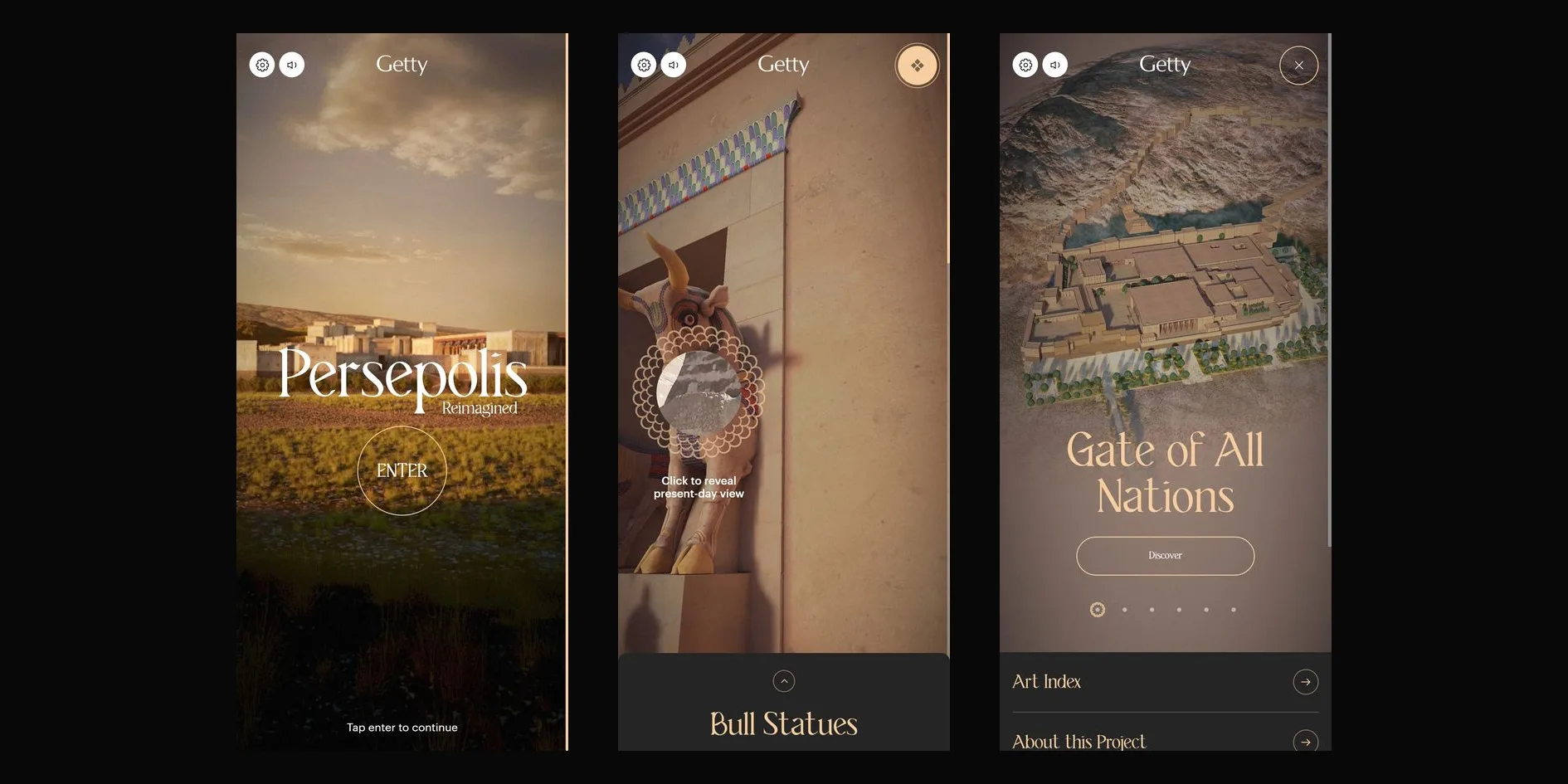
The phone layout moves the description from the side of the scene into a card at the bottom of the screen. The card has rounded top corners and an upward arrow, and the full text opens only when the visitor taps it, so the 3D scene keeps most of the screen. The sound and settings buttons move to the top left, and the Getty logo moves to the centre. The phone menu is rearranged as well, and its top half shows the 3D overview and the name of the current place, with a row of small dots for the six places that the visitor swipes through before tapping Discover to go. The bottom half holds two rows for the art index and About this Project.
03Motion
Persepolis Reimagined joins loading and scrolling into one continuous change of light. The loading screen is a ring of petal pattern on deep charcoal with a number in the middle counting from 0 to 100. While the assets load, a misty plain at night slowly rises out of the grey behind it, and by the time loading finishes, the night scene has already appeared.
After loading, the change of light is handed to the visitor's scrolling. The opening lines of text appear one after another, and each stretch of scrolling lifts more of the fog and turns the sky from blue-grey to gold. By the time the title appears, the city in the distance stands clearly in the dusk. After each line appears, the site locks scrolling for half a second, so a visitor who scrolls too fast cannot skip several lines at once.
Titles and descriptions across the site all arrive the same way. Each line starts scaled up to 1.2 times, shifted one character width to the right and sitting below its final place, and then over 1 second it shrinks back, moves into place and rises up while fading in. The scaling and sideways shift use a curve that starts very fast and has a long tail, while the rise uses a curve that starts slowly, speeds up in the middle and drags at the end, and the team defined both curves themselves. Neighbouring lines are only 0.075 seconds apart, so a few lines settle one on top of the next with a little of the weight of something carved into stone.
The ENTER button switches the opening to the flyover film, and the first eight tenths of the film follow the scroll. When the visitor scrolls down, the film plays forward, and when the visitor scrolls back, it rewinds. When the visitor stops, the film holds on that frame, and the captions change one by one with the scroll position. Once the visitor scrolls to the end, the site locks scrolling and lets the film play its last two tenths on its own. After the camera passes through the city gate, the picture becomes a 3D scene that can be turned in real time, with no visible cut, and the Engineering section explains how. Because the film plays that last stretch by itself, the visitor cannot stop or rewind at the moment the two kinds of picture hand over.
Inside the city, scrolling moves the camera along a fixed route. When the wheel stops, the camera does not stop at once but covers a tenth of the remaining distance each frame, so a light scroll makes it glide smoothly for about half a second before settling. When the camera nears a stopping point, the site briefly takes over, locking scrolling, carrying the camera to the centre of that point in 1 second and then handing scrolling back, and the description arrives in the way described above. Visitors therefore never miss a stopping point, much as a guide stops in front of each object before moving on.
A layer of white fog joins one stop to the next. The last short stretch of each stop is its ending. Once the visitor has scrolled through six tenths of it, the site finishes the rest of the way automatically in 2 seconds, plays a sound that signals the end of the stop and covers the picture with a layer of rolling white fog. While the fog covers everything, the next stop is swapped in behind it, and then the fog clears and the new stop comes into view. During the first and last 2 seconds of each stop, the scene itself also carries a fog that thickens or thins, so the white fog never arrives or leaves abruptly.
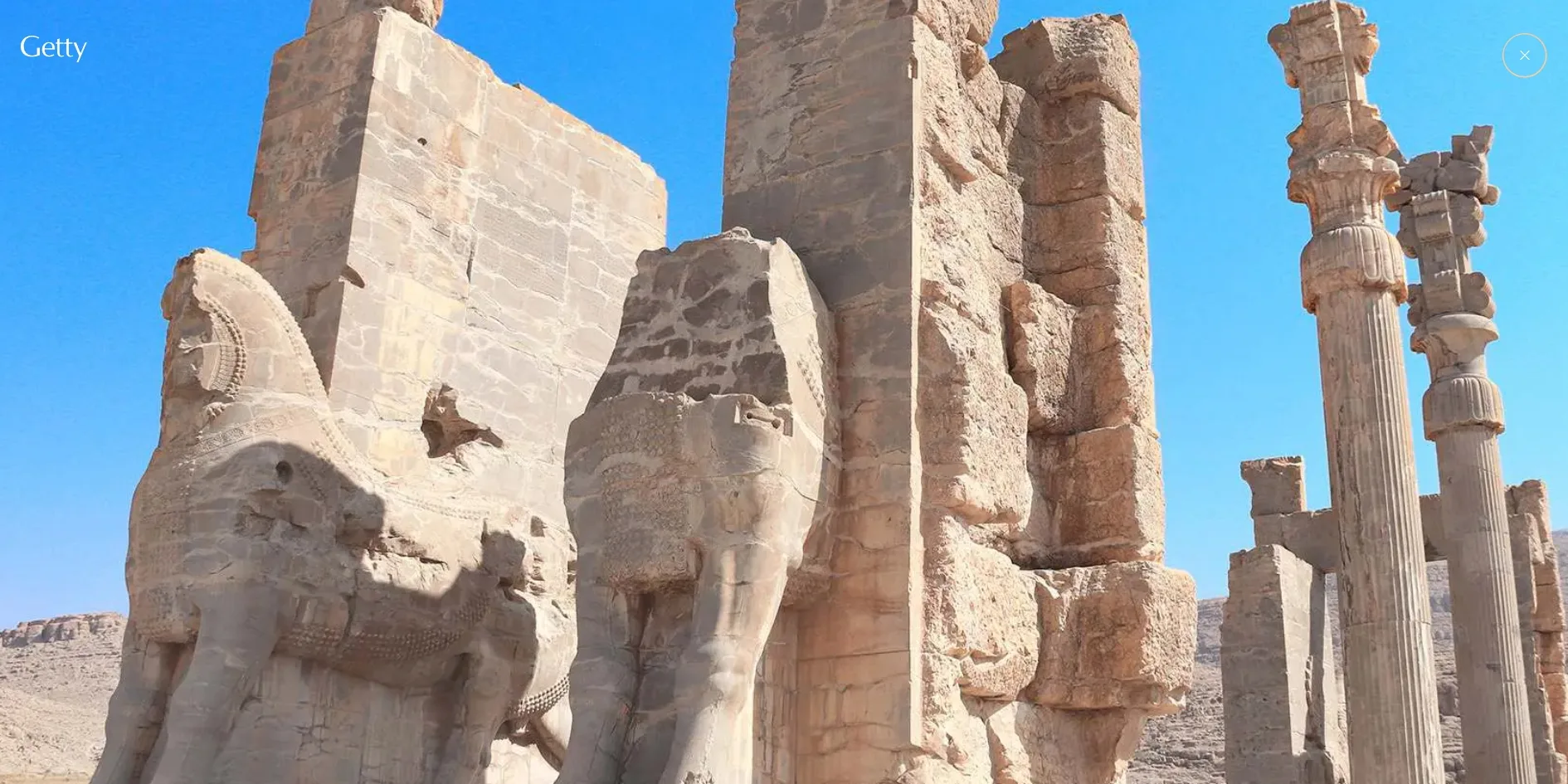
The petal frame in front of the statues is the most important interaction on the site. The petals around the frame turn slowly all the time, and when the cursor moves over it, the rings grow by a tenth within 0.3 seconds, each ring slightly later than the one before. With one click, the painted, rebuilt statue gives way to a photograph of the same spot today that fills the screen, and when the visitor clicks the close button, the picture returns to the rebuilt version. The colour and the complete outlines seen a moment earlier are reduced to weathered stone in the photograph, so visitors grasp at once how much of the city has been rebuilt.
The camera can also leave the fixed route for a look around. When the visitor holds the mouse button and drags, the camera turns in the direction of the drag, slows with a little inertia after release and turns back to its original direction within a few seconds. When the visitor scrolls on, the camera turns back toward the route in proportion to the scrolling speed, so faster scrolling brings it back faster. On phones that support it, the site also reads the gyroscope, so the camera looks wherever the visitor turns the phone.
The features and the inscriptions, the two deeper kinds of content, each have their own motion. When the visitor opens a feature and scrolls down with the wheel, the long scroll moves sideways to the left. The readings of the inscriptions, in turn, let the camera and the sound tell the story together. When the visitor clicks Listen to the translation in front of the trilingual inscription at the Gate of All Nations, the description folds away and the camera turns to face the inscription on the wall. Subtitles appear line by line at the bottom of the screen in the title typeface, such as I am Xerxes, the great king, and the cuneiform on the wall lights up section by section as the reading goes on.
When the visitor scrolls through all six stops with the wheel, the torches, dust and fog of Persepolis Reimagined keep moving. The picture holds a steady 60 frames per second within each stop and stalls once only at the moment of changing stops, while the next one loads, for about 0.3 seconds at most in the measurement. The site reads the operating system's reduced-motion setting and automatically turns on the matching switch in its own panel. With it on, the camera no longer turns when dragged, and the hover transition and the turning of the petal frame stop, but the camera's glide along the route and the white fog between stops play as usual.
04Engineering
The interface of Persepolis Reimagined is built with Vue and animated with GSAP, and the 3D scenes use no ready-made library such as three.js but a WebGL2 renderer Monks wrote themselves, which falls back to WebGL1 in browsers without WebGL2. The loading screen, the opening film, the overview in the menu and the six stops in the city are all drawn on the same canvas. The team's case study says this let them put the same post-processing on every picture, so vignette, bloom and film grain make the prerendered film and the real-time 3D scenes look like one kind of image. The vignette darkens the edges by the square of the distance from the screen centre, and the grain uses a new random number every frame at a strength of only 0.075, so the picture has a slight film texture without visible noise.
The city was made with a film-production pipeline. The team's case study says the terrain started from satellite data and was generated in World Creator, then assembled into one master scene in Isotropix Clarisse, and this one master scene produced the scenes on the web, the 360-degree dome in the galleries, the map in the menu and the film shots. Buildings and statues started from models by the Persepolis3D project, which were retopologised and sculpted further, some traced from old photographs, and then textured in Maya and Substance Painter. The web scenes were assembled in Unity, where the light maps and camera animation were also made, and exported to JSON with an exporter the team wrote. Each stop's bloom strength, bloom threshold and floor-reflection switch are also written on the Unity timeline. Every frame the site reads these values at the point in time the camera has reached, so the lighting mood of each spot was tuned section by section by artists in Unity.
The light and shadow in the city are baked into light maps ahead of time, and the shaders do no real-time shadow calculation. Each stop has its own light map, about 4.4 MB for the overview and about 2.5 MB for the Gate of All Nations. Every instanced object carries its own scale and offset into the light map, so a row of identical columns can be drawn in one call while each column still reads its own patch of light and shadow. Highlights do not come from real lights, because the shader hard-codes a warm sun direction coming from the side and above, plus a layer of Fresnel that makes the edges of the stone glow faintly. Columns and statues also carry normal maps, which create fine relief with very few triangles.
To make such a large city run in a browser, the team saved draw calls in several places. The team's case study says they split the geometry into reusable parts that are reassembled at runtime to reduce file size. Objects that share a model and a material are merged into one draw call through dynamic instancing, objects out of view are skipped by frustum culling, and distant objects switch to simpler models. Each stop takes only about 35 to 88 draw calls per frame, and four to eight tenths of them are instanced.
The floor reflections are made affordable by the fixed camera route. Dark red interior floors such as those in the Gate of All Nations and the Hall of 100 Columns reflect the columns. The reflection is first drawn into a separate texture, and the floor reads that texture at its own position on screen, choosing a blurrier level according to how rough the floor is, so the reflection is soft. The team's case study says that because the camera only travels a fixed route, they could choose in advance which objects appear in the reflection and skip drawing the whole scene a second time. Which stops have reflections switched on is also written on the Unity timeline.
The change of light in the opening is done by a dedicated shader that uses only three images. One is the night view, one is the dusk view, and the third is a depth map that records how far each point in the picture is from the camera. The shader blends between night and dusk according to progress, then uses the depth map to work out how much fog covers each point, thicker for points further away and nearer the horizon. A noise built from several layers of sine waves keeps the fog drifting. The first half of the progress is driven by loading and the second half by the visitor scrolling through the opening text, so the time spent waiting for the load becomes part of the opening itself.
The handover from the opening film to the real-time scene uses a green-screen key. The flyover film leaves pure green wherever the real-time picture should show through, the shader compares every pixel with pure green and makes it more transparent the closer it is, and the real-time scene underneath shows through those areas. The team's case study says the colour grading, camera movement and timing of the film and the 3D scene were matched, so visitors cannot tell when the picture becomes real time. The white fog between stops also comes from two films, a 2.1-second fog-in and a 3.8-second fog-out. The site takes only the brightness of the film as transparency and lays white over the picture, so the shape of the fog was filmed while its colour is set in code. On portrait phones, the site rotates the film 90 degrees before filling the screen, so the wide film is not cropped too much.
Scrolling is handled by the smooth-scrollbar library, and each stop's configuration records how long the stop is and in which part of the stop's progress each component appears. The bull statues at the Gate of All Nations, for example, appear between 30% and 34% of the progress, and the inscription between 80% and 84%. The camera, the descriptions, the petal frame and the indoor and outdoor ambient sound all read the same progress, so when the visitor scrolls back, everything runs backward in its original order. The snapping at stopping points is also written in this configuration, and as soon as a snapping component enters its range, the site clears the scroll's momentum and scrolls to the middle of that range in 1 second. The camera's field of view is calculated from the screen's aspect ratio and widens as the screen narrows, so even on a portrait phone both sides of a statue stay in view.
A few small things in the city are generated in shaders on the fly. The flames of the wall torches use no texture but compute their shape and colour from several layers of noise, so they flicker all the time. Fine dust drifts in the air, and the dust is placed only around the camera, so as the camera moves forward, the motes that fall behind wrap around to the front, which makes the whole city seem full of them. The drifting clouds over the overview in the menu are generated from noise as well.
Sound runs on Web Audio and uses 26 ogg files totalling about 13.4 MB. The team's case study says the music uses instruments from the ancient Persian world, such as the kemenche, duduk, ney and daf, chosen with the help of historians and blended with synthesised sound, and that a professor of ancient Persian music was consulted. Each stop has its own music, and the indoor and outdoor ambient sounds switch according to where the camera has reached. Positioned sounds go through HRTF panning, so their direction changes as the visitor turns the camera. The two inscription readings are separate mp3 files, and their subtitles come from srt subtitle files.
A first visit to Persepolis Reimagined downloads about 80 MB, the largest file being the opening flyover film at about 26 MB, followed by about 10 MB of overview scene data and an 8 MB ground texture 4096 pixels across. The site first loads the overview and the first stop, then preloads the next stop at each stop, keeps textures shared between stops in a pool and releases only those no longer needed when the stop changes. The site detects the device by screen width, and screens narrower than 920 pixels get a phone version of the film of only about 4.6 MB. Phone browsers and desktop Safari also get half-size textures and 2048-pixel light maps. As a result, phones download about 40 MB in total, while tablets get the phone film with full-size textures, about 59 MB. However, the site sets no cap on pixel ratio, so a phone with a pixel ratio of 3 still draws every pixel on its screen.
The 80 MB download does not leave visitors waiting in front of a blank screen. The server starts returning the page within 0.06 to 0.11 seconds, the petal ring of the loading screen appears at 0.26 to 0.33 seconds, and the first line of the opening appears between 6.5 and 7.5 seconds. During loading the page freezes for at most about 0.74 seconds, and nothing on screen jumps.
Persepolis Reimagined makes many provisions for visitors with different needs, but one key button has no name. The accessibility panel at the lower right has four switches, reduce motion, high contrast, larger text and no dragging interactions, the first two following the operating system's settings automatically, and the panel also changes the language. The inscription readings come with subtitles, so visitors who cannot hear the sound can still read them. The petal frame in front of the statues, however, has no name for screen readers, so screen reader users cannot tell that a present-day photograph waits behind it.
05Scores and Team
| Award | Source | Date | Score |
|---|---|---|---|
| Site of the Day | Awwwards | 2022-06-01 | 7.96. Design 8.11 / Usability 7.41 / Creativity 8.36 / Content 8.23 |
| Developer Award | Awwwards | 2022-06-01 | 8.03 |
| Site of the Month | Awwwards | June 2022 | Monthly award, no separate score |
| Developer Site of the Year | Awwwards | 2022 | Yearly developer award, no separate score |
| FWA of the Day | The FWA | 2022-06-01 | 88 POINTS, DAYS 1 |
| FWA of the Month | The FWA | June 2022 | Monthly award, no separate score |
| FWA of the Year | The FWA | 2022 | Yearly award, no separate score |
| People's Choice Award | The FWA | 2022 | Yearly award chosen by visitors' votes |
Persepolis Reimagined is the FWA of the Year for 2022, and it also won that year's People's Choice Award from the visitors' vote. FWA gave its FWA of the Day 88 points and filed it under architecture and design, art, illustration and exhibition and educational. On Awwwards it won Developer Site of the Year, the separate yearly award Awwwards gives for the build.
The site's highest Awwwards score was Creativity at 8.36, with Content close behind at 8.23, most likely because the rebuilt city, the real objects and the inscription readings come together. Usability was the lowest at 7.41, and the download of about 80 MB at the start and the stop-by-stop scrolling through the city may both have pulled it down. The five developer jurors gave 8.03, with Animations highest at 9.60 and WPO, the web performance score, lowest at 7.20, which matches the 80 MB download in the Engineering section. Responsive scored 8.0, which fits the slimmer phone film, the description card at the bottom and the rearranged menu.
| Credit | Who they are | Track record |
|---|---|---|
| Monks | The global creative production company that made the site, describing itself as crafting amazing work for leading businesses and brands | Awwwards works 119, SOTY 4, SOTM 8, SOTD 59, HM 112. FWA 333, FWA Hall of Fame since 2013 |
| The Getty | The American art institution behind the project | FWA 7 |
The project was made by a team that crossed several fields. Monks handled the design, 3D and development, Getty archaeologists, historians and curators checked the content, the materials scholar Ali Mousavi took part in reconstructing the materials, the base models of the buildings came from the Persepolis3D project, and a professor of ancient Persian music advised on the score. Monks' record also counts up to the time of writing, with 333 FWA awards and, on Awwwards, 59 Sites of the Day and 4 yearly awards. The Getty has 7 FWA awards in all, including the FWA of the Year this site won.
06Archive
- Award date
- 2022-06-01
- Awards
- Awwwards SOTD 2022-06-01, Awwwards DEV 2022-06-01, Awwwards SOTM 2022-06, The FWA FOTD 2022-06-01, The FWA FOTM 2022-06, The FWA FOTY 2022
- Site
- https://persepolis.getty.edu/
- Credits
- Monks, The Getty
- Design
- spatial
- Build
- scroll
- Awwwards
- 7.96 / 10. Design 8.11 / Usability 7.41 / Creativity 8.36 / Content 8.23. Developer Award 8.03. https://www.awwwards.com/sites/persepolis-reimagined
- The FWA
- 88 POINTS, DAYS 1. https://thefwa.com/cases/getty-villa-persepolis-reimagined
- Stack
- Vue, GSAP, smooth-scrollbar, custom WebGL2 renderer, Unity (scene export), baked light maps, Web Audio
- Total assets
- About 80 MB, of which the opening film is about 26 MB, textures about 26 MB, sound about 13.4 MB and scene data about 11.8 MB
- Speed
- FCP 260 to 328 ms (loading screen), first opening line at 6.5 to 7.5 s, CLS 0. 60 fps within stops, a stall of up to about 0.3 s when changing stops