Why Zero
Why Zero is a manifesto site that the online education company Zero made for itself. It argues that the university degree has stopped working through a story that counts down to zero, and the visitor pushes every turn of it by hand. The site only opens after the visitor draws a zero on a frosted sheet of ice. The story starts in a sunlit meadow, and when the visitor holds a button in the middle of the screen, the meadow shatters into glass printed with unemployment figures. After that the site burns a stack of banknotes, shreds certificates into strips, flies the camera through a tunnel shaped like a zero and stops above a city built from company headquarters.
The concept and design direction came from Zero's own team, and the build went to BUNQ LABS, a small studio founded by Sindhur Dutta. The site won FWA of the Day and FWA of the Month for July 2026, and Awwwards Site of the Day, the Developer Award and Site of the Month for September 2026.
01Concept
Zero launched at the end of May 2026, and its main site presents it as another road into work besides university. Its courses are worked backwards from real jobs, students do projects with a manager, a coach and a team inside a simulated company world, and at the end they look for work through Zero's talent network. The founding story on the main site says the same team spent ten years running TKS, an education programme for young people, and watched many of its alumni slow down once they went to university. Why Zero is the company's manifesto page and makes one argument, that the degree is no longer enough and that this is why Zero exists. The team writes in its FWA description that it wanted visitors to feel the argument, not only read it.
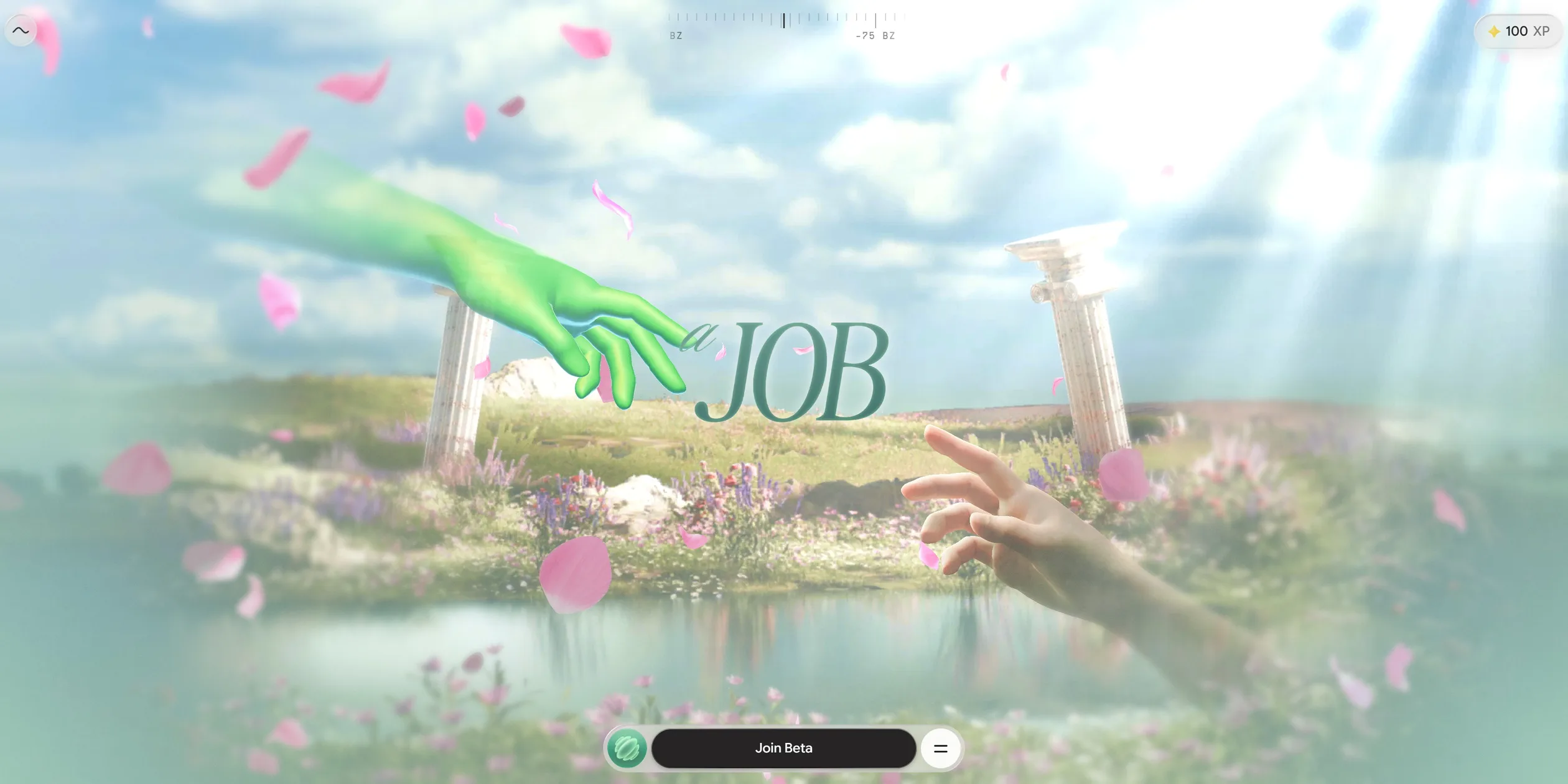
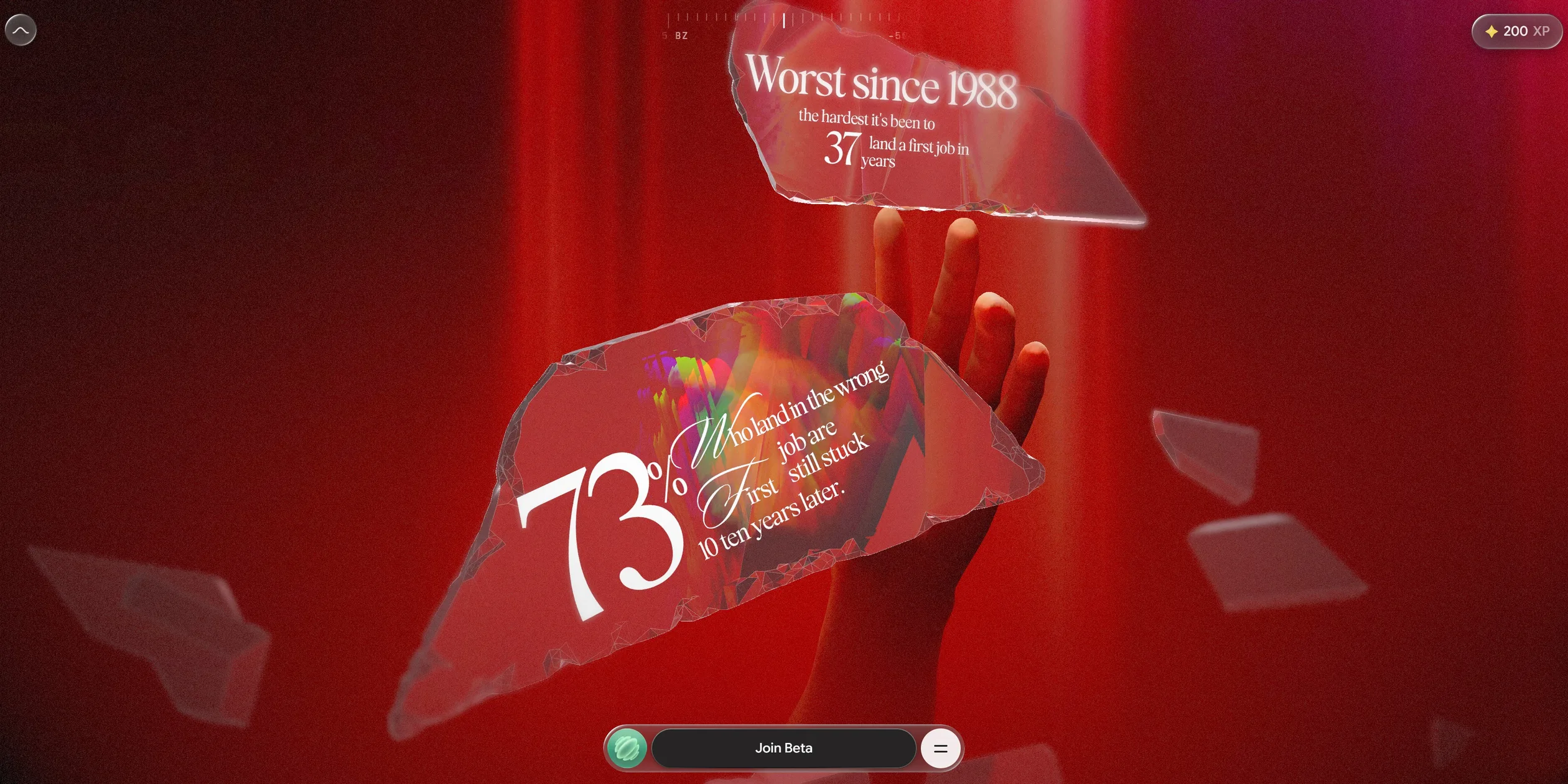
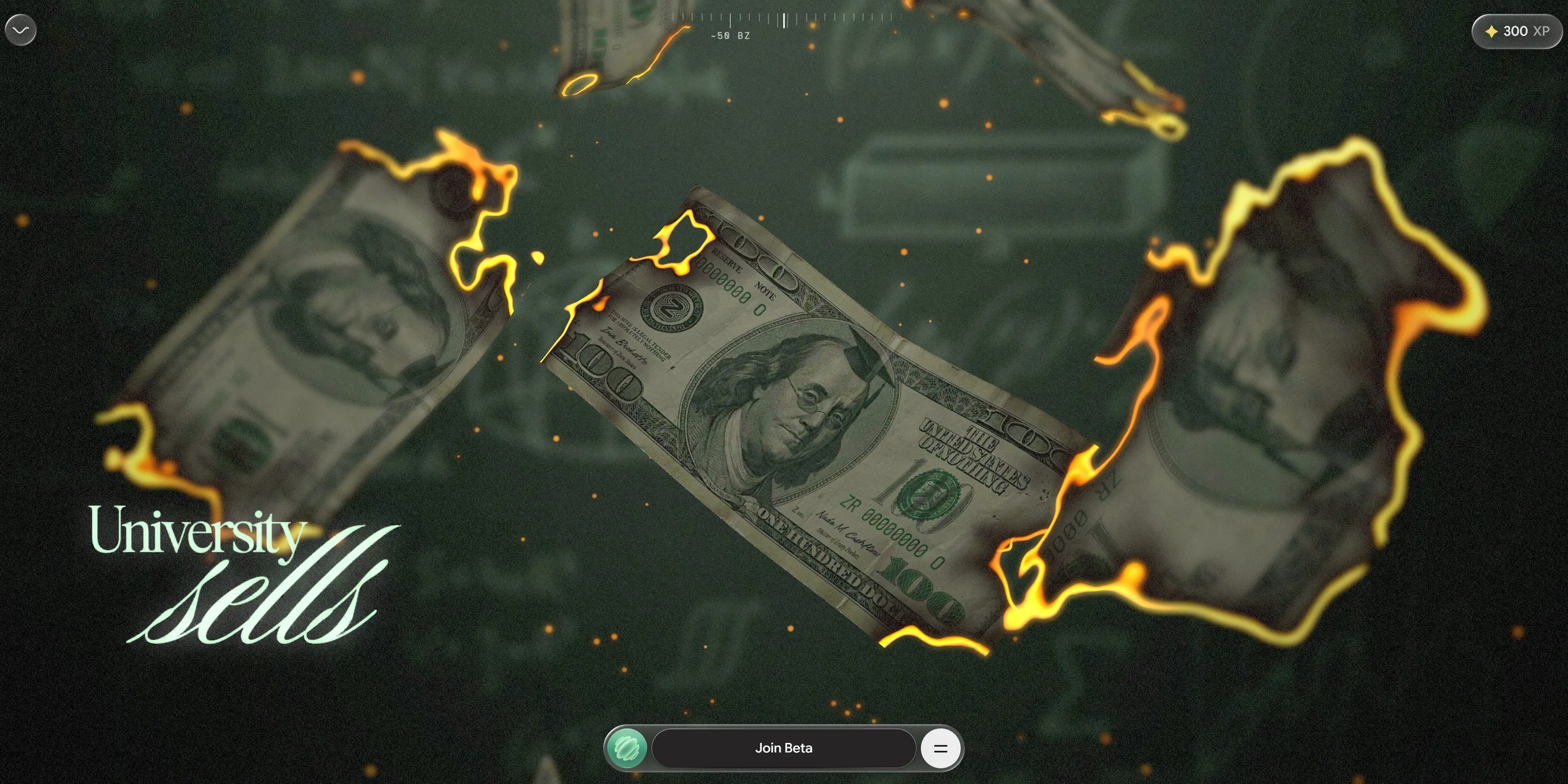
The visitor walks along a timeline that counts from -100 BZ to 0 BZ. A ruler at the top of the screen splits the story into five acts labelled -100 BZ, -75 BZ, -50 BZ, -25 BZ and 0 BZ, and the number on the loading screen also counts down from 99 until it turns into the word zero. The first act is the promise the visitor grew up with, and its captions read You Believed and College would land You a JOB. The second act opens with But, and That's Bullsh*t, then sends pieces of broken glass carrying statistics past a real hand, for example that 73% of people whose first job is the wrong one are still stuck ten years later. The captions of the third act join into one charge, University sells Paper, but Companies want Someone who can do the Job, and the act ends on and that's Why we had to Exist. The fourth act opens with Introducing zero, moves through real projects, tools and skills, and leads into the city map of the fifth act.
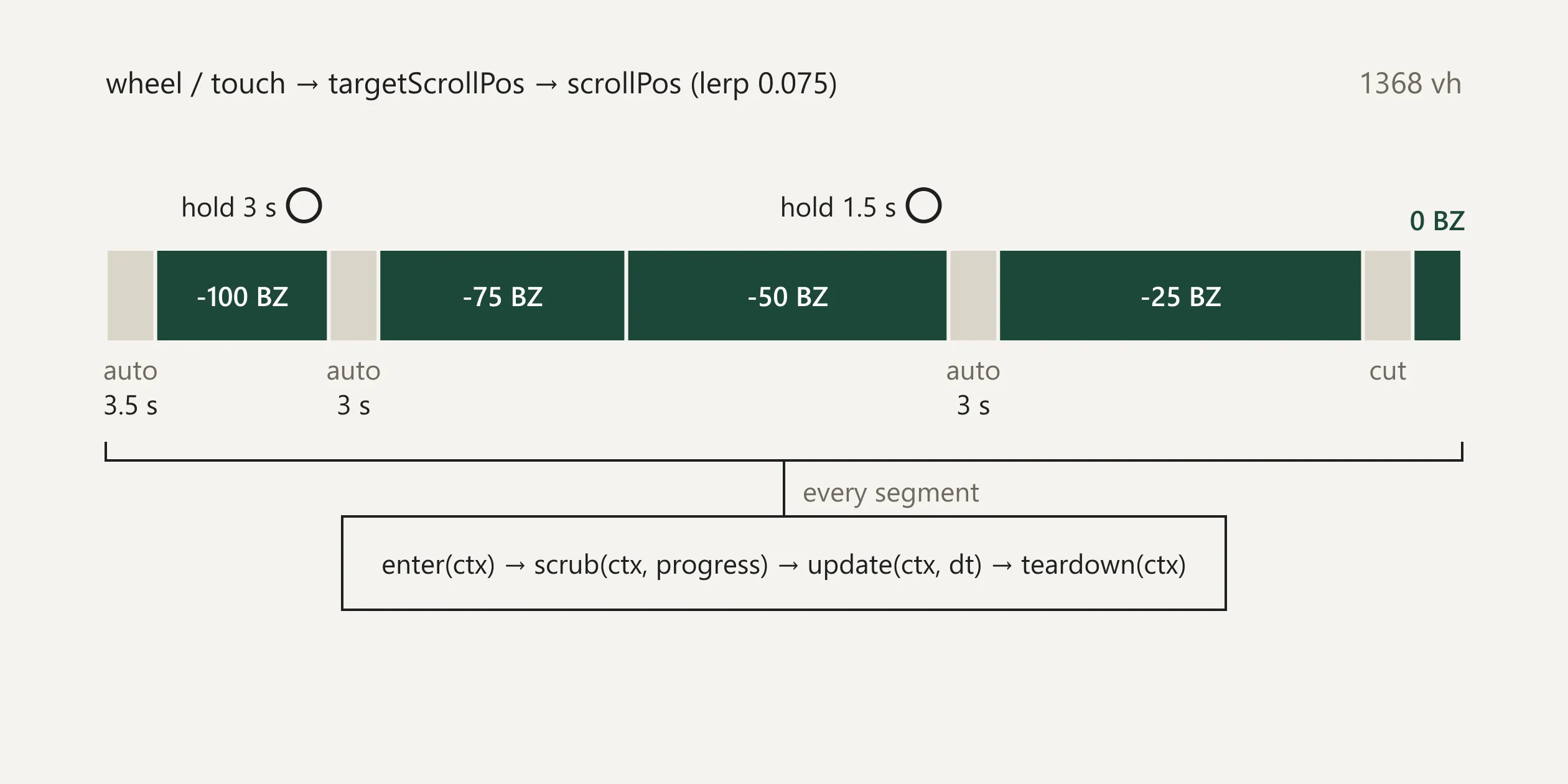
The pacing of the story comes from how much scroll each act gets and from three ways of moving forward. The first act, the promise, is the shortest, while the third act, the argument, and the fourth act, the product, are the longest, with the fourth taking about twice the scroll of the first, so visitors spend the most time on the charge and on the product. There are three kinds of link between acts. The first is the visitor's own scrolling, and the second is a passage the site plays by itself, such as the melting ice after the zero and the climb after the tunnel, each lasting about three seconds. The third is holding a button, which appears only at the two turns of the story, once when the dream falls into reality and once when the charge turns into Zero's product. The site makes the visitor hold for three seconds to shatter the meadow of the first act and for a second and a half to launch into the tunnel, so both turns of the story are done by the visitor's own hand. Each finished act adds 100 to the experience points in the top right corner, which reach exactly 500 when the visitor arrives at the city.
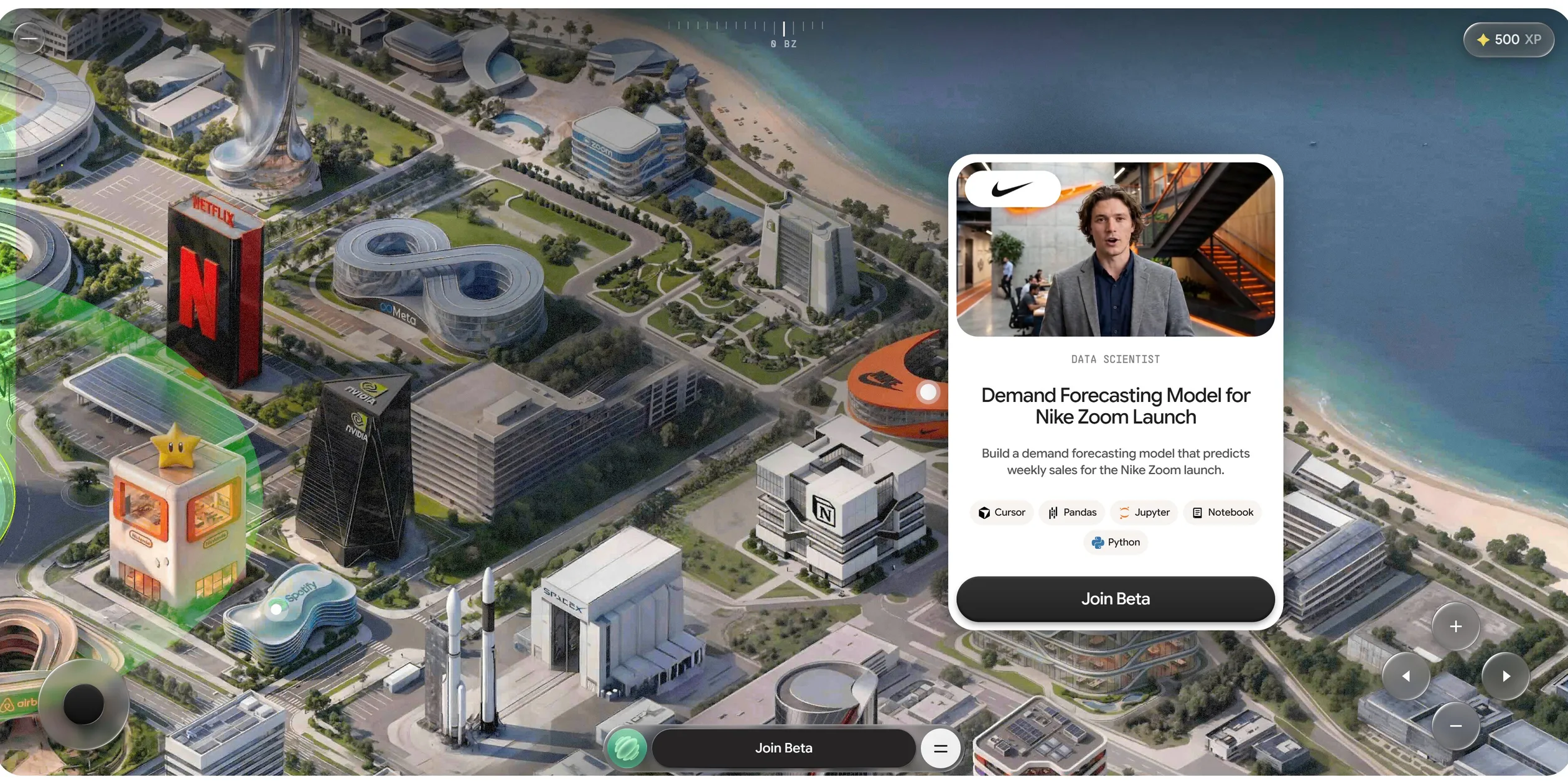
The fifth act hands control to the visitor. The city is a map the visitor can drag and zoom, and four glowing white dots stand for Nike, OpenAI, Google and Spotify. When the visitor opens a dot, a card shows an explainer video, a job title, a simulated project and the tools it needs, for example a data scientist project that forecasts weekly sales for a new Nike running shoe. Every card ends with a Join Beta button, the dark bar that follows the visitor along the bottom of the screen is the same entry point, and the menu in that bar also links to Zero's main site and to a set of open letters by the founders. Once the visitor leaves an email address and fills in a short profile form, the site folds a certificate bearing the visitor's name and school into a small origami animal, and the share card reads Your degree is finally useful. The first half of the story shreds the certificate into strips and the ending folds it into something new, so both ends use the same image.
02Design
The design rule of Why Zero is that each act owns one background colour, while the captions and the interface look the same in all five acts. A change of colour therefore tells the visitor that the story has turned a page. The ice at the entrance is a greyish mint green, and the gradient underneath the whole site runs from a deep ink green (#1c4839) to an almost white mint (#d4f6eb). The sky of the first act is a very pale aqua with pink petals falling on the grass. The second act turns the whole screen into a dark red curtain (about #5f0a0e), the third act sinks into an ink green close to black (about #101511), the tunnel lights up in a dense green (about #094612), and the clouds of the fourth act are almost pure white. The two biggest changes of colour, from meadow to red curtain and from darkness into white light, land exactly on the two moments when the visitor holds the button, so the breaks in colour line up with the turns in the story.
The captions carry more design than anything else on the site. Each one sets a key word large in a flourished script and squeezes the linking words beside it in a tall, narrow serif (a typeface with small finishing strokes on the letters). Key words such as College, Paper and Exist are drawn in script with long swashes, and small words such as would, land and who can do the tuck into the gaps those swashes leave. The script Bethany Elingston and the serif STK Bureau Serif used in the site's menu and sign-up form match the two letterforms in the captions, so the captions were most likely set in these two faces. On the site the captions are pictures set in advance, which means the size, spacing and placement of every small word were decided by the designer one caption at a time, something that is hard to get with ordinary text on a web page. The caption colour follows the background, deep teal green on the light acts and white on the dark ones.
Instructions and button labels switch to a separate, plainer set of typefaces, kept well apart from the script of the captions. Instructions are set in small monospaced capitals in PP Supply Mono, such as DRAW A ZERO in the middle of the ice, SCROLL at the bottom and TAP HOLD next to the button, and the -50 BZ on the top ruler uses the same face. The huge countdown number in the bottom left corner of the loading screen is set in Supply Sans Bold, the experience points in Google Sans Flex, and the Join Beta label on the buttons in Inter. With this split, the script only tells the story and the monospaced type only tells the visitor what to do, so the visitor can tell at a glance which words belong to the story and which are instructions.
The buttons of the interface come in two kinds, and both are made to look like physical objects. The first kind is a round button that looks like frosted glass, used for the sound switch in the top left corner and for the arrow and zoom keys on the map. Each one has a white highlight along its top left edge, a darker edge along its bottom right and a soft glow inside, so it reads as a raised bead of glass.
The second kind sits on the dark bar at the bottom of the screen, with a Join Beta pill in the middle, Zero's round green icon on the left and a menu button on the right. The pill is a dark grey (#353133) with a one-pixel light line along its top edge and a very faint outline around it, so it looks like a physical key with slightly bevelled edges. When the visitor opens the menu, a frosted panel rises above the bar and lists Home, Letters and Why Zero in the serif, and the menu button turns into a cross. When the cursor moves onto one of the links, its text rolls upward and is replaced by a copy of itself. When the visitor clicks Join Beta, the pill turns in place into a field for an email address, with a back arrow appearing on its left.
A contrast between two hands sits at the centre of the art direction of the 3D scenes. One is a translucent fluorescent green hand with an iridescent sheen, in the same family of green as Zero's round icon. The other is a realistic human hand with skin texture and soft natural light. In the first act the two hands reach for each other from the top left and the bottom right in front of Greek columns, a pond and a shaft of light falling from the top right, a composition plainly borrowed from Michelangelo's fresco The Creation of Adam. The props in the later acts are modelled on real things. The glass splits light into rainbows along its edges, the hundred-dollar bills carry a Z seal and ZR serial numbers, and the shredded strips show newspaper articles and quotes from business leaders. In the city, the Netflix, Nike, McDonald's and Uber headquarters can be recognised. A fine layer of film grain covers the whole picture and makes the rendered 3D scenes look more like footage shot with a camera.
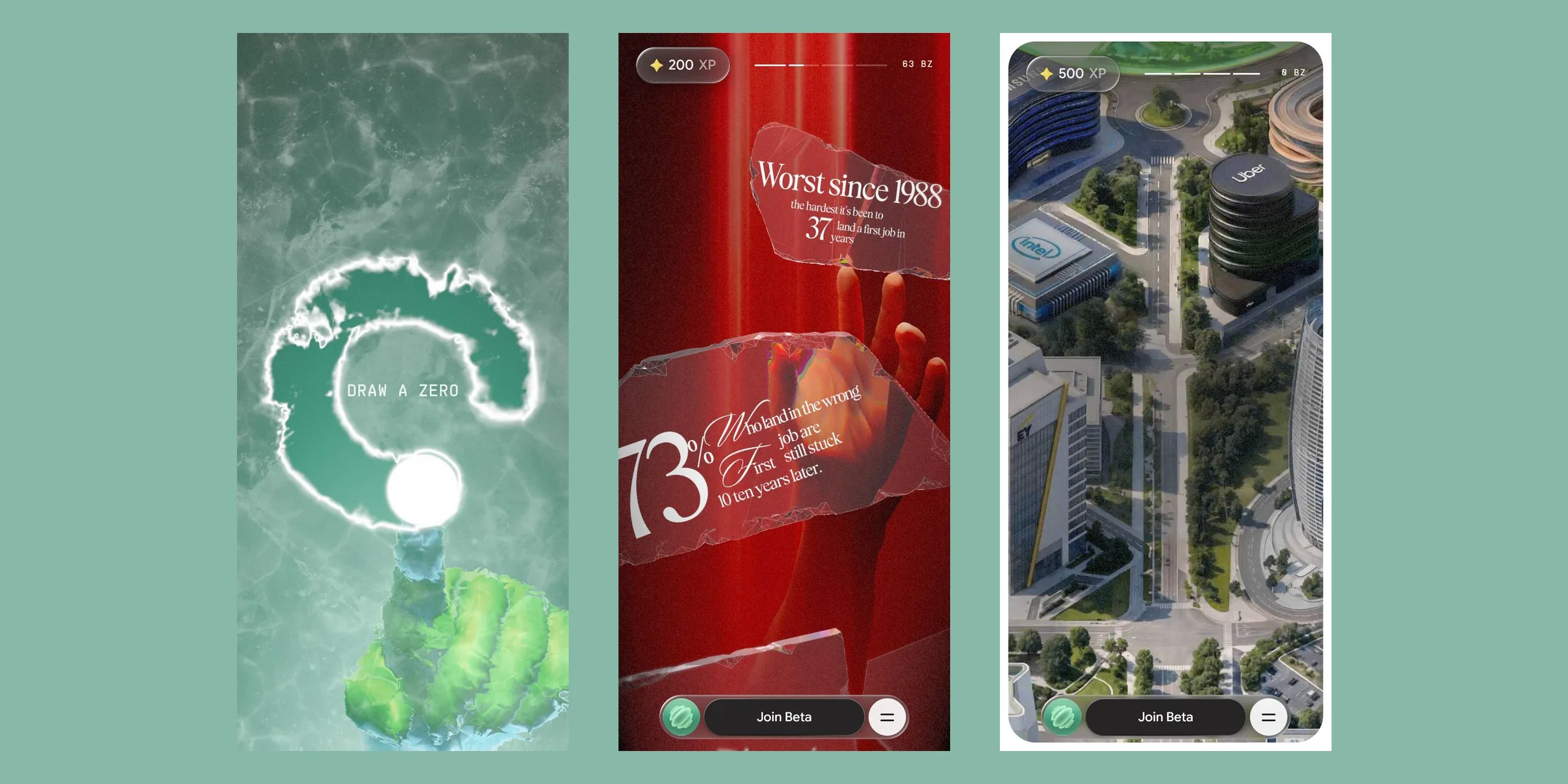
The phone version also has all five acts and both holds, and the site only rearranges the interface and the captions. The five marks of the top ruler become a thin segmented progress bar with a number beside it that keeps falling, from 100 BZ all the way down to 0 BZ. The captions switch to a second set of pictures stacked for a portrait screen, and the glass shards with statistics are stacked one above the other too. The bar at the bottom gets narrower, the arrow keys and joystick of the map are gone, and the visitor drags the map with a finger. The city map at the end sits inside a rounded frame, zoomed in so that one column of headquarters fills the upright screen.
03Motion
The page of Why Zero never moves. The wheel and the finger push a progress value that the site keeps for itself, and everything on screen follows that value. Each turn of the wheel moves the target of the progress forward by one step. The picture only covers a small part of the remaining distance in each frame, so after the visitor lets go of the wheel it keeps gliding forward for a moment before it settles. The movements of the two hands, the camera, the glass and the paper strips are all tied to this progress, so when the visitor scrolls back they play in reverse. When the visitor stops, the fingers of both hands start to flex gently by themselves, and the moment the visitor scrolls again this small motion fades out, so the picture never freezes just because the visitor paused.
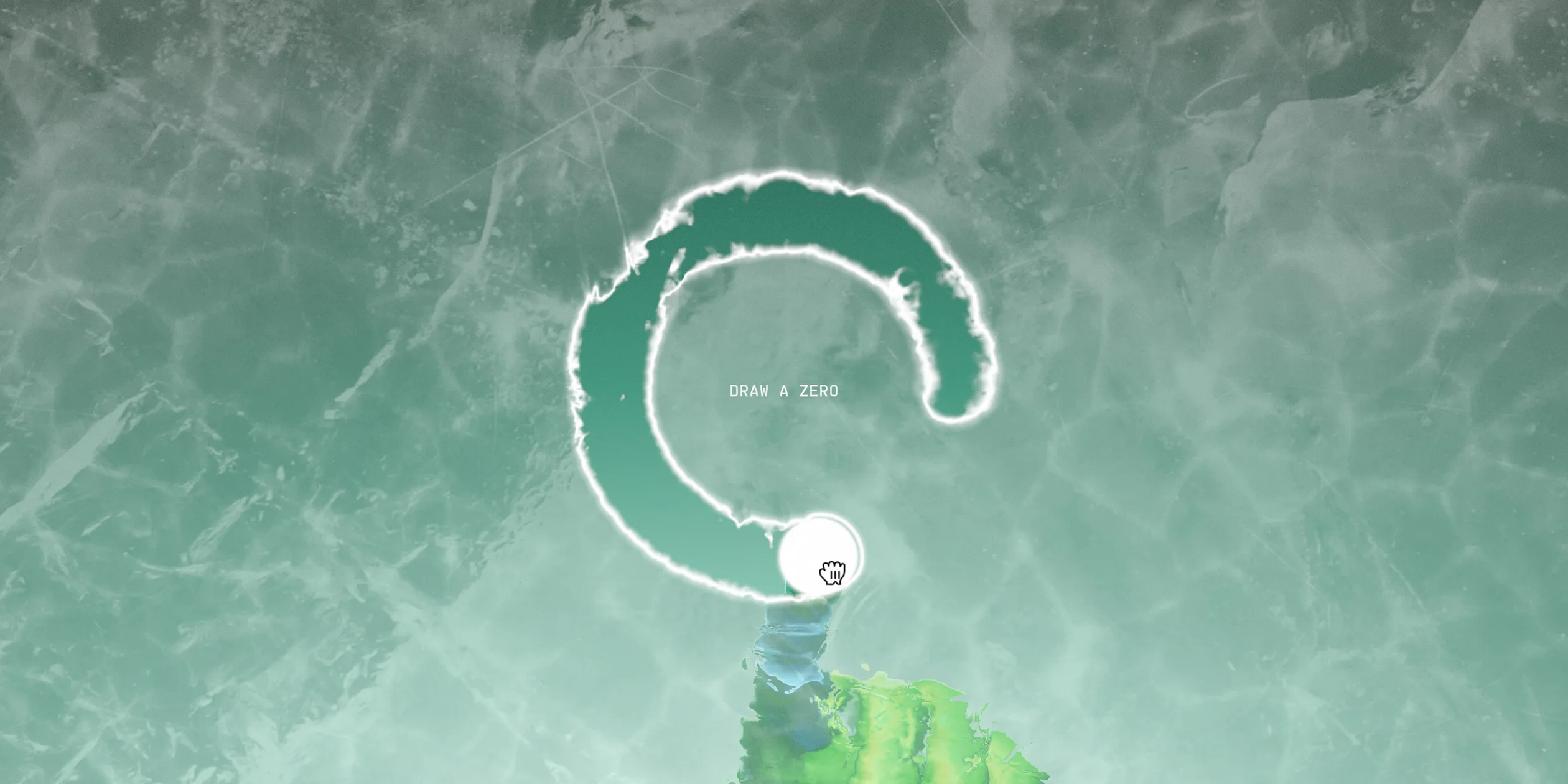
The melting ice at the entrance is the first signature motion of the site. On the loading screen the number in the bottom left corner counts down from 99, its edges break apart like ice, and it finally turns into the word zero. The green hand then rises from the bottom of the screen and traces circle after circle around the words DRAW A ZERO with its index finger, showing the visitor what to do. As the visitor presses and starts drawing with the mouse or a finger, the ice melts into a dark groove along the stroke, its two edges glowing with white ice crystals like electric light. The green hand and a white dot follow the tip of the stroke, and the dragging sound gets louder and higher as the visitor draws faster. The site checks only three things to decide whether the stroke is a zero: the loop has to turn through about 330 degrees, every part of it has to sit at about the same distance from the centre, and it has to end close to where it started. As soon as the loop closes, the ice melts outward from its centre and turns into a field of white light within three and a half seconds, a gold four-pointed star and +100 XP light up in the middle, and You Believed fades in.
Every caption arrives as if a lens were pulling it into focus. When the progress reaches the range of a caption, the caption first appears blurred, sharpens quickly and then more and more slowly. The whole change takes about four seconds, but most of it happens at the start, so the caption is already almost sharp when the visitor first reads it. A caption leaves in a third of a second. Whether a caption shows depends only on the progress, so when the visitor scrolls back the captions appear again in the same way.
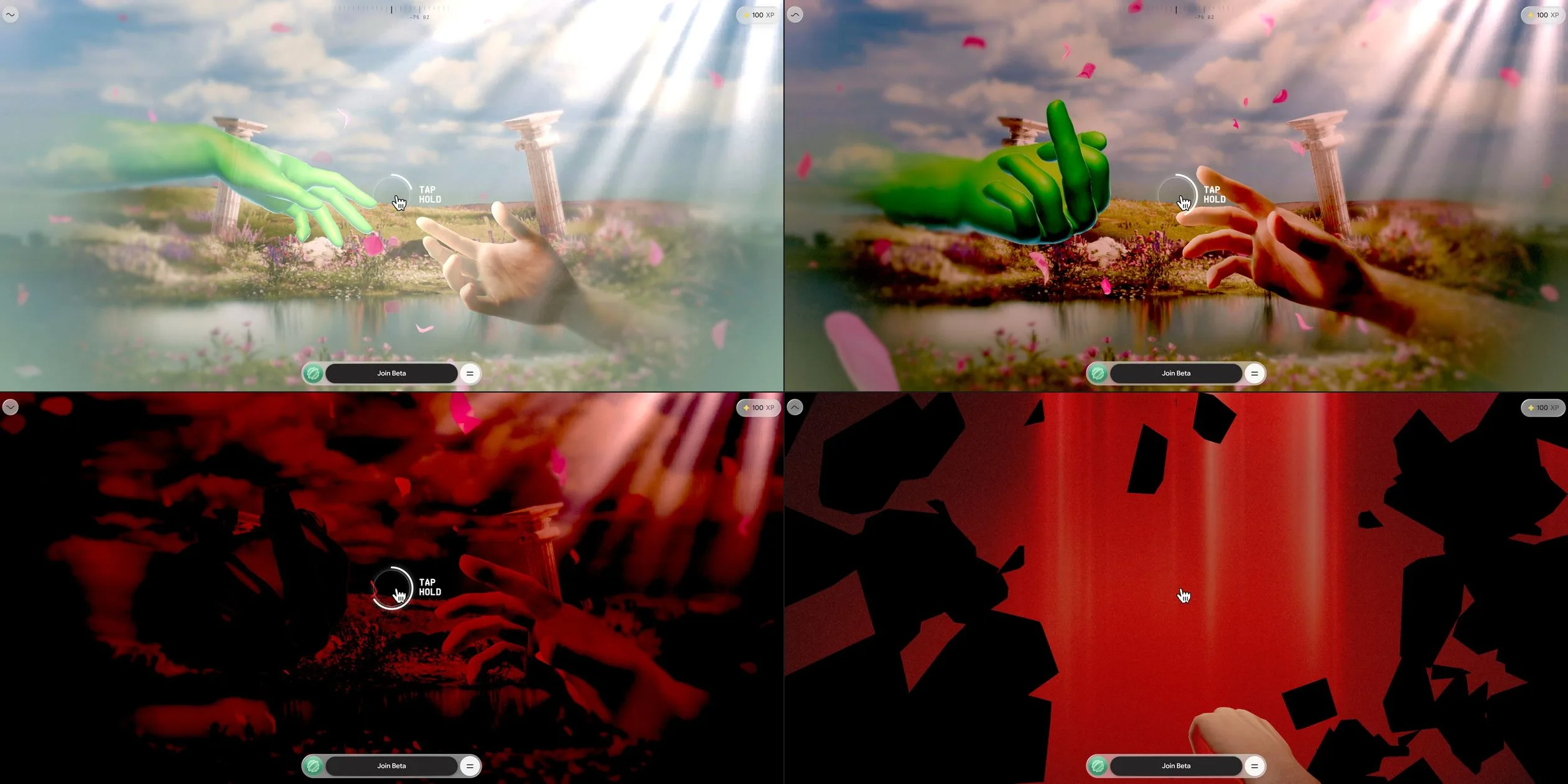
Holding the button is the second signature motion of Why Zero, and it comes at the end of the first and the third act. When the progress reaches the last short stretch of the act, a white ring with TAP HOLD next to it appears in the middle of the screen, and as the visitor holds it the ring fills slowly along a thin line. The first act asks for a three-second hold. During the hold the meadow first becomes denser and more saturated and the green hand closes into a fist. Then the whole picture fades step by step into dark red and sinks into black, while the music of the first act slowly gives way to the music of the second. The moment the ring is full, the black picture breaks like glass and the pieces fly outward, revealing the red curtain behind it. The team writes in its Codrops article that the colour snaps back in about 200 milliseconds when the glass breaks, and that a 400-millisecond version they tried felt noticeably weaker.
The hold lets the visitor change their mind. If the visitor lets go halfway, the ring runs back within a third of a second and the picture and the music return to how they were. If the visitor presses again within half a second, though, the ring carries on from close to where it stopped, and the longer the visitor waited, the more it has run back. The site also stretches or squeezes the sound of the hold so that it lasts exactly as long as that hold.
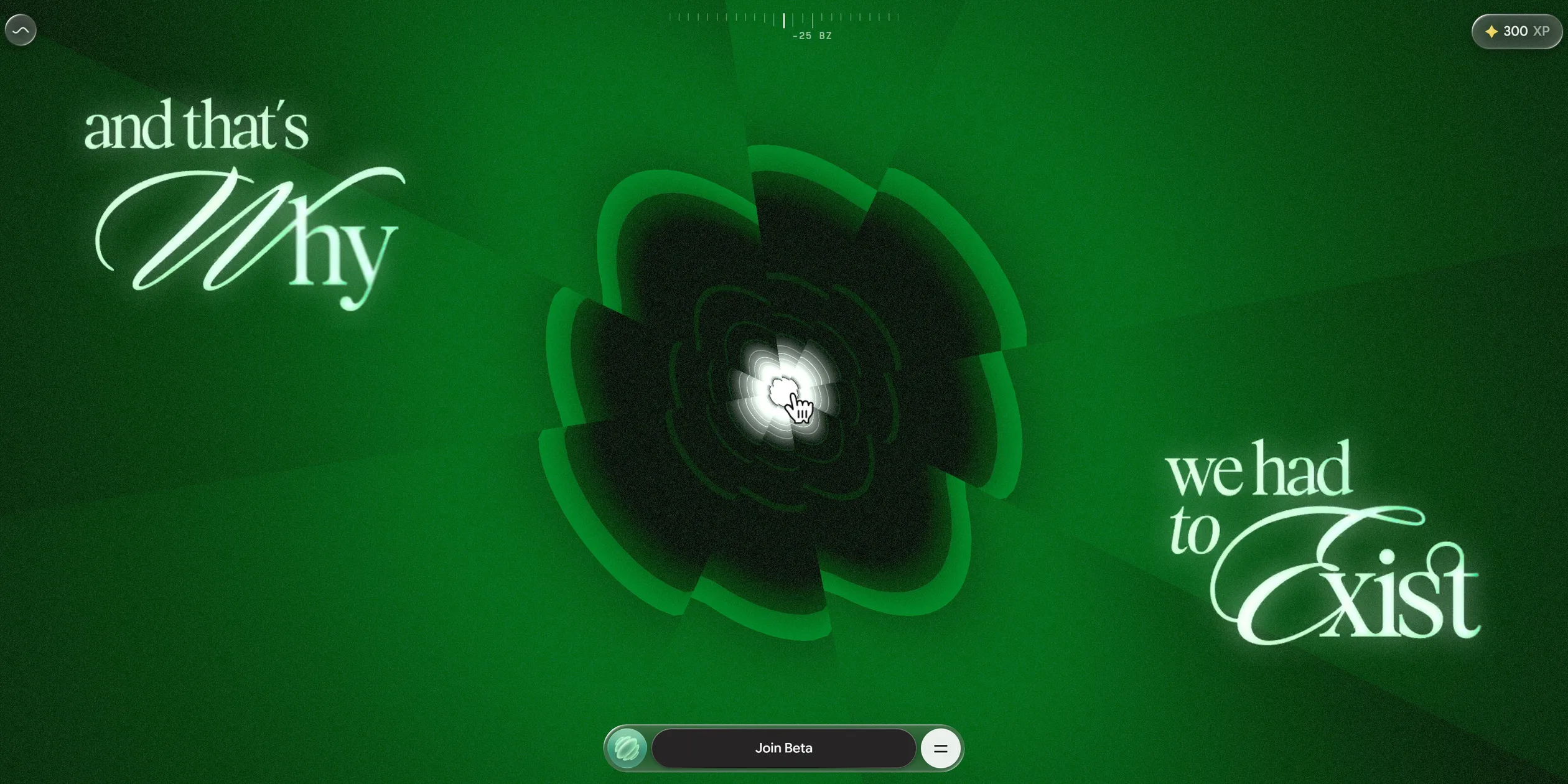
The hold at the end of the third act becomes a launch. The captions and that's Why and we had to Exist stay on either side of the screen, with layer after layer of green rings shaped like a zero between them. As the visitor holds for a second and a half, the camera pushes deeper along the rings and the light at their centre grows brighter until white light swallows the whole screen and Introducing rises out of the white. The site then takes over for three seconds as the camera bursts out of the light and the clouds slowly part above the city.
Each act also has one main object that moves with the progress. In the second act the glass shards carry their statistics upward past the real hand and turn slowly as they go. In the third act the banknotes catch fire from their edges and a wavering burn line eats its way inward. A bright yellow rim runs ahead of the burn line, the burnt area turns black first and then disappears altogether. A line moving from left to right tears the certificates apart, and each strip it cuts off tumbles down on its own. In the fourth act the clouds slowly draw apart to both sides and the city appears beneath them a little at a time.
The small motions of the interface are all short and start fast before slowing down. When the visitor opens the menu, the bar at the bottom first widens, then the three links rise one after another, each starting about fifty milliseconds after the one before, and the whole group settles in about two thirds of a second. Closing the menu takes only a third of a second, with the cross turning back into two bars. When the visitor clicks Join Beta, the label on the pill fades out first, the email field fades in about a tenth of a second later, and the back arrow rises from behind the bar at the same time. As the visitor moves the cursor, the camera leans slightly toward it, and on phones the camera follows the tilt of the phone instead.
On phones every action moves to the finger, so the visitor draws the zero, swipes up and down to push the progress and holds the button with a finger. Each act on a phone has seven tenths of its desktop scroll length, so the whole story takes just over thirty swipes.
From the meadow to the city, the picture on a desktop computer holds 60 frames per second, with no lasting stutter in any of the five acts or the two holds. The picture paused only once each, for a brief moment, after the zero was drawn, after the tunnel and at the start of the fourth act. All three are moments when a new act begins, so the site is most likely handing that act's assets to the graphics card.
04Engineering
Why Zero runs its whole story on a single number. The site uses neither the browser's own scrolling nor ScrollTrigger, and the page is always exactly one screen tall. Wheel and touch events only change a virtual scroll target, and each frame the position approaches that target by a factor of 0.075. The site converts that factor into an exponential decay that does not depend on the frame rate, so the glide feels the same on screens with higher refresh rates. The story is split into nine segments, with the loader and the zero gate as the first. Each segment only declares how much scroll it owns and provides four functions for entering, redrawing from its local progress, updating every frame and tearing down.
The passages and holds between segments hang on the same number. The site plays three passages by itself, running each over about three seconds on a smoothstep curve that starts slow, speeds up and slows again, and both holds share one configurable hold component that each segment fills with its own visuals and music. The team writes in its Codrops article that when they start debugging from any segment, the site replays the lifecycle of every segment before it, so the picture is always the same as if the visitor had scrolled there. The site also stores the segment the visitor reached in the session storage of the current tab, and a reload within half an hour resumes from that segment.
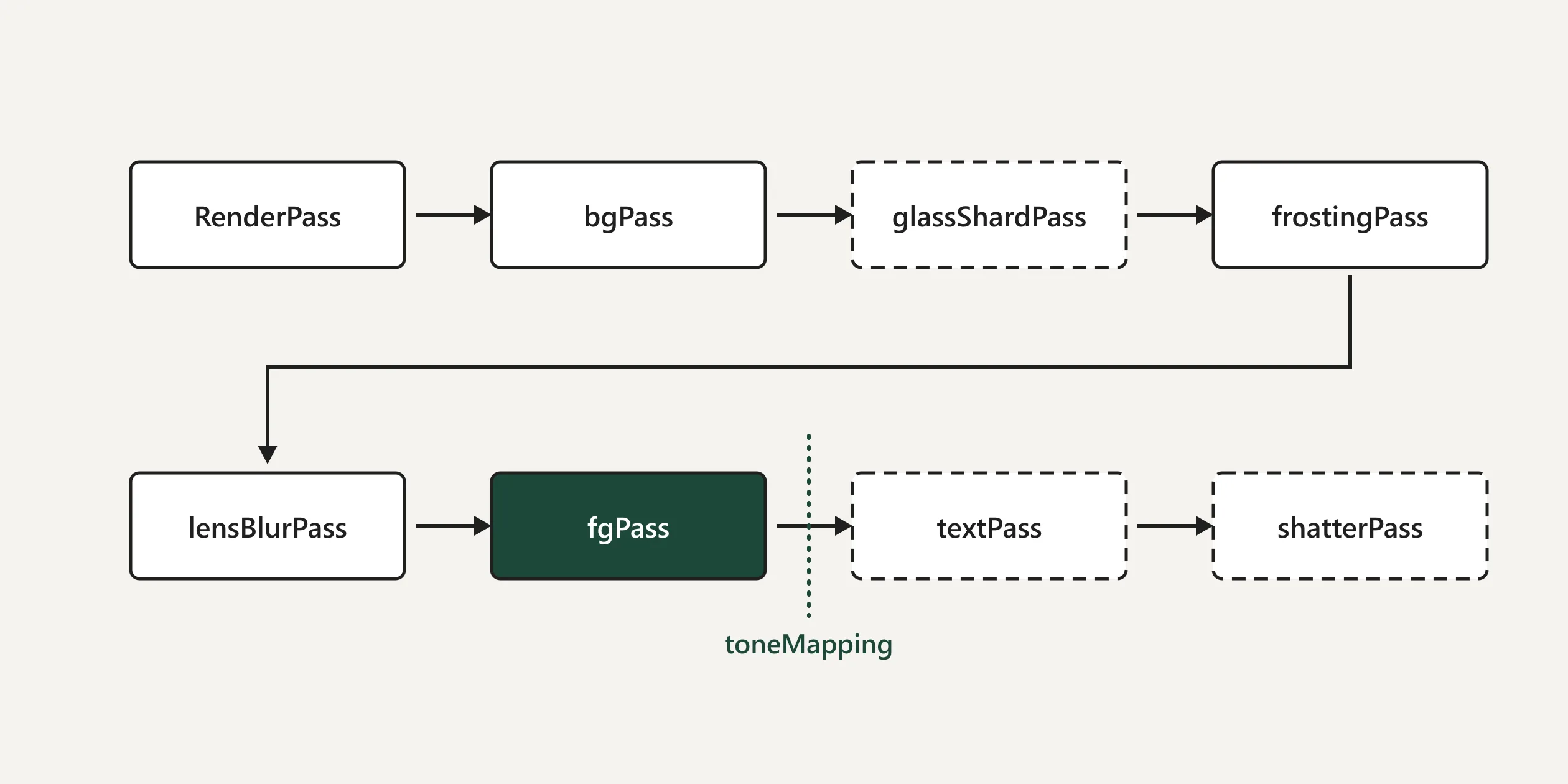
The picture is drawn by three.js on one full-screen WebGL2 canvas, and every frame runs through a chain of post-processing passes. The order the team lists is the 3D scene, a procedural background, refraction through the unbroken glass, the frost and the drawn stroke, depth of field, the colour grade with film grain, the caption composite and finally the shattering glass. The quality of the depth of field follows the quality tier. The glass, caption and shatter passes are only created after the loading screen, and their shaders are compiled during the idle time of an earlier act, so none of them stalls on compilation the first time it appears. Only the colour grade in the chain applies tone mapping, and it is also where the picture turns red during a hold, by scaling down the green and blue channels so that only red is left. The captions are composited after the tone mapping, so the white and deep teal text is never muddied by the grade.
The zero gate is made of a very short gesture check and a frost shader. The gesture check collects stroke points only while the pointer is held down. Once it has twenty points, it finds their centre and checks three things: the total angle the stroke turns around the centre exceeds 5.76 radians, the standard deviation of the distances to the centre is no more than 35% of the mean radius, and the end point lies within one mean radius of the start. When the stroke passes, its centre becomes the starting point of the melt. The frost itself runs on a pair of render targets that swap back and forth. Every frame it spreads once in each of four directions, horizontal, vertical and the two diagonals, taking the brightest neighbouring pixel each time, so the melted shape grows as an octagon. The step of the spread is scaled by the brightness of the ice texture, which gives the edge its jagged, crystal-like teeth.
The movements of both hands and the camera are animations made in Blender, and the scroll is only their playhead. The site loads hand models with skeletal animation and a model file that holds nothing but a camera animation, and sets the time of every animation to its full length multiplied by the current progress, so the camera path follows the design in the 3D software exactly. The lighting of the human hand is baked into textures. The team writes that real-time lighting was too expensive and hard to match to the original artwork, so they prepared a lighting texture for each keyframe and crossfade between two texture slots. Before blending, the site premultiplies the alpha to avoid a dark halo around the edges of the hand. The green hand uses a matcap texture together with a normal map and a mask, so it looks glossy without any light in the scene. When the visitor stops scrolling, the site adds a small sine-shaped swing to the bones of each finger, which is where the self-flexing fingers described in the motion chapter come from.
Every climax of the story gets a shader of its own. The burning money uses noise combined with a distance field to decide when each point catches fire, an HDR ember rim lights up just ahead of the burn front, the surface turns to char and is finally discarded. The fractal noise is the most expensive part of this shader, so pixels still far from the burn front are skipped as early as possible. For the shredded certificates, every vertex records which strip it belongs to. The tear moves from left to right, each strip falls and tumbles according to its own random value, and the normals for its lighting come straight from the function that drives the wave, so no normal map has to be downloaded.
The shaders for the tunnel and the captions are simpler. The tunnel is an extrusion of the cross-section of the ZERO logo, and a band of light runs along it based on the world-space Z coordinate, so the repeated tunnel sections join without visible seams. The captions come into focus through a hexagonal blur of seven samples whose radius shrinks with the reveal progress. The team also writes that several shaders had to declare highp precision, because many phone graphics chips treat mediump as a true 16-bit float, and on those phones all the certificate strips moved in exactly the same way.
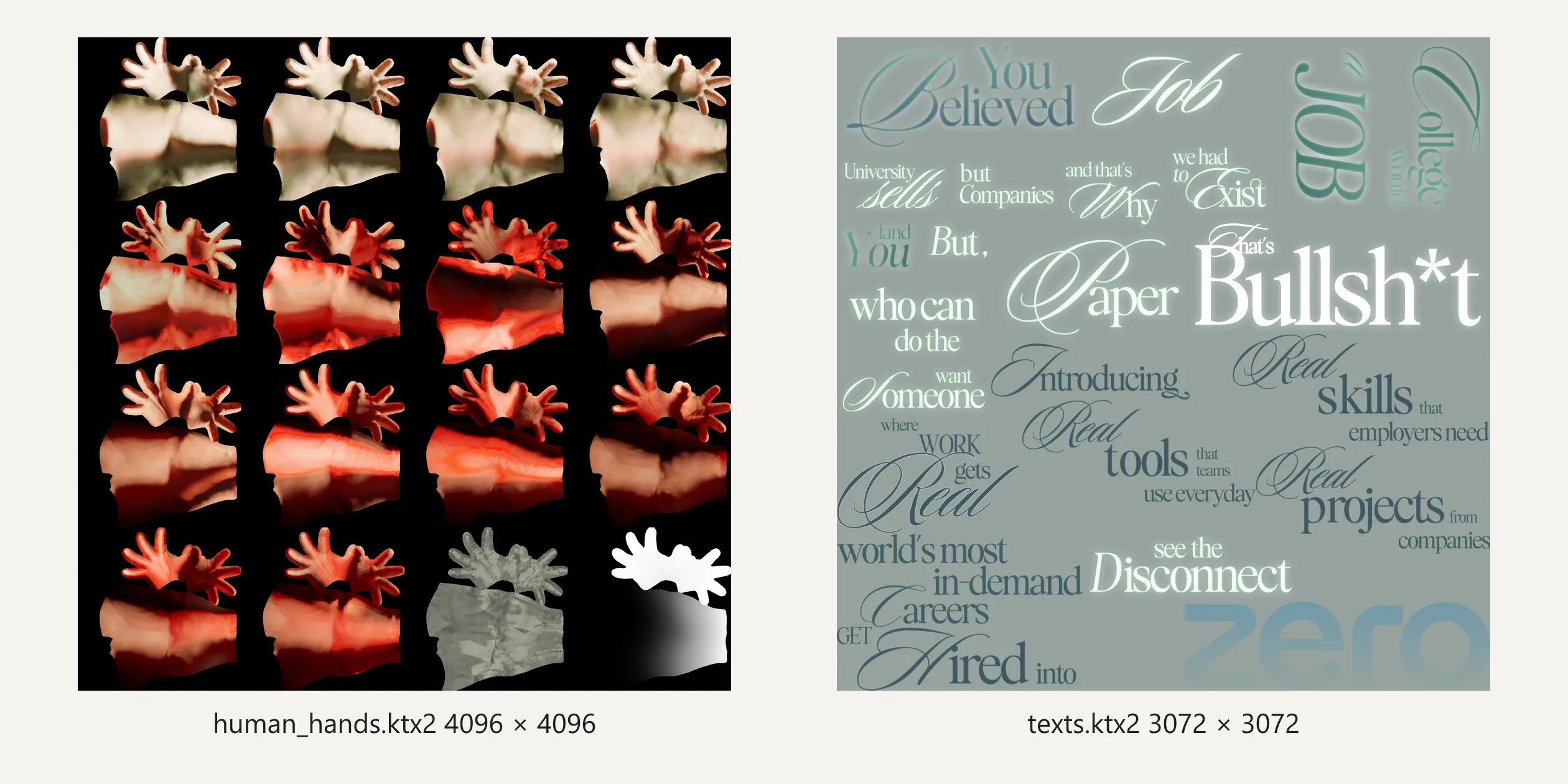
The captions of the story all come from one atlas. The site packs more than thirty captions into a single KTX2 compressed texture, and each caption records its place in the atlas, its aspect ratio, an anchor and the progress at which it appears and disappears. The anchor decides which side of the screen the caption sticks to, and the width is computed from the short side of the screen with a minimum reference size on desktops, so captions have the same pixel size on 1366 and 1920 wide screens. Phones use a different, smaller reference, scale the captions down to 85%, and keep the lower captions clear of the bar at the bottom. The team writes that the captions were first spread over four atlases and only later combined into one.
Preparing the assets took most of the four months of development. The team writes that the source material was a set of production Blender scenes with 8K textures and baked animations, more than 1 GB in all, and that most of the first month went into choosing a format for each asset. Models are compressed with DRACO and textures encoded as KTX2 with ETC1S, and both decoders are hosted on the site's own server, because a slowdown on a third-party CDN once made every compressed asset fail to decode. The team also built a compression previewer into its internal dashboard that shows each texture before and after compression side by side, so the strength could be tuned texture by texture. More than fifty separate images were merged into about twelve atlases, all the hand textures for example share one four-by-four atlas, and the gradient backgrounds were replaced with a few lines of shader code.
Assets are grouped by act, and each time the visitor enters an act the site starts loading the next act's assets in the background. The city map of the fifth act is a group of its own and starts downloading while the visitor is still in the first act. To avoid hitches in the middle of a scroll, the site hands textures to the graphics card one at a time during idle time, splits the large atlases into 256-pixel tiles uploaded one per frame, and empties the queue before each change of act.
The result is a download of about 6.3 MB before the visitor can draw the zero and about 10 MB for the whole story, which roughly matches the team's figure of under 10 MB. Opening the videos on all four company cards adds about 1.8 MB. The largest single file is the texture of the city map at about 3 MB, followed by the hand atlas at about 0.9 MB. The HTML already contains a 99 in the same typeface and position as the countdown number on the canvas, so the browser paints the first screen after about 0.2 to 0.3 seconds, and once WebGL starts, the real number on the canvas covers it exactly. The ice is ready for drawing after about 4.5 seconds.
The site also adjusts its own quality to the frame rate it actually gets. It compares the average time of the last 60 frames with two thresholds, drops a tier above 22 milliseconds, climbs a tier below 12 milliseconds, and waits 180 frames after each change before judging again. The top tier caps the pixel ratio at 2, the middle tier at 1.5 and the lowest at 1, and the lowest tier also turns off the depth of field, uses fewer segments for the coin ring and lowers the resolution of the captions. At the moment the glass breaks, the site also multiplies the pixel ratio by 0.8 for a while. On a desktop at a pixel ratio of 2, the canvas drops from 3840 to 3072 pixels wide and comes back after the shatter, which the team says hides the cost of that moment inside the gesture. Phones receive almost the same assets, with smaller versions of the second act's background video, the cloud atlas and the gold star video, and one fewer blur pass for the depth of field.
Sound runs on Howler.js, each act has its own music, and the music of two acts crossfades when one gives way to the next. The site only unlocks the browser's audio on the visitor's first press of the mouse or a finger, which is the moment the visitor starts drawing the zero, so the gesture that opens the site also turns on its sound. When the visitor opens the sign-up form or a company card, the site sends all the music through a low-pass filter that cuts the high frequencies within a quarter of a second, so the music sounds as if it comes through a wall. Clicks and the whoosh of transitions use a separate channel that the filter does not touch. The team writes that the sound of the breaking glass is played on the first frame the shatter is actually drawn rather than on a timer, because on slow devices a timer would let the sound arrive before the picture.
The reward after signing up is also generated live in the browser. The site first writes the visitor's name and school onto a certificate image on a 2D canvas, then uses it as the texture of an origami animal model. There are ten animals, the site picks one from a hash of the name, and each model carries an animation that folds a flat sheet into the animal. The share card reads Founding member with a number, and the visitor can export it as a video. The site captures the card with html2canvas, draws the folding animation frame by frame and passes the frames to the browser's WebCodecs video encoder and to mp4-muxer to build an MP4, so the whole video is made in the visitor's own browser.
Why Zero only works for visitors who use a mouse or a touch screen and can see the picture. Every caption of the story is a picture on the canvas, the page has no headings and no readable body text, and a screen reader finds only a few buttons. At the zero gate, keyboard focus moves only between the five ruler buttons at the top, which are invisible at that point. Pressing Enter on one of them jumps straight to an act and skips the gate, but the words DRAW A ZERO stay on the screen. After that the arrow keys, the space bar and the page keys cannot move the story, and both holds respond only to a mouse or a finger. The site reads the reduced-motion setting in one place only, to stop the wave animation on the sound button, while the melting ice, the shattering glass and the camera moves all play as usual.
05Scores and Team
| Award | Source | Date | Score |
|---|---|---|---|
| FWA of the Day | The FWA | 2026-07-17 | 86 POINTS, DAYS 2 |
| FWA of the Month | The FWA | July 2026 | Monthly award, no separate score |
| Website of the Day | CSS Design Awards | 2026-08-11 | Jury 8.90 |
| Site of the Day | Awwwards | 2026-09-07 | 7.73. Design 7.70 / Usability 7.46 / Creativity 8.16 / Content 7.75 |
| Developer Award | Awwwards | 2026-09-07 | 7.26 / 10 |
| Site of the Month | Awwwards | September 2026 | Monthly award, no separate score |
The first award for Why Zero was FWA of the Day on July 17, with 86 points, and it then became FWA of the Month for July. On August 11 it won Website of the Day at CSS Design Awards together with that site's public awards for UI design, UX design and innovation. On September 7 it won Awwwards Site of the Day and the Developer Award, and it went on to become the Awwwards Site of the Month for September.
Creativity was the highest of the four Awwwards categories at 8.16. The team writes that it had not seen anything like the draw-a-zero entrance before, and that entrance together with the hold-to-shatter transitions is a likely reason for the high mark. Usability scored lowest at 7.46. The site drops the browser's own scrolling, demands a hold at each turn and cannot be moved forward from the keyboard, which may have pulled this category down.
The Developer Award came with a score of 7.26. Animations scored highest at 8.40, while Semantics and Accessibility scored lowest at 6.60 each, which matches the problems in the engineering chapter, captions that are all pictures and a page with no readable structure. The FWA files it under Educational, Experimental and Promotional.
| Credit | Who | Track record |
|---|---|---|
| Sindhur Dutta | Founder and creative director of BUNQ LABS, described on the FWA as a multidisciplinary designer who builds immersive web experiences for brands. The account gives Bengaluru, India as its location | Awwwards works 1, SOTM 1, SOTD 1, HM 1. FWA 3 |
| Zero Design | Zero's account, which describes the company as helping people into in-demand careers through projects modelled on real jobs. The account gives Media City, United Arab Emirates as its location | Awwwards works 1, SOTM 1, SOTD 1, HM 1. FWA 2 |
| Atul Khola | The credits of the Codrops article place the concept and design direction of the site with the Zero team led by Atul Khola | FWA 2 |
The track records in the table are totals as of October 24, 2026. The site was made by two parties working together. On Zero's side, Atul Khola led the team that produced the concept and design direction, and the source material handed to BUNQ LABS was images and videos with no interaction specifications, so BUNQ LABS designed the way every gate works from scratch. On the BUNQ LABS side, Sindhur Dutta led Shuprobho, Yashas and others through the development, the 3D pipeline, the shaders and the performance work.
BUNQ LABS won the project with a prototype. The team writes in its Codrops article that instead of pitching with a presentation, it spent 48 hours building a working prototype of the draw-a-zero interaction. The team then spent four months building the whole site, with much of the first version of the code generated by AI and then rewritten and refined piece by piece. BUNQ LABS says on its website that brand, interface, motion and real-time web work are all designed and built by the same small team, and that it takes on only a handful of projects a year. Sindhur Dutta's other FWA of the Day went to the studio's own website.
06Archive
- Award date
- 2026-09-07
- Awards
- Awwwards SOTD 2026-09-07, Awwwards DEV 2026-09-07, Awwwards SOTM 2026-09, The FWA FOTD 2026-07-17, The FWA FOTM 2026-07
- Site
- https://why.zero.university/
- Credits
- Sindhur Dutta, Zero Design, Atul Khola
- Design
- cinematic
- Build
- scroll
- Awwwards
- 7.73 / 10. Design 7.70 / Usability 7.46 / Creativity 8.16 / Content 7.75. Developer Award 7.26. https://www.awwwards.com/sites/why-zero
- The FWA
- 86 POINTS, DAYS 2. https://thefwa.com/cases/why-zero
- Stack
- Vite, three.js r160, GSAP, Howler.js, DRACO, KTX2 (Basis Universal), html2canvas, WebCodecs, mp4-muxer, PP Supply Mono, Supply Sans, Bethany Elingston, STK Bureau Serif, Inter
- Total assets
- About 10 MB through all five acts, about 6.3 MB of it before the zero can be drawn. Compressed textures are about half, the largest being the city map at about 3 MB. The videos on the four company cards add about 1.8 MB
- Speed
- FCP 220 to 308 ms (loading number), zero gate ready at about 4.5 s, CLS 0.0002. Continuous scrolling 60 fps