Matteo Courquin
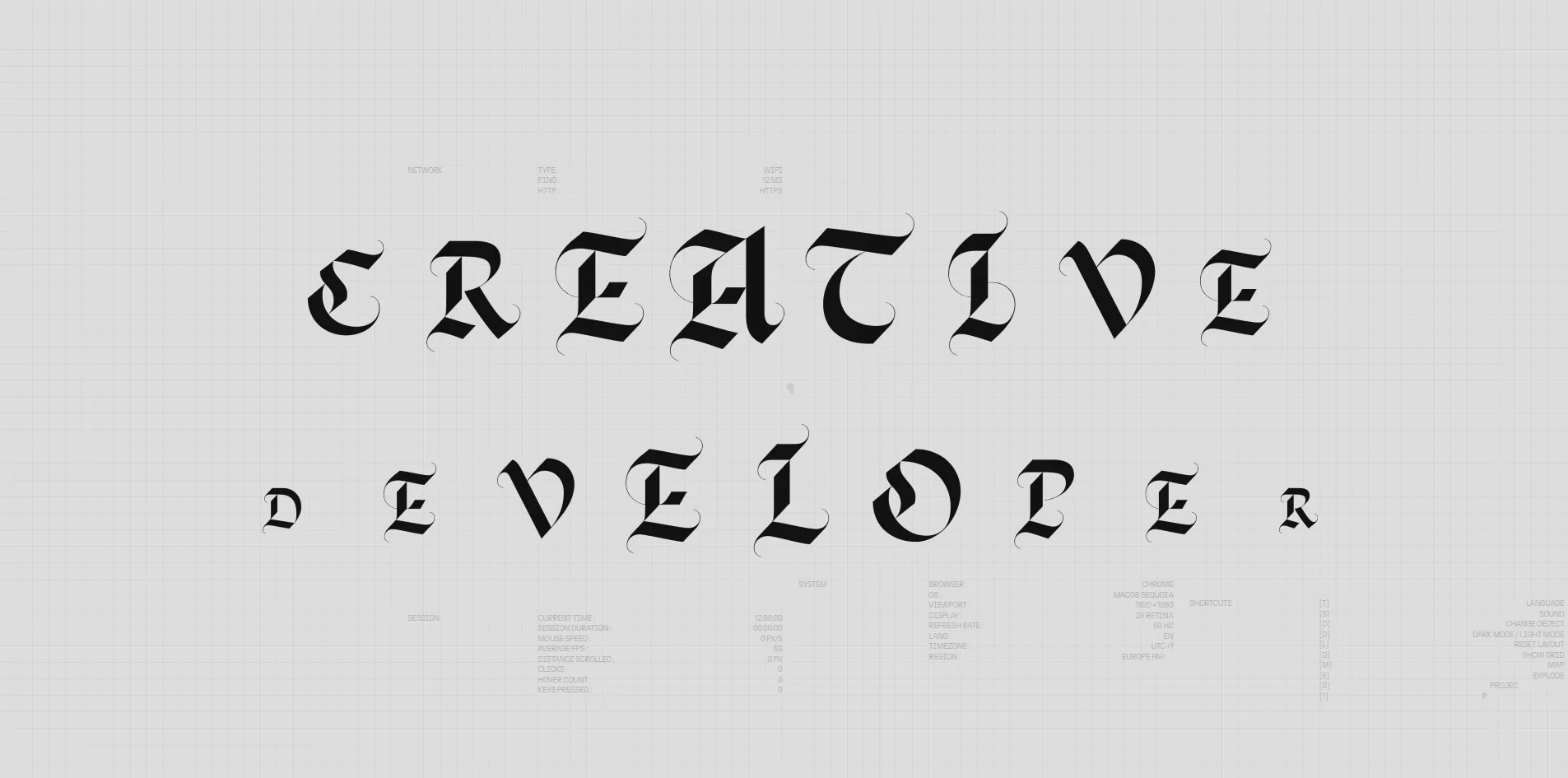
Matteo Courquin has turned his portfolio into a computer that boots up. The page opens on a screen of text imitating a computer's start-up check, and when the visitor presses Enter, a huge blackletter CREATIVE DEVELOPER appears one letter at a time. A desktop then fills with draggable windows holding his work, an introduction and his awards. In the gaps between the windows sits a live monitoring panel that records the visitor's mouse speed, clicks and key presses. The whole desktop fits within one screen, so the visitor sees everything without scrolling down.
Matteo Courquin is technical director of the Paris design studio Metabole Studio, and he shares the credit for this personal portfolio with the studio's art director, Jérôme Bezeau. It won FWA of the Day from the web design award FWA.
01Concept
A portfolio is usually one long page that scrolls, but this version by Matteo Courquin lays everything out on a single screen instead. The team's description on the FWA page puts it plainly, calling it a no-scroll interactive portfolio that explores an alternative way of navigating within one screen. To make that screen feel like a real computer, the site begins with a start-up screen. The opening imitates a BIOS screen, the system program that runs first when a computer is switched on and prints its hardware checks line by line on a black screen. This screen also carries the line PRESS ANY KEY (TAB+S) ...... SKIP, telling visitors they can skip the opening with a key press.
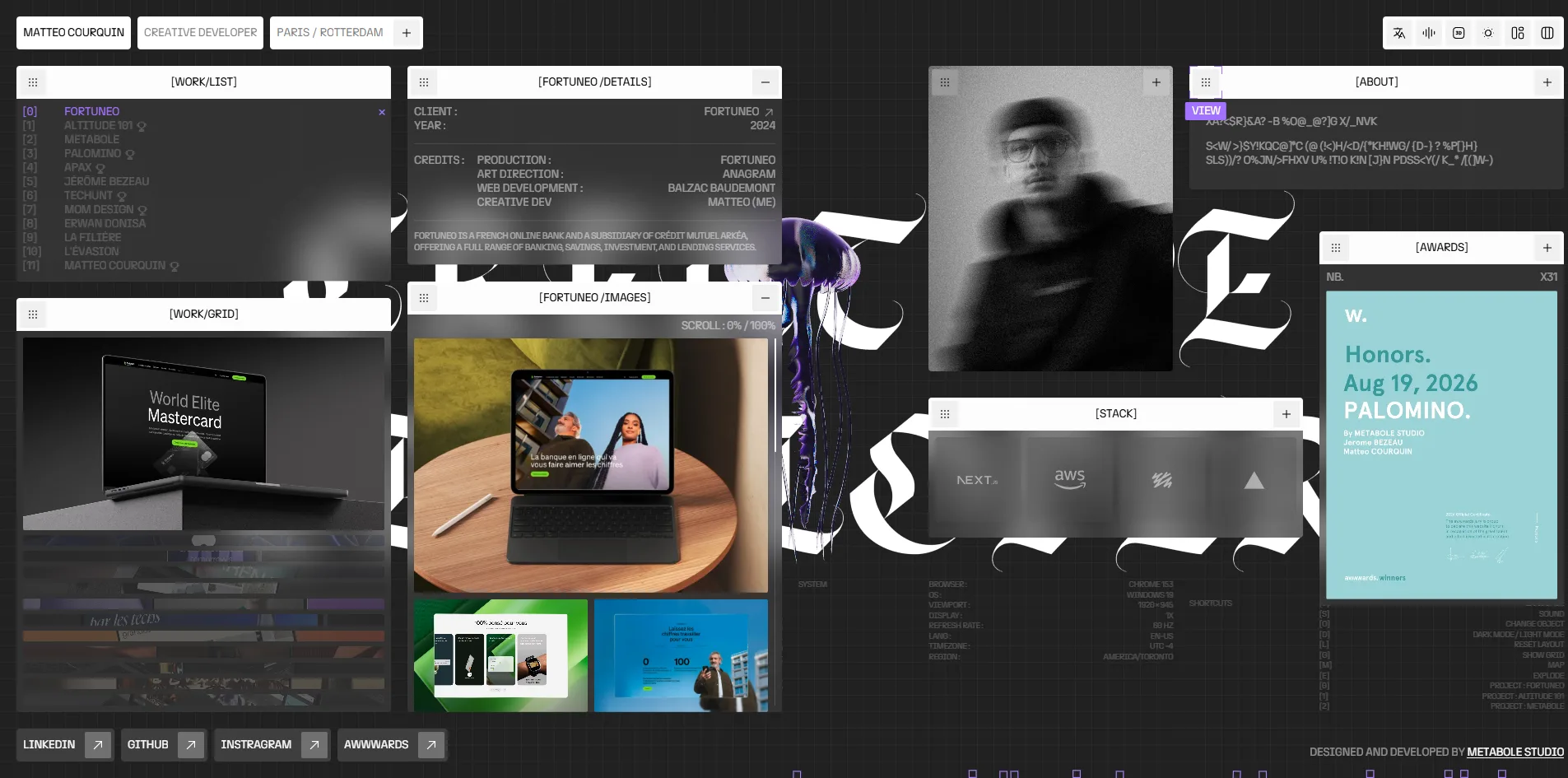
Once the machine has started, the visitor faces a computer desktop. On the left are windows for the work list and the thumbnails, and in the middle are two windows for project details and project images that start out empty. On the right sit a portrait photo, a tech stack window, an awards window and an introduction window labelled ABOUT. In the ABOUT window Matteo introduces himself, saying he moved from architecture to running a business, with a detour through carpentry. The work list holds 12 projects, with a small trophy after the ones that won awards, and clicking one opens that project in the two empty windows in the middle. Each window has a drag handle at the left of its title bar, so the visitor can move windows anywhere and restore the layout with a single press of L.
The most unusual thing on the desktop is the monitoring panel, scattered through the gaps between the windows in 10 pixel grey text. It lists data about the visitor's current visit, including the time, how long the visit has lasted, mouse speed, average frame rate, clicks, hovers and key presses. The panel also shows the visitor's browser, operating system, window size, screen refresh rate, language, time zone and region, along with the delay in reaching the server. Every action the visitor takes on the desktop makes one of these figures tick over.
The whole site can also be driven from the keyboard, with the list of shortcuts printed in the bottom right corner of the desktop. T switches language, S turns sound on and off, O swaps the 3D object in the middle, D switches to dark mode and G shows a grid. M opens a map window marking the two offices in Paris and Rotterdam, E blows the object in the middle apart, and the number keys 0, 1 and 2 open the first three projects in the list directly.
02Design
The interface uses only black, white and grey, plus a violet, #4d00e6, that appears only on the selected project name and a few small markers. The background is a pale grey with a fine grid laid over it, the window title bars are white on black, and the window contents sit on an even lighter grey. The desktop therefore looks like the system interface of an old computer, with colour used only to tell the windows from the background.
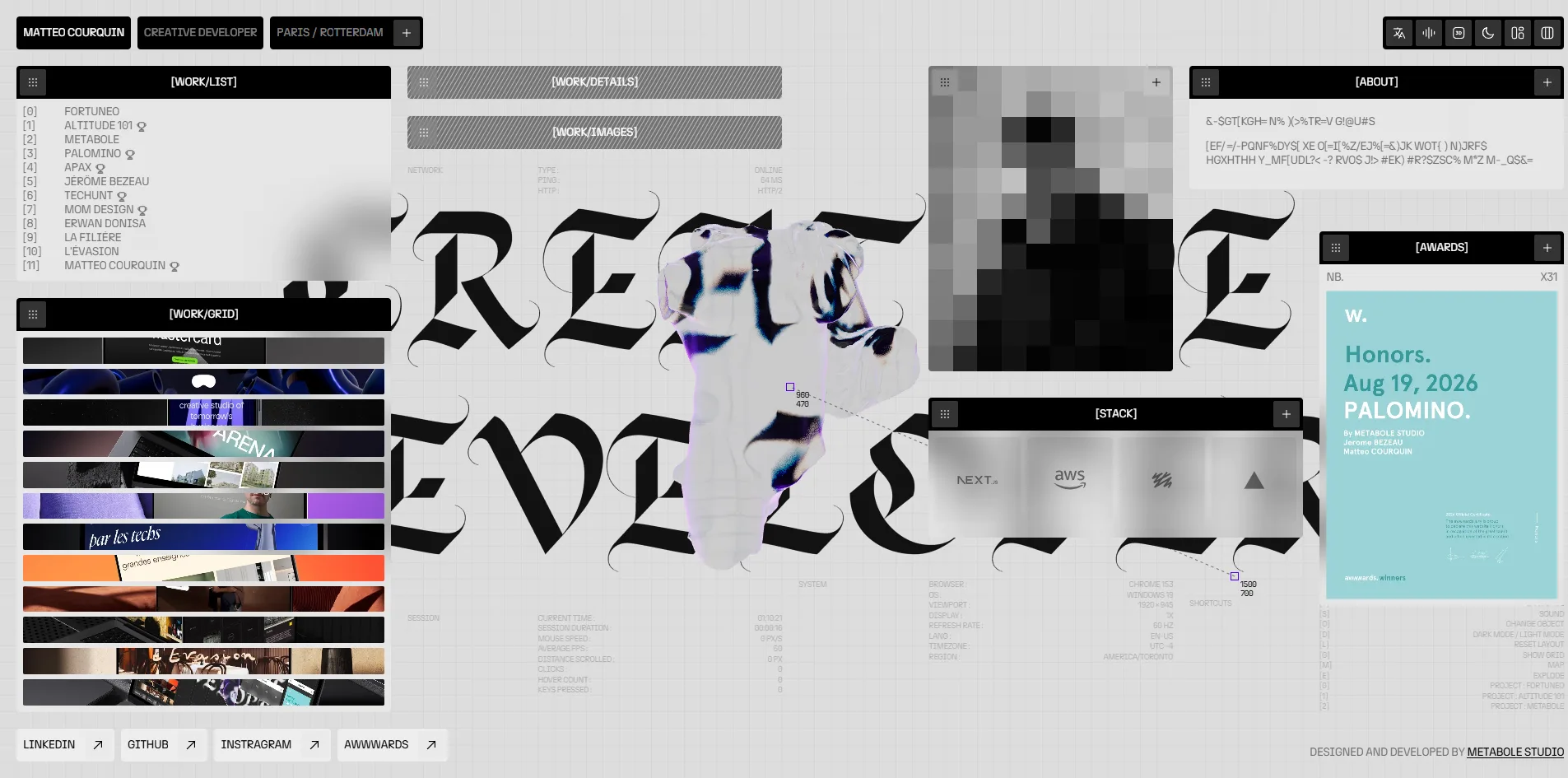
The window labels follow the style of a system interface as well. Each title bar carries the window's name in square brackets, such as [WORK/LIST], [STACK] and [ABOUT], with a plus button at the right end for expanding the window. Along the bottom of the desktop runs a row of four link buttons with arrows, leading to LINKEDIN, GITHUB, INSTRAGRAM and AWWWARDS, and the Instagram button is misspelled as INSTRAGRAM, with an extra r.
The text on the site is split between two typefaces that could hardly be more different. All the interface text uses a sans-serif called n27, in capitals only, at just three sizes of 10, 14 and 18 pixels and with tight letter spacing, so it reads like system messages in a terminal. The only large type is the CREATIVE DEVELOPER in the background. It is not a web font but blackletter drawn stroke by stroke as vector graphics, the sharp-angled Gothic lettering with strong contrast between thick and thin strokes found in medieval manuscripts. Its two lines fill the whole screen, the windows sit on top of them, and the 3D object floats between the windows, which splits the picture into three layers of lettering, windows and object.
The object in the middle is the only 3D element on the desktop. There are six of them, a Greek bust, a rose, a jellyfish, a skull, a heart and a chess knight, and each press of O brings up the next one. Their material is translucent with rainbow-tinted edges, and judging by that look, it is probably made with a matcap texture. A matcap is a sphere-shaped image with lighting and reflections painted on in advance, and an object wearing one looks glassy without any lighting being calculated live.
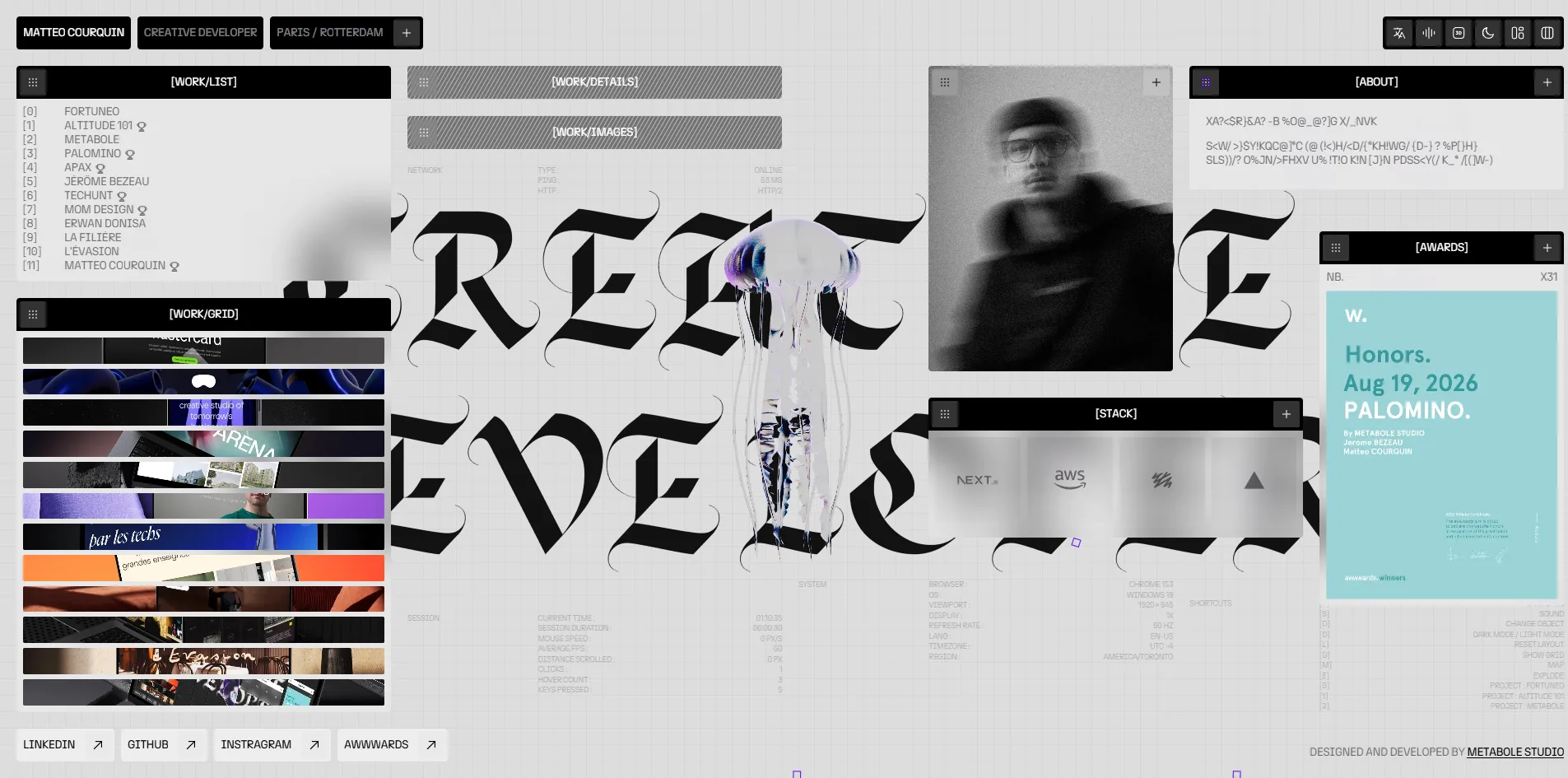
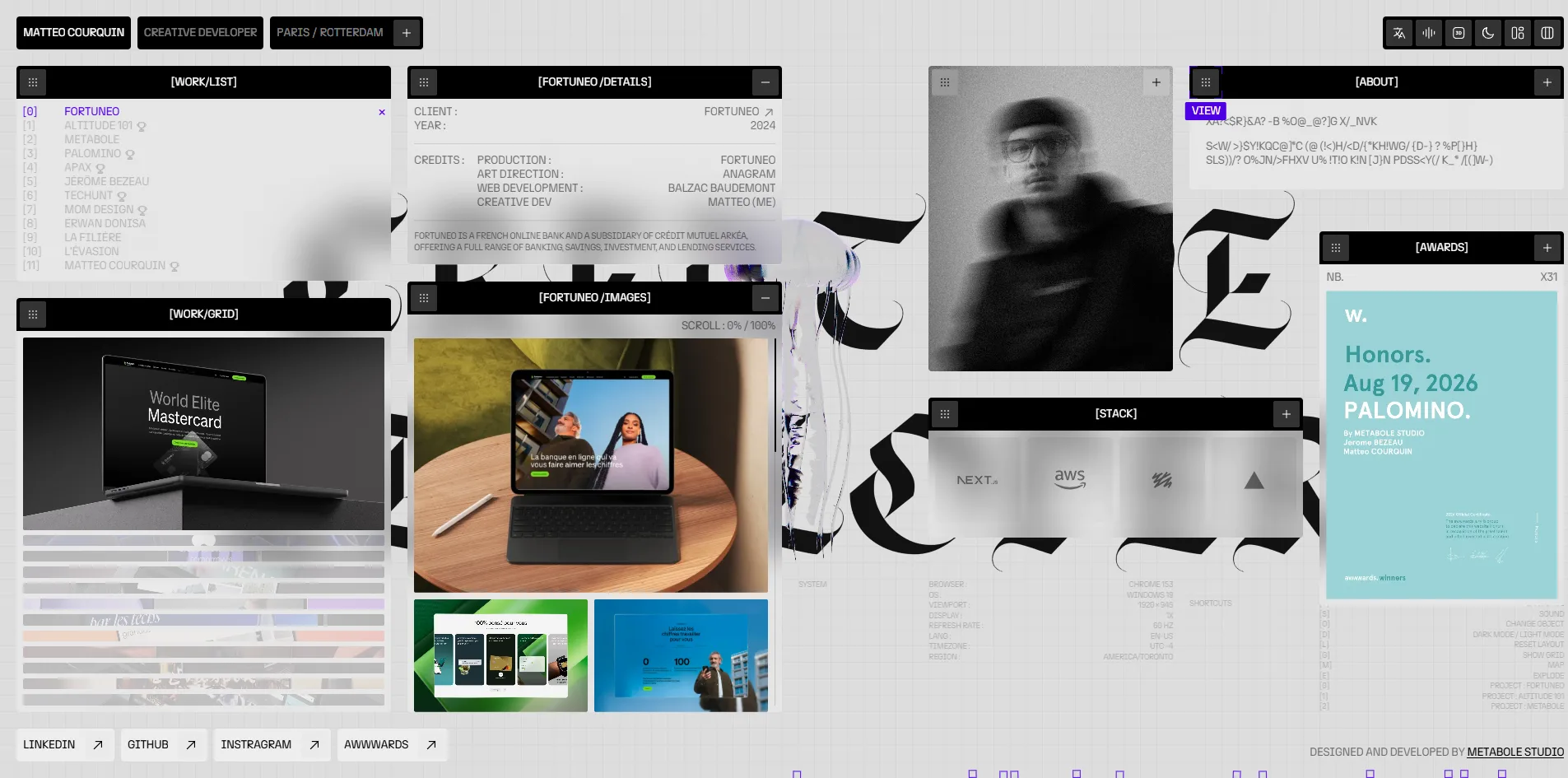
Opening a project gives the two middle windows its name as their title, and their content is then laid out like system information. The details window has a column of field names on the left, such as CLIENT, YEAR and CREDITS, with the client, the year and who did each part of the work aligned on the right. Matteo's own role in that list appears as MATTEO (ME). The images window holds the project's screenshots and videos, with one large picture above two small ones.
Pressing D switches the desktop to dark mode, and the black, white and grey scheme flips as a whole. The background turns near black, the window title bars become black on white, and the blackletter in the background turns white.
03Motion
Most of the motion on this site happens at the moment information appears. The BIOS text types itself out line by line, and after Enter the blackletter letters appear one at a time before the windows pop open in turn. The portrait in the photo window starts as a coarse mosaic and slowly sharpens. The text in the ABOUT window is normally a string of shifting gibberish, and it only turns back into readable text, one character at a time, once the cursor moves over it.
The picture stays smooth while a visitor drags windows and plays with the object. At rest, while a window is being dragged and while E blows the object apart, the picture holds 60 frames per second. The slowest frame takes about 17 milliseconds, close to the budget of about 16.7 milliseconds per frame at 60 frames a second. The 3D library three.js handles only the single object in the middle, while all the windows, the grid and the text are ordinary page elements.
04Engineering
Matteo Courquin built the site with the web framework Next.js, and its content lives in Sanity. Sanity is a headless content management system, which stores and manages the content but has no say in how pages look, so Next.js fetches the content and lays out the pages itself. Project images and videos load from Sanity's servers, and the STACK window accordingly shows the logos of Next.js, AWS and a few other tools.
The biggest problem with the site is how much it downloads. On a first visit, while the page is still on the BIOS screen and before the visitor has pressed Enter, the browser has already downloaded 32.6 to 33.4 MB. Of that, 24.4 MB is a background ambience track in WAV format. WAV is an uncompressed audio format, and the same sound saved as MP3 or AAC would usually take about a tenth of the space. More importantly, sound is off by default on this site, with the sound button labelled Unmute sound, so unless the visitor turns sound on, those 24.4 MB are never used.
Besides the background sound, a whole batch of other files is downloaded at once during the opening. The other eight sound effects are also WAV files, about 650 KB in total. The six 3D object models add up to 2.6 MB, with the rose alone at 979 KB, and on top of these come a 2.9 MB project video and about 950 KB of scripts.
Despite the size of the download, the first screen itself appears quickly. The server returns its first byte in 201 to 309 milliseconds, against the 0.8 seconds Google recommends, and the browser paints the first content (first contentful paint, FCP) after 360 to 540 milliseconds, against a recommended 1.8 seconds. The largest piece of content (largest contentful paint, LCP) is an image in the thumbnails window, which appears at around 1 second, also inside Google's 2.5 seconds, and nothing on the page shifts while it loads. Loading does include one long task of 0.9 to 1.1 seconds, a stretch of script that keeps the browser too busy to respond to any input. For about a second, the visitor's clicks and key presses get no response.
Every feature on this site can be reached from the keyboard, but screen reader users run into a number of problems. Of the 55 buttons, 24 have no name a screen reader can announce, and judging by the desktop, most of them are the windows' drag handles and expand buttons, which carry only an icon and no text. The page has no heading elements at all, so screen reader users cannot jump around the desktop by heading. The English version also declares its language as French, so a screen reader will read the English text with French pronunciation. Operating systems offer a reduced motion setting for people who feel unwell when things move on screen, and the site does nothing at all to respond to it.
05Scores and Team
| Award | Source | Date | Score |
|---|---|---|---|
| FWA of the Day | The FWA | 2026-09-24 | 82 POINTS, DAYS 5 |
Matteo Courquin's portfolio received 82 points from the FWA, which filed it under three categories, Fun & Playable, Music & Sound and Personal/Portfolio.
| Credit | Profile | Record |
|---|---|---|
| Matteo Courquin | Technical director of Metabole Studio, Paris | FWA 2, Awwwards HM 3 |
| Jérôme Bezeau | Art director and co-founder of Metabole Studio | FWA 2 |
Both credited people come from Metabole Studio, which has offices in Paris and Rotterdam. Each of their FWA profiles shows two wins of the day, one on 19 August and the other for this portfolio. The certificate hanging in the desktop's awards window is an Awwwards Honors certificate for the Palomino project, dated the same 19 August, and a corner of that window reads NB. X31, which appears to be the studio's total award count. Matteo Courquin has 6 projects and 3 Honorable Mentions on Awwwards, and Altitude 101, Palomino, Apax, Techunt and Mom Design in the work list are all Metabole Studio projects. Judging by their job titles, Jérôme Bezeau probably led the art direction on this site while Matteo Courquin handled the development.
06Archive
- Award date
- 2026-09-24
- Awards
- The FWA FOTD 2026-09-24
- Site
- https://matteocourquin.com/
- Credits
- Matteo Courquin, Jérôme Bezeau
- Design
- interface
- Build
- realtime
- The FWA
- 82 POINTS, DAYS 5. https://thefwa.com/cases/matteo-courquin
- Stack
- Next.js, Sanity, three.js r185, Lenis, SVG, Web Audio
- Total assets
- 32.6 to 33.4 MB on first load, of which the background WAV 24.4 MB and six 3D models 2.6 MB
- Speed
- FCP 360 to 540 ms, LCP about 1 s, CLS 0. 60 fps on the desktop