Colonia Zacamil
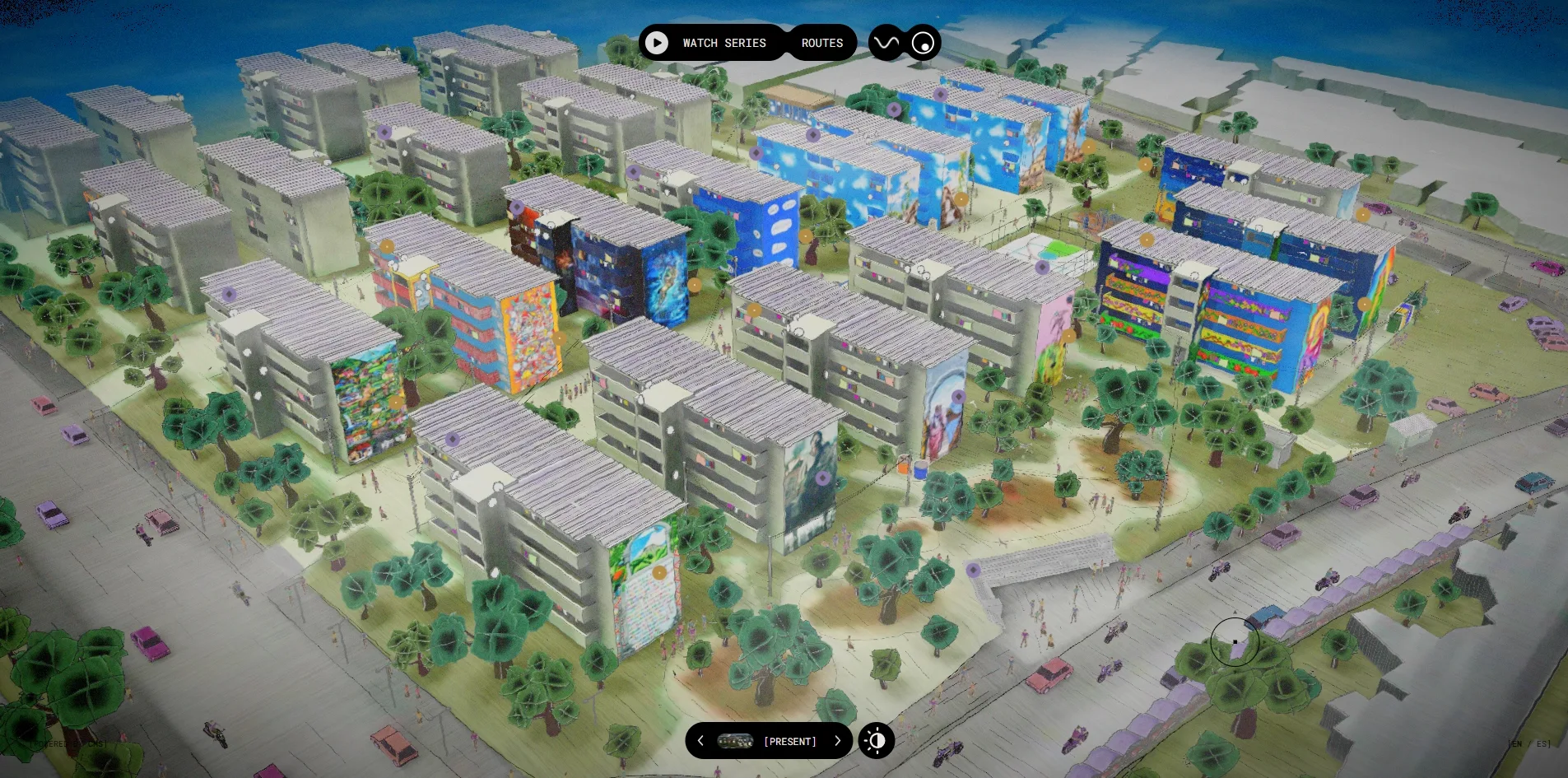
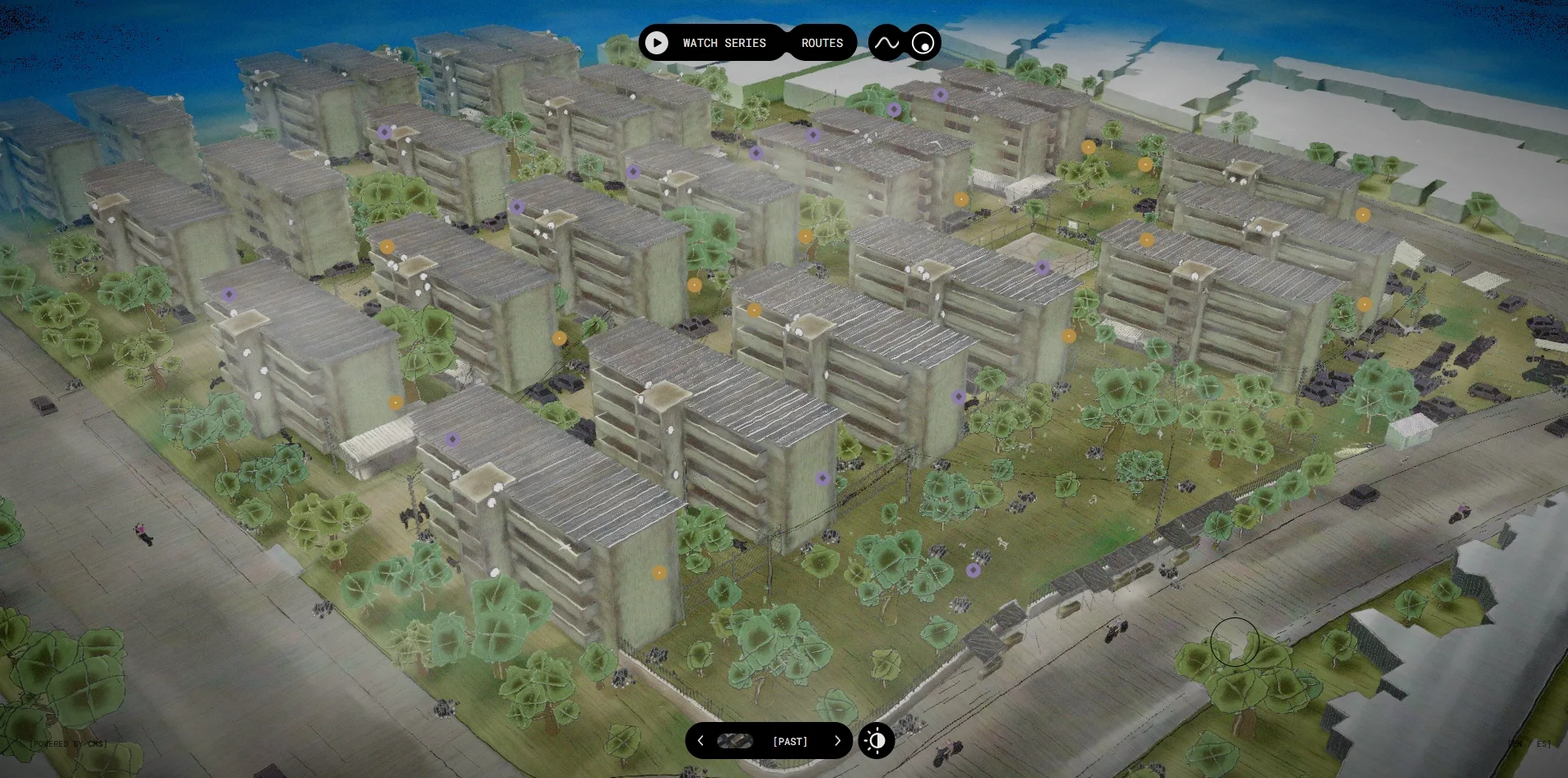
The Colonia Zacamil website puts a neighbourhood's before and after into one 3D model that a visitor can fly into. The visitor looks down on a hand-painted model of apartment blocks in El Salvador, with a switch at the bottom of the screen that reads PRESENT. When the visitor flips the switch, the murals fade from the walls, the people and the brightly coloured cars disappear, and the whole district returns to the grey-green place it was before the work began. When the visitor flips it back, fourteen murals reappear, and each one can be opened to hear the artist explain how that wall came about.
Colonia Zacamil is a neighbourhood in San Salvador, the capital of El Salvador. The website documents the public art and community regeneration carried out there by the foundation Custom Made Stories. The site was built by two studios, Adoratorio Studio in Italy and 60fps in France, and it has been named site of the day by both the FWA and Awwwards.
01Concept
The website tells the story of how a neighbourhood went from gang territory back to being a home. The text on the site gives the background, explaining that these forty apartment blocks were built under a mid-century housing programme for workers. Fighting took place here during the civil war, two gangs later divided the area between them, and residents lived behind iron bars and barbed wire until 2022. After that, the artist-run foundation Custom Made Stories brought in muralists, landscape designers and urban designers to rework the district together with the people who live there. Rather than lay all this out as a project brochure, the website places the visitor above the neighbourhood and lets them fly down to look.
Before reaching the model, the visitor has to pass a gate that needs one click. While the page loads, an aerial photograph of the district fills the screen, with a ZACAMIL wordmark built from squares and half circles laid across it. The photograph then shrinks into a horizontal strip that sits between the large words FLY TO and ZACAMIL. Below the strip are a black Discover button and a line asking the visitor to turn the sound on. When the visitor clicks the button, ambient sound begins, three small diagrams explain dragging, zooming and clicking pins, and only then does the model appear.
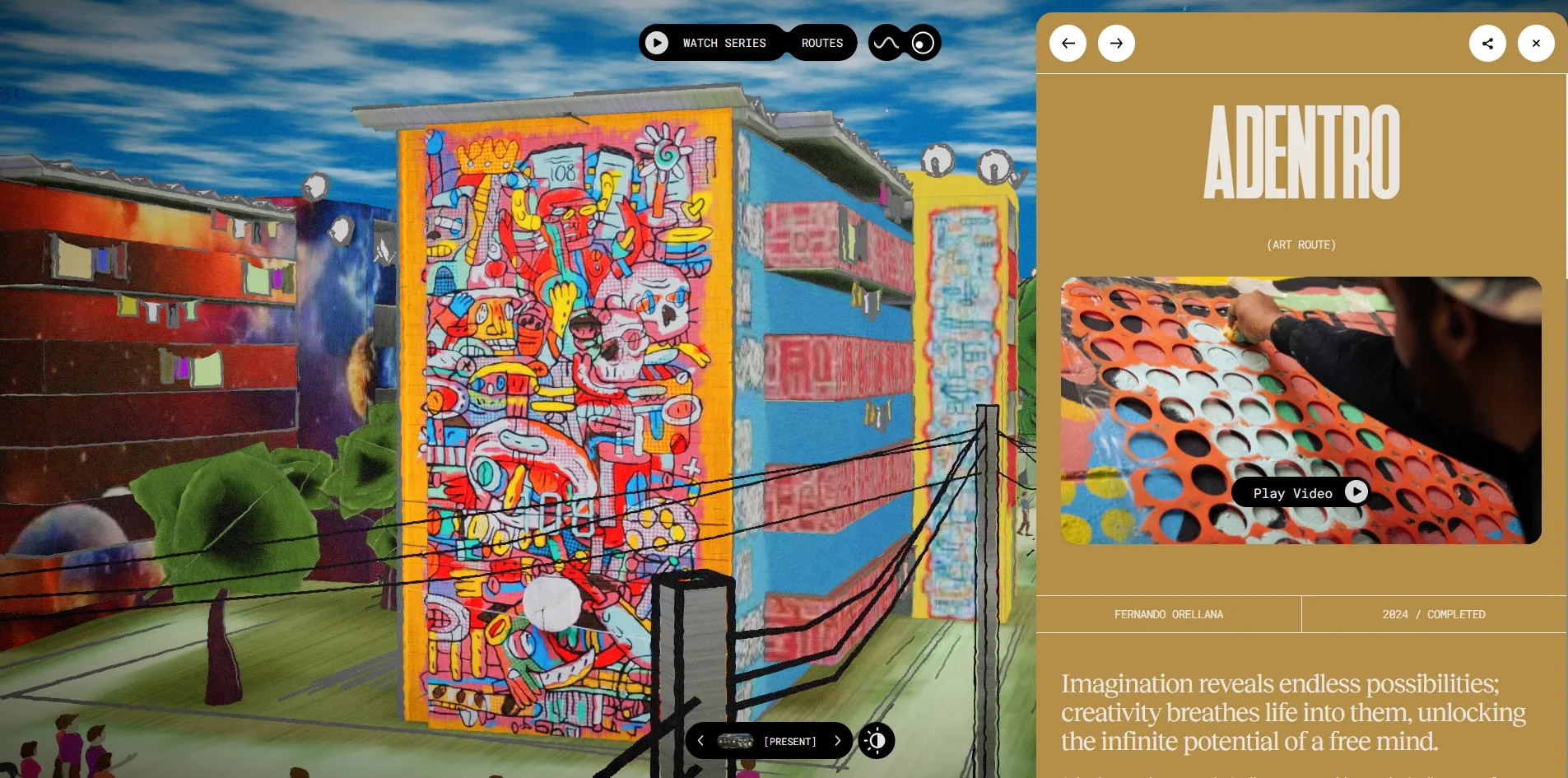
Twenty-seven pins are scattered across the model, and clicking them is the main thing a visitor does. Each of the fourteen gold pins belongs to a mural, and when the visitor clicks one, the camera flies to that wall and a panel slides in from the right. The panel holds the mural's name, its artist, the year it was finished, a statement from the artist and a short film, and two arrows at the top jump straight to the previous or next mural. The other thirteen pins are purple and only show a name when the cursor rests on them, so the visitor cannot open them. Three unmarked objects are also hidden in the model, a paint pot, a statue and a recycling point. When the visitor clicks one of them, a small card appears about the person who donated the paint, the civil war memorial or the community's own recycling scheme.
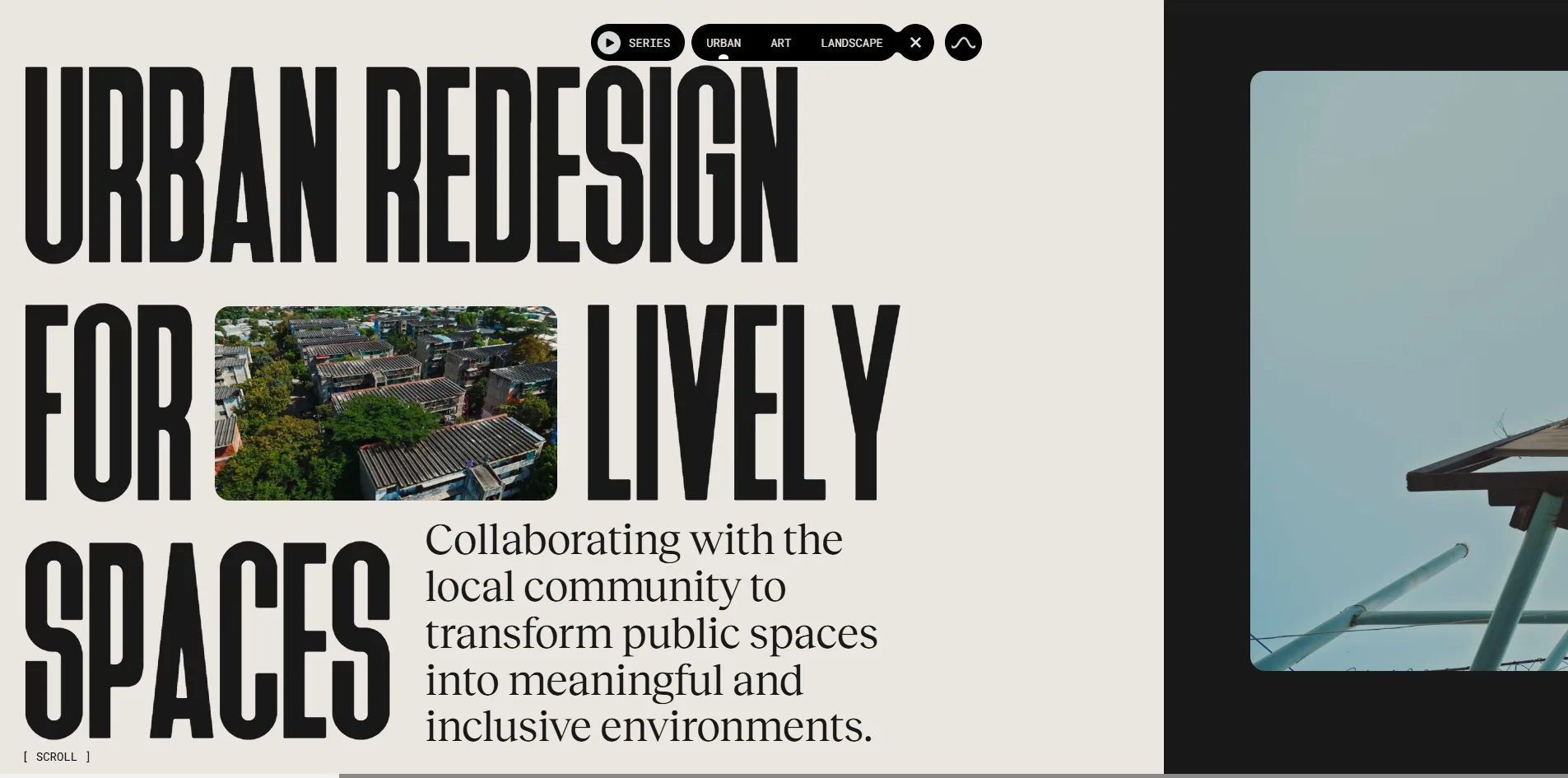
Beyond the map, the website has three routes and a film series, and these hold most of the writing. The ROUTES button at the top expands into URBAN, ART and LANDSCAPE, which cover public space, murals and planting. Each route is a long article that scrolls sideways, with an introduction, a trailer, a piece of history and a set of photographs, and its last screen leads directly into the next route. The WATCH SERIES button opens a documentary series called Rebirth, which has seven episodes. The whole site exists in English and Spanish, and the pin names and all the body text are translated.
Every mural and every route has an address of its own. When the visitor opens a mural, its name is added to the end of the address in the browser, and the share button on the panel copies exactly that address. Someone who opens the link later goes through the Discover gate and is then flown directly to that mural.
02Design
The production team has drawn the whole neighbourhood as a hand-coloured architectural model. The apartment blocks are grey-green boxes with pale purple corrugated roofs, and their edges, the power lines and the railings are all traced in black lines that look like pencil. Those black lines are actual lines built into the model rather than an outline added afterwards, so they stay attached to the blocks however the camera turns. The trees are a few overlapping patches of green, and the people are no bigger than matchsticks. The corners of the picture are darkened, a fine grain covers the surface, and the distant sky looks like a wash of blue watercolour. Against all that grey-green, the murals are by far the most vivid things, so the first thing a visitor sees is that dozen or so coloured walls.
The switch at the bottom changes more than the murals, because many details of the district change with it. In the PAST state the walls are blank, black debris is piled beside the blocks, and black railings stand in front of them. The cars along the roads are dark, almost nobody is on the streets, and a grey haze hangs over the whole picture. Back in PRESENT, the walls carry paintings, earth-coloured paths cross the grass, people stand in small groups below the blocks, and the cars have turned pink and purple. Both states use the same viewpoint and the same buildings, so every difference the visitor sees comes from the last few years of work.
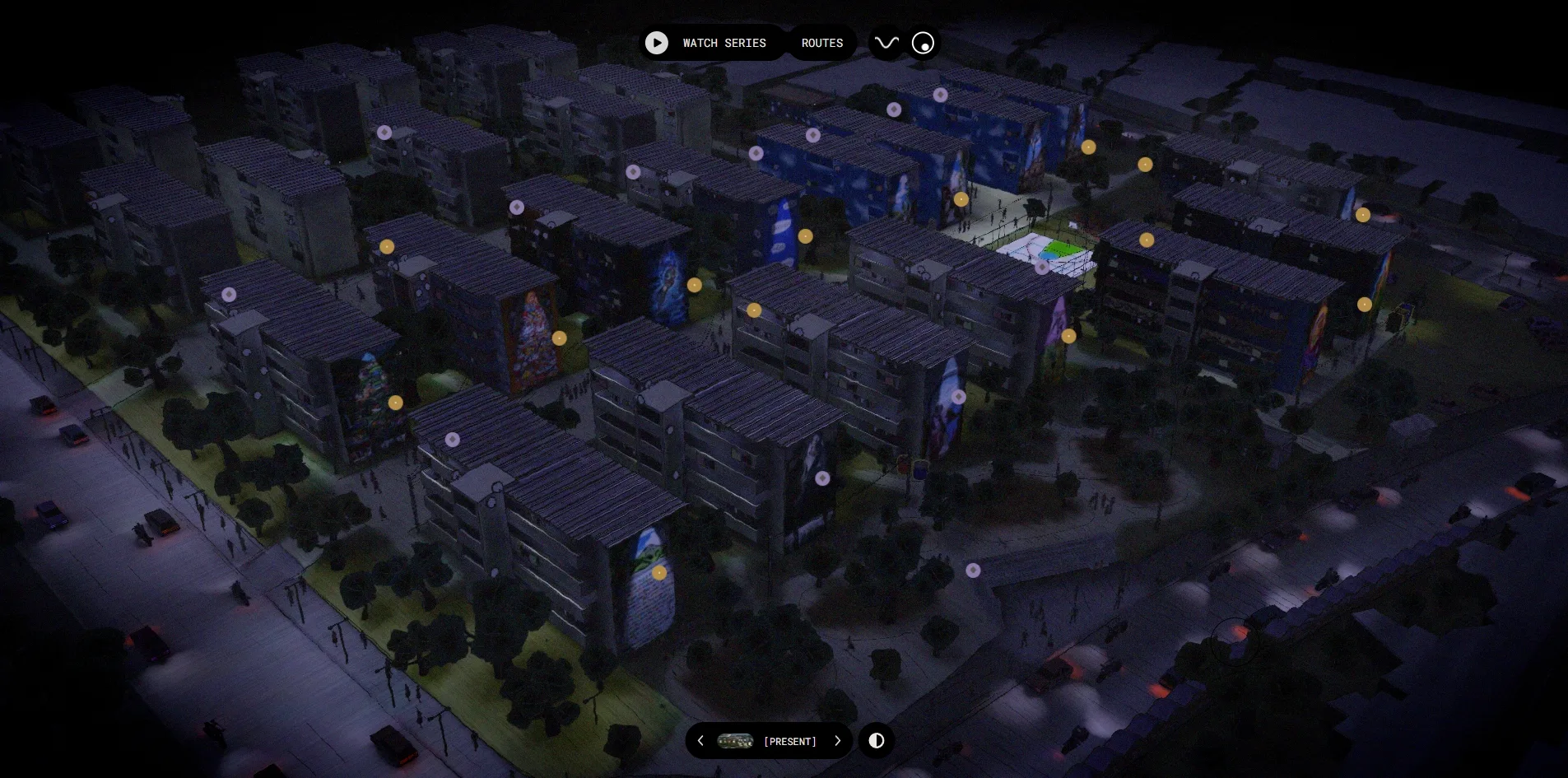
Next to the switch is a day and night button, and it keeps the murals at the centre of the picture after dark. Once the visitor presses it, the blocks sink into a deep blue-purple, street lamps throw pools of light on the roads, the cars trail orange-red tail lights, and the gold and purple pins glow in the dark. The brightest things in the picture are the murals and the sports court in the middle, so the night view amounts to circling the murals a second time.
The interface laid over the model uses only black pill-shaped buttons and very small monospaced type. The four buttons for WATCH SERIES, ROUTES, sound and resetting the view sit at the top centre, while the past and present switch and the day and night button sit at the bottom centre. The language switch is written as EN / ES inside square brackets in the bottom right corner. All of these controls are small and fixed in place, and none of them covers a mural.
The mural panel and the three routes each have a background colour of their own. The mural panel is mustard yellow, the same colour as the gold pins, with a title in white condensed capitals and body text in a serif face. The body of all three routes is set on off-white, but each route ends on a screen filled with one flat colour. The mural route ends in grey-blue, the landscape route in pink and the urban route in light brown, and each of those blocks carries the name of the next route.
Just three typefaces carry all the text on the site, and each of them handles one kind of content. Heathergreen is a tall, narrow sans serif in capitals that is used only for titles, including FLY TO ZACAMIL at the gate, the mural names and the route titles. In a route title each line of letters stands about a quarter of the screen high. Reckless Neue is a serif face that carries every paragraph and quotation meant to be read. Roboto Mono is a monospaced face used only for buttons, labels and the small text in square brackets. The production team has also set a small photograph with rounded corners inside each route title, on the same line as the letters, like a word that has been swapped for a picture.
03Motion
The model makes its entrance like a picture developing. After the visitor clicks Discover, the screen goes black, the roofs and walls surface patch by patch as scattered white strokes, and then colour spreads across the whole district while the camera settles into its overhead position. From the click to a stable picture the visitor waits about nine seconds, a little over four of which are spent on the three instruction diagrams.
Everything the visitor does on the map carries a little inertia. When the visitor holds and drags, the district pans along, and after the button is released the picture glides for more than a second before it stops. The scroll wheel moves the view closer and further away within limits at both ends, so the camera always stays at a height where the pins can be read. The round reset button at the top returns the camera to its starting position in about a second. The cursor on the map is a thin circle, and when it moves onto a gold pin, the pin opens into a label with the mural's name while a short silent preview film appears in the bottom right corner.
The flight that follows a click on a pin is the most cinematic movement on the site. The camera takes three or four seconds to glide from the overhead view to the mural, and when it stops, the mural exactly fills the space to the left of the panel, with a different composition for every wall. The model holds twenty-two camera positions set up in advance, and the camera appears to travel between them, which would explain why every mural has an angle chosen specifically for it. When the visitor clicks Play Video in the panel, the film plays inside the panel and can also be expanded to full screen.
The change between past and present is a change of one layer of colour on a single model. When the visitor flips the switch, the colour of the murals and the grass fades out or in over a few seconds, the grey haze rises or clears, and the people and cars are replaced by a different set. The production team seems to have prepared two sets of hand-painted surfaces for the same buildings and to blend from one to the other during the switch. As a result the position and shape of the blocks never move, and the visitor's attention stays on the layer that is changing.
The three routes scroll sideways, so when the visitor turns the wheel, the page moves to the left. The smooth scrolling library Lenis lets the page coast a little after the wheel stops. A thin progress bar also runs along the bottom of the screen and advances with the page. Titles and introductions appear one word at a time. Midway through each route there is a window onto the corner of the model that the chapter is about, which in the urban route is the sports court.
Whether the visitor is dragging the map, zooming or scrolling a route sideways, the picture holds at 60 frames per second. The route pages are this smooth because the 3D scene behind them stops redrawing a second or two after a route opens. What the window shows is the last frame before the scene stopped, and scrolling only slides that frame from side to side. Stopping the redraw does show its seams at times, because the scene occasionally stops while the camera is still in flight and the window is left with a blurred wall.
04Engineering
The site builds its pages with the web framework Nuxt, hands the 3D work to three.js, animates with GSAP and scrolls sideways with Lenis. Before the visitor clicks Discover, the browser has already downloaded about 6.4 MB, and that includes the entire neighbourhood. The largest single item is the model of the district, at 1.9 MB in transfer. The model contains more than 5,600 objects, including over five hundred people and over four hundred pieces of laundry. The rest is about 2.3 MB of textures for the murals and the ground and one ambient soundtrack of about 1 MB. After the gate, each route downloads another soundtrack of about 1 MB, and each mural panel downloads two photographs of 0.25 to 0.5 MB, while a film starts to transfer only when the visitor presses play.
The page opens quickly, but there is one noticeable stall along the way. First Contentful Paint (FCP) comes at 0.6 to 0.7 seconds, well inside the 1.8 seconds Google recommends. The loading screen finishes and the Discover button appears at about four seconds, and nothing in the layout jumps. During loading, however, there is one long task of 0.65 to 0.86 seconds. A long task is a stretch in which a script holds the browser continuously so that the browser cannot respond to input, and Google's recommended limit is 0.05 seconds. That time is probably spent unpacking the model and the textures.
The stored model holds fewer than ninety thousand triangles, yet the screen draws more than two million in every frame, because most of the objects are one model placed again and again. Thanks to that repetition the picture stays smooth, since the graphics card receives only about 110 drawing instructions per frame, and more than seventy of those each draw a large batch of identical people, trees or cars. In the past state the count falls to a little over seventy, because the people and paths of that layer do not need to be drawn. The pause on route pages described above also leaves the graphics card completely idle while the visitor reads a long article.
A visitor who uses only the keyboard can get through the gate but cannot look at a single mural. At the gate the visitor can reach the Discover button with the Tab key and enter with Return, although the button shows no visible focus outline when it is selected. Inside the map, the twenty-seven pins, the four buttons at the top and the two switches at the bottom are not real button elements, and the Tab key can select only one external link in the footer. Once a panel is open, the Esc key does not close it either.
Visitors who rely on a screen reader have just as hard a time on this site. The four buttons at the top of the panel, for the previous mural, the next mural, sharing and closing, have no names, and none of the photographs in the panel or the routes has alternative text. The route pages contain no heading tags, and neither the English nor the Spanish version declares the language of the page. The one thing the production team got right concerns the route titles and introductions. These texts are split into single words for animation, and the team has supplied the complete sentence for reading aloud, so a screen reader hears whole sentences.
When the visitor turns on reduced motion in the operating system, nothing on this site changes. The setting exists to tell web pages to animate less, but here the loading animation, the developing of the model and the camera flights all play as usual, and neither the styles nor the scripts respond to the setting.
05Scores and Team
| Award | Source | Date | Score |
|---|---|---|---|
| Site of the Day | Awwwards | 2026-10-01 | 7.58. Design 7.56 / Usability 7.42 / Creativity 7.81 / Content 7.69 |
| Developer Award | Awwwards | 2026-10-01 | 7.04. Semantics 6.20 / Animations 8.80 / Accessibility 6.40 / WPO 7.00 / Markup 6.40 |
| FWA of the Day | The FWA | 2026-08-28 | 83 POINTS, DAYS 3 |
Creativity is the highest of the four Awwwards categories at 7.81, Content comes second at 7.69, and Usability is the lowest at 7.42. The Creativity score fits the switch that turns the neighbourhood back to its past. Content ranks second on a site that holds fourteen mural films, seven documentary episodes and three long articles, so there is a great deal to read and watch. Usability being lowest may have to do with the nine-second wait after the gate and with a keyboard that is almost useless here.
The five categories in the Developer Award table are far apart. Animations stands at 8.80, well clear of everything else, while Semantics at 6.20, Accessibility at 6.40 and Markup at 6.40 only just pass six. These scores agree with the engineering chapter, where the camera work and the transitions are finely made but headings, the language declaration and button names are largely missing.
The FWA named the site its site of the day on 28 August, more than a month before Awwwards, with 83 points. The team wrote the same single sentence as the project description on both platforms, saying that Colonia Zacamil is a place where public art, community co-design and sustainable development converge. That sentence is about the neighbourhood and says nothing about how the website itself was made.
| Credit | Who | Record |
|---|---|---|
| Adoratorio Studio | Independent design studio in Italy, with offices in Brescia and Amsterdam | Awwwards 73 works, SOTM 1, SOTD 45, HM 66. FWA 27 |
| 60fps | Creative development studio in Nancy, France, which describes itself as building for premium brands and for other studios | Awwwards 36 works, SOTM 1, SOTD 23, HM 36. FWA 39 |
Both studios are regulars on the two platforms. Adoratorio Studio has 45 Awwwards sites of the day, states on its profile that it has been studio of the year, and counts Gucci and Max Mara among its clients. 60fps positions itself as the developer for other studios, and a good part of its work list was made with design studios such as Immersive Garden. From that division of labour, this site was most likely designed by Adoratorio Studio with 60fps handling the 3D and the development, although both platforms credit only the studios and name no individuals.
06Archive
- Award date
- 2026-10-01
- Awards
- Awwwards SOTD 2026-10-01, Awwwards DEV 2026-10-01, FWA FOTD 2026-08-28
- Site
- https://coloniazacamil.com/
- Credits
- Adoratorio Studio, 60fps
- Design
- spatial
- Build
- canvas
- Awwwards
- 7.58 / 10. Design 7.56 / Usability 7.42 / Creativity 7.81 / Content 7.69. Developer Award 7.04. https://www.awwwards.com/sites/colonia-zacamil
- The FWA
- 83 POINTS, DAYS 3. https://thefwa.com/cases/colonia-zacamil
- Stack
- Nuxt, Vue, three.js r162, GSAP 3.13, Lenis
- Total assets
- About 6.4 MB before the gate, of which the district model is 1.9 MB and textures about 2.3 MB. About 11 MB after viewing a dozen murals
- Speed
- FCP 0.6 to 0.72 s, gate screen complete at about 4 s, CLS 0. 60 fps while dragging and zooming the map and scrolling routes