Long Hoang Portfolio
Long Hoang has turned his job-hunting portfolio into a game in which the visitor drives a tank. After the start screen, the visitor steers a small lime green tank from a grassy hill into a cartoon factory, where the author's four projects are loaded into a machine with a screen. When the visitor parks the tank in front of the machine and presses a key, the camera drops to ground level, the screen lights up with a project, and a card shaped like torn paper appears beside it. Wooden crates along the way can be lifted with a green beam, and a red enemy tank drives straight at the visitor. A visitor with no time to play can press a button at the bottom of the screen, and the tank is delivered directly to the work.
Long Hoang is a product designer and creative developer in Hanoi, Vietnam, who goes by the name Lyo. He made this site alone, and it has been named FWA of the Day.
01Concept
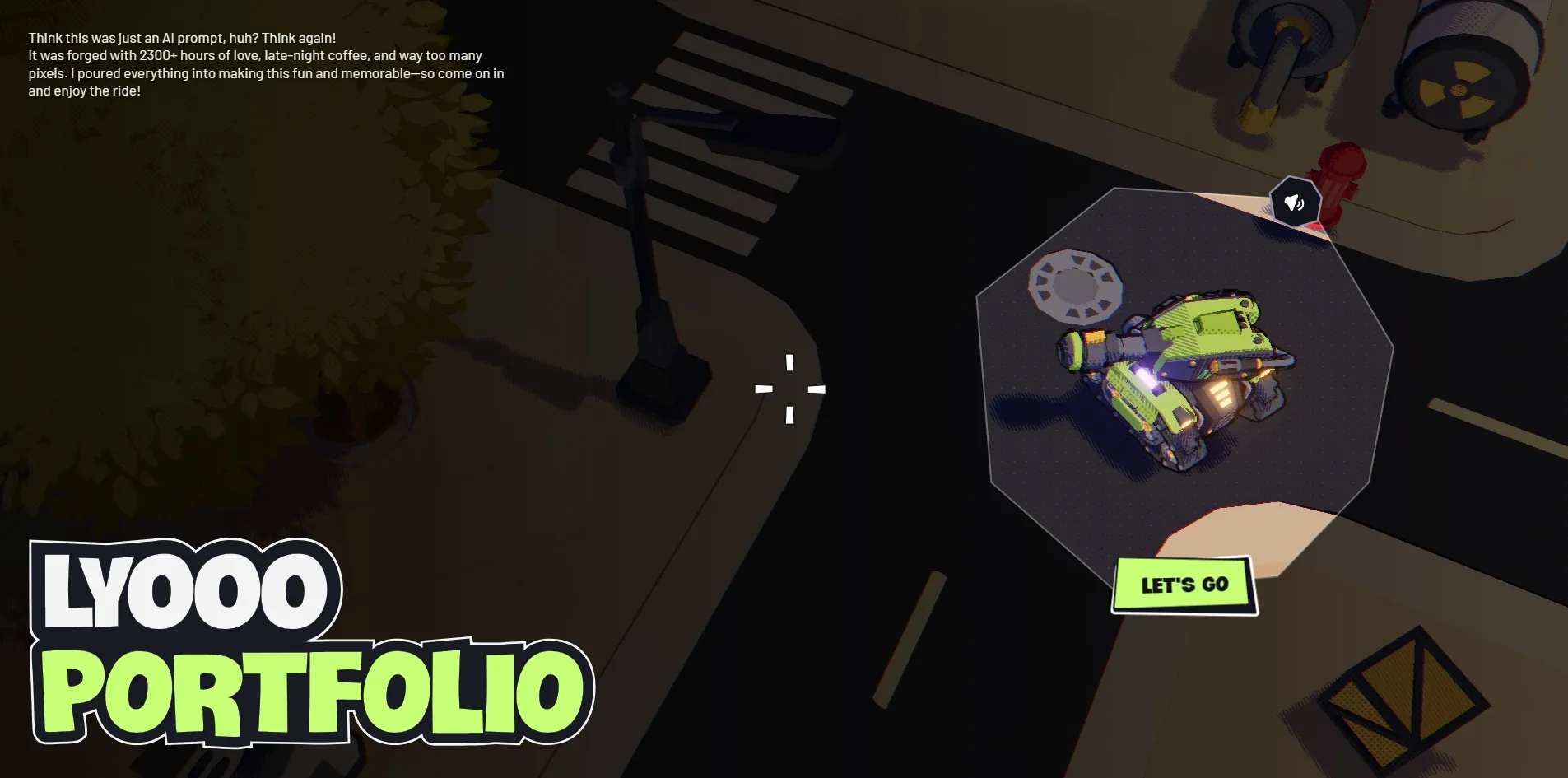
The portfolio sets out to prove that a product designer can also carry 3D and development all the way through. On his ABOUT ME page, where he introduces himself, Long Hoang writes that he has spent three and a half years designing education apps and once ran a startup with friends that did not succeed. The projects he shows are all language learning apps for phones, yet what he wants to demonstrate is 3D modelling, rendering and programming, which designers rarely touch. So instead of setting his projects out in a list, Long Hoang built a factory and asks the visitor to go and find them by tank. A short text at the top left of the start screen, the first thing the visitor sees, makes the same point. It says that the site was not generated from a single AI prompt but took more than 2,300 hours to make.
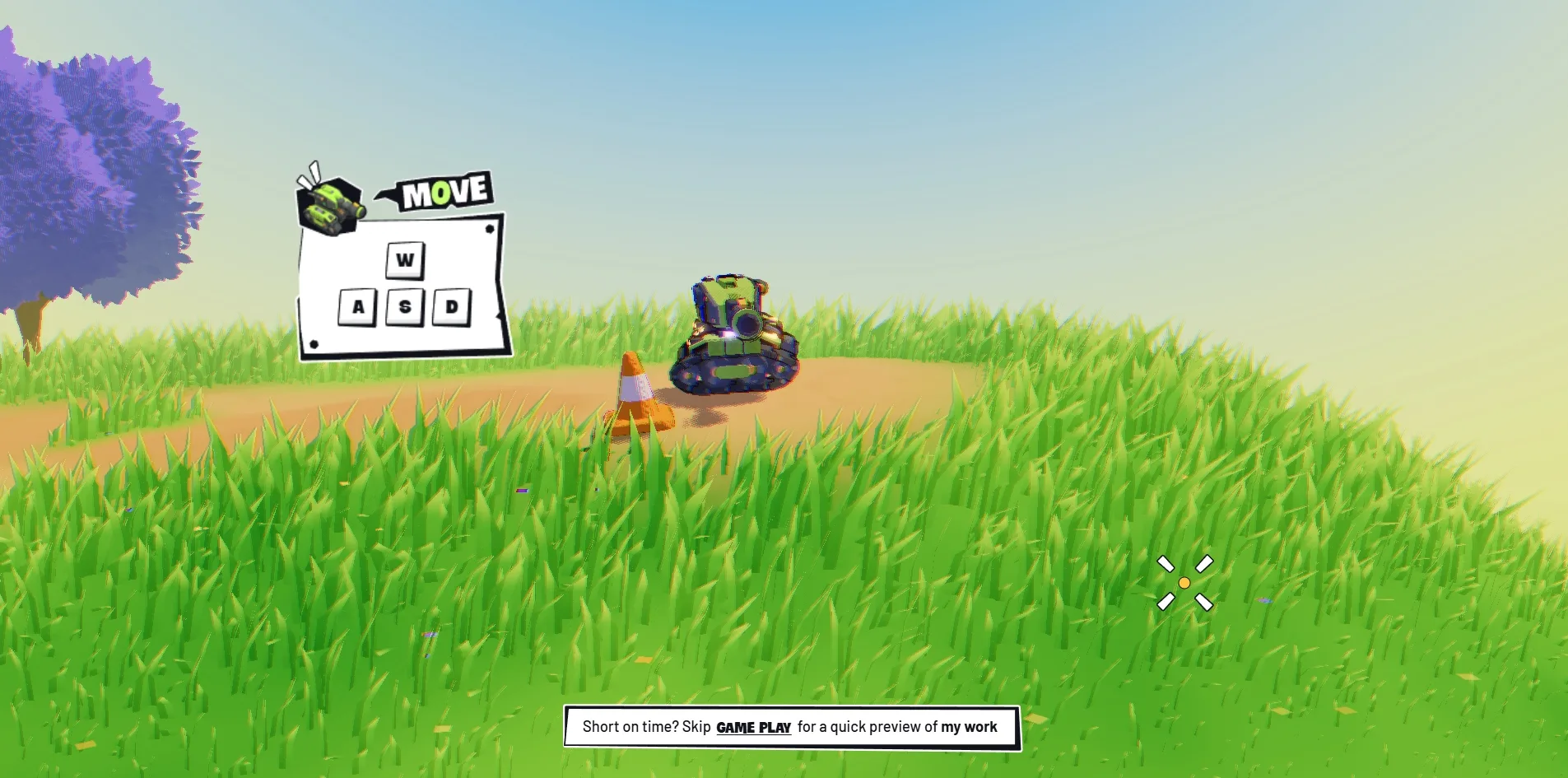
After pressing LET'S GO, the visitor first learns to drive the tank on a grassy hill. The tank sits on a dirt track, and as the visitor moves forward, four tutorial cards appear beside the track one after another. The first teaches movement with the W, A, S and D keys, the second teaches boosting with Shift, the third teaches firing with Space or the left mouse button, and the fourth teaches grabbing objects with G. At the firing lesson a red enemy tank drives towards the visitor. The area after the tutorial is a factory that the site calls Factory Playground, and its welcome text invites the visitor to run wild, smash things, fight enemies and explore.
The instructions in the interface spell out the full game, in which the visitor collects four kinds of parts and uses them to start a machine. The four parts are gears, tools, circuits and fuel, and the visitor drags them into a machine called the Power Core. Only when that machine is running do fast travel on the map and the work display unlock. The factory also holds two kinds of enemy, a small one and a boss, and the tank has thirty points of health. When the tank is destroyed, the screen shows a self-mocking line that congratulates the visitor on finding yet another way not to do this, and the tank is then respawned.
Visitors who do not want to play have a shortcut. A line at the bottom of the screen at the start of the game says that those short on time can skip the gameplay for a quick preview of the work. When the visitor clicks it, a field of dots covers the picture and clears again, and the tank is already parked in the factory yard next to the work machine. This shortcut leads into what the site calls View mode, in which enemies, health and parts no longer appear. The map is available straight away and offers four fast travel points for the work, his self-introduction, contact and a behind the scenes page.
Taken together, there is a good deal of content behind those four points. The work machine holds four projects, the Chinese learning app Hanzii, the Chinese conversation app Niubii, the Japanese dictionary Mazii and the German learning app Todaii. Only Hanzii opens into a full case study, while the button on the other three reads LOCKED. The Hanzii case study is a record of the design process about 47 screens long, made of thirty tall images and five screen recordings. The ABOUT ME page runs to four screens on his background, his view of design and his skills. The contact area has five pedestals for social accounts and a contact form headed LET'S COLLAB, and the behind the scenes page explains which tools and assets went into the site.
02Design
Long Hoang splits the picture into two layers, a cartoon-rendered 3D world underneath and an interface of paper pieces on top that look cut from a comic. Both layers share one set of colours, which are lime green, a dark blue close to black, and white. The tank is lime green, the buttons are lime green, and the word to be stressed in each title is lime green. On any screen the visitor can therefore find the main character and the next thing to press by that colour.
The 3D world is built from low-polygon models with comic-style shading. The oil tanks, crates, traffic cones and machines in the factory have very few faces and flat colours, their shadows are filled with a fine pattern of dots, and their edges are drawn with dark lines. The corners of the picture carry a slight red and blue fringe, like the picture on an old television. Long Hoang lists the techniques behind this look on his behind the scenes page as low-poly, cel shading, halftone dots, hatched shadows, heavy outlines and a little chromatic aberration. Beyond these fixed techniques, the light in this world also changes over time, and in a minute or two on the site the sky goes from a blue day to an orange dusk and then to a purple night.
Every panel in the interface is made to look like a piece of torn paper. The edges of the tutorial cards, the project card, the map and the settings panel are crooked, and the four corners sit at different heights. A thick black border runs around each piece, and some pieces also have two pin holes. The titles are set in Crocante, a fat, rounded face in capitals with a heavy dark outline, so that they read as stickers. The body text is set in the sans serif Barlow at a much smaller size than the titles. On the behind the scenes page Long Hoang says he was after a pop art and torn paper feeling, with uneven edges and changing shapes.
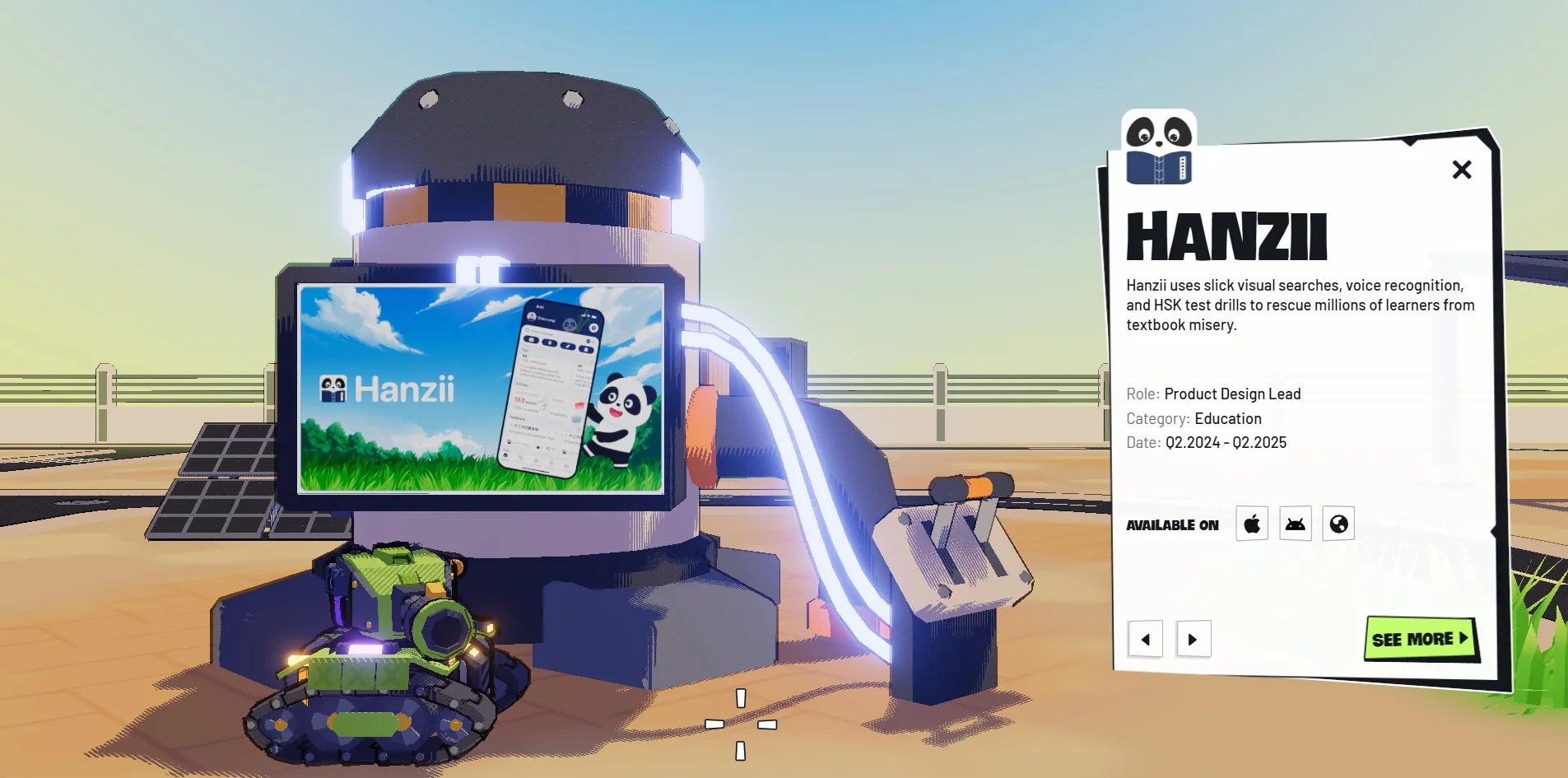
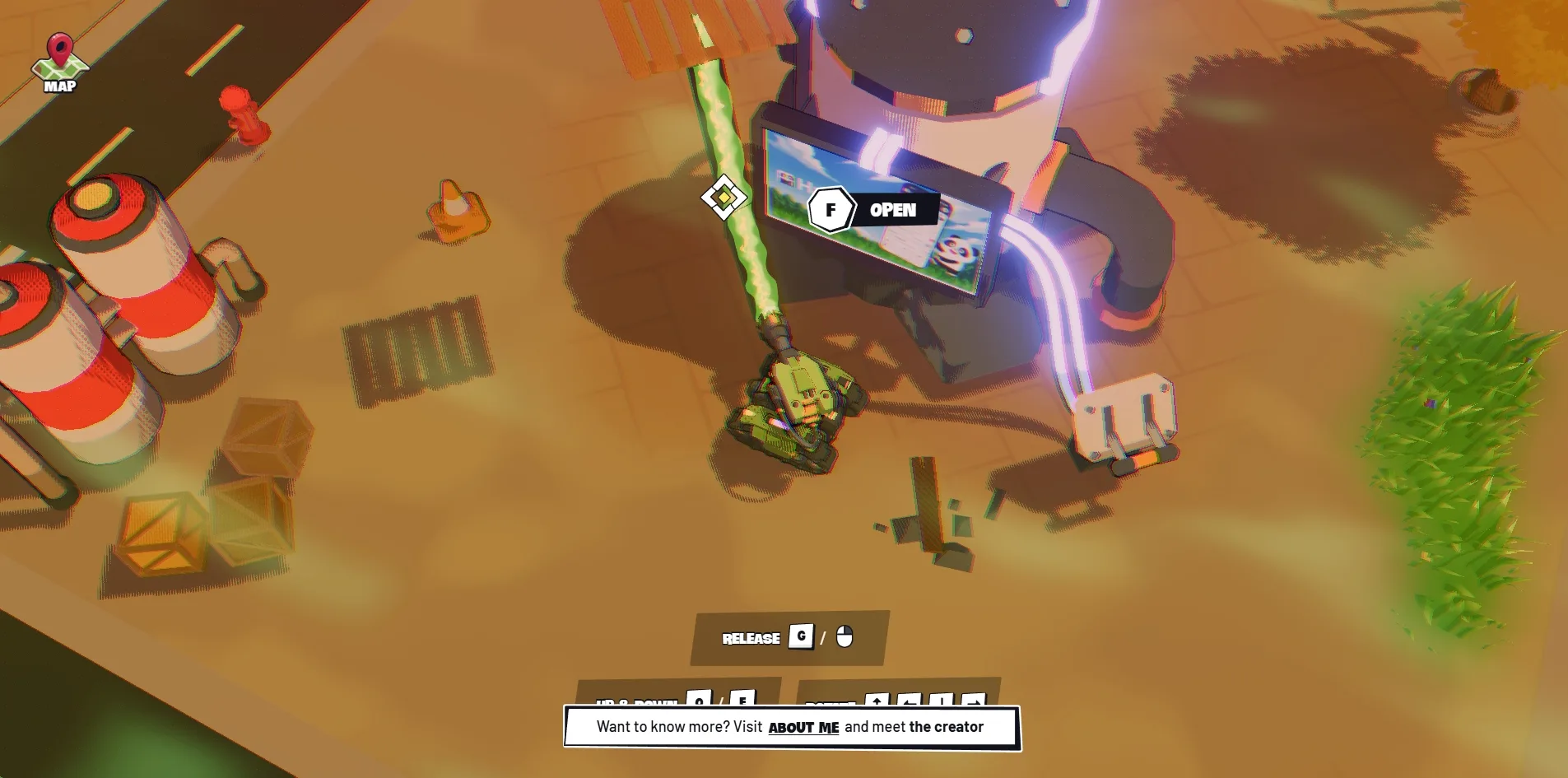
The screen at the work machine is the most complete composition on the site. The camera drops to about the height of the tank, and on the left stands a machine with a dark domed cap and a screen set into its front, showing the promotional image for the current project. A glowing bundle of tubes runs from the side of the machine down to a switch on the ground. On the right is the project card, with the app icon stuck to its top left corner. Below the icon come the project name, one line of description, the role, the category and the dates, followed by the app store icons and a SEE MORE button. When the visitor switches project, the image on the screen changes and so does the colour of the tubes. The tubes are blue-white for Hanzii, green for Niubii and yellow for Todaii.
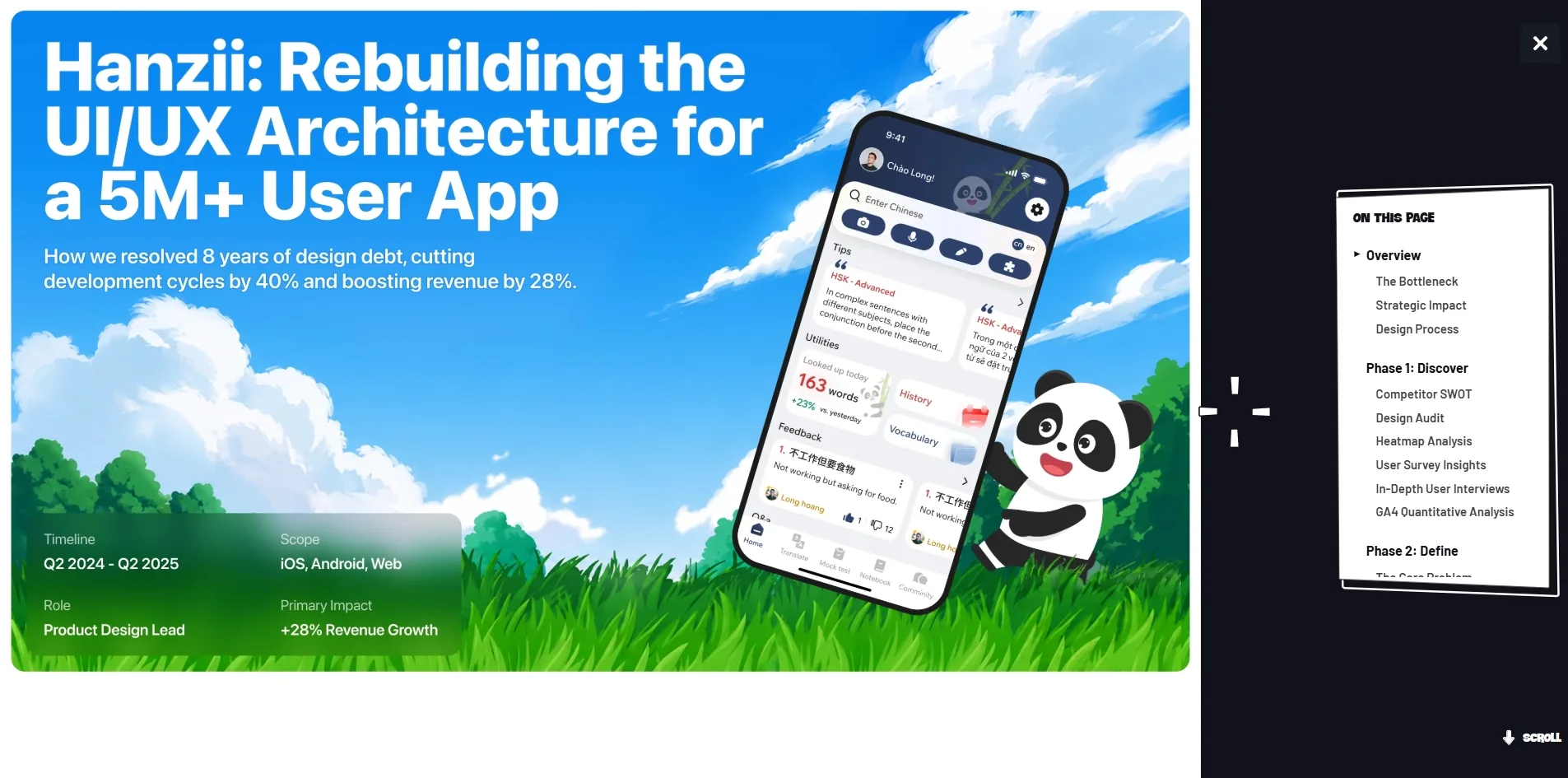
The Hanzii case study speaks in a completely different voice from the game. After the visitor clicks SEE MORE, the game recedes, the left three quarters of the screen become tall images on a white background, and a dark sidebar takes the right. A torn paper card in the sidebar lists the twenty-eight sections of the page, with a small triangle in front of the section being read. The images themselves are an orderly product design presentation, titled as the story of how Hanzii rebuilt the interface architecture of an app with five million users. They move through the problem, the research, the wireframes, the testing, the design guidelines and the figures after launch. The game is there to make people remember the person, and the case study is there to show what his daily work looks like.
03Motion
The tank drives like a real tracked vehicle. The A and D keys turn the hull on the spot, W and S move it forward and back along the direction it faces, and the turret moves independently of the hull and always points at the cursor. When the tank drives into grass, the blades fall to either side and a dark flattened trail is left behind it, and on the dirt track it leaves two lines of tread marks. When the visitor holds Shift while driving, the tank surges forward.
The position of the camera changes with the area the tank is in. On the hill the camera sits very low, diagonally behind the tank, and the horizon can be seen to curve, as if this world were a small planet. When the tank drives deep into the grass or into the factory yard, the camera rises overhead and looks straight down. When the visitor presses F at the work machine, the camera drops to the ground again and faces the screen, while coloured confetti drifts down through the air. Each time the camera moves, the visitor is looking at a different kind of game picture.
Grabbing objects is the most game-like action on the site. When the visitor presses G, a green glow spreads around the edges of the picture. Three groups of keys are listed at the bottom of the screen, one for releasing, one for moving up or down, and one for rotating. When the cursor moves onto a crate or a wooden pallet, a marker with four arrows appears on the object. When the visitor clicks once, a wavy green beam shoots from the muzzle to the object, which is lifted off the ground and follows the cursor. When the visitor presses G again, the beam disappears and the object drops back to the ground. The fall and the collisions are calculated by the physics engine Rapier, which works out how each crate should roll and come to rest.
The change from one scene to another is done with a field of dots that covers the screen. When the visitor fast travels from the map or presses the button to skip the game, the screen fills with dots of different sizes until it is black, and the dots then scatter to reveal the new place. This transition uses the same pattern as the dots in the shadows, so it looks like part of this world. The paper panels make a much briefer entrance than the scenes, arriving with only a very short pop.
The whole site runs evenly, and the picture holds at 60 frames per second while the tank drives on the hill, in the grass and through the factory. The ABOUT ME page and the behind the scenes page also scroll at 60 frames. The Hanzii case study is 47 screens long, and it also runs at 60 frames almost all the time when the visitor scrolls it from top to bottom. A brief hitch occurs only at the instant some of the large images first come into view. Five screen recordings play automatically in the later part of the page, and the picture also holds at 60 frames while the visitor scrolls past them.
04Engineering
Long Hoang built the site without a web framework, relying on three.js for the 3D, Rapier for the physics and the playback library Howler.js for the sound. Interface animation is handled by the animation library GSAP, and smooth scrolling on the long pages by Lenis. The new generation renderer in three.js is able to use the newer WebGPU interface, but this site fixes it to WebGL, which more browsers support.
Before the visitor sees the start screen, the browser has to download about 10 MB in 449 requests. The largest group is sound, with 58 files totalling 3.9 MB, and besides several music loops there are separate collision sounds for plastic, metal, wood, concrete and brick. Next come 48 3D models totalling 1.9 MB and 1.4 MB of scripts, while the paper pieces and icons of the interface are 247 vector images totalling 0.46 MB. After the visitor enters the factory, the browser downloads about another 1.4 MB of textures and images. Of the thirty tall images in the case study, only the first three are fetched at the start, and the rest are not part of that 10 MB.
Loading is the part of this site where the visitor waits longest. The progress bar appears after 0.2 to 0.3 seconds, but the start screen cannot be clicked until about the twelfth second. Within those twelve seconds, scripts hold the browser for more than eleven seconds in total, and the longest single stretch lasts 4.3 to 4.6 seconds, whereas Google recommends that such long tasks stay under 0.05 seconds. While the browser is held, the page does not respond to clicks, and the progress bar can only move in fits and starts. Once loading is over, nothing in the layout jumps.
With the game running, the load on the graphics card is actually light. Each frame draws roughly 190,000 to 370,000 triangles, the graphics card receives 75 to 130 drawing instructions per frame, and the picture stays at 60 frames throughout. The settings panel has a High quality switch, and when the visitor turns it off, the triangles per frame fall by a little over a tenth, which is the fallback left for slower machines.
Alongside the 3D game, Long Hoang has given the site the full skeleton of an ordinary website. The home page, the work, the ABOUT ME page, contact and the behind the scenes page each have an address of their own, and the server returns a page with its own title and description for each one. Someone who opens the link to the ABOUT ME page directly sees that page without passing the start screen first. The page also hides a layer of text that visitors cannot see, holding the site title, the navigation and the names and descriptions of the four projects, and this is the layer that search engines and screen readers read.
Screen readers have more to work with on this site than that hidden layer. Every image carries an alternative text attribute, and the language of the page is declared. However, the text of the Hanzii case study is all set inside images, so the visitor cannot select or search it, and a screen reader cannot read the body either.
Keyboard users can get into this site and can get the game going. When the visitor presses Tab on the start screen, focus lands first on the sound button and then on LET'S GO, both of which show a visible focus outline, and pressing Return enters the game. Driving and firing use the keyboard anyway, and Esc closes the map and the settings panel. The trouble starts with the third press of Tab, when focus moves into the invisible navigation links with nothing on screen to show it, so the keyboard user cannot tell what is selected. Aiming is also possible only with the mouse, because the turret follows nothing but the cursor.
This site responds to the reduced motion setting only halfway. The setting is an operating system option that tells web pages to animate less, and here it governs only the interface. Once the visitor turns it on, the paper panels no longer pop in but simply appear, and the camera no longer recoils when the tank fires. The game world itself, the dot transition and the camera movements carry on as before, because they are the content of the game.
05Scores and Team
| Award | Source | Date | Score |
|---|---|---|---|
| FWA of the Day | The FWA | 2026-10-02 | 85 POINTS, DAYS 3 |
The FWA gave this site 85 points, calculated from 21 votes, and filed it under Fun & Playable, Game and Personal/Portfolio. The statement Long Hoang wrote for the FWA is only two sentences long. It describes him as a product designer and creative developer who takes products from zero to one and combines 3D design with scalable design systems to build emotional interfaces. That statement is about the person and mentions neither the tank nor the factory.
| Credit | Who | Record |
|---|---|---|
| Long Hoang | Product designer and creative developer in Hanoi, Vietnam, who goes by Lyo and has worked on education apps for three and a half years | FWA 1, this site |
This site is Long Hoang's first FWA award, and he is the only person credited. On the behind the scenes page he explains what each tool was for. He wrote the code with two AI coding assistants, Codex and Antigravity, drew the interface in Figma and Photoshop, built the 3D models in Blender and tried out the effects in Unity first. The sound came from two asset libraries, Envato and Epidemic Sound. The last section of that page says the source code will stay private for now, until he has collected several web awards. Below that section is a button asking visitors to vote.
06Archive
- Award date
- 2026-10-02
- Awards
- FWA FOTD 2026-10-02
- Site
- https://longhoang-lyo.com/
- Credits
- Long Hoang
- Design
- spatial
- Build
- realtime
- The FWA
- 85 POINTS, DAYS 3. https://thefwa.com/cases/long-hoang-lyo-portfolio
- Stack
- three.js r183, Rapier, Howler.js, GSAP, Lenis, matter.js, KTX2 compressed textures, Draco
- Total assets
- About 10 MB before the start screen, of which 58 sound files are 3.9 MB and 48 3D models 1.9 MB. About 11.4 MB after entering the factory
- Speed
- FCP 0.19 to 0.34 s (the loading bar), start screen usable at about 12 s, CLS 0. 60 fps in the game and when scrolling pages