Kinoria
Kinoria is a fully mechanical 35mm camera that does not exist, and its website does not stop at describing it. The site hands the camera to the visitor along with four frames of film. The visitor loads a roll, raises the finder to four scenes that are playing as moving footage, and presses the shutter. Each frame locks the moment it is taken, with no preview and no delete. The four prints then develop slowly in a darkroom and land on a wall covered with other framings of the same scenes.
Seoul graphic designer Seunghyuk Kim designed and coded this independent concept project on his own, and it won FWA of the Day.
01Concept
The KINORIA 135 described on the site is a fictional film camera with 36 exposures to a roll, a leaf shutter and a brass chassis, and no battery or light meter. In his FWA case notes, the designer says phones let people shoot everything and sort it out later, and Kinoria puts the choice back before the shutter. He adds that the site is built so visitors feel its rules instead of reading them. The star of the site is therefore not a product page but a restricted photo walk, with four frames, no preview and no second try.
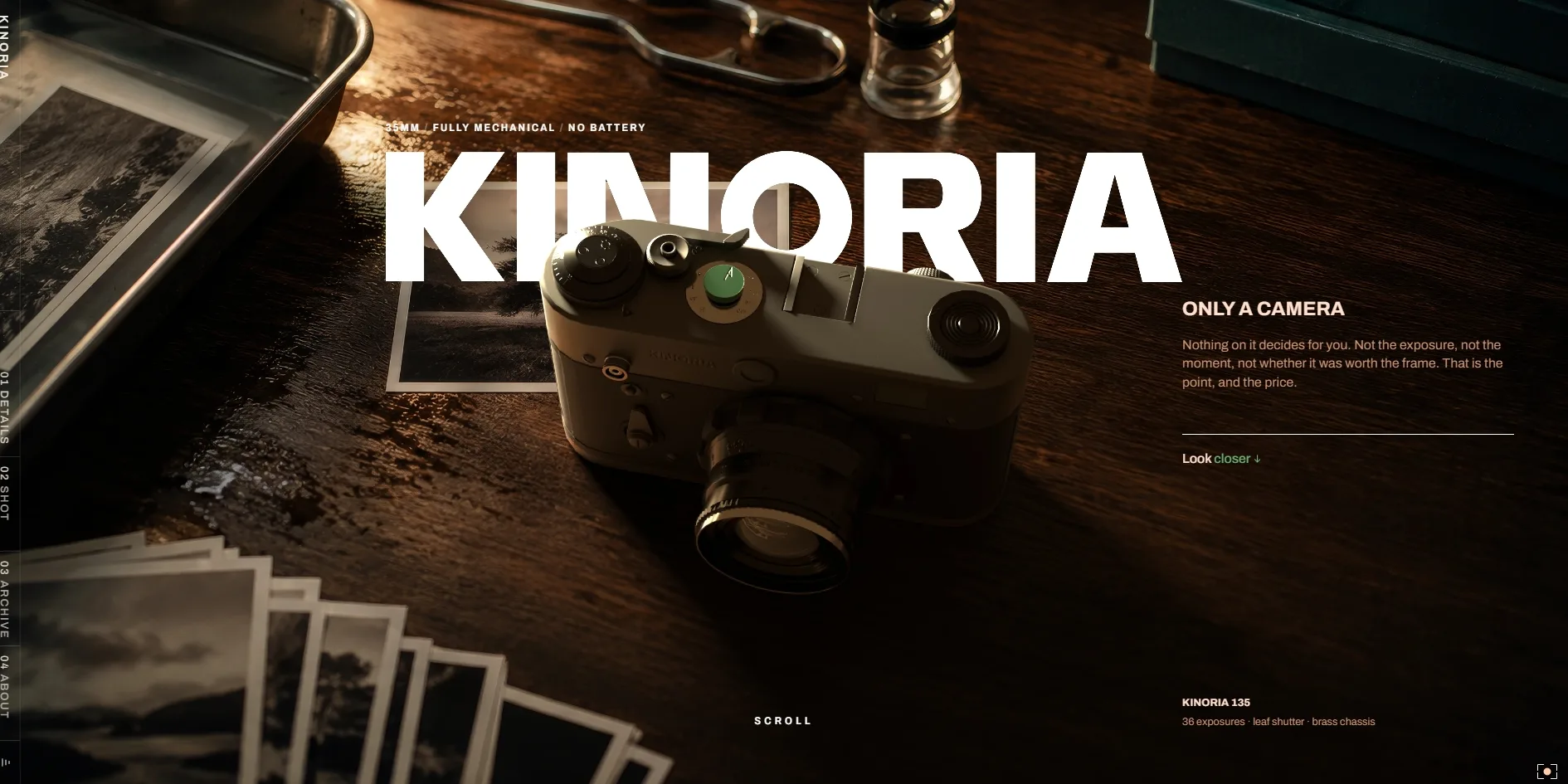
Every visit opens on a view through the camera's finder, and the light meter scale along its bottom doubles as the loading bar. Once loading ends, the first screen shows the camera on a dark wooden desk among finished prints, a developing tray and a loupe, with the word KINORIA set behind the camera and ONLY A CAMERA on the right. As the visitor scrolls, a number spelled out in words counts up from ZERO to THIRTY-SIX, and the word after it changes from EXPOSURES to DECISIONS. The camera then turns to different angles, and seven parts, including the lens, the advance lever and the roll, each get a line or two. The lens entry, for instance, gives 40mm f/2 and says the softness at the edge is the edge. This part ends with a hand holding up the camera under a glowing EXPOSED.
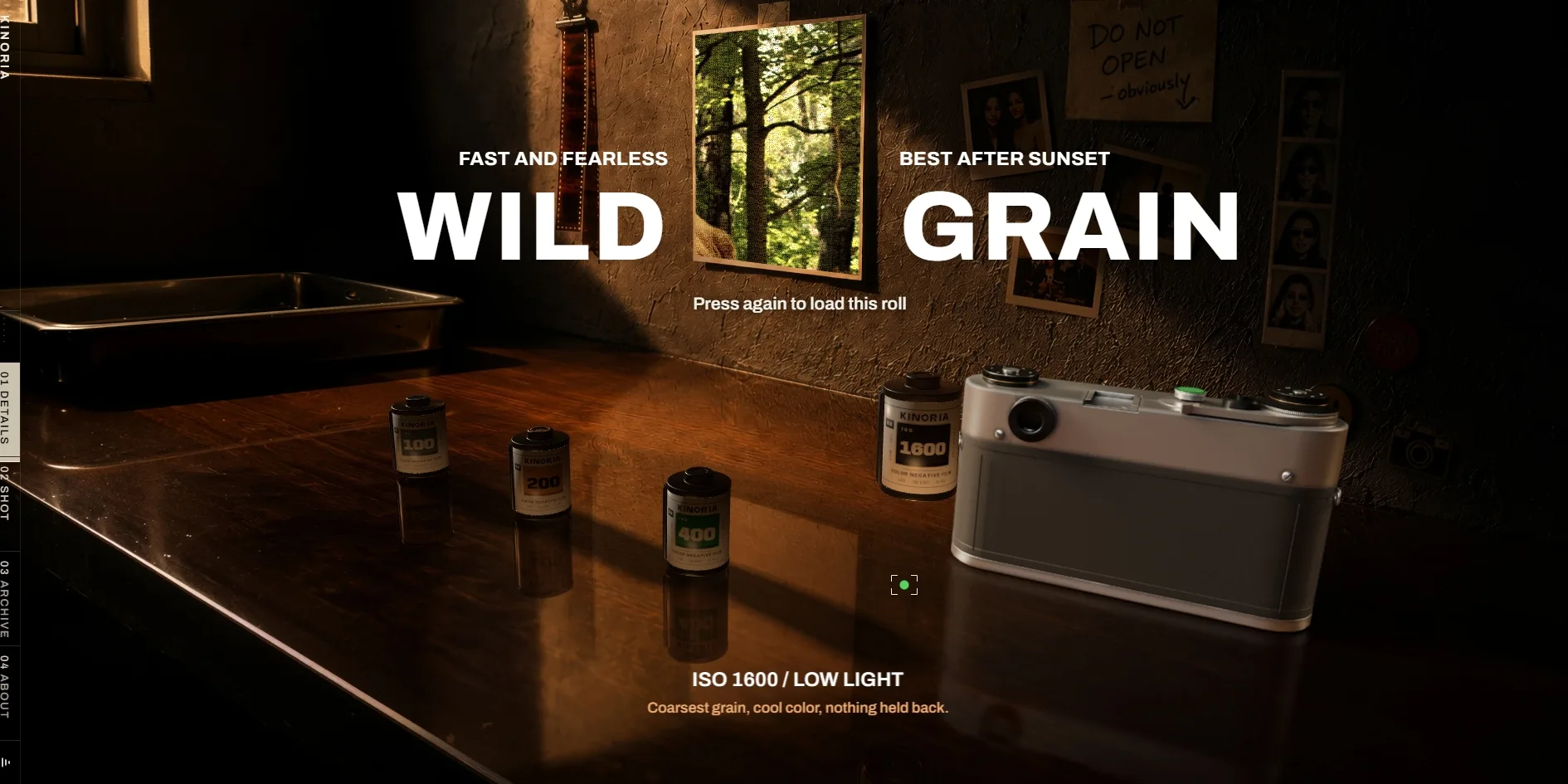
After the camera introduction, the visitor has to choose a roll. Four rolls marked 100, 200, 400 and 1600 stand on a workbench under the headline THIS ROLL IS YOUR STORY, with a reminder that once a roll is loaded there is no going back. A click on a roll lifts it, and the headline, the line beneath it and the forest photo pinned on the wall all switch to that roll's character. With the 1600 roll, the headline becomes WILD GRAIN, the caption promises the coarsest grain and cool colour, and the photo on the wall turns heavily grainy. Only a second click loads the roll into the camera.
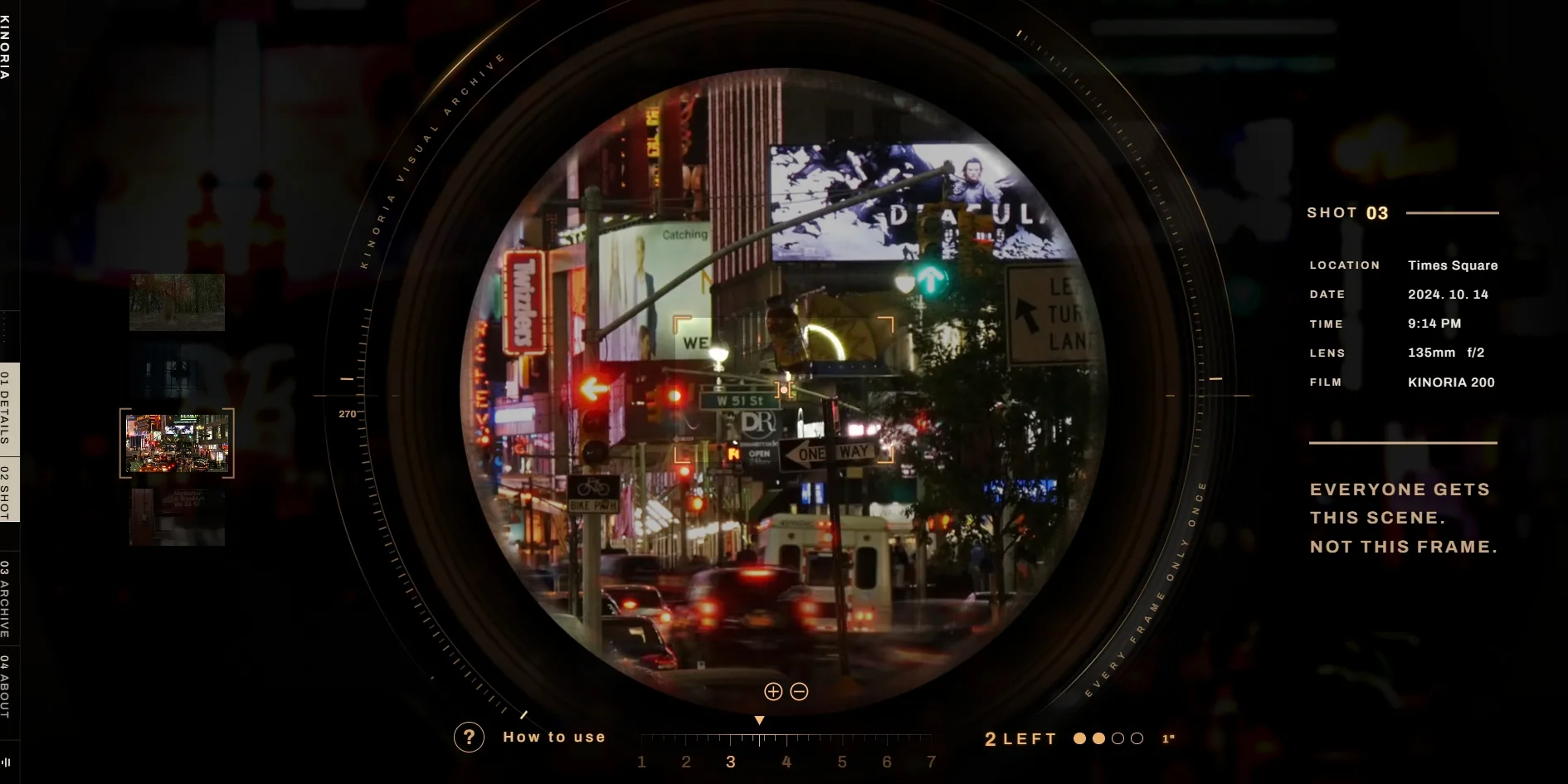
Once the roll is loaded, the view moves into a round finder showing four scenes of real footage. There is a golden retriever in a forest park, a ballet dancer in a studio, Times Square at night and a subway station in Queens. Each scene carries its own location, date, time and lens, and the Times Square scene, for example, lists a 135mm f/2 lens at 9:14 PM. Dragging with the right mouse button turns the camera, the zoom button moves in, and a click takes a frame, while holding the button down keeps the shutter open longer. After each frame the finder reads LOCKED, and the visitor never sees what was just taken. A visitor who would rather not shoot at all can simply keep scrolling, and the site takes the four frames for them.
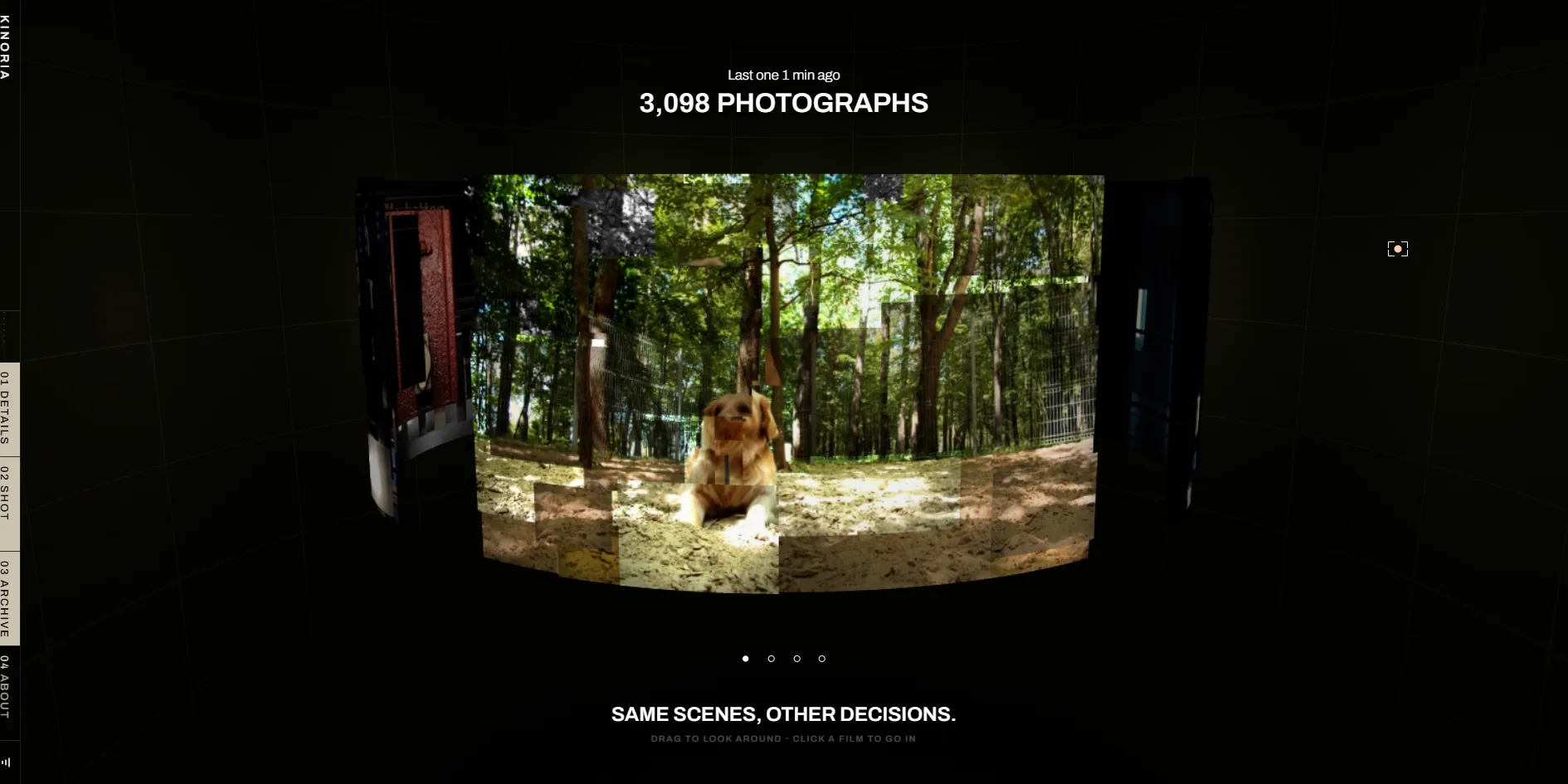
When the roll is done, the four prints drop into a darkroom to develop, and then the archive opens. Its title reads Everybody else's photographs, meaning these are other people's pictures with the visitor's four among them. On the page, each scene is rebuilt as a curved wall out of many small photos with different framings, and the top shows the total number of photographs and how many minutes ago the last one was taken. Visitors can drag to look around or click into one of the scenes. After the archive comes a page about the designer, and the site ends with the credits.
02Design
The whole of Kinoria looks like a darkroom at night. The background is close to black, the light is a warm low amber, and most things on screen are real objects from film photography. The desk on the first screen, the workbench where the rolls stand, the developing tray and safelight, and the film canisters, paper and prints that keep turning up all belong to that world. Apart from the finder, the interface has almost no ordinary buttons or cards, and most of what the visitor operates is one of these objects.
The type on Kinoria comes almost entirely from a single family, Archivo, which the designer pushes to two extremes. The headlines are heavy capitals, and words like KINORIA, EXPOSED and THIS ROLL IS YOUR STORY span about half the screen. The captions use the same family at a small size and a light weight, tucked toward the edges of the screen. The gap between the two sizes is so large that each screen has one line that stands out while the rest of the text speaks quietly.
The large type is a slightly warm off-white set against a warm black. Some of the small text turns amber, and so do the readouts, the frames left and the buttons inside the finder, like the glowing scales on an old camera. The other colour is a touch of green. It appears on the shutter button on top of the camera and on the word closer in Look closer on the first screen. It also lights the dot at the centre of the cursor when the cursor rests on a roll that can be chosen.
The finder is the screen that feels most like a precision instrument. The round view sits inside a lens ring engraved with KINORIA VISUAL ARCHIVE and EVERY FRAME ONLY ONCE, surrounded by a ring of tick marks. On the right is a shooting log that lists location, date, time, lens and film, followed by three lines reading EVERYONE GETS THIS SCENE. NOT THIS FRAME. The line means that everyone gets the same scene but nobody takes the same picture. Thumbnails of the four scenes run down the left, and the bottom holds a How to use button and the frames left, drawn as four small circles that fill in one by one. A small amber box inside the view marks what the film will actually keep. One of the short lines in the camera introduction makes the same point, that the finder shows more than the frame keeps.
The camera and the desk on the first screen are made in two different ways. The desk and the prints scattered on it are a single prepared image, while the camera is a 3D model rendered live on top, so the camera can turn on its own as the visitor scrolls. The hand that holds the camera, the four rolls and the darkroom prints are realistic 3D objects as well, and the rolls even cast reflections on the workbench.
03Motion
Scrolling drives nearly every move on this site. As the visitor scrolls, the camera on the desk moves closer and turns to different angles, pausing at each part while its short line appears beside it. The spelled-out number at the start also steps up with the scroll, so it counts faster when the visitor scrolls faster.
Each of the two clicks in the roll choice comes with its own animation. On the first click the roll rises from the bench and the two headline words change. The photo on the wall takes on that roll's grain and colour at the same moment, so the visitor sees what the film will look like before loading it. On the second click the roll goes into the camera and the view cuts into the round finder.
The most interesting move in the finder is holding down the shutter. While the visitor holds the button, the shutter readout next to the frames left at the bottom slows from 1/30 to 1/8, then 1/2 and then one full second, and everything moving in the scene smears during that time. In the Times Square scene, holding for a moment before releasing stretches the car lights at the crossing into long streaks. After each shot, the finder shows LOCKED and needs a moment before it can shoot again. A click during that pause brings up Not while the scene turns, meaning the scene is still changing.
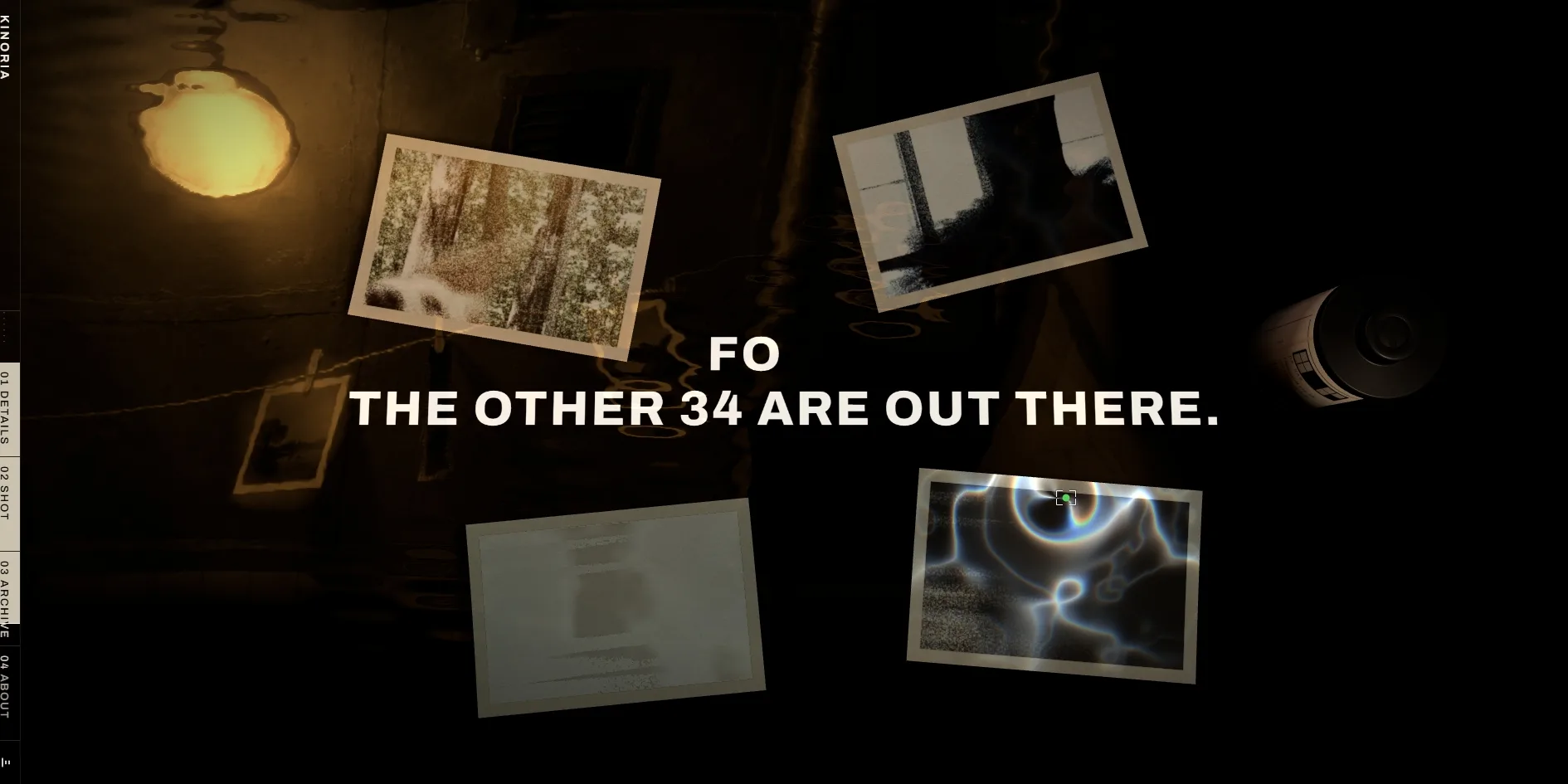
The darkroom sequence turns the wait for the prints into a countdown. The view first glides along the camera body, and then four blank sheets of paper spin down through the dark under the line FOUR MINUTES IN THE DARK. A warm amber safelight comes on, the paper settles into the developer, and the pictures appear one by one while light ripples across the liquid. Each time a print develops, the word FOUR loses a letter, from FOUR to FOU, FO and F, and the number in the line below drops from THE OTHER 36 ARE OUT THERE down to 32. A roll holds 36 frames and the site used four, so the line seems to say the remaining 32 are left for the visitor to take out in the world.
In the archive, the visitor's own four frames drop onto the wall with white borders, and the total at the top ticks up and turns amber. When the visitor scrolls on to the very end, film canisters tumble from the top of the screen and pile up as they knock into each other. The site loads the Rapier physics engine for this part, so every bounce and every landing in the pile is worked out live.
Kinoria's motion stays smooth through almost all of the scroll. From the end of loading to the end of the story, the page holds 60 frames per second nearly all the time, which is the most an ordinary screen can show. The only slow stretch comes right after loading, when the rate drops to about 31 frames per second and the worst frame hangs for about 0.4 seconds, because the page is still loading the models and images it needs later.
04Engineering
Kinoria is built without a web framework, and its core is a set of hand-written scripts that the designer split along the story, with separate parts for the camera, the finder, the darkroom and the archive. The 3D work is rendered with three.js, and the model textures are stored in a compressed format the graphics card can read directly (KTX2). The site is hosted on the Vercel platform, and the page about the designer is a separate web page placed in an embedded frame.
Before the visitor has scrolled at all, Kinoria has already downloaded about 18 MB, and the largest single file is the 3D model of the camera at 5 MB. A complete pass through the introduction, the roll choice, the shooting, the darkroom and the archive downloads about 116 MB. The largest share of that, about 41 MB, is frame sequences, which are pictures rendered in advance and played one after another for continuous moves such as the push into the finder. Most of the rest is the four scene clips and the 3D models.
Visitors wait several seconds before the camera on the desk appears. The server answers quickly, with the first byte arriving in about 0.03 seconds. The time the browser takes to paint its first content (FCP), however, is unstable, from 0.88 seconds on a fast load to 2.2 seconds on a slow one, against Google's recommended limit of 1.8 seconds. That first paint is plain black, the finder-style loading screen appears at about 3 seconds, and the desk with the camera arrives at about 6.5 seconds. During loading, scripts repeatedly hold the browser for more than 50 milliseconds at a time (long tasks), for a total of over two seconds, and the longest runs past half a second, leaving the page unable to respond. Once the picture is up nothing jumps, and layout shift (CLS) is 0.
The archive's title calls the wall everybody else's photographs, which does not fully match what is actually on it. The visitor's own four frames really do land on the wall, but the rest of the wall was not shot by other visitors. It comes from four fixed lists on the site with 340 entries per scene. Each entry is cut from the scene footage at a preset moment, position, zoom and film, and the lists do not grow with new visitors. When a visitor finishes a roll, the site only tells the server that a roll was finished, and the photographs themselves are never uploaded. The total at the top is not a pure count either, since it starts from a fixed number, rises with the passing of time and adds the number of rolls real visitors have finished.
Kinoria partly looks after two groups of visitors, people who are sensitive to motion on screen and people who use only the keyboard. When a visitor sensitive to motion turns on the reduced motion setting in their system, the headline and captions on the first screen simply appear instead of fading in line by line. Keyboard visitors can get through the whole story. Pressing Tab moves focus between the wordmark, the navigation links and the sound switch, each with a clear off-white outline, and Page Down and the arrow keys move the story forward. Choosing a roll and pressing the shutter, though, work only with a mouse, and pressing Space or Enter in the finder leaves the frame count unchanged.
Screen reader users will find the structure of the page hard to make out. The page declares English but has no top-level heading, and navigation is the only landmark, which is the kind of region screen readers use to jump around a page. The images on the first page all have empty alternative text, so screen readers skip them as decoration.
05Scores and Team
| Award | Source | Date | Score |
|---|---|---|---|
| FWA of the Day | The FWA | 2026-10-04 | 82 POINTS, DAYS 4 |
FWA gave Kinoria 82 points, filed it under Experimental, Fun & Playable and Photography, and noted that it is best viewed on desktop. The designer's own portfolio received the same 82 points when it won FWA of the Day in August.
| Credit | Who they are | Track record |
|---|---|---|
| Seunghyuk Kim | A Seoul graphic designer focused on brand systems, editorial design and data visualization, who runs a pipeline of KeyShot 3D, motion and generative AI on top of that work, with clients including Samsung Asset Management, SKT, LOTTE, Naver Cloud, The Shilla and the Korean Ministry of Health and Welfare | FWA 2. Awwwards HM 1 |
Kinoria is the second FWA award for Seunghyuk Kim. The first went to the portfolio mentioned above, a single continuous space in which one square unfolds into a whole galaxy of work. That portfolio also earned an Awwwards Honorable Mention. The site's footer says he built the project alone, covering concept, art direction, design and development himself.
06Archive
- Award date
- 2026-10-04
- Awards
- The FWA FOTD 2026-10-04
- Site
- https://kinoria.studio/
- Credits
- Seunghyuk Kim
- Design
- interface
- Build
- realtime
- The FWA
- 82 POINTS, DAYS 4. https://thefwa.com/cases/kinoria
- Stack
- three.js, KTX2, Rapier, Vercel
- Total assets
- About 18 MB / 335 files on a first visit, of which the camera model is 5 MB. About 116 MB / 3,234 files for a full pass, of which frame sequences are 41 MB
- Speed
- FCP 880–2196 ms (black screen), camera on the desk at about 6.5 s, CLS 0. Story scrolling about 55 fps, steady 60 fps after loading