The Renaissance Edition
The Renaissance Edition is the site Shopify built for its Winter '26 product release in December 2025, and it turns 150-plus updates into a Renaissance picture book in which every chapter opens on a moving 3D oil painting. The Renaissance figures in the paintings wear sneakers and carry pink shopping bags, and the site uses them to cast today's merchants as masters with new tools. As visitors scroll, the camera and the figures in each painting move with them. At each chapter change, the painting fades into a glowing pencil sketch and the next painting is drawn in from its own lines.
Shopify's in-house team, Shopify Design, made the site. It won Site of the Month for February 2026 on both Awwwards and the FWA, along with Site of the Day on both platforms and the Awwwards Developer Award.
01Concept
Shopify publishes an Edition every few months to present the product updates it has shipped in that period. The Winter '26 Edition went live on December 10, 2025, with more than 150 updates and AI as its theme. In an article published the same day, Shopify's VP of Product, Vanessa Lee, called it The RenAIssance Edition and wrote that the team chose the Renaissance because it stands for progress, courage and new beginnings. Shopify Design entered the site in the in-house design awards of Canada's Association of Registered Graphic Designers (RGD). In that entry, the team writes that the site turns a changelog into a gallery visitors scroll through. Each painting stands for a group of updates, and the merchants appear in them as Renaissance masters equipped with AI tools.
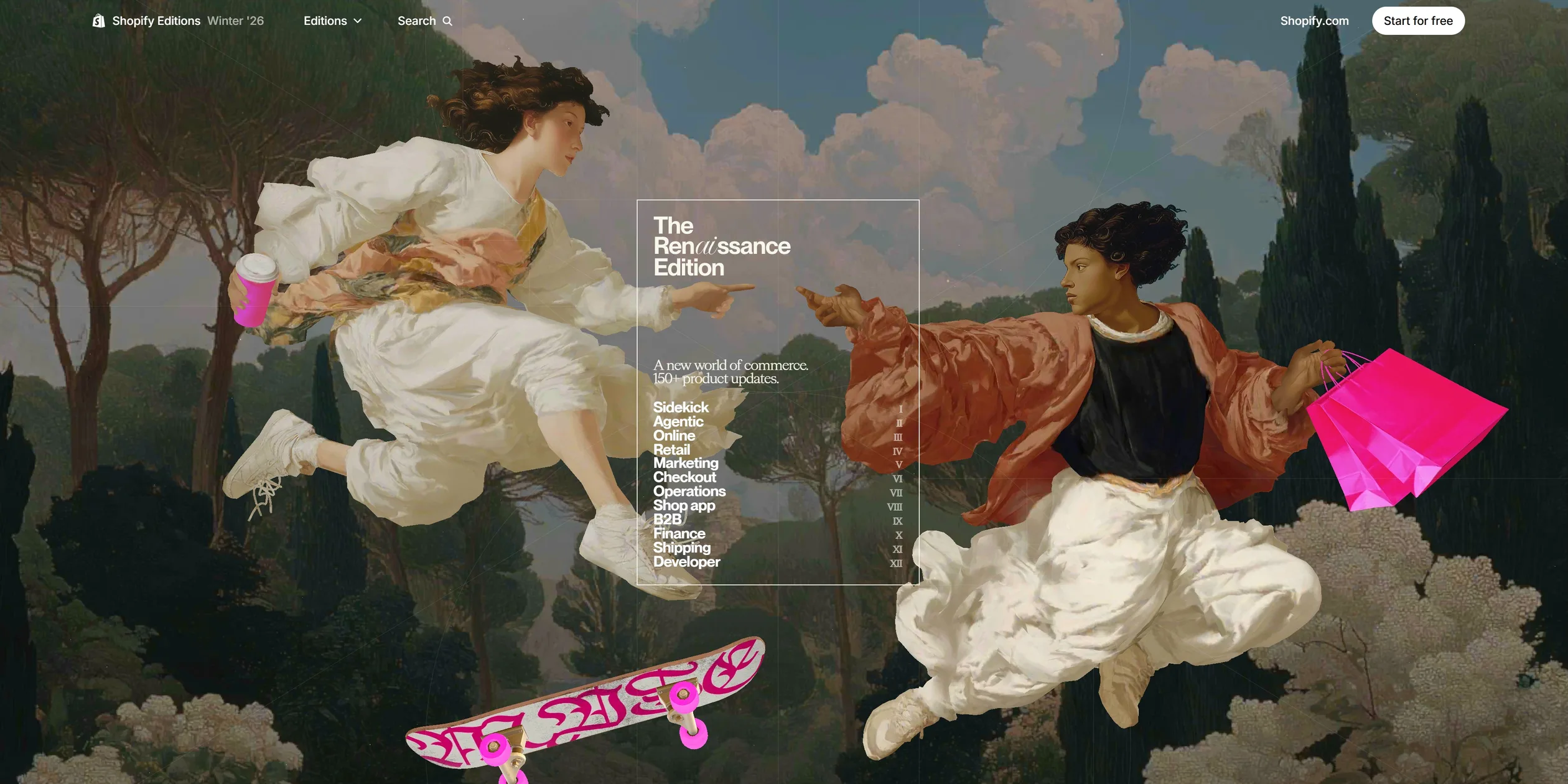
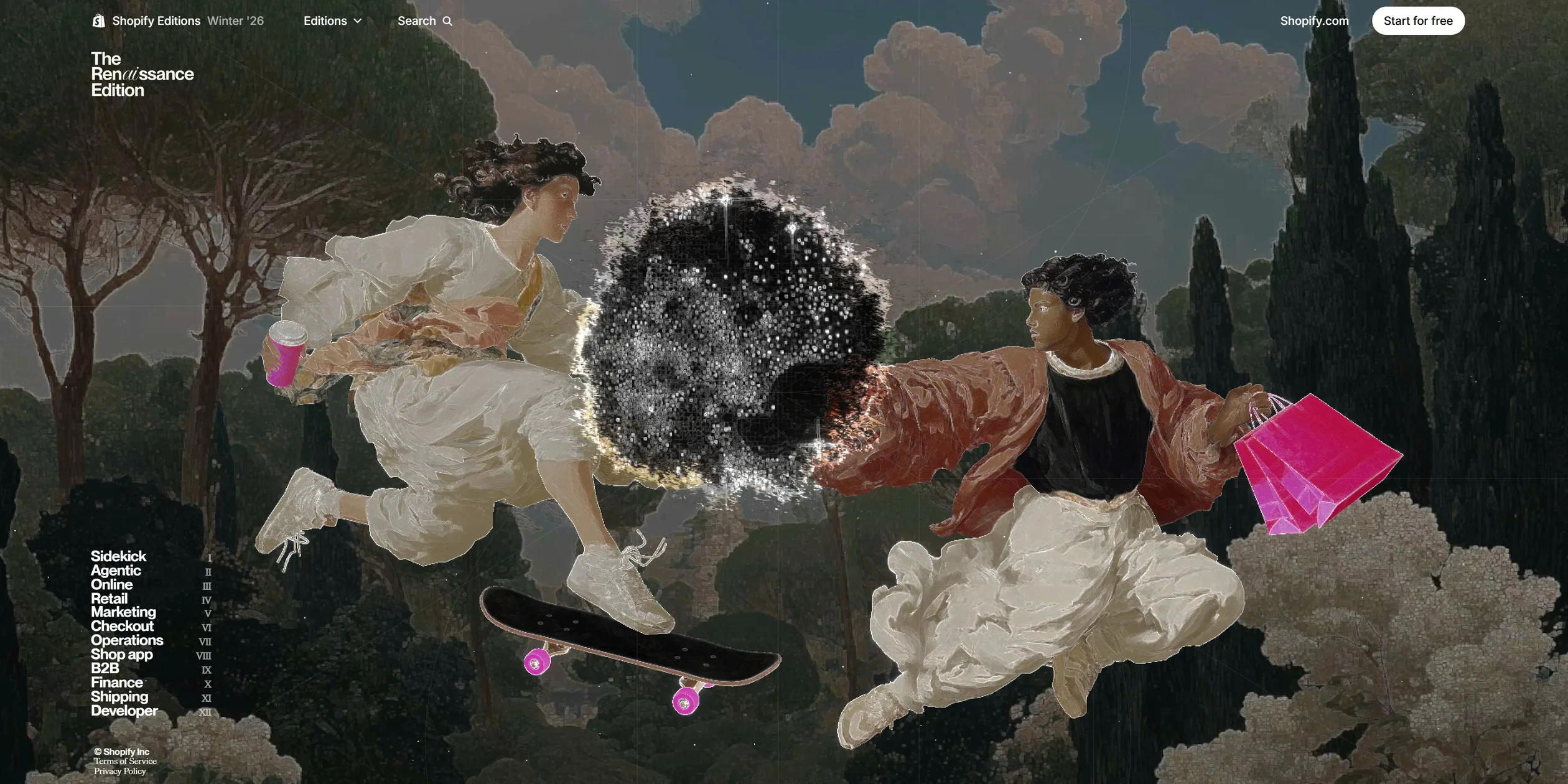
When visitors open the site, a short black opening plays first, and a few seconds later the first painting fills the screen. Two figures in Renaissance robes and white sneakers fly toward the middle from either side. The one on the left holds a pink coffee cup, the one on the right carries two pink shopping bags, and a skateboard with pink calligraphy floats below them. Their outstretched fingers almost touch, a composition taken from Michelangelo's fresco The Creation of Adam. A thin-lined frame in the middle works like a book's title page, holding the Edition's name, the line A new world of commerce. 150+ product updates., and a contents list of twelve chapters numbered I to XII in Roman numerals.
The twelve chapters follow Shopify's product lines, starting with the AI assistant Sidekick, passing through retail, marketing and checkout, and ending with Developer. Every chapter follows the same order from start to finish. It opens on a full-screen painting with a huge chapter name and a one-line summary. The page then turns into paper-coloured pages that present a few headline updates with videos and animated product demos, and the chapter finishes with the smaller updates in two columns of small text. The chapters vary a lot in length, from more than nine screens each for Sidekick, Retail and Developer to a little over two for Checkout and Shipping, and the whole page runs to about sixty screens on a desktop. A contents list of the twelve chapters stays fixed on the left, so visitors can jump to any chapter at any time.
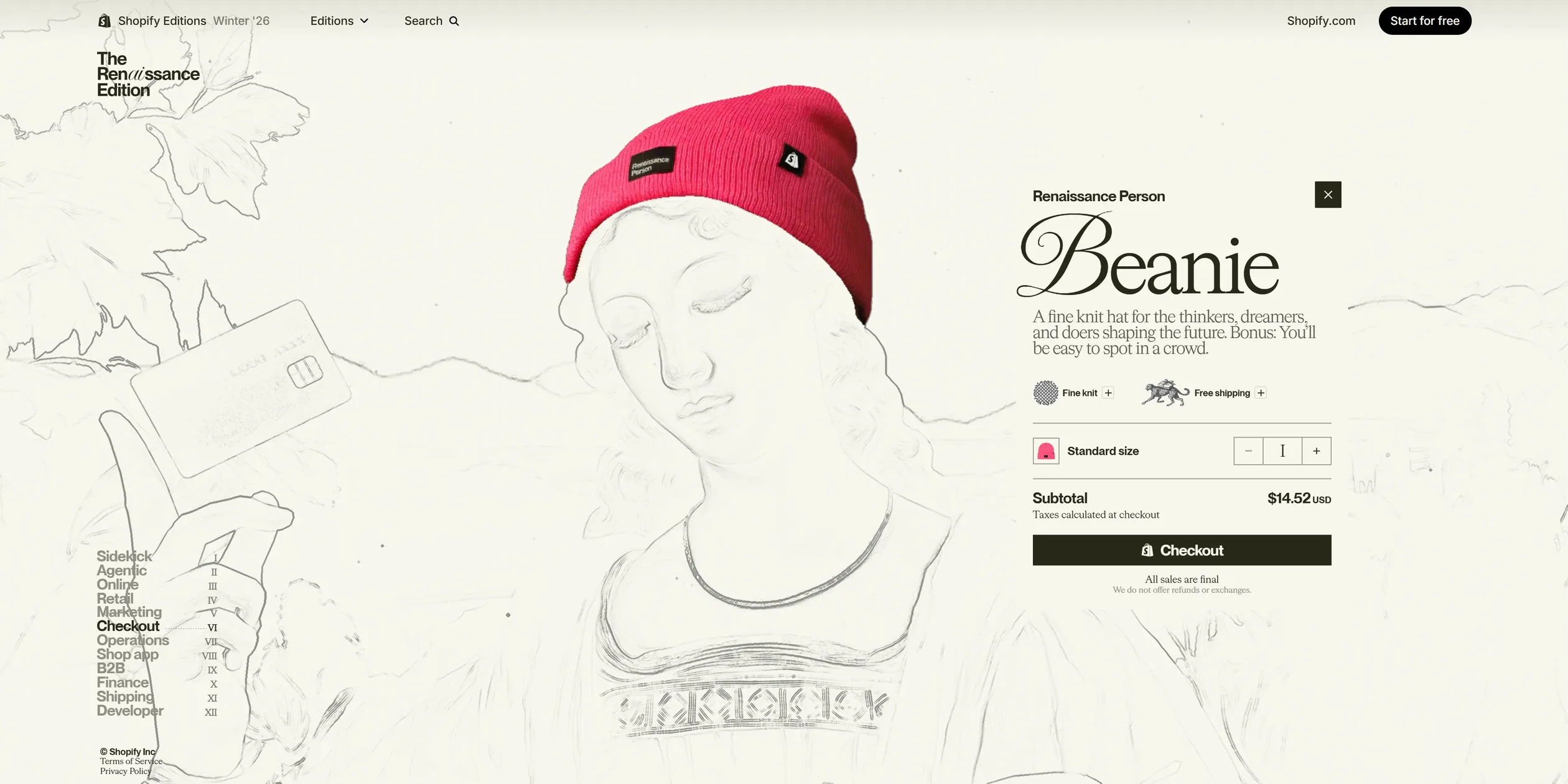
The book hides three surprises for visitors to find. In the Checkout painting, visitors can click the pink beanie on the figure's head, and the site then opens a purchase panel for that beanie, priced at 14.52 US dollars. Shopify Design writes in its award entry that the price comes from Leonardo da Vinci's birth year, 1452. A glowing golden key floats in the sky of the Shipping chapter, and when visitors click it, the browser opens a small window that shows another layer of the painting. The site's missing-page screen shows a unicorn under the title CDIV, 404 in Roman numerals, above the line This page doesn't exist, unless you believe it does. The team says in its entry that these hidden details reward visitors who explore a little longer.
02Design
The design rule of The Renaissance Edition splits every chapter into two materials, with a dark, rich oil painting at the opening and the updates printed on warm white paper. The paper is a slightly yellow white (#F7F7EE), and the text is an almost-black ink with a hint of olive (#292919). The greys in between lean olive too (#DCDCD0, #909083, #5C5C4E), so the paper reads like the pages of an old art book and does not look cold next to the paintings. Where painting meets paper, a torn paper edge runs across the screen, ragged and rimmed with white light. The twelve opening paintings all have different compositions, and the site sets the position of the chapter name and summary for each chapter separately. The Sidekick title sits high on the painting, the Operations title runs across the table in the lower part of the picture, and the Shipping title lies right across the cheetah.
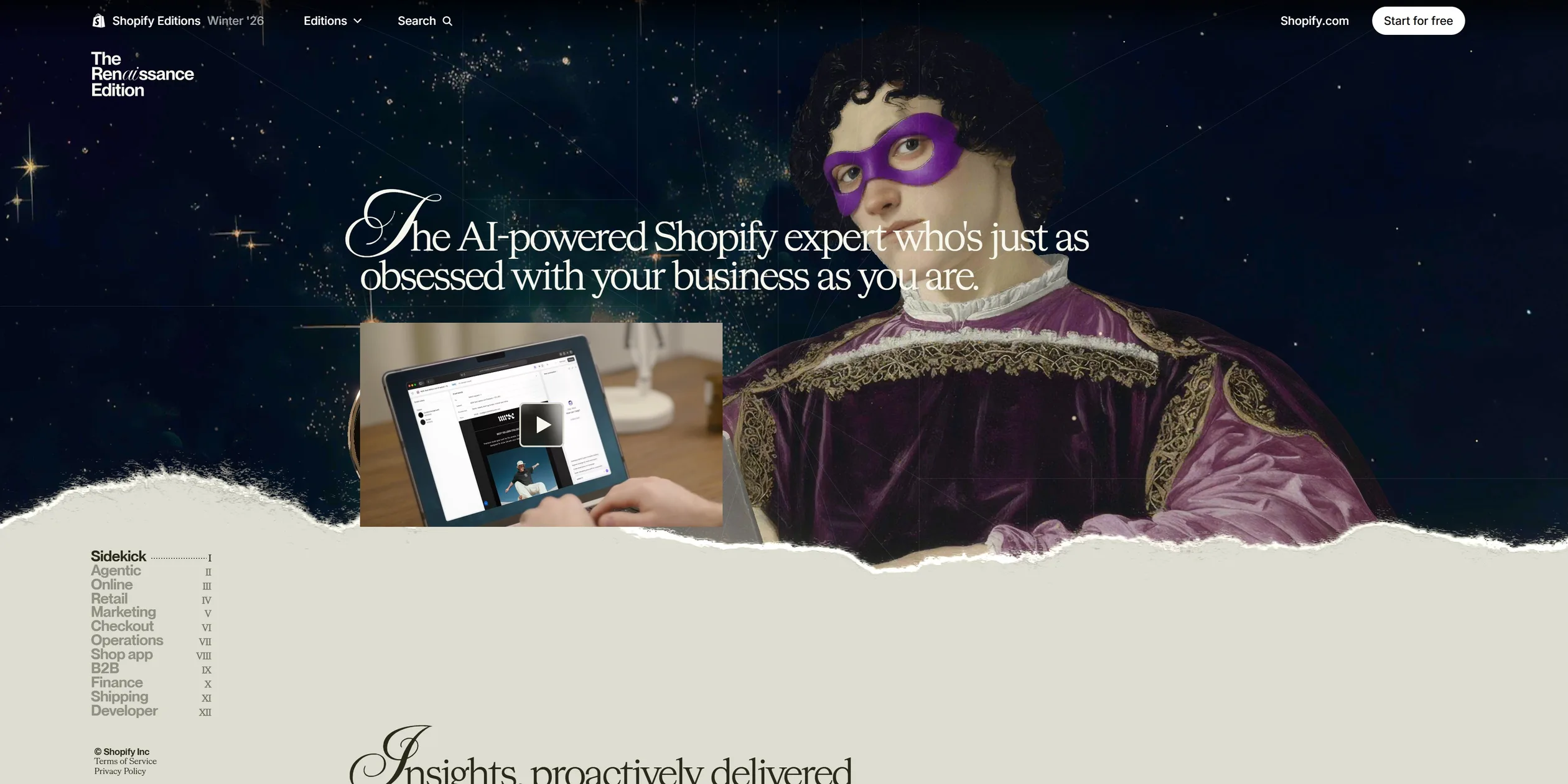
In all twelve paintings, Renaissance figures hold today's products and devices. In Sidekick a young man in a purple eye mask works at a laptop, and in Agentic a woman with a Mona Lisa expression sits in a library. In Shipping a cheetah carries an orange parcel, and in Checkout a red-haired woman wears a pink beanie and holds a pink bank card. In the opening screen and the Checkout chapter, the brightest pink falls on these modern props, so visitors can see at a glance which objects came from today. Shopify Design writes in its entry that AI generated the base of every painting and human artists then refined the depth, the lighting and the figures' movements. The last chapter, Developer, switches style to a pencil drawing on yellowed paper like a page from Leonardo's notebooks, and its title changes from white to dark ink.
The type is split into three roles that match the three kinds of text in an art book. Chapter titles use the bold weight of NeueMontreal, a sans serif (a typeface whose strokes end plainly, without small finishing marks), at about 220 pixels on a 1920-wide screen. The site pulls the line height in to 90% of the size and tightens the letter spacing by 3%, so the titles sit on the paintings like poster type. Summaries and update headings use the serif HWCigars, whose strokes do end in those small marks, with ligatures and small caps turned on so they read like the text of a book. The first letter of each summary switches to the script face ImperialScript and hangs outside the text's left edge like an illuminated initial, and the ai in the Ren(ai)ssance logo uses the same script. Navigation, buttons and captions use Inter at 14 pixels, so chapter titles are about sixteen times that size.
Small details that come back again and again add to the feel of a book. Every chapter in the contents list is followed by a Roman numeral, and the current chapter gains a dotted line from its name to its numeral, as on a book's contents page. Roman numerals turn up elsewhere too, and even the quantity 1 in the beanie's purchase panel is written as I. When the cursor moves to another chapter, that chapter's dotted line is drawn as well. Over the paper, the other chapter names turn light grey and only the current one stays dark. The opening screen, the video player's background and the phone contents page all carry the same thin-lined circles, diagonals and crosshairs, like the construction lines Leonardo drew before a composition.
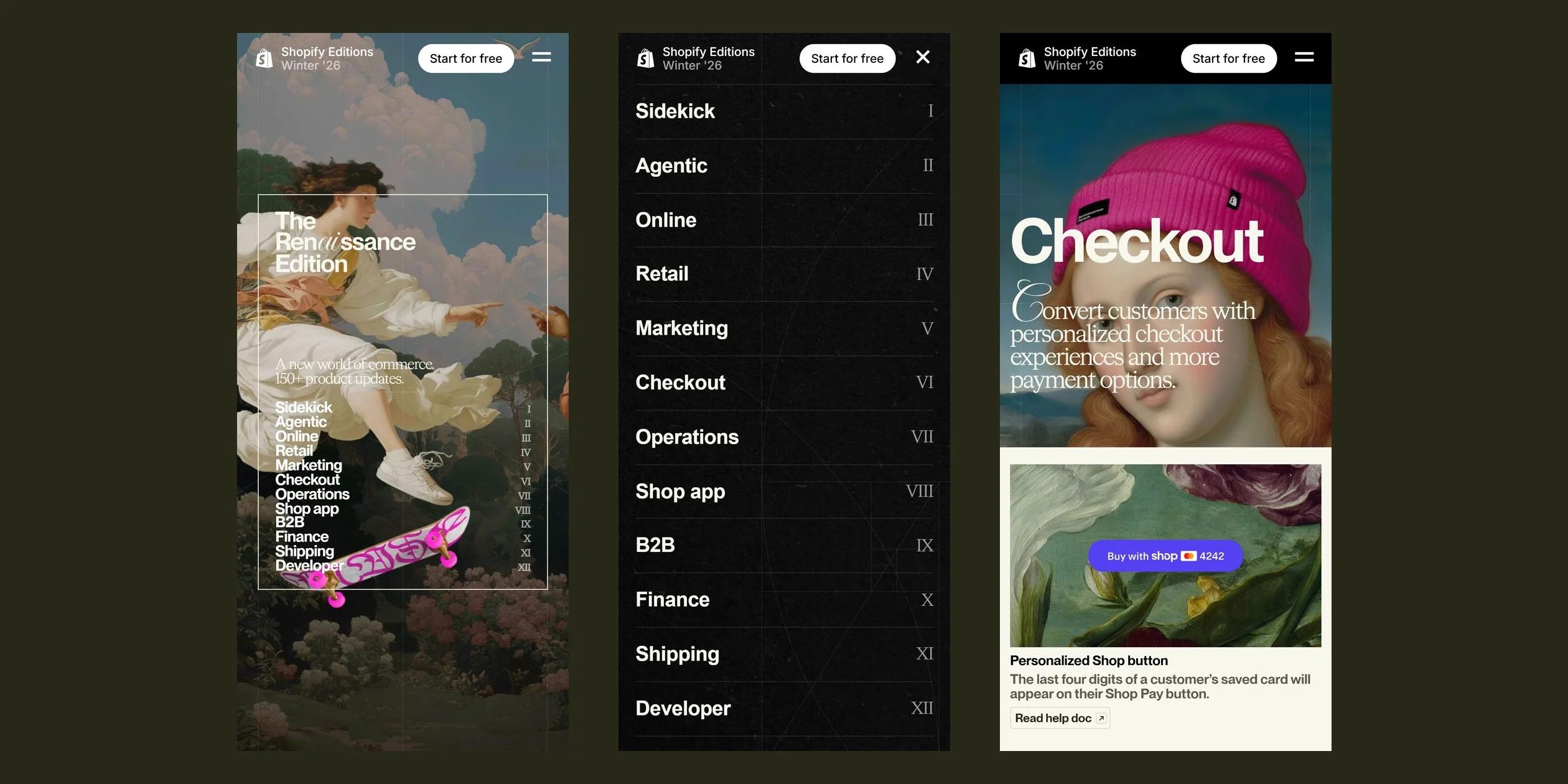
On phones, the site rearranges the same rules. The contents list moves behind a menu button at the top right, which opens a full dark screen with the twelve chapter names in large type in one column and the Roman numerals on the right. Every painting switches to a portrait crop, so the opening screen keeps only the left-hand figure and the skateboard, and the Checkout chapter moves in close on the woman's face and beanie. The update cards stack in a single column.
03Motion
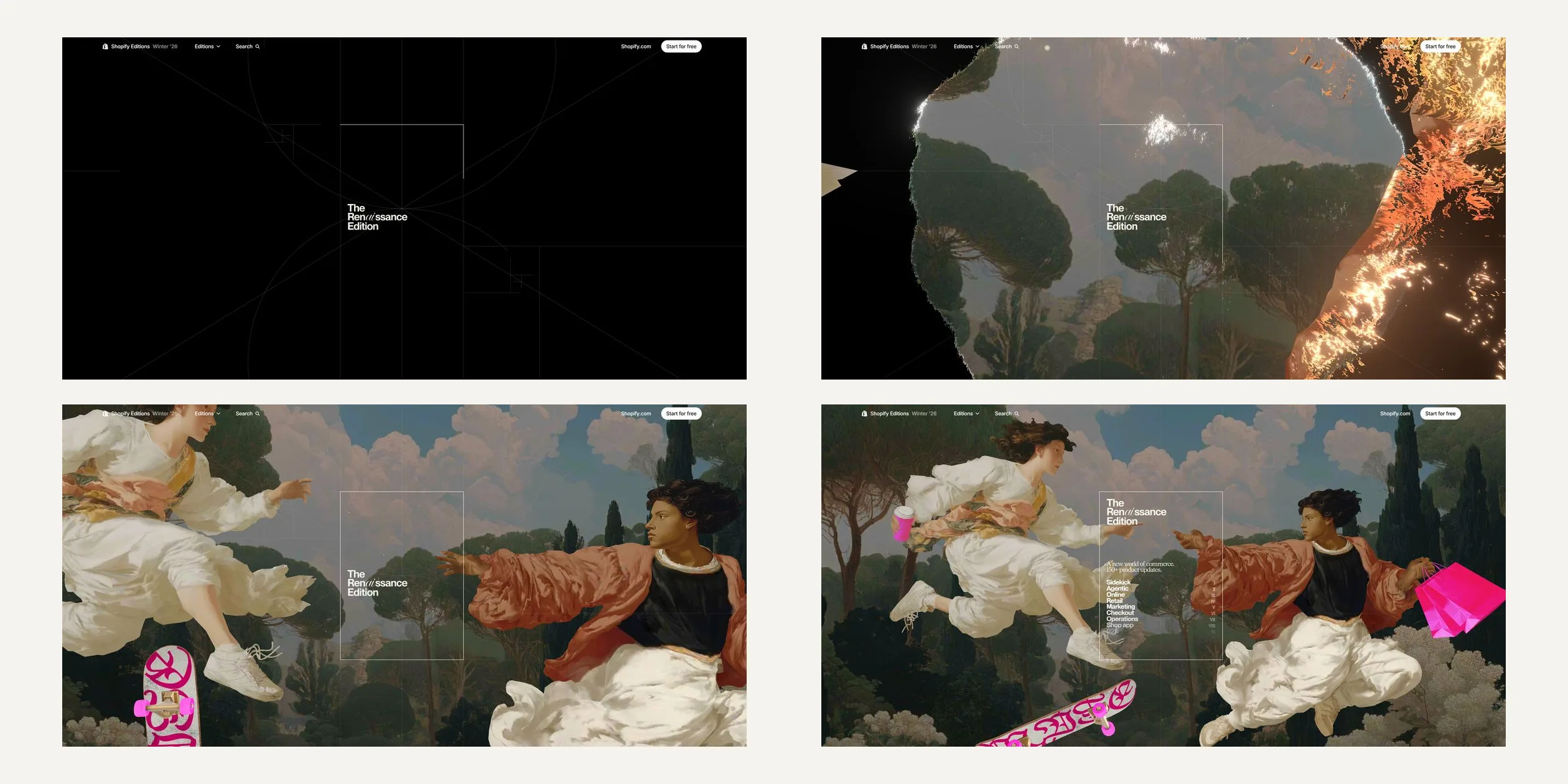
The opening of The Renaissance Edition draws a construction sketch first and then burns the first painting into view. On the black screen a small title appears, and thin lines slowly draw out around it, two large circles, several diagonals and a few crosshairs. At first the title reads only The, the script ai and Edition, and Ren and ssance fill in afterwards. At about four seconds the sketch fades out over half a second and a hole burns open in the middle of the screen. The edge of the hole is ragged and glows white and orange like burning paper, and the painting shows through as the hole grows.
As the hole opens, the camera is close to the figures, the two of them fly in from either side, the camera then pulls back, and the twelve chapter names in the contents fade in line by line. The whole opening finishes within about seven seconds, fast at first and slowly settling at the end.
After the opening, the scroll bar takes over. The camera and the figures in each chapter follow how far visitors have scrolled, and scrolling back plays everything in reverse. Each frame the picture covers only half of the remaining distance, so after visitors stop the wheel, the painting glides a little further before it settles. In the opening painting the two flying figures slowly drift apart as visitors scroll, and the skateboard turns. When the cursor moves, the camera leans about three degrees toward it, and the figures in front shift more than the scenery behind, which gives the picture depth. On a desktop, scrolling from the opening screen to the bottom holds 60 frames per second, with only an occasional brief stall.
The first time visitors scroll down, the title page folds into the contents list on the left. The frame lines and subtitle fade out in about half a second, and the title slides to the top left corner while shrinking to three quarters of its size. The twelve chapter names slide left and down into the bottom left corner, each line starting one frame after the one above. The whole group settles within 0.6 seconds, creeping through the first few frames, rushing in the middle and easing out over a long tail. The fold only checks whether visitors have left the top, so once it starts it plays to the end, and it plays back to the title page when they return to the top.
The chapter change is the signature motion of the site. When visitors scroll past the end of a chapter, the next painting rises from the bottom of the screen behind a roughly horizontal front that bends up slightly in the middle. The front wavers all the way, like a wet brush dragged across paper, and a band of light runs along it. Where the front passes, the old painting first fades into a glowing pencil sketch, and the new painting also appears as line work before its colour fills in. The whole change takes exactly one screen of scrolling, so it moves as fast as visitors scroll and stops halfway when they stop. The change from the opening screen to the first chapter works differently, with the new painting burning outward in a circle from the centre of the opening scene, a circle that also leans slightly toward the cursor.
These chapter changes do not stop for the reduced-motion setting. When visitors turn the setting on in their system, the site only stops the product videos and interface demo animations. The scroll-driven movement of the paintings and the sketch effect of the chapter changes keep playing, so visitors sensitive to motion still see whole-screen changes.
The paper arrives behind the same kind of front. After the Sidekick title appears, the paper pushes up from the bottom of the screen with its torn, glowing edge and covers the whole painting over about a screen and a half. The update list that follows sits on that paper. When the next chapter starts its change, the paper leaves together with the incoming painting.
Not every chapter uses paper to carry its text. Agentic and Marketing darken their paintings until only faint glowing outlines remain, and the product cards float straight over the dimmed picture. Online ends by pressing the whole picture down to black with only faint outlines left before it changes to the next chapter.
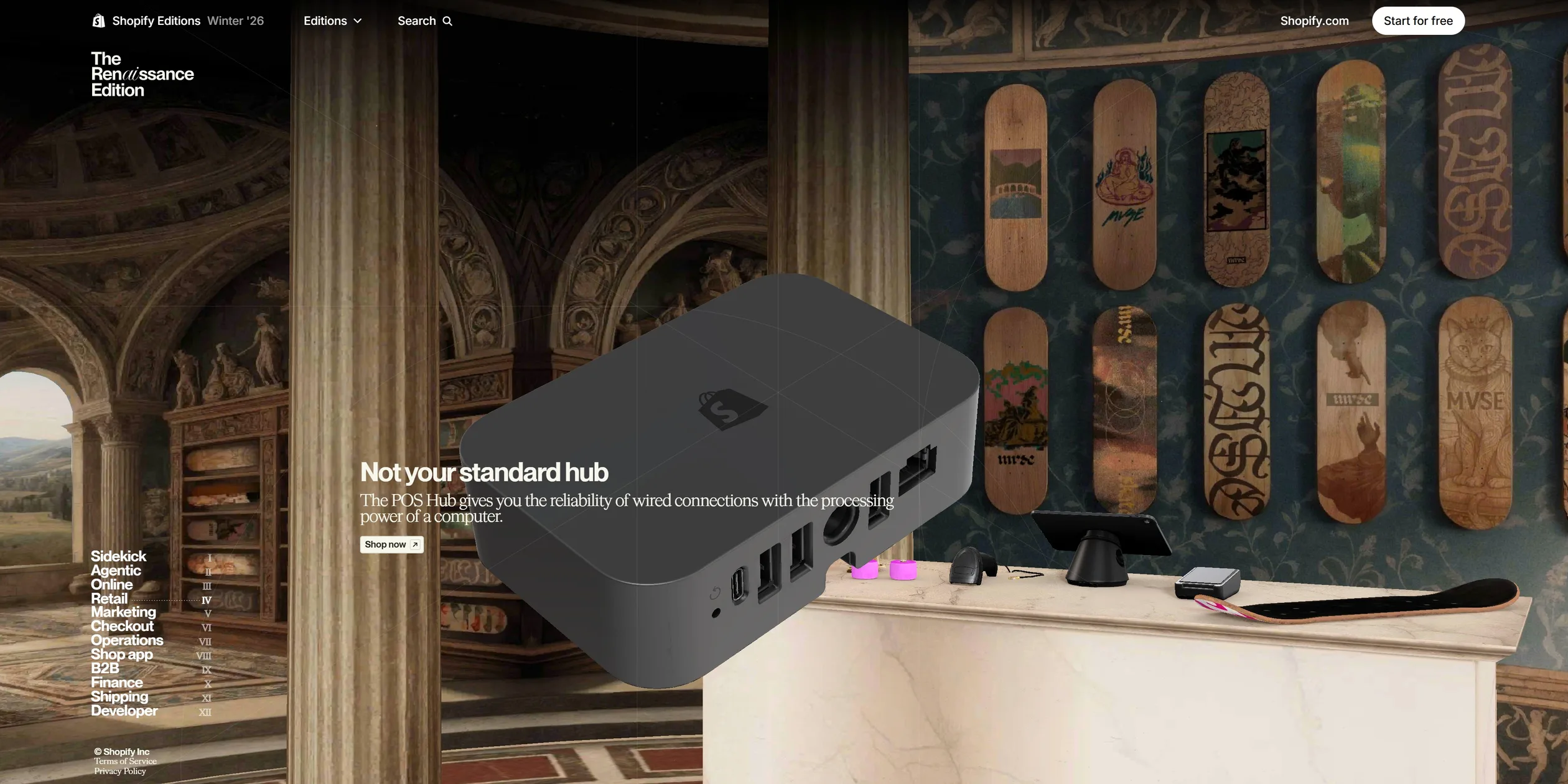
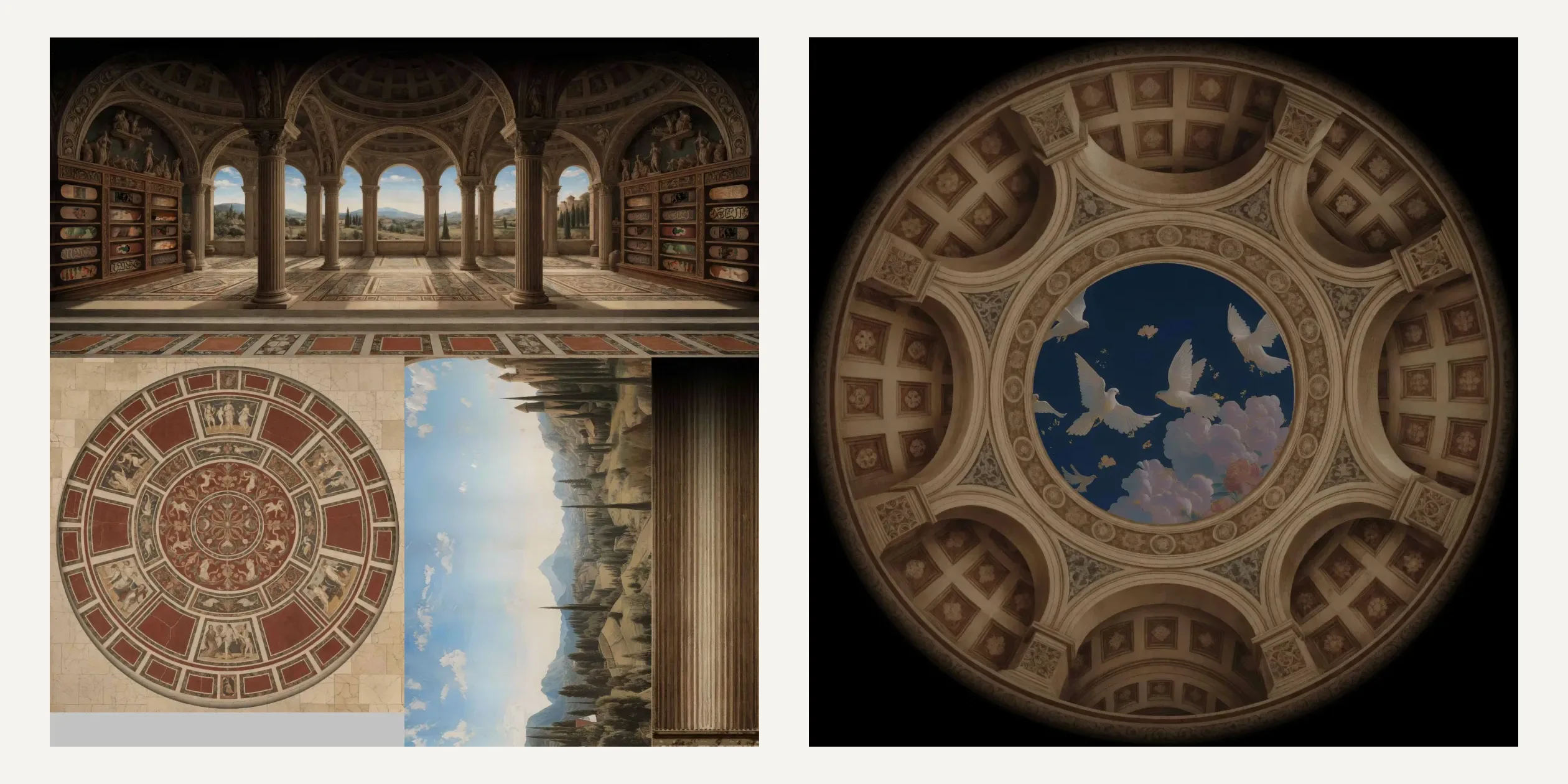
Retail is the chapter where the camera travels furthest. The camera moves forward through a domed hall, with a wall full of skateboards on one side and a marble counter on the other. Shopify's new point-of-sale hub floats above the counter and slowly turns as the camera passes, and at the end the camera looks up into the dome, where white doves fly past a round skylight. The walk is spread over more than nine screens of scrolling, and the product text appears in step as the camera moves on.
A few things in the paintings can be touched directly. When the cursor moves over the beanie in the Checkout chapter, a white line traces the beanie's outline. When visitors click, in under a fifth of a second the whole oil painting turns into faint pencil lines on white paper, and only the beanie keeps its colour. The purchase panel appears from the right at the same time, and pressing Esc returns visitors to the painting. In the Operations chapter a golden globe sits among the figures inside a translucent shell that light lines sweep across. The globe turns slowly on its own, visitors can drag it round with the cursor, and after they let go it keeps spinning for a while before returning to its slow turn.
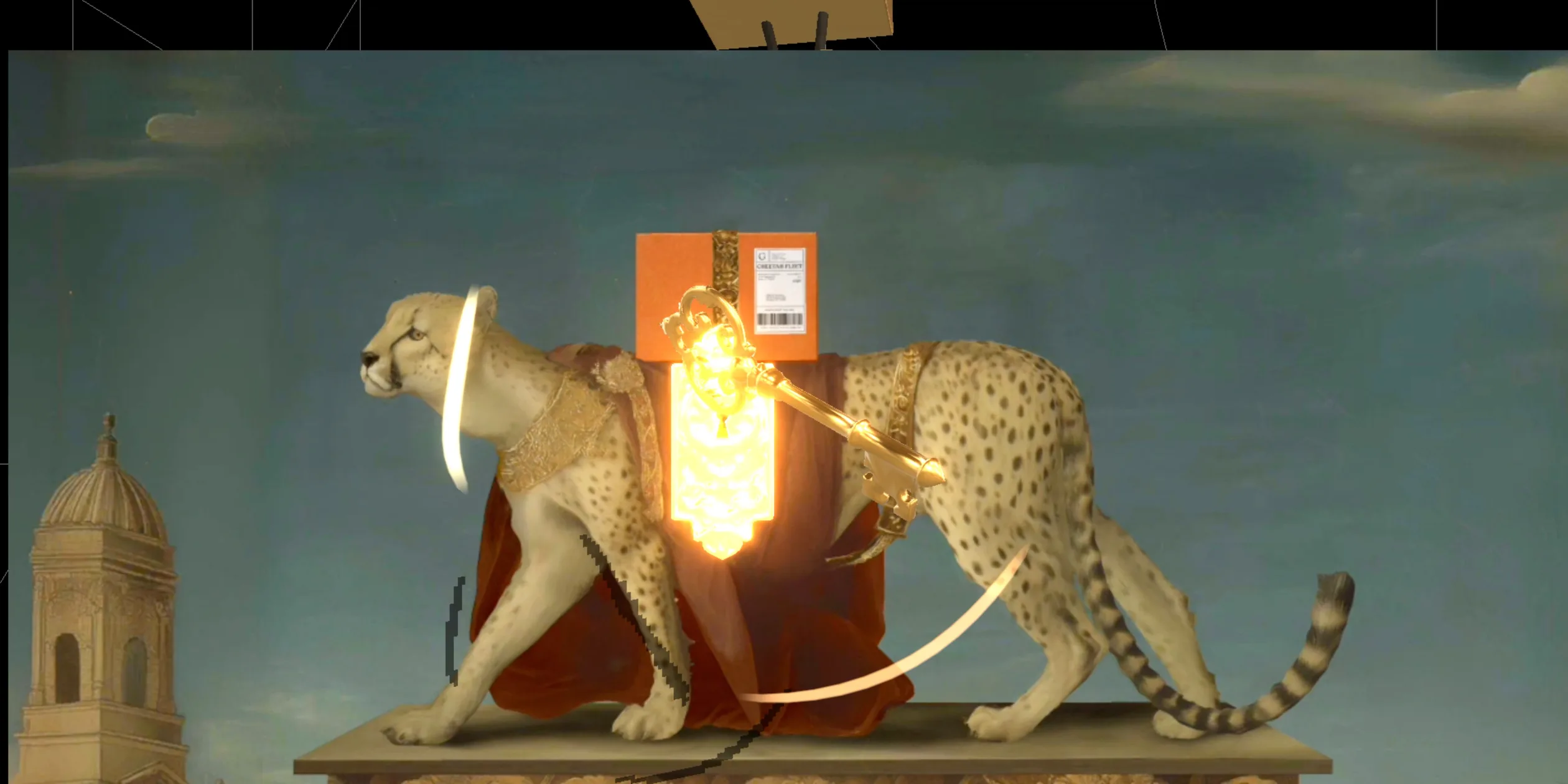
The golden key in the Shipping chapter spins a full turn on the spot when the cursor comes near, taking about 0.6 seconds with a slow start and a slow finish. When visitors click it, the browser opens a small 4:3 window where the cursor is. None of the page's text appears in the window, only the painting itself. The lock on the cheetah's harness lights up as a keyhole, the key becomes large and floats in front, and a few white ribbons of light circle around it. Visitors click the key once to pick it up and then drag the window across the screen, like holding a magnifying glass over the painting. When the key lines up with the keyhole and visitors click again to drop it, gold coins rain down on the main page, and two seconds later the painting in the small window switches to a graffiti layer.
The contents list, the videos and the phone controls are all simple. When visitors click a chapter in the contents, the page scrolls there in about a second, covering 70% of the distance in the first fifth of a second and then settling slowly. Product videos open out of their preview images on the paper, the player's background is paper with the same construction lines, and closing it with Esc leaves the page where it was. On phones, visitors swipe to move the paintings on and jump between chapters from the menu at the top right.
04Engineering
The Renaissance Edition draws every painting on a single full-screen WebGL canvas, each of the twelve chapters is a three.js scene loaded on demand, and each scene's motion is driven by a Theatre.js timeline. The site is a Shopify Hydrogen app, the 3D part is written with React Three Fiber, and the canvas is fixed behind the page, with the text, cards and videos layered over it. Each chapter's scene is a separate code chunk, the site mounts only the current chapter and one chapter on either side, and hovering a chapter in the contents mounts its scene ahead of time for three seconds. The team writes in its RGD entry that Theatre.js gave designers direct control over on-page motion. In practice, designers keyframe each chapter's camera, every layer of the picture and the post effects in the Theatre.js editor. Those keyframes are exported as a JSON state file into the content management system, and the site reads one file per chapter at load time.
The site links scroll to the timeline with one formula. It tracks each chapter's height and its on-screen progress, and the timeline position equals progress times (chapter height plus one screen) divided by one screen. One timeline unit is therefore exactly one screen of scrolling, so designers can plan every move in screens. On desktop the timeline covers half of the remaining gap to its target each frame, which is where the short glide in the Motion chapter comes from. The opening screen adds an offset that runs from minus one to zero over five seconds on a cubic ease-out, so the first unit of the opening timeline plays by itself before scrolling takes over. If visitors arrive through a chapter link or the page opens away from the top, this automatic playback is skipped.
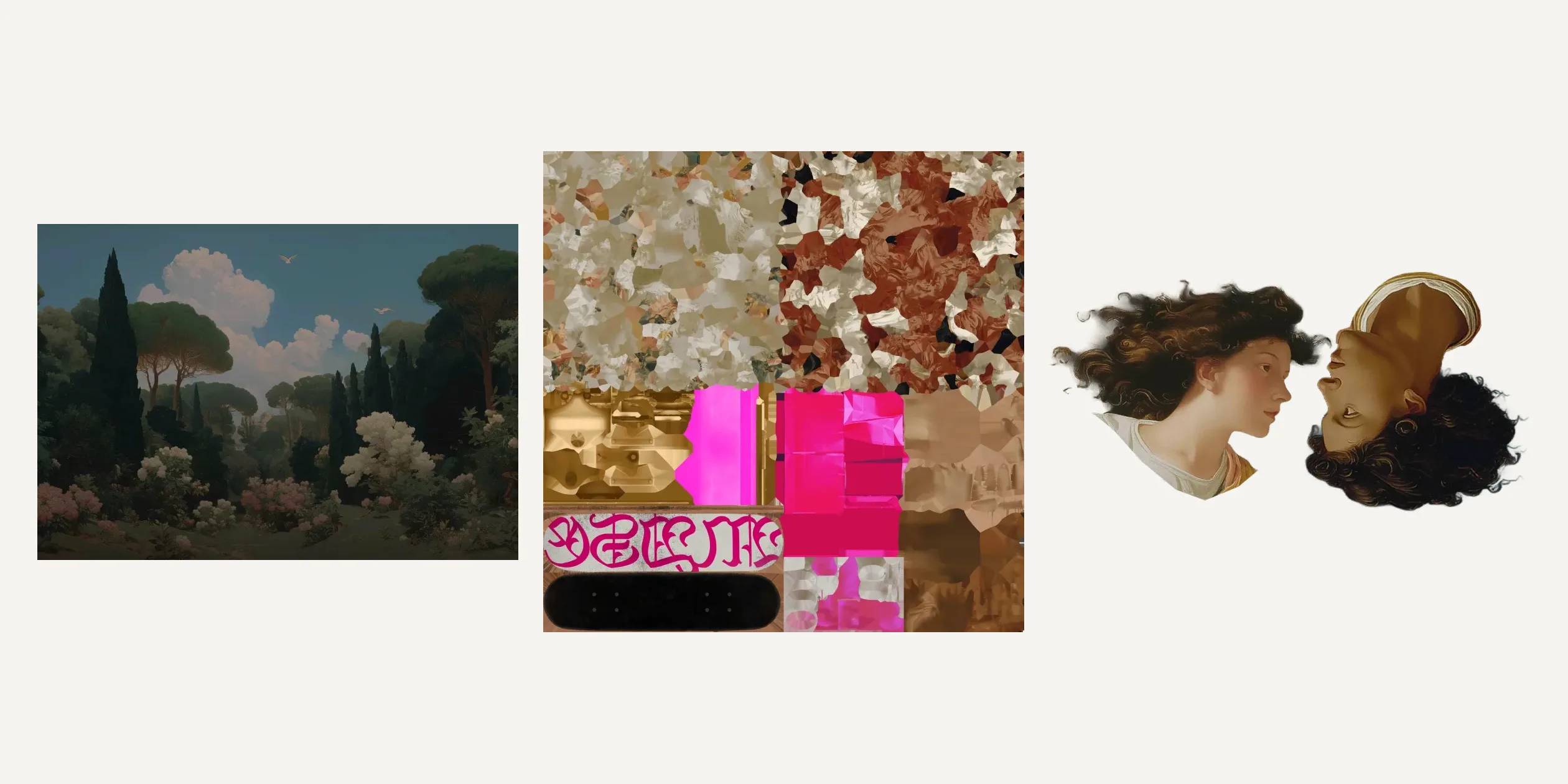
Each painting is built from a few layers of painted models. The background is just a flat plane carrying painted scenery. Foreground figures and props are shapes cut out along the painting, with alpha masking for their edges. Hands, eyes and shopping bags carry bones, so fingers can bend and eyes can turn on the timeline. The two figures in the opening screen are low-poly 3D bodies wearing one shared painted texture atlas, while their faces are separate flat painted cards.
These painted materials ignore lighting and show the texture's colours directly, so as the figures turn and the camera shifts, the brushwork and the light and shade stay exactly as the artists painted them. Metal props such as the golden key and the globe switch to lit metal materials that reflect the scene's environment light.
The Retail hall is built another way. The whole hall is a panorama painted on one texture, which the site wraps around the inside of a cylinder. The dome has its own round ceiling painting, and a larger cylinder outside carries the scenery seen through the arches. The camera path is an animation made in Blender and exported with the models, and the site only converts scroll into the play position of that animation. This way two textures of 2048 pixels square are enough to build a hall visitors can walk through.
The animated figures use a third kind of asset. At load, the site splits a short video into a 30-frames-per-second image sequence, seeking to every frame's timestamp and keeping each picture as a bitmap. During playback it draws only the current frame onto a canvas that the 3D model uses as its texture. Designers move frame progress on the timeline, so the figures' movements follow the scroll exactly, reverse frame by frame when visitors scroll back, and never stall on video decoding.
Every layer of a painting can also appear and disappear on its own. The site injects code into the materials' shaders that uses 3D noise and the distance from the scene centre to decide when each pixel burns away, and pixels whose turn has not come are discarded. The ring that is burning at the moment is brightened to eight times its colour, so figures and props burn in or out piece by piece from the centre outward.
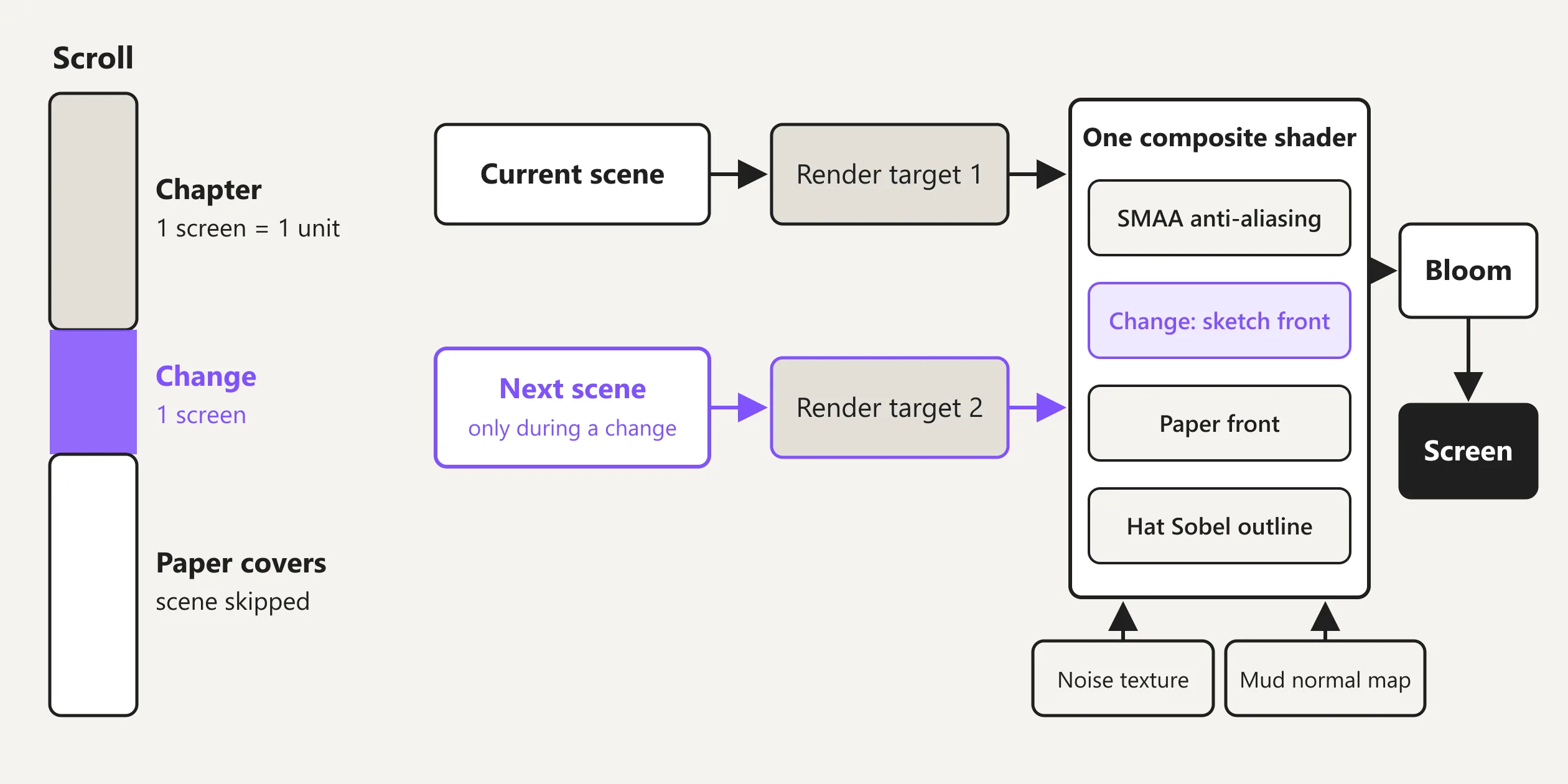
All of the transitions happen in one post-processing pass. The site renders the current chapter's scene into a half-float offscreen texture, during the one screen of a chapter change it also renders the next chapter's scene into a second texture, and a full-screen shader then combines the two. The shader computes a wavering threshold line from the vertical coordinate, a noise texture and a mud-like normal map, and pixels past the threshold show the new painting while the others show the old one. Near the threshold line, pixels use the hardware derivative fwidth to measure changes in brightness, so places with large changes light up and the rest go dark, and the picture turns into glowing line work. The closer a pixel is to the front, the stronger the line work, and the front itself is multiplied several times in brightness.
The same shader holds three more effects, which are SMAA anti-aliasing, the paper front and the Sobel outline that turns the Checkout scene into a pencil sketch. After the composite comes a bloom pass that only affects bright areas. When the paper fully covers the picture, the site skips rendering the scene, so the GPU has almost nothing to do during the long update lists.
The site sets its own quality level from the device's GPU. It uses detect-gpu to look up the GPU's benchmark tier and maps it to high, medium or low. All three keep the pixel ratio at 2 or below and lower it by level so the canvas's longest side stays within 3840, 1920 or 1280 pixels, never going under 1. The low level draws only 30 frames per second. The site also keeps measuring the real frame rate, and when the average on high or medium drops below 45 frames per second, it steps down a level.
Phones and GPUs with a benchmark score of zero take another path, in which each chapter shows a single pre-rendered image of its painting, with a portrait crop on phones. The sketch chapter changes, the paper and the darkening all stay, while the 3D figures, the parallax and the layer-by-layer burning are dropped, so phones download no models at all. Safari is treated as a low-performance browser, and the webm video assets in the paintings are replaced by still images there.
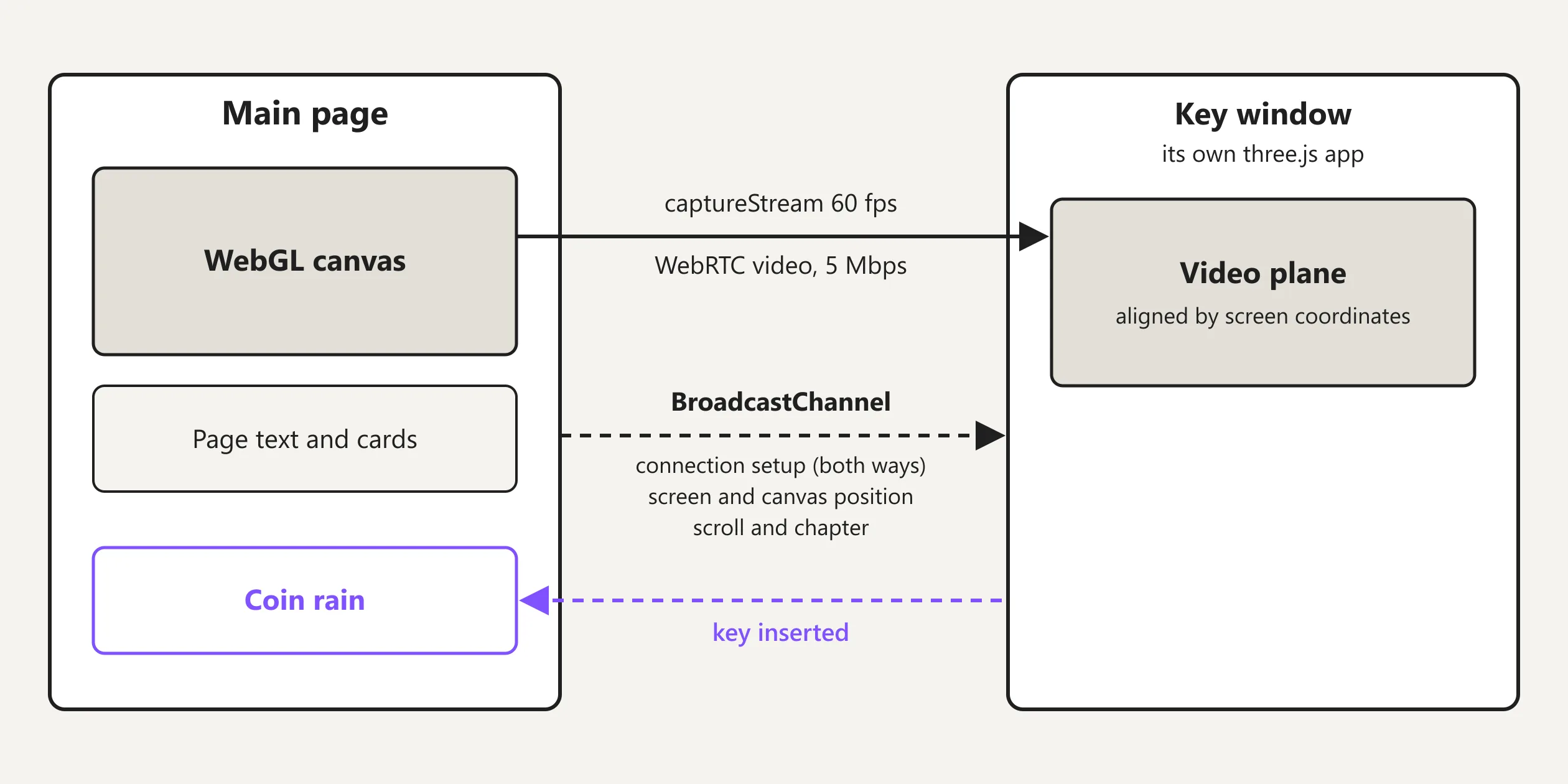
The key's small window is the most unusual piece of engineering on the site. The site opens a 4:3 popup with window.open, records the main page's WebGL canvas as a 60-frames-per-second video stream with canvas.captureStream, and sends it to the window over a local WebRTC connection at 5 Mbps. The two windows exchange connection details over BroadcastChannel, and every frame the main page also sends its screen position, the canvas position, the scroll position and the current chapter. The small window is a separate three.js app that uses the two windows' screen coordinates to work out where the main canvas sits behind it. It places the incoming video on a plane aligned to that spot, so moving the window works like moving a magnifying glass.
The blacklight effect in the window, which lets only bright areas glow purple, the dot-grid scan and the graffiti are all shaders on that video plane. When the key lines up with the keyhole, the small window sends a message back to the main page, which starts the coin rain. The small window closes itself after ten seconds without focus, and the key does not appear in Firefox or on phones.
The product demos on the paper are separate from the paintings. More than ten of the interface demos are Rive animations whose images download separately, with one set for phones and one for desktops, and each animation plays only once it scrolls into view. The videos for the headline updates are hosted on Shopify's own video service, and a 1366-wide laptop receives the 720p version while a 1920-wide screen receives 1080p.
On a first visit, the site's own files come to about 2.4 MB, and the browser paints the first screen between 0.4 and 1.4 seconds, depending mostly on how fast the server responds. The first painting, however, waits for the opening construction sketch to finish and appears between a little over three seconds and five and a half seconds.
Scrolling from top to bottom downloads about 33 MB in total, of which about 17 MB is five 1080p product videos. When visitors scroll back up, those videos are downloaded again in full, while the KTX2-compressed scene textures come straight back from the browser cache. Every Rive demo requests the same Inter font file of about 400 KB on its own, though the browser only downloads it once.
Keyboard visitors can get through the whole site. When visitors press Tab, focus moves through the top navigation, the twelve chapters in the contents and the links on the paper, and the page scrolls to follow it. The contents links show a clear blue focus box, and after a jump from the contents, focus lands at the start of that chapter. The figures and props in the paintings are decoration, and screen readers get the chapter titles, summaries and update lists from the page with nothing missing. The beanie and the golden key, however, can only be reached with a mouse, and the reduced-motion setting does not stop the chapter changes described in the Motion chapter.
05Scores and Team
| Award | Source | Date | Score |
|---|---|---|---|
| FWA of the Day | The FWA | 2026-02-05 | 86 POINTS, DAYS 2 |
| Site of the Day | Awwwards | 2026-02-09 | 7.92. Design 8.03 / Usability 7.51 / Creativity 8.24 / Content 8.09 |
| Developer Award | Awwwards | 2026-02-09 | 8.05 / 10 |
| Website of the Day | CSS Design Awards | 2026-02-17 | Jury 8.71 |
| Site of the Month | Awwwards | February 2026 | Monthly winner, no separate score |
| FWA of the Month | The FWA | February 2026 | Monthly winner, no separate score |
The Renaissance Edition won FWA of the Day first, on February 5 with 86 points, and Awwwards Site of the Day and the Developer Award followed on February 9. On February 17 it won Website of the Day at the CSS Design Awards, together with the three public awards there for UI design, UX design and innovation. It then became Site of the Month for February 2026 on both Awwwards and the FWA. The FWA lists it under Commercial/Corporate, Promotional and Resource & Community.
Of the four Awwwards categories, Creativity scored highest at 8.24. The site puts Renaissance oil paintings and today's products into the same picture and draws every chapter in from a sketch, which may explain the high mark. Usability scored lowest at 7.51, and the page's length of about sixty screens, with the main content laid over constantly changing paintings, may have pulled it down. The developer jury gave 8.05, with Animations highest at 9.40 and Accessibility lowest at 7.00. The low Accessibility mark matches what the report describes earlier, where reduced motion only stops the videos and the hidden interactions can only be reached with a mouse.
| Credit | Who | Record |
|---|---|---|
| Shopify Design | Shopify's in-house design team, with Canada as the account's location | Awwwards works 6, SOTM 1, SOTD 4, HM 6. FWA 2 |
| Danetag | The account lists the United States as its location | Awwwards works 1, SOTM 1, SOTD 1, HM 1 |
| Anton Kolisnyk | The account lists the United States as its location | Awwwards works 2, SOTM 1, SOTD 1, HM 2 |
| nikki-stephens | The account lists no location | Awwwards works 2, SOTM 1, SOTD 1, HM 2 |
| Damien Mortini | Their own site describes them as a technical director, creative technologist and VJ, and Codrops describes them as building interactive showcases and surprises with Three.js at Shopify | Awwwards works 5, SOTM 1, SOTD 4, HM 5 |
| Andy Thelander | A Codrops article from June 2026 calls them Shopify's Principal Product Designer, while the Awwwards account introduces them as co-founder and creative director of Active Theory | Awwwards works 1, SOTM 1, SOTD 1, HM 1 |
The records in the table are cumulative as of October 25, 2026. Shopify's in-house team made the site itself, and the RGD entry is credited to Shopify Design as well. The Shopify Design account holds several other Editions sites, and Summer '24 won an Awwwards Site of the Day and Developer Award. The previous Edition, Winter '25's The Boring Edition, received an Honorable Mention, and Anton Kolisnyk and nikki-stephens are credited on that one too. Damien Mortini ran Christmas Experiments with David Ronai for six years, and Codrops' report on the first Three.js conference in 2026 says Damien Mortini builds interactive demos and surprises with Three.js at Shopify.
06Archive
- Award date
- 2026-02-09
- Awards
- Awwwards SOTD 2026-02-09, Awwwards DEV 2026-02-09, Awwwards SOTM 2026-02, The FWA FOTD 2026-02-05, The FWA FOTM 2026-02
- Site
- https://www.shopify.com/editions/winter2026
- Credits
- Shopify Design, Danetag, Anton Kolisnyk, nikki-stephens, Damien Mortini, Andy Thelander
- Design
- cinematic
- Build
- scroll
- Awwwards
- 7.92 / 10. Design 8.03 / Usability 7.51 / Creativity 8.24 / Content 8.09. Developer award 8.05. https://www.awwwards.com/sites/the-renaissance-edition
- The FWA
- 86 POINTS, DAYS 2. https://thefwa.com/cases/the-renaissance-edition
- Stack
- Shopify Hydrogen (Remix, hosted on Oxygen), React, React Three Fiber, three.js r181, postprocessing, Theatre.js, Lenis, Rive, detect-gpu, DRACO, KTX2 (Basis Universal), Tailwind CSS, NeueMontreal, HWCigars, ImperialScript, Inter
- Total assets
- About 2.4 MB on first load, about 33 MB scrolling top to bottom, of which about 17 MB is five 1080p product videos
- Speed
- FCP 0.4 to 1.4 s, first painting at about 3.3 to 5.6 s, CLS 0.0002. Continuous scroll 60 fps