Oryzo AI
Oryzo AI is a launch site that the UK studio Lusion built for a cork coaster that does not exist. It presents the most ordinary coaster imaginable as a premium tech product for the AI era, as earnestly as a keynote launch. The star is always the same 3D coaster, which the camera carries through more than sixty screens as the visitor scrolls. A six-fingered hand lifts it up, a wrapper seals it and then tears open, a microscope closes in on its edge, and at the end it stacks into three models. The last line on the page states the site's purpose. If we can sell a coaster, it says, imagine what we can do for your brand.
The site's footer says the whole thing is a fictional creative project by Lusion, that Oryzo does not exist and that nothing is for sale. The site won Awwwards Site of the Day, the Developer Award and Site of the Month for April 2026, as well as FWA of the Day and FWA of the Month for March 2026.
01Concept
Lusion mostly builds 3D interactive sites for brands and agencies, usually for digital products, and it had never made a site for a physical product. In a behind-the-scenes series on the studio's blog, Edan Kwan writes that the team wanted to explore how a physical product tells its story on the web. The team had no product, so someone picked up an IKEA cork coaster from a desk, chosen precisely because it is so ordinary and carries no brand. The team did not want to borrow a famous logo to make the work look legitimate, and wanted to prove that if it could sell this, it could sell anything. The series also says this was a year-long internal project, which produced a founder video in the style of a startup pitch, an open-weight model page on GitHub and a set of social media posts besides the site.
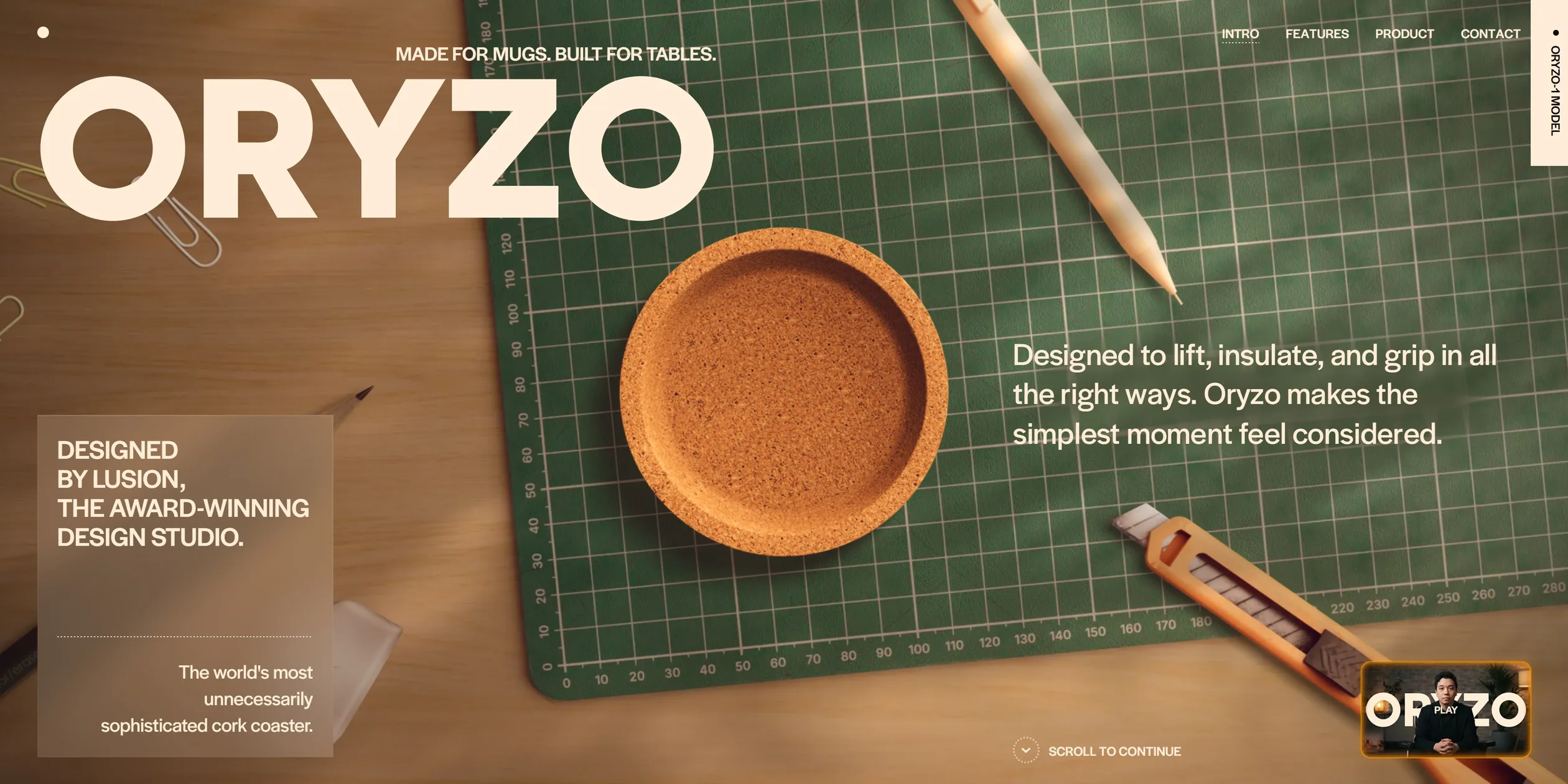
The site opens with a loading screen that draws the coaster's outline the way a vector drawing app would, with orange handles hanging off two concentric circles. After the loader, the first screen is a top-down shot of a work desk, where a green cutting mat holds the coaster, a pencil, a utility knife and paper clips. A huge ORYZO sits in the top left, and a frosted glass card in the bottom left reads DESIGNED BY LUSION, THE AWARD-WINNING DESIGN STUDIO. The bottom right holds a thumbnail of the founder video, which visitors can play right on the page.
The skeleton of the whole site is a standard product page. The order the team lists in the series is hero, key benefit, usage, specs, reviews, comparison and purchase, and the site runs in that same order from top to bottom, about sixty-four screens in all. The difference is that every section is rewritten in the language of AI. The key benefit section says Powered by AI, and the small print notes that this AI is Adobe Illustrator. The specs section calls heat retention a thermal diffusion model, calls roundness RoPE (Roundness Optimization & Perimeter Engineering), and claims the coaster is 37.9% more circular.
The jokes in the second half of the site stick just as closely to real product pages. One review is signed Edan K., a would-be astronaut, and another borrows Gol D. Roger from the manga One Piece. The comparison table names the three tiers ORYZO, Pro and Pro Max, and lists connectivity as none and updates as never. The page ends with a section dressed as an academic paper, presenting Oryzo-1 as an open-weight coaster model with a paper, model files and a citation block.
The team set four principles for the site: a realistic image, the product at the centre, seamless transitions and humour. The series explains that a premium product page is not a spectacle-driven experiment, so the team held back the dramatic transformations and the objects flying across the screen, and kept the coaster at the centre of the frame. The whole page is therefore one continuous world, moving from the desk to a dark stage and from a photo wall to a microscope without the camera ever really cutting away. The humour follows the same rhythm, with the page presenting specs seriously most of the time and inviting visitors into the joke in only a few places. Visitors can move the hand's fingers with the cursor, ask the coaster to put on a bikini, write a secret message on its underside, or make a water bear pop out of the microscope. The last screen reads we caught your attention with a non-existent product, followed by a button to Lusion's own site and the studio's business email.
02Design
Oryzo's design rule is to keep the layout as quiet as possible and leave the attention to the 3D scenes and the jokes about AI. The team writes that the page already carries renders, photography, hand drawings and a desk full of props, so the design could not compete for attention, and it kept typefaces and colours to a minimum. Nearly the whole page sits on a brown so dark it reads as black (#100904), with text in a warm cream (#ffedd7). The accent is a reddish orange (#dc5000), used mainly for small labels such as ORYZO-1, highlighted words in the reviews and the selected button. The fourth colour is a greyish olive (#445231), used on the first data card in the sustainability section, and the loading screen sits on a similar green. The dark brown and cream make the site feel like a dimly lit showroom, so every time the orange appears, the visitor's eye is pulled to a key word or something to press.
More than nine tenths of the text on Oryzo's pages is set in one sans serif (a typeface whose letters have no small finishing strokes), Halyard Display, and headings and body copy are separated only by size and weight. Body copy and small headings use weights 400 and 500, and only the screen-filling words such as sustainability and Runs on the edge go up to 600. On a 1920 pixel wide screen the common sizes are 164, 68, 45, 32, 24 and 16 pixels, so the largest heading is about seven times the body text. The scale looks at both the width and the height of the screen and follows whichever is tighter, so on a wide but short laptop screen the headings never grow large enough to push out of the frame. Under the layout is a sixteen-column grid, which on a 1920 pixel screen gives 90 pixel columns, 24 pixel gutters and 60 pixel margins on each side.
The team broke these rules deliberately in only two places. One is the magazine cover at the end of the photo wall, where RISE, We Are So Cooked! and the issue number switch to a serif with small finishing strokes, Literata, laid out like an old fashion magazine. The team writes that this is one of the few places where the interface itself is allowed to be showy, because the scene around it calls for that kind of decoration. The other is the mock paper for ORYZO-1, where the citation block switches to the monospaced DM Mono and looks lifted straight from an academic site. Both exceptions imitate another medium, so they do not break the overall quiet.
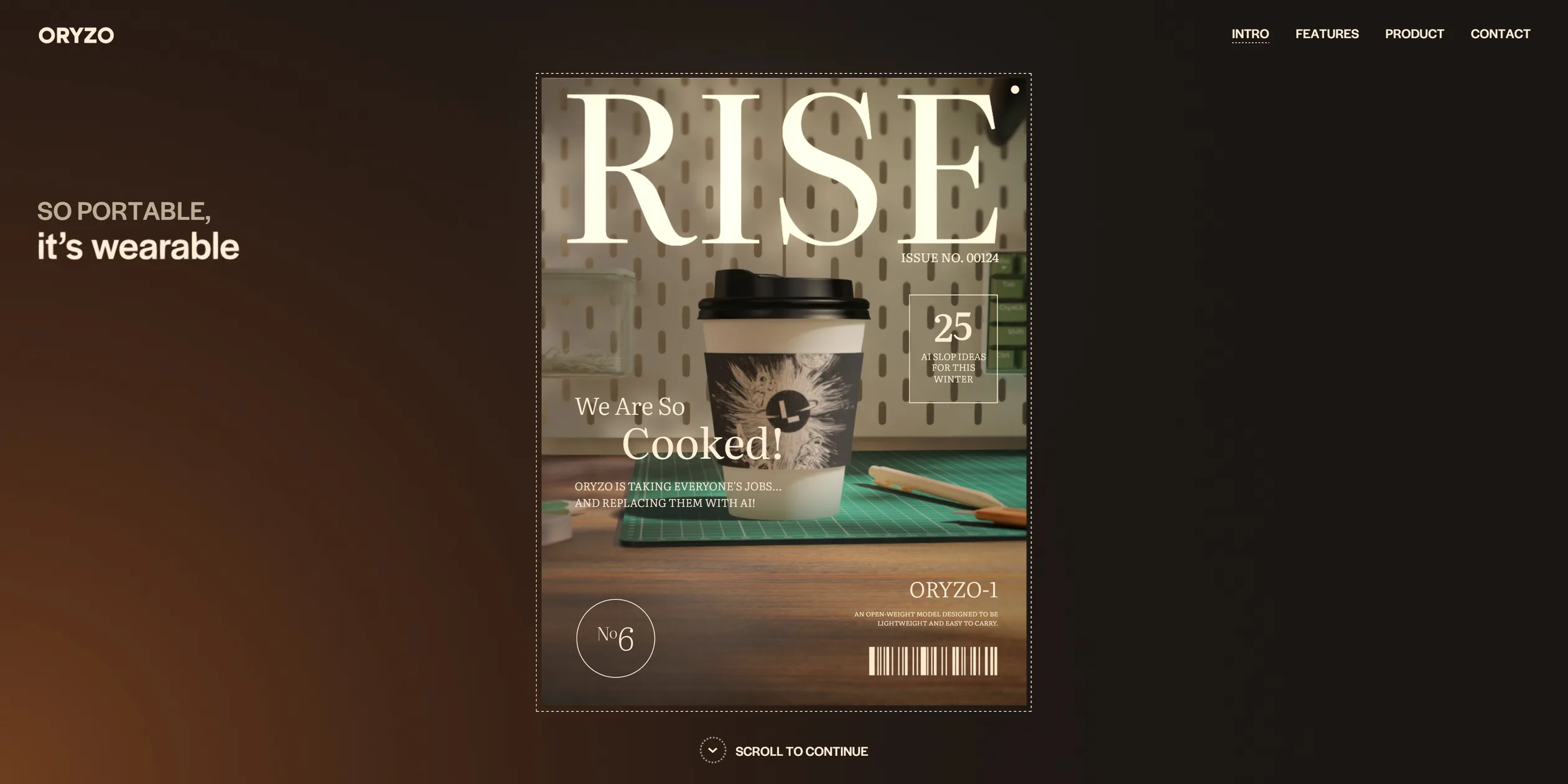
The interface elements on Oryzo are small and share one look. The four navigation links in the top right are small capitals, and when the cursor moves over one, its letters roll over once while the rest of the page dims, leaving only the navigation lit. Buttons are pills, dark for ordinary actions and orange for the main action such as Send. The photo wall sits inside a dashed viewfinder frame with a tick at the middle of each side and a small dot in the top right corner, like a camera's focus frame. A cream tab in the top right of the first screen reads ORYZO-1 MODEL vertically. It is actually the scrollbar for the whole page, and clicking it jumps straight to the ORYZO-1 section at the end, while scrolling down shrinks it into a thin slider on the right edge.
The art direction for the 3D scenes is real materials under warm light. The coaster's cork surface shows clear grain and relief, and the dark brown space behind it glows orange in the lower left corner. The desk in the middle of the page is a solid wood table with a pegboard, a green keyboard, a game controller and a lidded cup of coffee, all dappled with patches of light. The team writes that it dropped a first concept that was more abstract and closer to a typical award-winning site, because it felt lifeless, and accepted a little less minimalism to put the product in a believable setting. To balance all the tech polish, the team drew every illustration on the site by hand in Procreate, and none of them used AI. They include the orange sketches in the style of da Vinci's anatomical studies in the roundness section and the astronaut on the coffee cup.
On phones, Oryzo keeps every 3D scene and simply sets the text in one column. The four navigation links collapse into a pill labelled MENU, and the big ORYZO and the intro text sit above the coaster on the first screen. The desk on the phone's first screen has no pencil, knife or paper clips, only the cutting mat and the coaster. On tablets, the screen is wider than 767 pixels, so the site uses the desktop layout while downloading the set of assets prepared for phones.
03Motion
Almost every movement on Oryzo follows the scroll position. The picture stops wherever the visitor stops scrolling and plays backwards when they scroll back up, and very few animations play out on their own once triggered. Headings enter the same way, with each word of a small label rising from below, the letters of a big heading sharpening out of a blur one after another, and lines of body text sliding up one by one. If the visitor stops halfway, the words stay half blurred. The site also takes over scrolling itself, moving 100 pixels per wheel notch, and the page catches up quickly at first and then slows. It covers nine tenths of the distance in about a quarter of a second and settles at around 0.4 seconds, so the page scrolls smoothly without overshooting.
The opening joins the loading screen and the first screen into one movement. The two rings on the loading screen first grow into place with a slight bounce, then fill with cream around the ring as loading progresses, while a few dashed circles turn slowly beside them. When loading finishes, the line drawing fades and the top-down desk comes into focus out of a blur, with the real coaster landing exactly where the ring was, as if the design drawing had turned into the object. Right after that, the pencil, knife and paper clips fly in from outside the frame, each starting a little after the one before, and land on the desk within about a second, fast at first and then easing in. On desktop, sweeping the cursor across these props pushes them aside a little, and the pencil and knife wobble a few times before settling in their new spots.
Once the visitor starts scrolling, the desk on the first screen pulls back slightly and blurs, the coaster rises off the desk into a pitch-black space, and the big ORYZO shrinks into the small logo in the top left. The coaster turns in the dark, showing its edge and then its face, as ISN'T JUST A COASTER fades in. Then the letters of Powered by AI surface one by one out of a blur, and a six-fingered hand rises from the bottom of the screen to hold the coaster on its fingertips. Every joint of the hand moves frame by frame with the scroll position, and when the visitor scrolls back, the hand slowly lowers again. As the hand appears, a band of pink, orange, yellow and cyan light glows around all four edges of the screen. The glow starts at the right edge where the scrollbar sits and then spreads around the frame, imitating the rainbow border that appears when AI features start up on an iPhone.
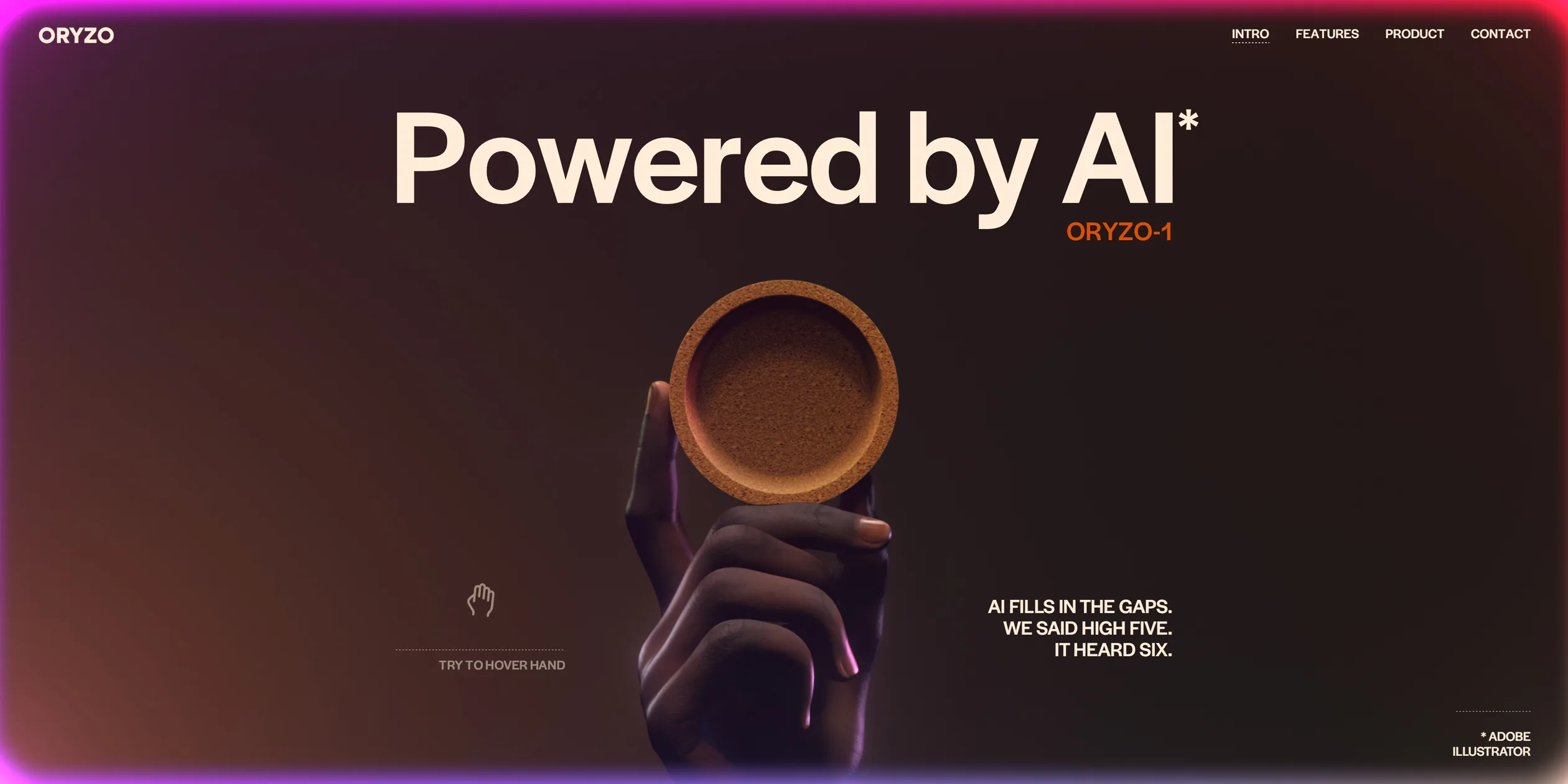
The hand also responds to the cursor. When the visitor moves the cursor over the hand and then slowly down, the curled fingers straighten one after another, and the lower the cursor goes, the more fingers open. When the cursor leaves the middle of the screen, the fingers curl back. Each finger chases its target with a little spring, overshooting slightly before settling, so the fingers have weight like real ones. On phones, the site uses the tilt of the phone to drive the fingers instead, and tilting the phone to one side makes them open.
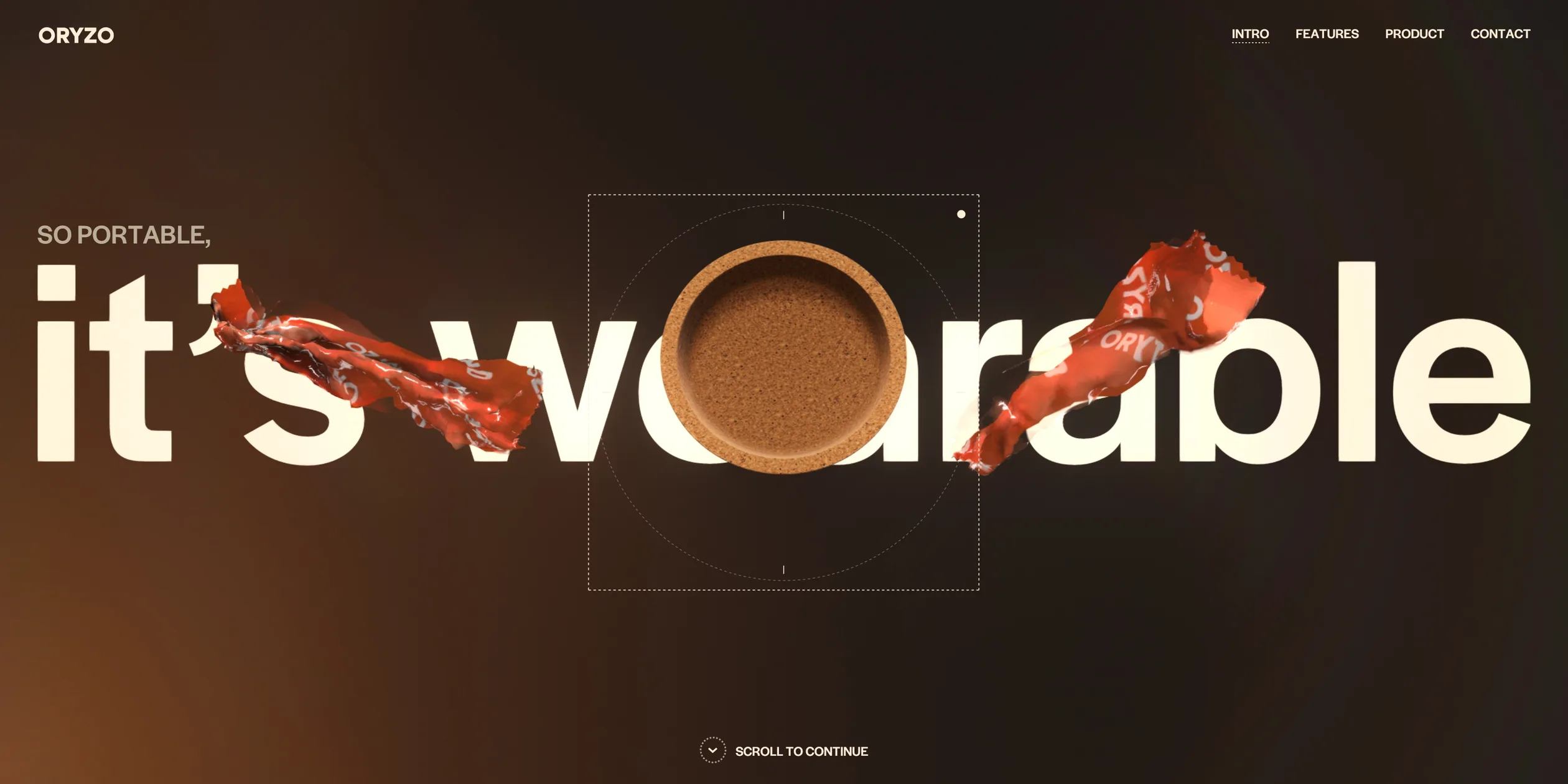
Further down, the coaster is placed inside a dashed viewfinder frame, with a small SO PORTABLE beside it. An orange wrapper printed all over with ORYZO then seals the coaster, and a huge wearable slides in from the right. As the visitor keeps scrolling, the wrapper tears open from the top and its pieces curl away to both sides, the big words become it's wearable, and the coaster sits right between two of the letters. The words then flare with white light, and the coaster drops into a photo, where it becomes an AI pin on someone's jacket. A small cyan holographic panel appears next to the pin, reminding the wearer that they have only had three cups of coffee today.
The photos then line up in a horizontal strip, and each stretch of scrolling slides the strip one frame to the left, with small thumbnails moving along on both sides. The strip has eight frames, opening with the pin on the jacket and closing with a magazine cover. One of the middle frames is a short video of a yoga practitioner turning their head all the way around, captioned as a stunt performed by professionals that should not be attempted at home. In the other frames the coaster rests on someone's shoulder, covers one eye and is held between someone's teeth. One frame is a photo of the coaster on red, with a chat prompt underneath that reads Hey @oryzo, can you put on a bikini? When the visitor clicks Send on the right, the prompt slides away, the photo sharpens out of a blur and the coaster now wears a teal bikini, a jab at the habit of asking AI to edit photos on social media.
The magazine cover links the photo wall to the 3D scene that follows. The coffee cup on the cover is the same cup that sits in the 3D scene behind it, and once the cover text has cleared, the camera pushes straight into the cover and the magazine becomes a full 3D desk. On this desk the camera moves along a route the team designed in advance, travelling exactly as far as the visitor scrolls. The first stop shows the coaster lifting a cup. At the second, the whole picture switches to thermal imaging, sweeping in along a diagonal from the lower left corner to the upper right, with the coffee cup showing as the brightest yellow. A scale on the right runs from CREATIVE T=10 down to DETERMINISTIC T=0.1, a joke about the temperature setting of language models.
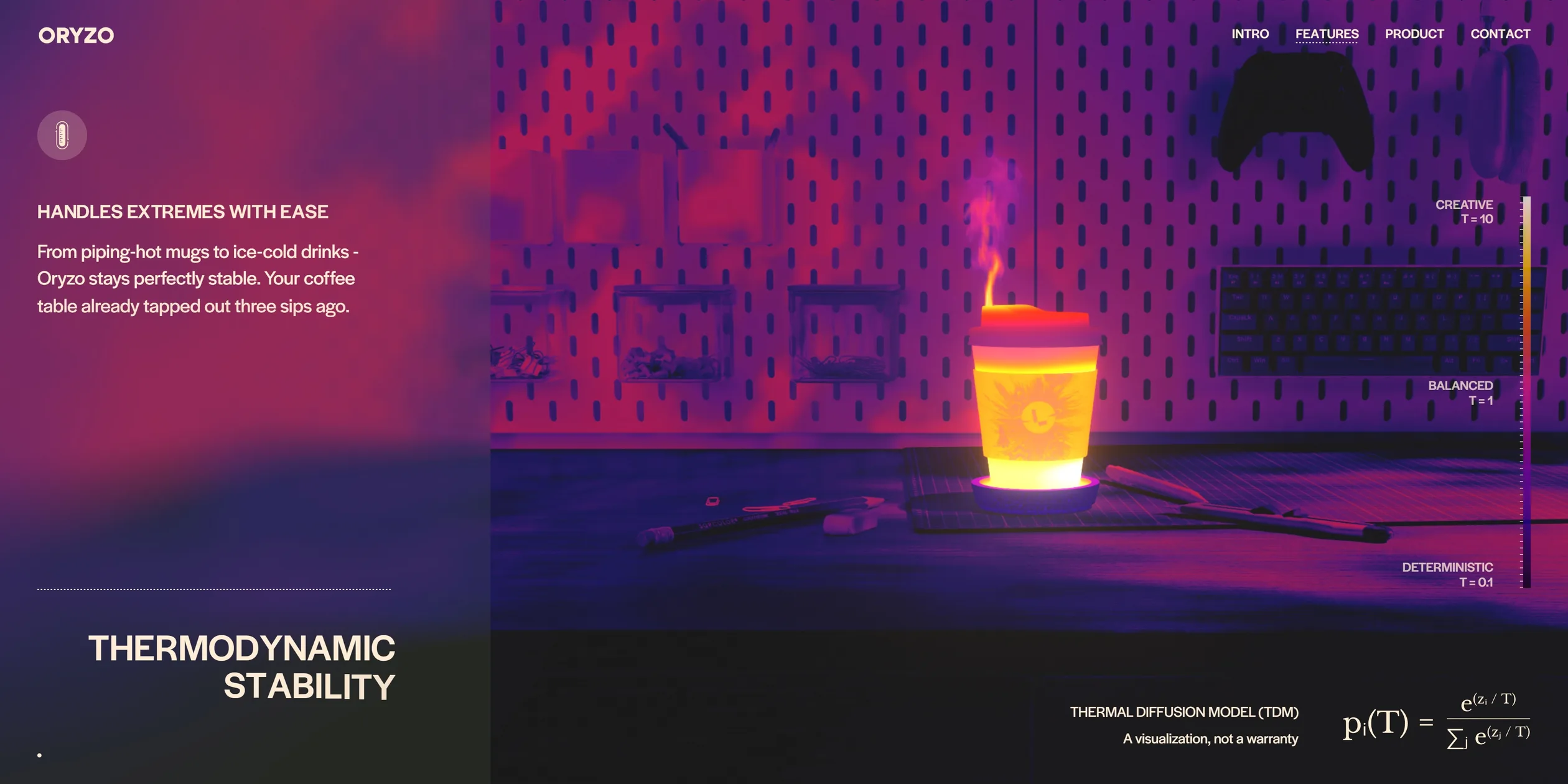
At the third stop the camera turns to look straight down on the desk, the coaster becomes an orange line drawing, and hand-drawn sketches around it fade in and out one by one. Moving the cursor across them drags the sketches into a blurred smear. Finally, two circles in the line drawing stretch into the two Os of the ORYZO logo, and the whole logo grows out of construction lines drawn in the same style as the opening loader.
There are two more places in the middle of Oryzo's page where visitors can play. In the encryption section, the visitor types a message into the field and it appears printed on the underside of the coaster. When the visitor presses the button, the coaster flips over in about 0.8 seconds and hides the message underneath, landing at a random angle every time. In the grip section, the camera closes in on the coaster's edge, the picture fades to black and white, and a small microscope window shows the cork magnified. Visitors can hold the window and drag it left and right, it springs back to the middle on release, and the friction coefficient on the window changes between 0.80 and 0.93 as it moves. If the visitor shakes it back and forth several times, a 3D water bear pops out of the window with a bounce while smaller water bears drift across the whole screen.
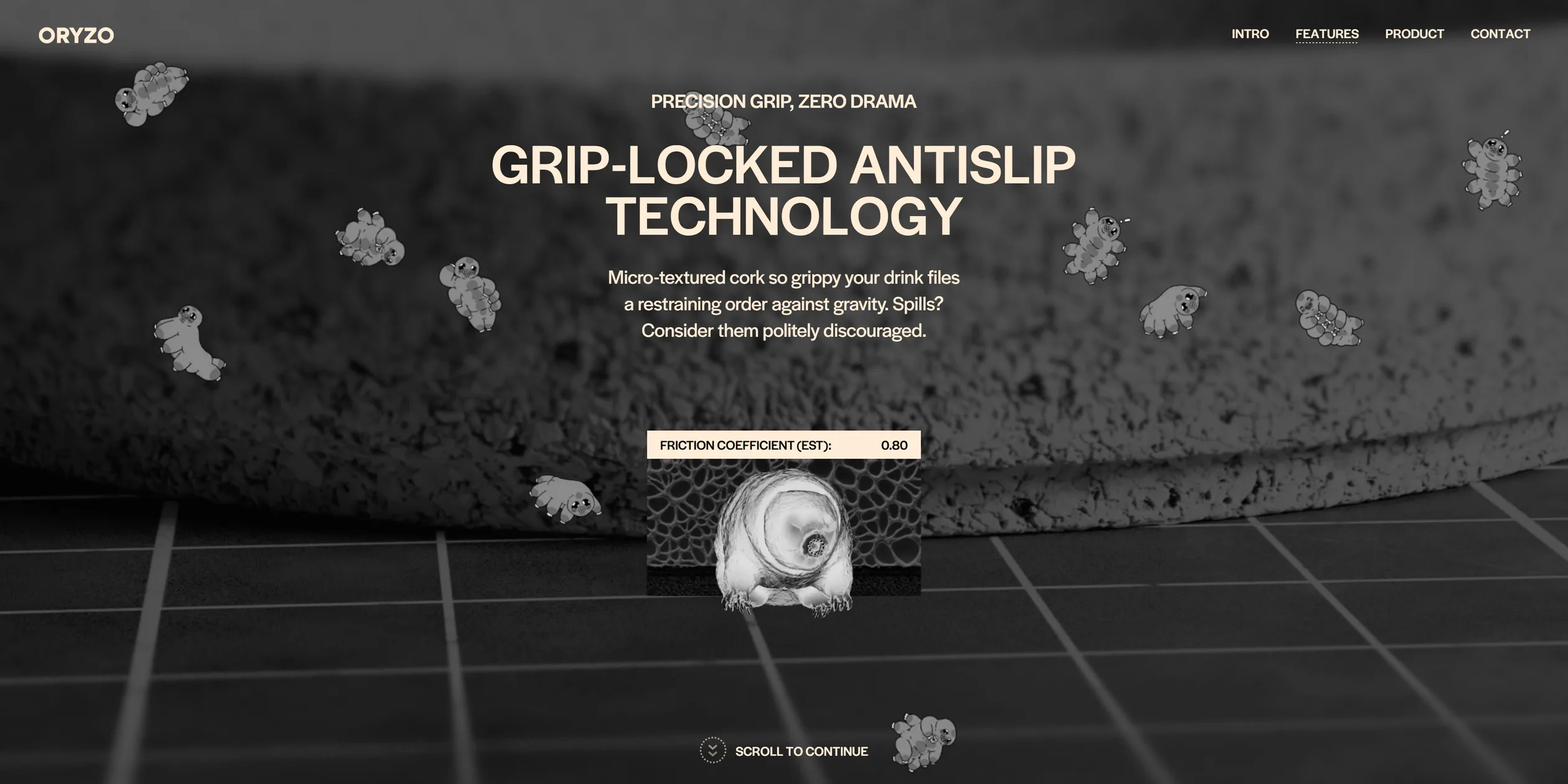
In the second half of the page, the site's movement is more restrained. The sustainability section opens on a close-up of bark that splits down the middle to reveal the word sustainability, and the background then flips from dark brown to cream under the swaying shadow of a palm leaf. In the review section, a coaster turns slowly in the middle of the list. Further down, a horizontal strip of cards moves left as the visitor scrolls down, and the photo and heading inside each card move at different speeds for an extra layer of parallax. In the model picker, clicking Pro or Pro Max stacks the coaster into two or three layers in about half a second. In the footer background, a stream of coffee beans flows slowly along a spiral path, and the cursor pushes nearby beans aside as it passes.
From the desk past the photo wall, the microscope and the model picker down to the footer, every section holds 60 frames per second under a scroll wheel. The first time the page scrolls through the stretch from the photo wall to the desk after opening the site, it sometimes freezes for close to a second, and a second pass runs clean.
04Engineering
Oryzo is a static page built with Astro, and every 3D scene is drawn on one full-screen WebGL canvas fixed behind the page, with the text, buttons and photo wall layered on top as ordinary HTML elements. The canvas runs on Lusion's own engine, built on a version of three.js the studio has modified. Each frame, the engine reads where each HTML section sits on screen, converts that into the section's progress and hands it to the matching 3D scene. The whole site uses a single coaster model, the same object from the first screen to the model picker. Each section only swaps its environment lighting, light position and material, so when the camera changes scenes the coaster is never replaced and the seams do not jump. Post-processing settings are stored per section too, with separate values for bloom, depth of field, vignette and grading, blended between neighbouring sections by scroll progress.
Scrolling and the camera routes are the core of this continuity. The site intercepts the browser's native wheel events, adding 100 pixels to a target position per notch, and the actual position closes in on the target exponentially each frame with a coefficient of 12, roughly an 80 millisecond time constant. The result is written back to the browser's native scroll position, so HTML elements are still positioned by native scrolling. The camera routes and the movements of the coaster and coffee cup are animations the team built in Houdini and exported as per-frame position, rotation and focal length. The engine finds the two frames that match a section's progress, interpolates position linearly and rotation spherically, and converts focal length into field of view, so the visitor's scroll wheel is really scrubbing a camera move cut in 3D software. Text entrances use GSAP's SplitText to split headings into letters and body copy into lines, but the code, not a tween, sets each letter's opacity and blur from scroll progress every frame, keeping text and camera in step.
The desk on the first screen and the desk in the middle of the page are drawn in two completely different ways. The top-down desk on the first screen is actually flat, with the desk and cutting mat as one image rendered from directly above, and the pencil, knife and paper clips each as an image on a flat plane. Each prop image holds three pre-lit versions side by side, with a height map in a fourth strip, and as a pushed prop wobbles, the code blends the two nearest versions, so shadows and highlights always look right. Each prop also has its own collision force, damping and spring strength, and its shadow is drawn as a separate blurred image offset along a fixed light direction. The solid wood desk in the middle, which the camera circles around, is a true 3D scene. Its small props and the reflections on the desk use Gaussian Splatting (recording a scene as a large number of semi-transparent ellipsoid points), while large surfaces such as the table and cutting mat still use ordinary models and textures.
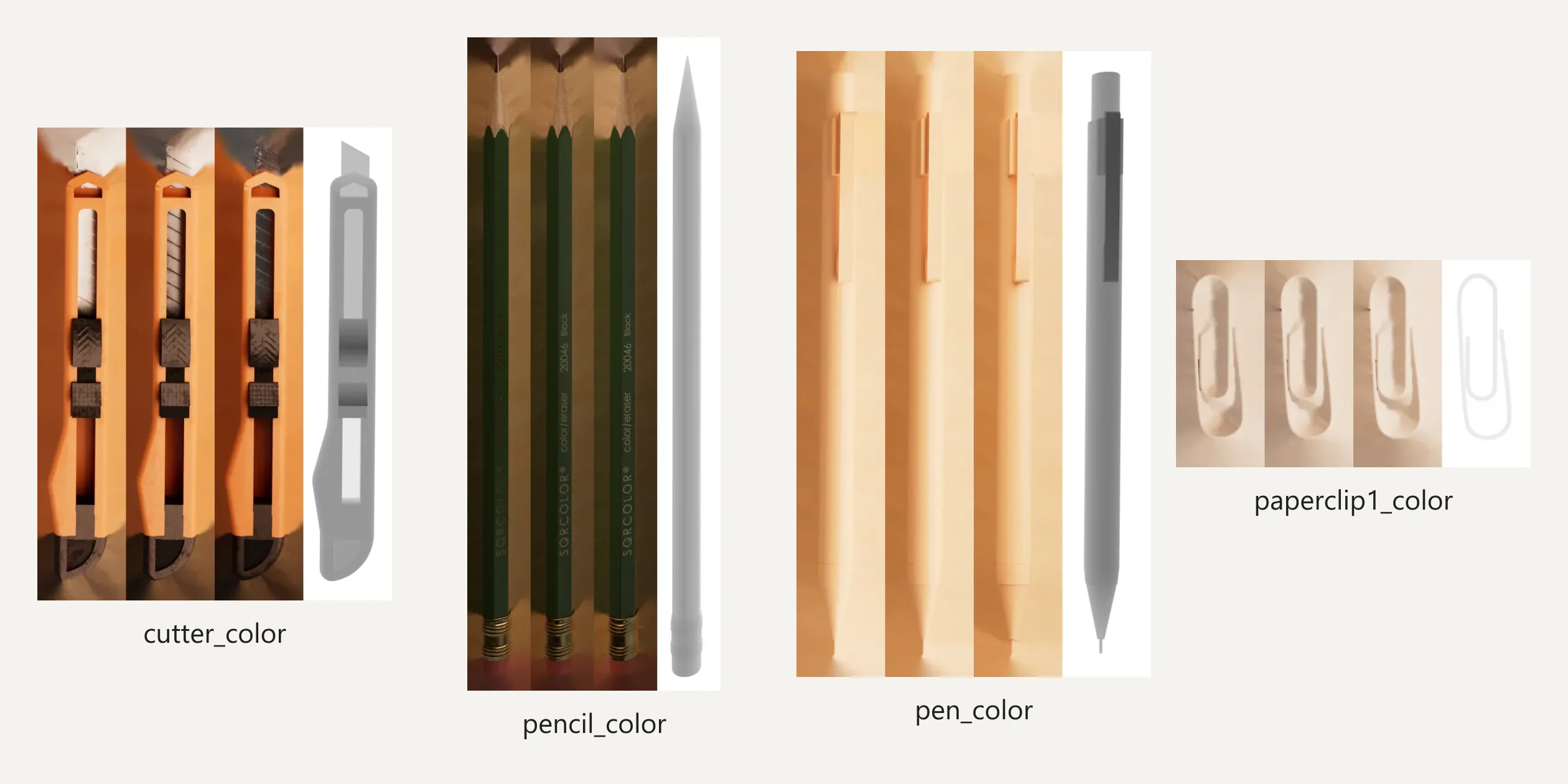
The team explains in the series that real-time PBR rendering could not reach the quality it wanted, and that image sequences or video could not be interactive. The team therefore rendered the scene in Houdini from many angles spread over a hemisphere and trained the renders into splats with Postshot. The team first tried turning the whole desk into splats, using about 900,000 points, and the wood grain and fine lines on the cutting mat were still blurry. Once the team limited splats to the props and reflections, the point count fell to about 77,000 on desktop and about 45,000 on phones, and the image actually got better. The team also notes that rendering the training images along the site's final camera route made the result worse, because a slow eased camera produces many nearly identical frames and misses the angles that matter. The table and cutting mat textures were rendered from above and from the front, stitched in Photoshop and warped by a shader so the desk's central half, where the camera lingers, gets about nine tenths of the detail.
Lusion wrote its own splat renderer. A splat file is an uncompressed zip holding several WebP images that store each point's position, rotation, scale, base colour and view-dependent colour, plus a JSON file of codebooks for decoding. The site parses the zip itself, decodes the images and packs everything into one integer texture with a single GPU pass, then reads each point's centre back into memory. View-dependent colour takes up most of the file, about 2.1 MB of the roughly 3.0 MB props file.
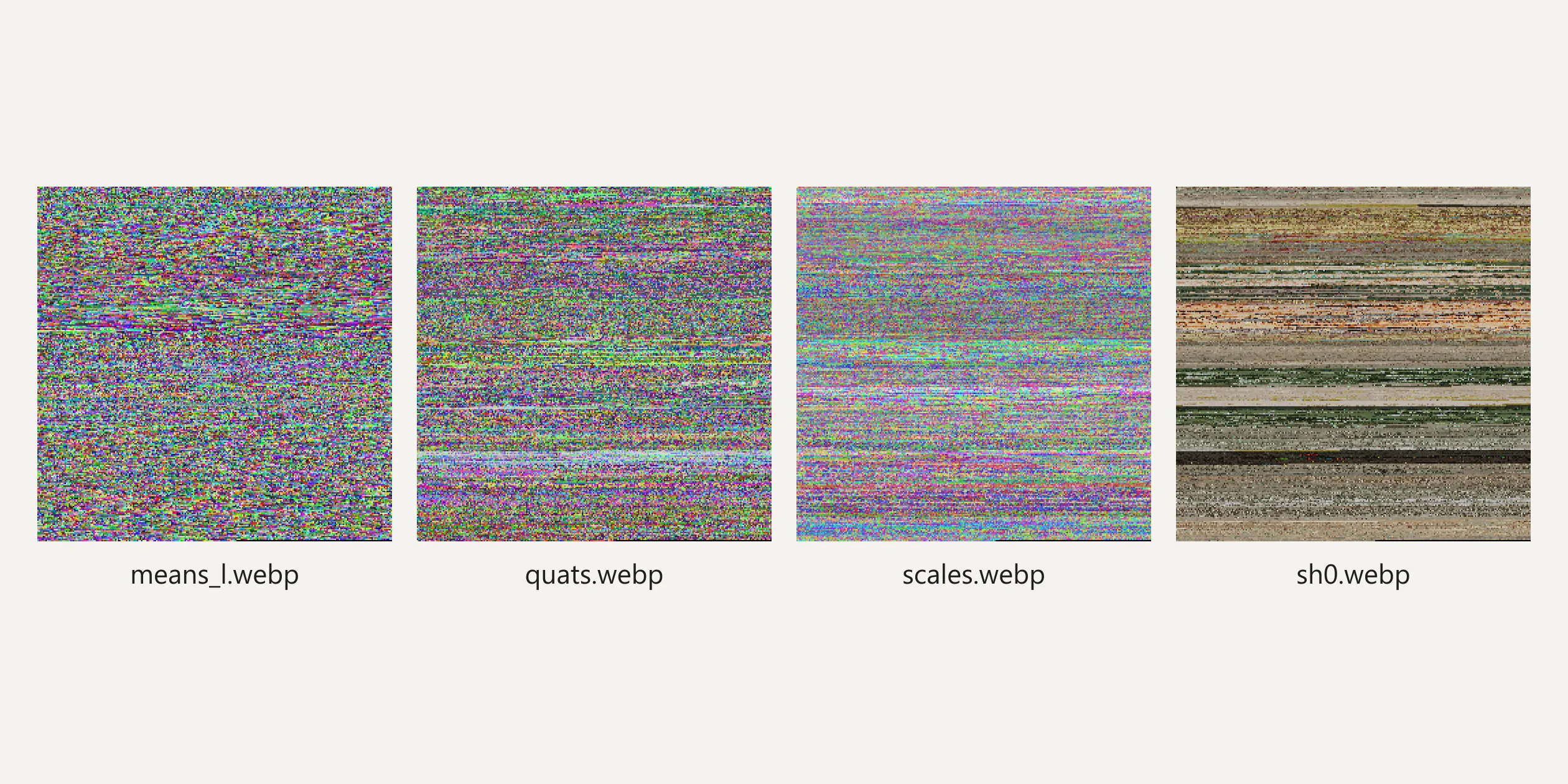
Splats have to be sorted by distance from the camera to blend correctly, and that work goes to a Web Worker. The worker runs a sorter written in Rust and compiled to WebAssembly, which sorts on 24-bit depth keys and hands the result back to the main thread as a transferred buffer without copying. When the camera's direction and distance have not changed, the code skips the sort, so this part costs almost nothing while the camera is still.
The other signature effects follow one idea, computing complex simulations and animations ahead of time, storing them in textures and reading them back in shaders. The six-fingered hand stores every bone's position and rotation for every frame in one animation file, and the code interpolates between two frames by scroll progress into a tiny data texture that the vertex shader uses for skinning. The cursor-driven fingers add a rotation on top, each chasing its target through a second-order spring system, which is why they overshoot slightly before settling. The wrapper tear was simulated in Houdini with Vellum, where two layers of different stiffness are first pulled tight and then break apart wherever the load exceeds the limit of their weld constraints. The simulation was baked into an animation texture recording the position and orientation of 1,024 point groups over 32 frames, and scroll progress acts as the playhead. The water bear works the other way and is computed live, with its bones driven by a simple wiggle system plus random Brownian motion, so it never strikes the same pose twice.
The remaining image effects live in post-processing. The site turns off the browser's built-in antialiasing and renders colour together with a per-pixel velocity, then uses temporal antialiasing (TAA) to blend in earlier frames along the motion, falling back to SMAA when TAA is off. After that come depth of field, the rainbow border, bloom, frosted glass, the cursor smear and a final grade. The frosted card on the first screen, the encryption field and the citation block in the paper section skip CSS backdrop blur, and the code blurs and tints the matching patch of the WebGL picture underneath them instead. The thermal view is also a full-screen post effect that reads the rendered picture, looks up a colour in a thermal gradient by brightness, and uses a soft-edged diagonal to decide which part switches to thermal. The secret message on the coaster's underside uses a multi-channel signed distance field (MSDF) font texture, so any text a visitor types prints crisply on the 3D surface.
All this imagery makes the download large. Opening the page on desktop downloads about 16.6 MB, of which WebP photos and textures make up about 6.5 MB, models about 3.5 MB and the two splat files about 3.5 MB. The largest single file is the roughly 3.0 MB props splat. The Rive runtime alone is about 0.65 MB, yet it only plays the small animations on two cards in the sustainability section. The models use Lusion's own binary format, with vertex data quantised to integers within each attribute's range and restored on load.
Phones receive a lighter set of assets. The code switches to reduced textures and splat files by device type, dropping the props splat to about 1.6 MB and the whole page to about 10.4 MB. The props and their physics on the first screen are not loaded at all on phones, and depth of field switches to its low-quality mode. Every device renders at a pixel ratio of at most 1.5 and a total of at most 2560×1440 pixels, so high-resolution phones never draw extra pixels nobody can see.
The loading screen waits for more than files. The first nine tenths of the progress ring track file downloads and take at least one second, and the last tenth tracks shader compilation. The site queues every material the page will need and hands one per frame to the browser to compile asynchronously, entering the first screen only when all of them are done. The first screen arrives a little later as a result, but scrolling into a new scene never stalls on a shader compile. The server returns the first byte in about 0.05 seconds, the loading screen appears at 0.52 to 0.74 seconds, the full first screen appears 3.5 to 4.5 seconds after opening, and the layout does not shift.
Oryzo's interactions mostly serve visitors with a mouse or a touchscreen. Pressing Tab from the top of the page sends focus straight to the Lusion link in the footer and scrolls the page to the bottom. Buttons in the middle of the page can only be reached by keyboard while their section is on screen, and the play button for the video on the first screen cannot be reached at all. The video window cannot be closed with Esc, and almost none of the photos have alt text, so screen reader users get nothing from the photo wall or the reviews. The site ignores the reduced motion setting, and with it turned on, the camera, the wrapper and the rainbow border all move as usual.
05Scores and Team
| Award | Source | Date | Score |
|---|---|---|---|
| FWA of the Day | The FWA | 2026-03-25 | 90 POINTS, DAYS 2 |
| FWA of the Month | The FWA | March 2026 | Monthly award, no separate score |
| Website of the Day | CSS Design Awards | 2026-04-09 | Jury 9.22 |
| Website of the Month | CSS Design Awards | April 2026 | Monthly award, no separate score |
| Site of the Day | Awwwards | 2026-04-13 | 7.86. Design 7.90 / Usability 7.51 / Creativity 8.35 / Content 7.76 |
| Developer Award | Awwwards | 2026-04-13 | 7.87 / 10 |
| Site of the Month | Awwwards | April 2026 | Monthly award, no separate score |
Oryzo first won FWA of the Day on 25 March with 90 points, then became the FWA's site of the month for March. On 9 April it won Website of the Day at CSS Design Awards, and it later became that platform's website of the month for April. On 13 April it won Awwwards Site of the Day and the Developer Award, and it went on to become Awwwards Site of the Month for April. Among the four Awwwards categories, Creativity scored highest at 8.35. Presenting a coaster in earnest as a new AI product, with the camera almost never cutting away, is the likely reason this category came out on top. Usability scored lowest at 7.51, and a page more than sixty screens long whose interactions are mostly out of keyboard reach may have pulled it down.
The five developer jurors gave 7.87. Animations and WPO scored highest at 8.60 each, and Accessibility scored lowest at 7.00, matching the keyboard gaps and missing photo descriptions covered in the engineering section. The FWA filed the site under design and production studios, fun and playable, and AI.
| Credit | Who | Track record |
|---|---|---|
| Lusion | A digital production studio in Bristol, UK, founded by Edan Kwan in 2017. This site is an internal studio project | Awwwards works 20, SOTY 1, SOTM 3, SOTD 14, HM 20. FWA 25 |
Lusion is a regular on both platforms, with 14 Sites of the Day and 14 Developer Awards on Awwwards, and the studio's own site won both Awwwards and FWA Site of the Year for 2023. In the studio's self-introduction on Codrops, Lusion writes that Edan Kwan comes from Hong Kong, first studied music, and then taught themself design and coding. Edan Kwan freelanced for several years and worked at an agency in New York before starting the studio. Lusion handled the design, 3D production and development of Oryzo in house. Edan Kwan wrote the behind-the-scenes series, co-writing the 3D part with Paul Catoera and the design part with Andrii Ovsiannikov. The series lists Edan Kwan as co-founder, executive creative director and lead engineer, and Edan Kwan also recorded the voiceover for the founder video.
06Archive
- Award date
- 2026-04-13
- Awards
- Awwwards SOTD 2026-04-13, Awwwards DEV 2026-04-13, Awwwards SOTM 2026-04, The FWA FOTD 2026-03-25, The FWA FOTM 2026-03
- Site
- https://oryzo.ai/
- Credits
- Lusion
- Design
- cinematic
- Build
- scroll
- Awwwards
- 7.86 / 10. Design 7.90 / Usability 7.51 / Creativity 8.35 / Content 7.76. Developer Award 7.87. https://www.awwwards.com/sites/oryzo-ai
- The FWA
- 90 POINTS, DAYS 2. https://thefwa.com/cases/oryzo-ai
- Stack
- Astro, three.js r178 (modified by Lusion), custom scrolling, post-processing and Gaussian splat rendering, GSAP SplitText 3.14, Rive 2.37, Vimeo, Halyard Display, Literata, DM Mono
- Total assets
- About 16.6 MB, of which photos and textures about 6.5 MB, models about 3.5 MB, Gaussian splats about 3.5 MB. About 10.4 MB on phones
- Speed
- FCP 524 to 736 ms (loading screen), full first screen 3.5 to 4.5 seconds, CLS 0. Continuous scroll 60 fps