Ceramic Beats
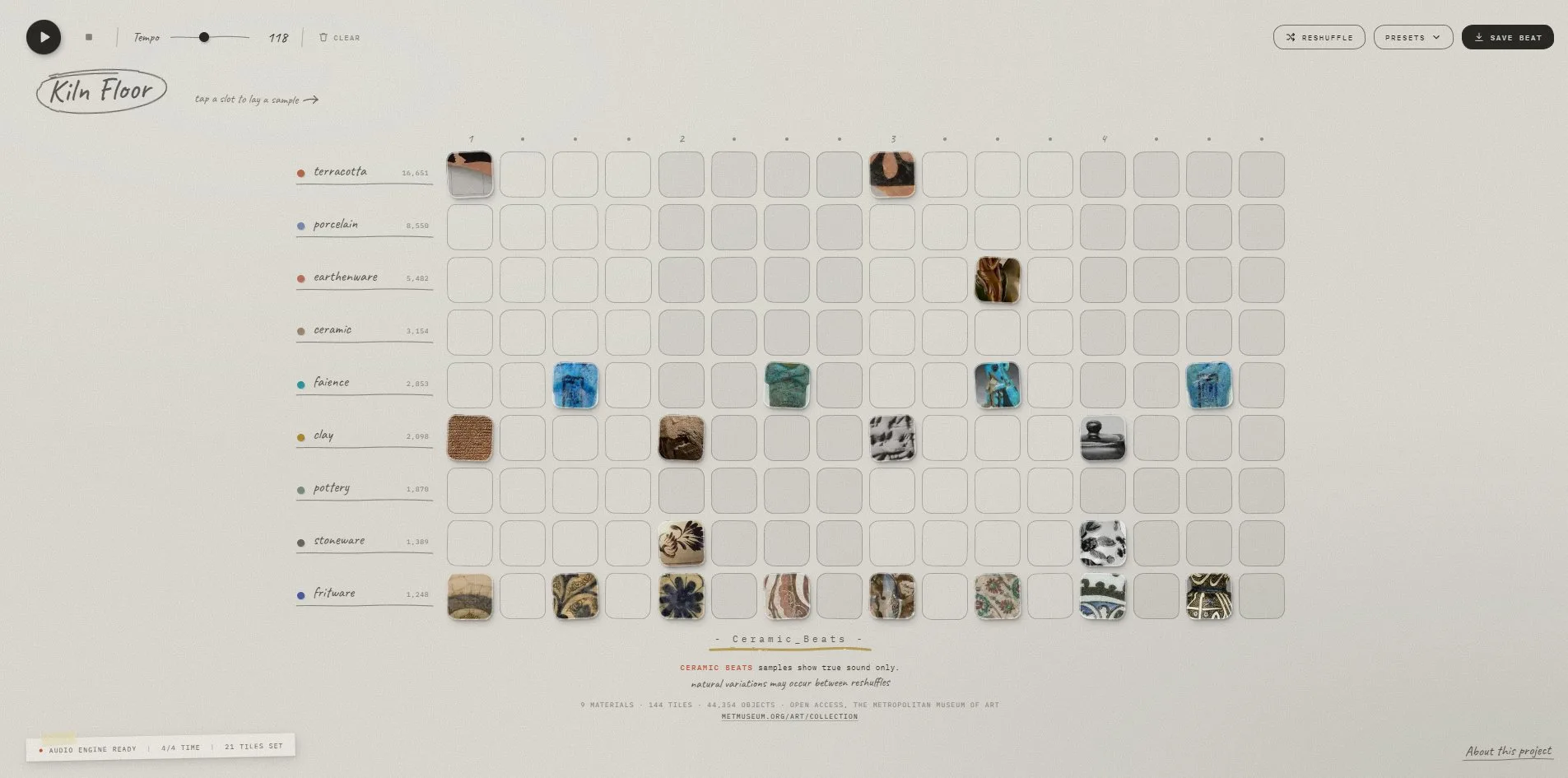
Ceramic Beats is a drum machine in the browser, where a visitor lays out a beat on a grid and it plays on a loop. Its nine tracks are the nine ceramic materials in the Metropolitan Museum's own catalogue. Each of the 144 slots stands for a real object in the collection, shown as a corner cropped from its open access photograph, and when the cursor rests on one, a visitor can see whether it is an Athenian cup from the fifth century BCE or a fifteenth century mosque lamp. When a visitor taps a slot to lay the object down and presses play, the machine sounds that material being struck, clay dull, porcelain ringing.
Zui Chen made the site alone, and it won FWA of the Day with 82 points.
01Concept
Through its open access programme, The Met Open Access, the Metropolitan Museum has made the photographs and data of more than forty thousand ceramic objects free for anyone to use. This site borrows one ready-made structure from that release, the fact that the museum's own catalogue is sorted by material. In the catalogue, terracotta has 16,651 objects, porcelain 8,550, and so on down to fritware, a ceramic body made with ground glass, with 1,248. The nine materials become the nine tracks, and each row begins with the material's name and its count, so a row of the drum machine is a row of the catalogue.
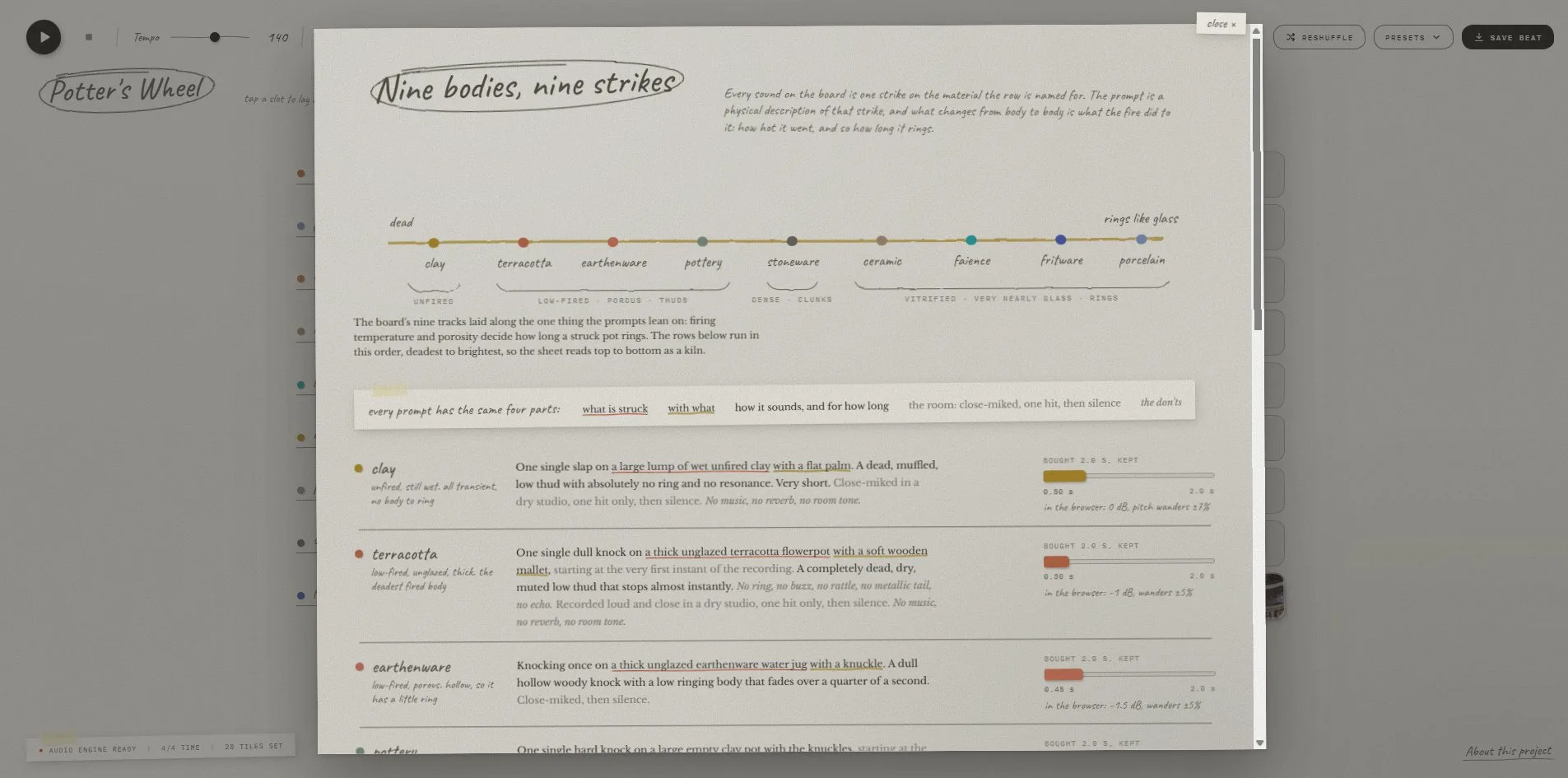
The drum machine's sounds come from the nine materials too, with one strike sound for each material. The sounds were not recorded but generated through the sound effects API of the AI audio company ElevenLabs, each from a written description of what is struck, with what, and how long it rings. What separates the nine sounds is firing temperature. Unfired clay gives a dead knock with no ring at all, and a terracotta pot gives a single dull thud. Porcelain, faience and fritware are fired until they vitrify, meaning the body partly melts into glass, and they ring like the glass they nearly are. A separate worksheet on the site lays out all nine descriptions, how much of each two second clip bought from the API was kept, and how many decibels each was turned down in the browser, failed attempts included. The stoneware description ends up being about a granite block, because every version written about a pot came back as two seconds of shapeless wash.
The whole drum machine is one board of nine rows and sixteen columns, and each of its 144 slots maps to one object. Thirty two objects are prepared per material, and a row shows a continuous run of sixteen of them. The thirty two are sorted in advance by glaze family and hue, so a row read from left to right runs through that material's colours from light to dark. The Reshuffle button moves each row to another stretch of its thirty two, and every object on the board changes. When the cursor rests on a slot, a small card floats up with the object's title, date and origin. When a visitor holds Alt and clicks the slot, the object's page on the Met's website opens in a new tab.
The site opens on a beat called Kiln Floor, described as four on the floor, in fired clay, at 118 beats per minute. Four on the floor is the dance music pattern with a kick drum on every beat. Besides Kiln Floor, the four other presets each carry a line of description. Amphora is a three three two lean, Greek and Roman, meaning a group of eight notes accented in groups of three, three and two. Potter's Wheel is rolling sixteenth notes with no let up, and Glaze Drift is sparse and slow and mostly porcelain. Frit & Faience uses the bright bodies from the Islamic wing. When a visitor changes any slot, the beat's name gains the word variation, and the name itself can be clicked and rewritten. When a visitor presses Save Beat, the site encodes the whole board into thirty bytes and writes them into the page address. The resulting link is itself the beat, with no account and no server behind it.
02Design
Zui Chen draws the whole site as a worksheet in a studio. The background is a paper colour, rgb(228, 226, 219), and the text is ink, rgb(43, 42, 38). The page has only two accent colours, a terracotta red and a crayon yellow. The terracotta red, rgb(201, 88, 58), marks the play button, the dot that shows the playing position and the line CERAMIC BEATS. The crayon yellow, rgb(183, 154, 70), marks the stroke under the title and a swipe of highlighter on the status strip. Each material also has a marker colour of its own, rgb(188, 106, 72) for terracotta, rgb(42, 157, 163) for faience, rgb(74, 94, 168) for fritware. These colours appear only in the dot at the start of each row and in the outline around a slot as it is struck.
Three typefaces divide the work like a form filled in by hand. Caveat is a handwriting face, used for material names, the beat's name and every note. The beat's name is 38 pixels inside a hand drawn oval, and the rest is 15 to 18. IBM Plex Mono is a monospace face, with every character the same width, used for counts, the status strip, the buttons and the footer, always in 8 to 11 pixel capitals like numbers from a typewriter. Libre Baskerville is the serif, appearing only in the body text of the about panel and the worksheet. The whole board holds fewer than five hundred characters, and more than three hundred of them are 8 pixel monospace.
The slots on the board are the real heart of the sheet. There are 144 squares, each 59 pixels wide, each with four different corner radii. Each is also turned by a fixed angle of up to 2.8 degrees tied to its position, like paper chips cut out and pasted down. An empty slot is white, with a 1 pixel white line drawn inside its edge and two drop shadows outside. The slots come in groups of four, and every other group is shaded with 6.7 percent ink, so a visitor can count the four beats of a bar without looking at the numbers above. A filled slot carries the object's photograph cropped square, keeping the same corners and tilt.
Above the board sits a row of sixteen small dots, the playhead, which shows which step is playing, with beats 1, 2, 3 and 4 marked in handwritten numerals. At the top left is the play button, an ink circle drawn slightly off round, then stop, a Tempo slider for the speed and a Clear button with a bin icon. At the top right are three buttons, Reshuffle and Presets as outlined pills and Save Beat in solid ink. The pill buttons, too, have four corners that are all unequal. At the bottom left a paper strip reads AUDIO ENGINE READY | 4/4 TIME | 21 TILES SET behind a red dot, with a stroke of yellow highlighter across it. The centre of the footer carries the line - Ceramic_Beats -. Under it, red monospace says CERAMIC BEATS samples show true sound only, and a handwritten line adds natural variations may occur between reshuffles, so the whole thing reads like the label on the back of a product.
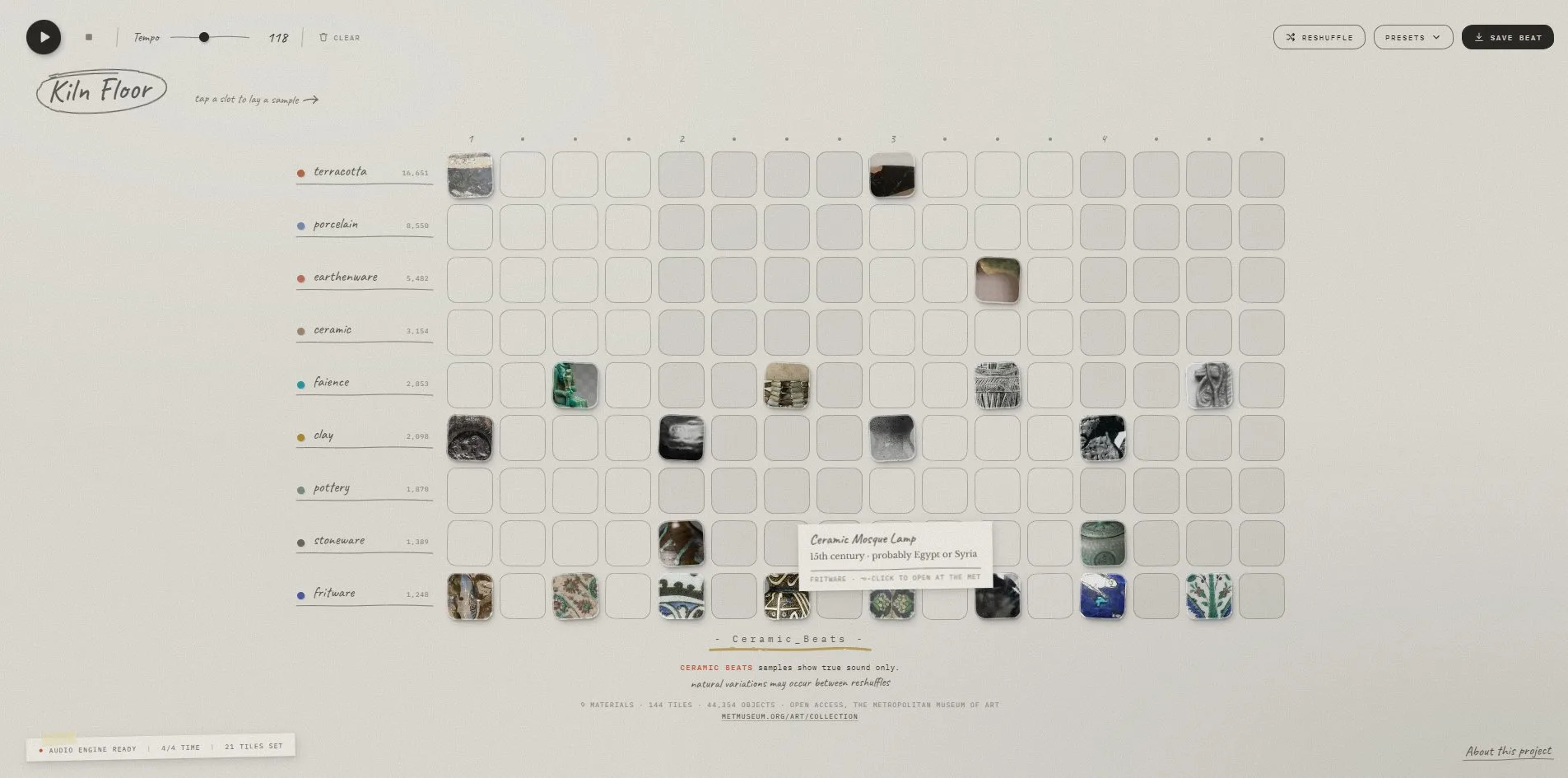
The site's pop-up cards and panels are made of the same paper. The card that appears on hover is pale, with the object's title in handwriting on the first line, its date and origin in serif on the second, and the material and the Alt click hint in small monospace on the third. When a visitor clicks About this project at the bottom right, a sheet of notes slides in from the corner, tilted 0.6 degrees, with serif body text and, at its foot, a handwritten How each sample is generated with an arrow. When the visitor clicks that line, a worksheet of 1,157 by 887 pixels comes up and covers the whole board. The worksheet's title, Nine bodies, nine strikes, sits inside an oval. Below it is a scale running from dead to rings like glass, with the nine materials' coloured dots placed along it by firing temperature. Then come nine rows of sound descriptions, each with a coloured bar on the right marking bought 2.0 s, kept 0.30 s. At the bottom a flow diagram runs from prompt to sound generation to cut to pad.
Every image on Ceramic Beats is the same kind, a detail of an object photograph cropped square and left ungraded. The board reads like a box of glaze samples sorted by colour, and every chip traces back to one object in the museum.
03Motion
Nothing on Ceramic Beats scrolls, since everything fits on one screen, and it has no page changes. Only three things on the page move, the playhead, the slots being struck, and the paper slips as they come and go.
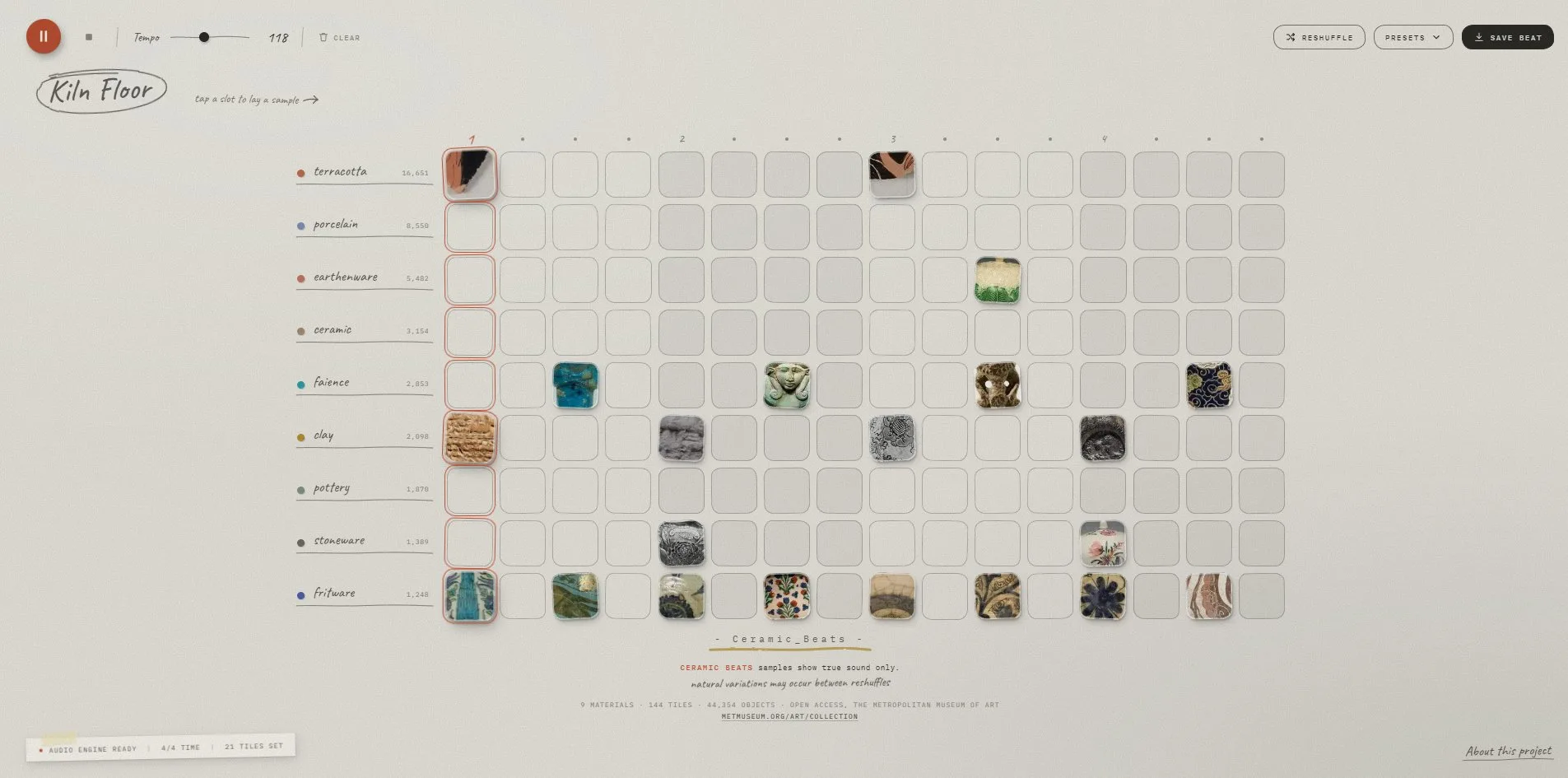
When a visitor presses play, the current dot of the sixteen turns terracotta red and grows to 1.3 times its size. The nine slots in that column light up with an outline, and the filled ones among them scale up to 1.08 with a deeper shadow, as if just struck. The redraw is timed by the audio clock. The browser's audio thread schedules each strike ahead of time, and a slot lights up on the very frame its beat is heard, so sound and picture stay in step. When the visitor stops playback, the last lit column is cleared 80 milliseconds late, so that it does not collide with a redraw already scheduled.
When a visitor taps a slot while the machine is stopped, the object is laid down with a preview of its sound. When the visitor holds the mouse and drags sideways, every slot passed takes on the result of the first one, so a whole row can be filled or cleared in one pull. When the visitor presses Reshuffle, a small slip comes up at the bottom right, tilted 0.8 degrees, reading Drew a new set of objects. The Presets button opens a dropdown slip listing the five presets, each name in handwriting and each description in monospace capitals. A visitor can also play and pause the machine with the space bar on the keyboard.
The nine strike sounds never come out the same twice. Each hit's volume is picked at random between 0.55 and 1, and its pitch drifts at random within a range the material allows. Porcelain is the steadiest, drifting only 1.5 percent, and unfired clay the loosest, drifting up to 7 percent. So even when sixteenth notes run for two bars, a visitor never hears one sound file (a sample) played over and over. Each material's volume is also turned down in advance, fritware by 5 decibels and clay not at all. The nine sounds had their loudness evened out when they were generated, and turning them down in advance puts back a little of the natural difference.
04Engineering
Ceramic Beats uses no front end framework and no bundler, the tool that normally merges and compresses code. The seven handwritten script files total 34 KB, unminified, and each opens with a comment explaining why it is written the way it is. The only library is the web audio library Tone.js, which adds a beat clock, sequencing and sample playback on top of the browser's own Web Audio interface. Tone.js is 284 KB of source and 57 KB once compressed for transfer. There is not a single canvas on the page. The slots are ordinary buttons, and the pictures are CSS background images on those buttons.
The 144 slots share one picture, since every object detail is cropped and packed into a single 746 KB WebP image of 16 columns and 18 rows, 288 crops in all, 32 per material. An image packed like this is called a sprite sheet, and the browser only has to download it once. Each slot lines up its own cell through a background-position written in percentages, so a slot can be any size and still show the right crop. The objects' ids, titles, dates, origins and average colours travel in a 10 KB JSON data file. The nine strikes are nine wav audio files of 26 to 95 KB each, 403 KB in all, downloaded together when the page opens. On a first visit the page downloads 1.34 MB in 29 requests, including 102 KB of fonts from Google Fonts.
Every strike creates a new sound playing node (a BufferSource) and a new volume node (a Gain node), and both are discarded when the sound ends. This is because in a run of sixteenth notes each hit overlaps the tail of the one before, and a single shared player would cut that tail off. The playhead is a sixteen step Sequence running on Tone.Transport, the global clock in Tone.js, and each redraw is queued through Tone.Draw for the moment the matching sound plays. Browsers do not let a page make sound until the visitor has interacted with it once, so the visitor's first press of the mouse anywhere on the page unlocks the audio, and the visitor's very first tap on a slot already makes a sound.
When it saves a beat, the site touches no server and packs the state of the board into 30 bytes. The first byte holds the tempo minus 60. The next nine hold each row's picture offset, meaning which stretch of the thirty two objects that row is showing. Then 18 bytes use one bit per slot to record which of the 144 slots are filled, and the last two bytes are the mute mask, one bit for each muted row. The 30 bytes are turned into URL safe base64 text and written into the part of the address after the # sign, the hash, followed by the beat's name, and the link is copied to the clipboard. Anyone who opens that link gets the board, the tempo, the mutes and the picture in every slot back exactly as they were.
It takes the server 109 to 179 milliseconds to send its first byte, and the first content appears on screen (first contentful paint, FCP) at 632 to 916 milliseconds. The largest piece of content on the page (largest contentful paint, LCP) is the handwritten beat name at the top left, which appears at the same moment, well inside the 2.5 seconds Google recommends. The layout shift score (CLS), which measures how much things jump around during loading, is 0.09, just inside Google's recommended ceiling of 0.1. The shift happens because the board is built only after the JSON arrives, and building it pushes the footer down once. There is a single long task, a stretch of script that keeps the browser too busy to respond to clicks, lasting 66 to 178 milliseconds. While the machine plays, the picture holds 60 frames per second throughout.
The site's work for screen reader and keyboard users is only half done. On the good side, the page declares English and marks three landmark regions, header, main and footer, so screen reader users can jump straight to each. Play, stop, clear, reshuffle, presets, save and the nine mute buttons all have names a screen reader can announce, and the beat's name is an editable heading. When a visitor moves onto a button with the keyboard, a 1 pixel terracotta focus ring appears around it. When a visitor turns on the system's reduced motion setting, the slot transitions and the panel animations are all switched off. What the site leaves out is the 144 slots on the board. They are buttons, but they have no names and do not say whether they are pressed, so a screen reader announces 144 identical buttons, and the whole content of the machine lives in those slots.
05Scores and Team
| Award | Source | Date | Score |
|---|---|---|---|
| FWA of the Day | The FWA | 2026-09-22 | 82 POINTS, DAYS 6 |
Ceramic Beats received 82 points from the FWA, and the award page lists DAYS as 6.
| Credit | Identity | Record |
|---|---|---|
| Zui Chen | Product designer, Irvine, United States | FWA 1 |
Zui Chen made the site alone, and it is her first FWA. Her profile describes her as a product designer who writes code, with five years of consumer apps and agentic interfaces, the kind of product where AI carries out tasks for the user. She also builds instruments that play a drawing, the weather or a fired pot. She holds a BS in Statistics from the University of Michigan and an MS in Data Visualization from the design school Parsons. Ceramic Beats is the pot she describes, a fired pot that plays.
06Archive
- Award date
- 2026-09-22
- Awards
- The FWA FOTD 2026-09-22
- Site
- https://ceramic-beats.zui.ooo/
- Credits
- Zui Chen
- Design
- interface
- Build
- realtime
- The FWA
- 82 POINTS, DAYS 6. https://thefwa.com/cases/ceramicbeats
- Stack
- Vanilla JavaScript, Tone.js, Web Audio, CSS, ElevenLabs sound effects API, The Met Open Access
- Total assets
- 1.34 MB on a cold load, of which the object sheet 746 KB and the nine samples 403 KB
- Speed
- FCP 632 to 916 ms, LCP 632 to 916 ms, CLS 0.09. 60 fps while playing