Heron AI
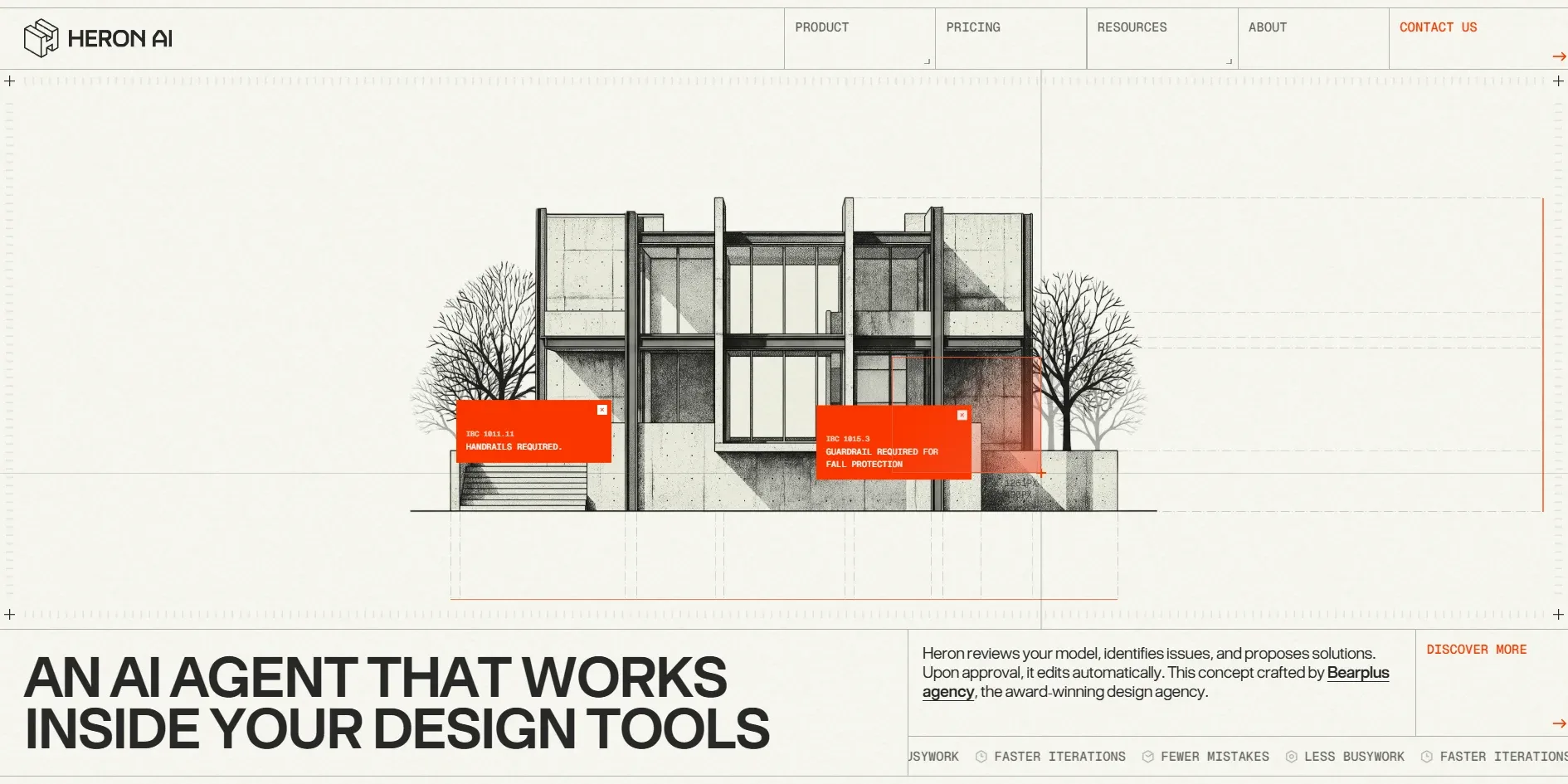
Heron AI is the website of an AI assistant that checks architects' plans, and its home page makes the visitor play plan checker. The first screen is a house elevation drawn on a drafting sheet, and the cursor becomes the crosshair of a design program. When the visitor drags a box around a red dot on the house, an orange card pops up saying that the building code requires a handrail here. Heron sells an AI assistant that checks architects' models for exactly this kind of violation, and the home page lets visitors do that job by hand before the product offers to do it for them.
Heron AI is an AI software company founded in 2026. Its site was made by Bearplus, a design company with offices in Vietnam and Australia, together with the designer Kenny Ho, and it won FWA of the Day and then the Awwwards Site of the Day and Developer Award.
01Concept
The product Heron sells has no physical form and is hard to capture in a photograph. It is an AI assistant that lives inside building design programs such as Revit, Rhino, ArchiCAD and SketchUp. It watches the architect model, points out where the design breaks the code, and once the architect agrees, makes the change directly in the model. With nothing to put on display, Bearplus turned the whole website into an architectural drawing and let visitors experience plan checking on the drawing itself.
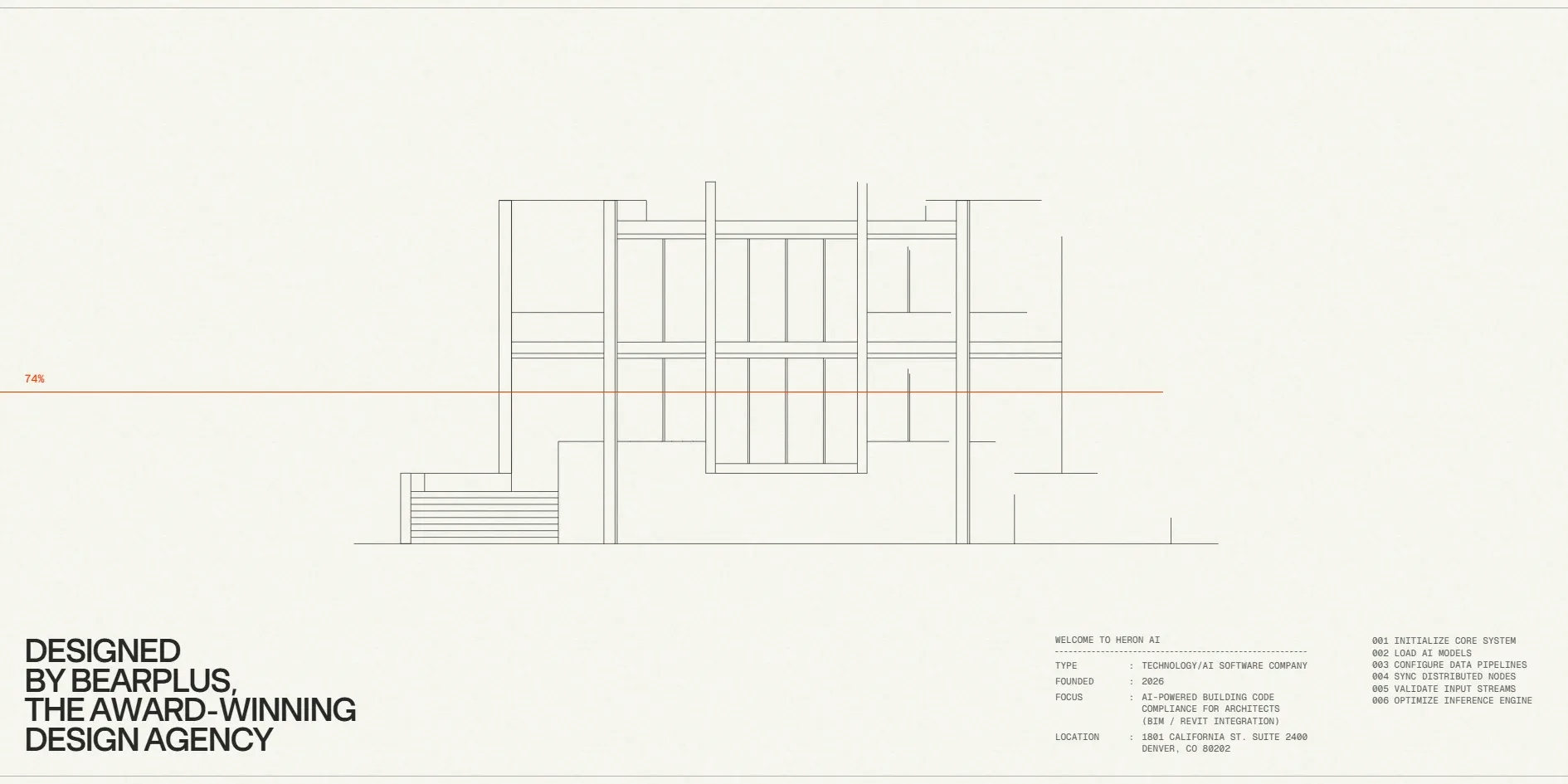
Every visit starts with a loading screen that lasts about 8 seconds. On an off-white sheet, the lines of the house elevation draw themselves stroke by stroke while a percentage climbs beside a thin orange line. The lower left of the loading screen reads DESIGNED BY BEARPLUS, THE AWARD-WINNING DESIGN AGENCY. At the lower right sits a spec card that looks like the title block of a drawing, giving the company type, the founding year 2026, a focus on AI building code checking for architects and an address in Denver. Beside it run six numbered lines that read like a machine boot log, from INITIALIZE CORE SYSTEM to OPTIMIZE INFERENCE ENGINE. Once the lines are finished, pencil shading fills in, and only then do the headline and menu of the first screen appear.
That elevation is the first screen, ready for the visitor to drag boxes over in search of violations. The house hides two red dots, one for a handrail rule and one for a guardrail rule, and when the visitor circles both, two orange cards hang side by side on the house. The headline reads AN AI AGENT THAT WORKS INSIDE YOUR DESIGN TOOLS, and a ticker at the lower right repeats faster iterations, fewer mistakes and less busywork.
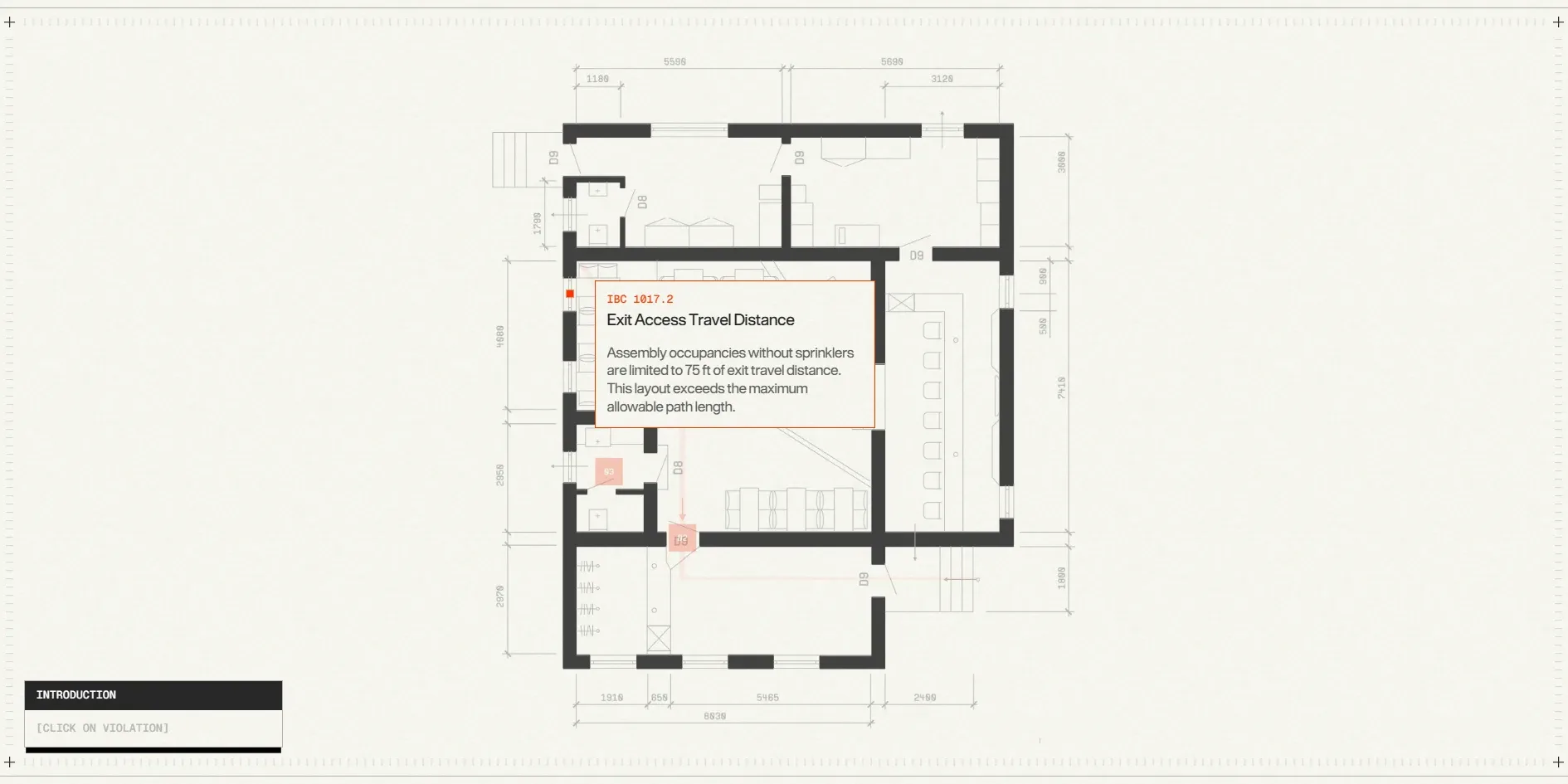
Below the first screen, the page sets out a complete problem and answer. It opens with a statement and a row of client logos, repeating that Heron works directly inside the design programs named above. Four cards then list an architect's four frustrations, every change made by hand, generic AI tools that cannot see the model, nobody watching for problems, and small tasks piling up into lost days. Next the page pauses to tell a short story, in which three captions appear in turn and a floor plan assembles itself from scattered pieces of wall. Red dots then appear on the plan, and clicking one opens a code note about exit travel distance.
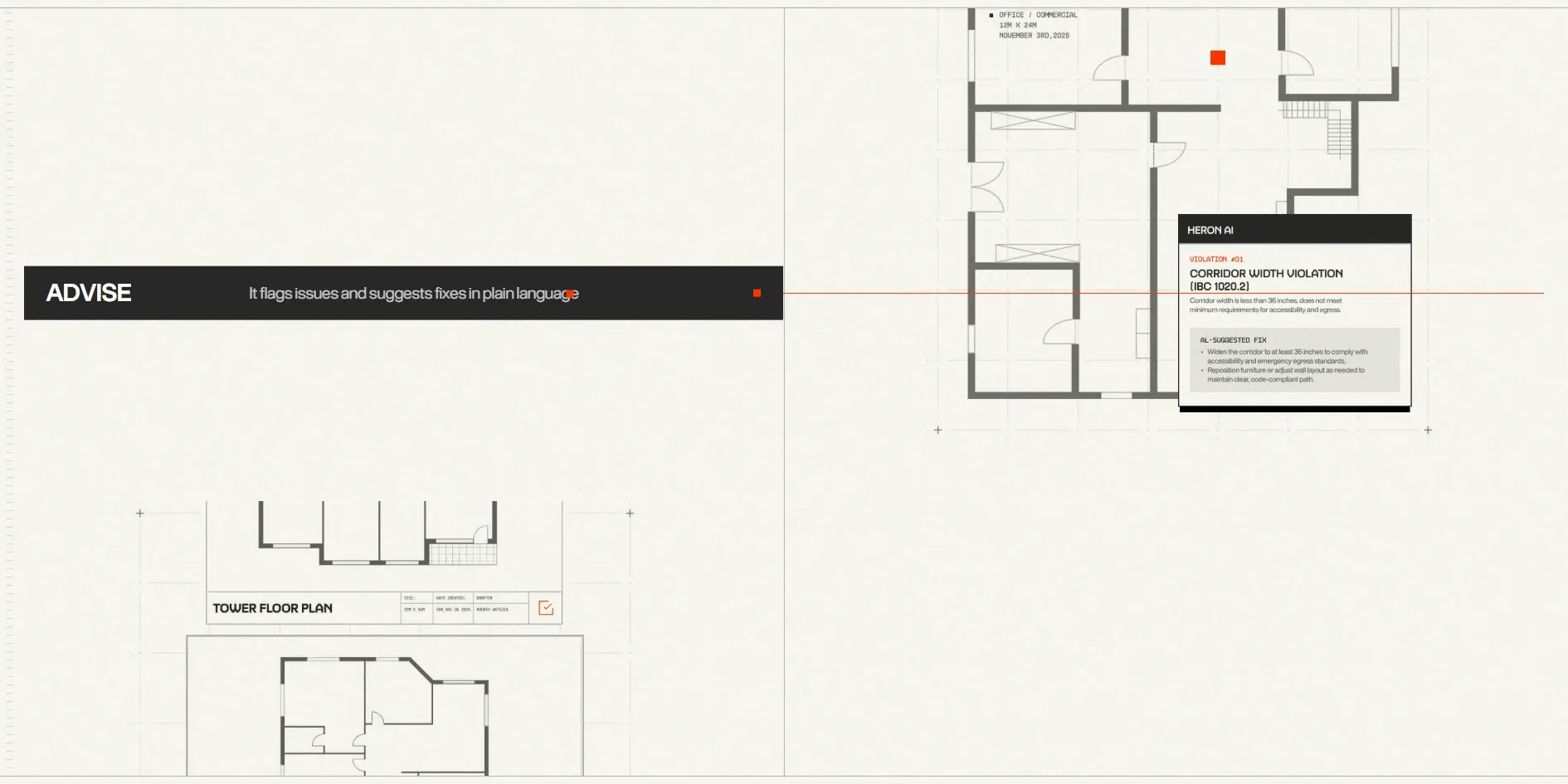
Only after the story does the page introduce the product itself. Heron comes as two products, a chat window that floats over the design program and a dashboard that gathers every change and approval. Further down, the words Observe, Advise, Act and Learn split its way of working into four steps. The page ends with a list of eight kinds of users, from architects and interior designers to drafters and small firms, followed by a button to book a demo. A visitor who wants more after the home page can open the other pages from the top menu: two product pages, a pricing page, a resource library, a company page labelled ABOUT and a contact page. The pricing page's headline promises that you pay for the hours you get back.
02Design
Heron's site draws everything onto a single sheet of paper. The background is an off-white with a faint paper grain, and small crosshair marks sit at the corners of the screen and where grid lines meet, like the registration marks on a drawing. Thin lines divide the layout into cells, with the menu in the cells along the top and the description in a cell at the lower right, so the whole page reads like a laid-out construction drawing.
The building illustrations on the home page all have the texture of pencil and charcoal. The house on the first screen, the tall apartment block on the second and the brutalist buildings further down are all shaded with fine hatching, and some have an orange-red disc hanging behind them like a setting sun. This style makes an AI product look like an architecture practice's own sketches, far from a technology company's promotional art.
Heron's home page palette holds only the paper colour, charcoal and one orange-red. The orange-red is reserved for the places that need the visitor's attention, including the violation cards, the selection box, the red dots on the plan, the progress line during loading and CONTACT US at the top right. The rest of the layout is black, white and grey, so whenever orange-red appears it pulls the eye, and what it marks is usually a problem or a button to press.
The type speaks in two voices, one for headlines and one for small prompts. Headlines are set in the heavy sans-serif BT Grotesk, the kind of typeface whose strokes end without small feet, in capitals, like the titles on a drawing. Descriptions, numbers and prompts use the monospaced Geist Mono at a small size, often wrapped in square brackets such as [01], [SCROLL TO CONTINUE] and [CLICK ON VIOLATION], which read like status messages in a software interface. Bearplus also treats the code clause numbers themselves as part of the layout, printing numbers like IBC 1017.2 and ICC A117.1 at the very top of each card, ahead of the title.
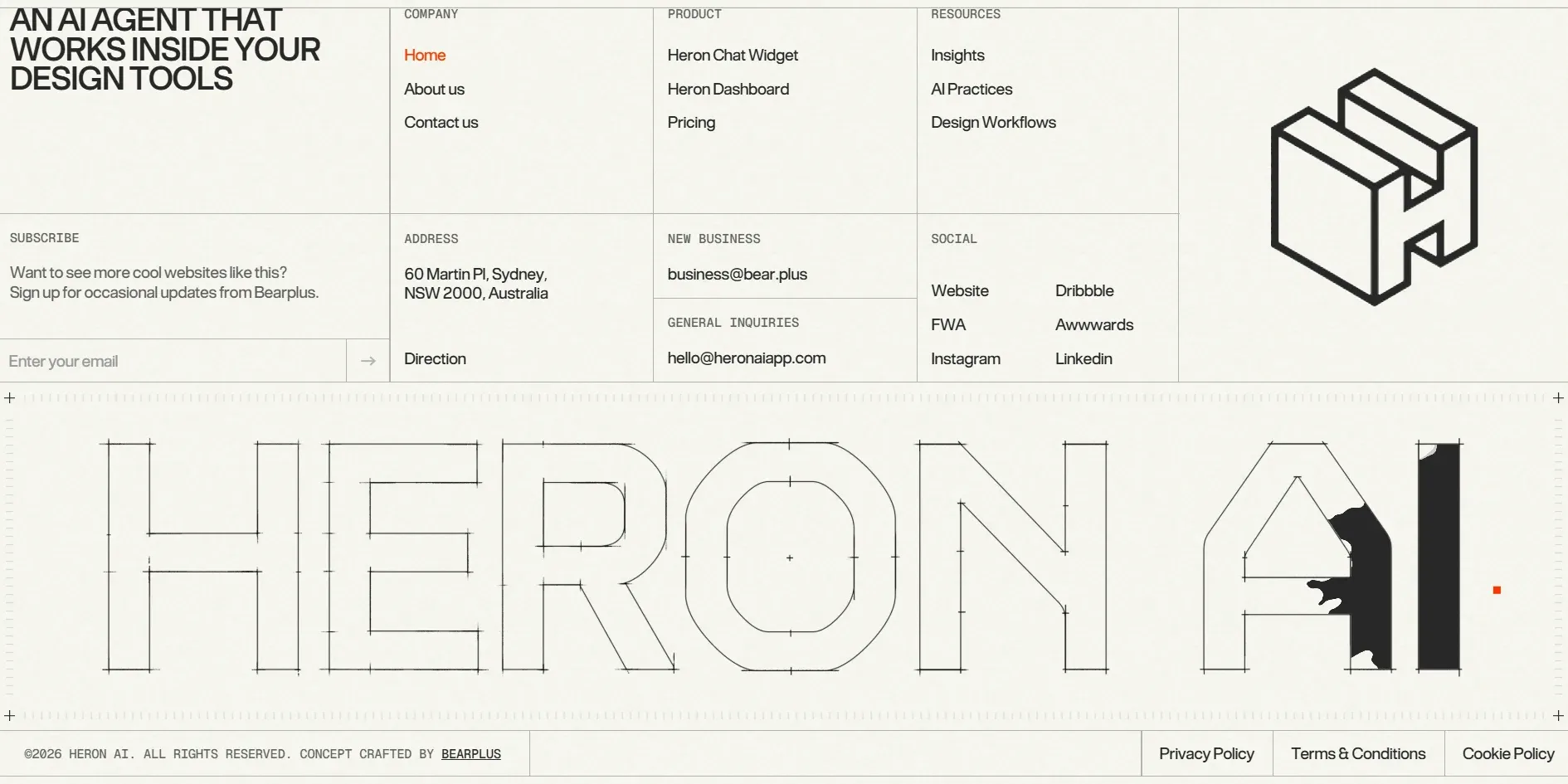
The footer draws the company name as a type construction drawing that has not yet been inked. The letters of HERON AI are only outlines, marked with dimension ticks and centre points. On the left the footer also holds a subscription box whose text promises more cool websites like this one to people who sign up for updates from Bearplus. The footer therefore also recruits readers for the agency that built the site.
03Motion
Bearplus turns the visitor's cursor into a drafting tool. As it moves over the first screen, it drags a horizontal and a vertical guide line across the whole sheet, and the X and Y coordinates beside it change as it goes, much like the snapping crosshair in architecture software. When the visitor holds the mouse button and drags, a translucent orange selection box stretches out behind the crosshair. On release the box disappears and a violation card opens on any red dot that was inside it. Once open, a card stays hanging on the house and never closes on its own.
The floor plan sequence is driven entirely by scrolling. When the visitor reaches it, the page holds still, pieces of wall fly in from every direction and lock together into a complete floor plan, and dimension lines and furniture are then drawn in. A small black label below changes its caption with each stretch of scrolling, asking the visitor to keep going, until its text finally switches to [CLICK ON VIOLATION] and the red dots appear on the plan.
The small animations on the page also imitate the act of drawing. The line icons on the four problem cards redraw themselves when the mouse moves over them. The hollow letters in the footer get inked by the cursor, as if the spots it passes over were soaked through. When the visitor opens the ABOUT page, a hexagonal floor plan is drawn first and its rooms fill with orange one after another, and only after about three and a half seconds does the cube-shaped company logo appear.
Scrolling on Heron's page stays steady from top to bottom. As a visitor scrolls from the first screen to the footer, the page holds 60 frames per second with almost no dropped frames.
04Engineering
Bearplus built the layout in Webflow and took the animation, smooth scrolling, page transitions and carousels from ready-made libraries on public CDNs, chiefly GSAP and several of its plugins, with smooth scrolling handed to Lenis. The crosshair and selection box on the first screen are drawn from the cursor's coordinates, and most of the graphics on the page are vector line drawings on which the drawing and inking animations run. The script written for the site itself has been obfuscated, with its variable names and the order of its steps scrambled so that others will find it hard to read or copy.
The whole site downloads very little data, only about 1.7 MB when the home page opens and about 3.9 MB after scrolling all the way to the bottom. Of the full 3.9 MB, the largest group of files is the set of illustrations for the eight kinds of users in the list, about 1.7 MB together. Most of the graphics on the page are line drawings stored as vector images, and although there are many of them, together they add up to less than 0.2 MB.
Nearly all of the visitor's waiting happens on the loading screen. The server returns its first byte in 0.04 seconds, and the first and the largest pieces of content are both drawn within 0.3 seconds, but what they show is the headline and illustration hidden under the loading screen. The visitor has to wait for the 8-second loading screen to finish before seeing the first screen, and every return to the home page draws the house again from the beginning. The page jumps once about half a second after opening, under the loading screen, where the visitor cannot see it.
Heron's two violation-hunting interactions can only be done with a mouse, and screen reader users and visitors sensitive to motion get only a little help. The red dots are not buttons and the keyboard cannot reach them, so a keyboard-only visitor can neither drag a box nor open a violation card. The rest of the site is reasonably friendly to the keyboard, with the default focus ring on links and buttons and dropdowns that open when focus reaches Product or Resources. The two logo links at the top have no names, the footer's subscription field has only placeholder text and its submit button no name, and five images lack alt text. With the reduced motion setting on, Heron stops only the hover animations on the problem cards and in the section on how it works, and the loading screen still draws the entire house.
05Scores and Team
| Award | Source | Date | Score |
|---|---|---|---|
| Site of the Day | Awwwards | 2026-10-12 | 7.70. Design 7.75 / Usability 7.48 / Creativity 7.85 / Content 7.81 |
| Developer Award | Awwwards | 2026-10-12 | 7.01 / 10 |
| FWA of the Day | The FWA | 2026-10-01 | 83 POINTS, DAYS 3 |
| Honorable Mention | Awwwards | 2026-09-01 | No jury scores published on the page |
Heron AI first received an Honorable Mention on Awwwards on 1 September, won FWA of the Day on 1 October and then won the Awwwards Site of the Day on 12 October. Creativity was the highest of its four Awwwards scores at 7.85, which fits a home page that has visitors circle the violations themselves. Usability was the lowest at 7.48, and the roughly eight-second wait before the first screen appears may be one reason. The developer jury gave 7.01. Leaving out responsiveness, Animations scored highest at 7.6 and Markup lowest at 6.6.
FWA gave the site 83 points and filed it under Architecture & Design and Commercial/Corporate. The team's description on FWA runs to just three short sentences. In essence it says that Heron is an assistant that works inside your design tools, watches your model and suggests fixes, makes the edits itself once you approve, and is built by architects. The three actions in that description, watching, suggesting and editing, can all be found on the page as the Observe, Advise and Act steps.
| Credit | Who | Record |
|---|---|---|
| Bearplus | Digital product design company working on web experiences, branding, UX/UI and software development, with offices in Ho Chi Minh City and Sydney | Awwwards works 11, SOTD 4, HM 10. FWA 6 |
| Kenny Ho | Vietnamese designer specialising in art direction, freelance and open to remote work | Awwwards works 6, SOTD 4, HM 6. FWA 6 |
The award records of Bearplus and Kenny Ho overlap almost completely. All six works Kenny Ho lists on Awwwards, including United Carriers, Kanak Naturals and CargoKite, also appear in Bearplus's portfolio, so Kenny Ho appears to be the company's regular lead designer. Bearplus and Kenny Ho also each have six awards on FWA. On 6 September, United Carriers, another project the two worked on together, won Site of the Day on Awwwards.
06Archive
- Award date
- 2026-10-12
- Awards
- Awwwards SOTD 2026-10-12, Awwwards DEV 2026-10-12, The FWA FOTD 2026-10-01, Awwwards HM 2026-09-01
- Site
- https://heronaiapp.com/
- Credits
- Bearplus, Kenny Ho
- Design
- interface
- Build
- scroll
- The FWA
- 83 POINTS, DAYS 3. https://thefwa.com/cases/heronai
- Awwwards
- 7.70 / 10. Design 7.75 / Usability 7.48 / Creativity 7.85 / Content 7.81. Developer Award 7.01. https://www.awwwards.com/sites/heron-ai
- Stack
- Webflow, GSAP, ScrollTrigger, SplitText, Lenis, Barba, Swiper
- Total assets
- About 1.7 MB on first load, about 3.9 MB for the whole page, about 1.7 MB of it the eight user illustrations
- Speed
- FCP 228 to 248 ms, LCP 248 to 280 ms (both under the loading screen), first screen visible after about 8 s, CLS 0.12. Continuous scroll 60 fps