Experience FunTech Creativity
FunTech has turned its 2026 showreel film, HELLO, WORLD., into a website that visitors have to play with their own hands to see the rest of. Ten real-time 3D scenes follow one another, and each one leaves the visitor a job to do. The visitor switches the mascot Fun-kun through layer after layer of rendering, calls down lightning, walks between statues of the whole staff and knocks on an old computer's screen until Fun-kun breaks out. Only when one job is done does the site move on to the next scene.
FunTech is a Tokyo creative studio that works at the meeting point of design and AI, and the site won FWA of the Day with 89 points.
01Concept
FunTech wants visitors to try its technology and ideas for themselves, as the team's description on the FWA puts it, and the guide on that tour is the company's official character, Fun-kun. A poster inside the site calls the piece FUNTECH SHOWREEL 2026, titled HELLO, WORLD. and starring Fun-kun. An orange Watch the film button stays at the top right throughout, so visitors can play the film itself, about fifty seconds long, at any moment. Visitors whose browser cannot show 3D get a short notice instead, along with the same button for the film.
FunTech's site opens on an imaginary old computer starting up. Lines of green terminal text on black read FUNTECH OS 26.09 and then report, one by one, that code, models and textures are loading. Further lines say that sound is being decoded and that the shader programs the graphics card uses to draw are being compiled. After that the terminal warms up all ten scenes in turn, adding an ok at the end of each line as it finishes. The last line reads READY., a large line in the middle of the screen says BOOT FUNTECH.EXE, and a prompt invites the visitor to press Enter or click to boot, which also turns the sound on.
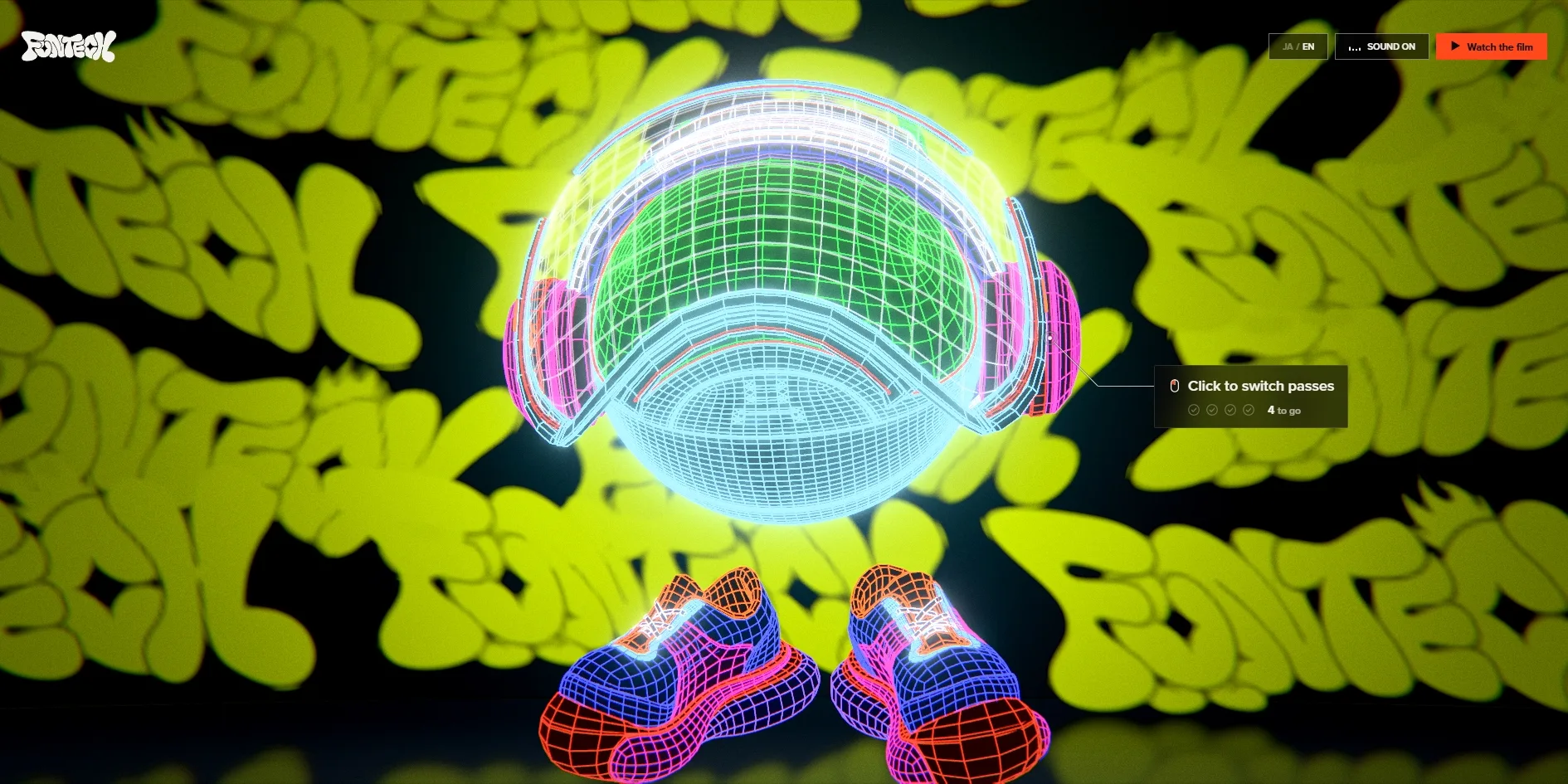
After the boot, Fun-kun first appears as a wireframe in front of a wall covered in FUNTECH graffiti lettering. Each click moves Fun-kun to the next rendering layer, from wireframe WIREFRAME through see-through X-RAY, glowing HOLOGRAM and mirror-like CHROME to the finished BEAUTY. Seen in order, the layers lay out how a 3D character goes from bare structure to finished render. In the finished layer Fun-kun is a glossy red round head, and one click on it leads to the next scene. In that scene lightning strikes by itself and Enter calls down another bolt. The job is to slap eight stickers onto the picture in front of a wall of black, balloon-like puffed-up stickers, and the stickers carry Japanese sound words such as ドドン and FunTech logos.
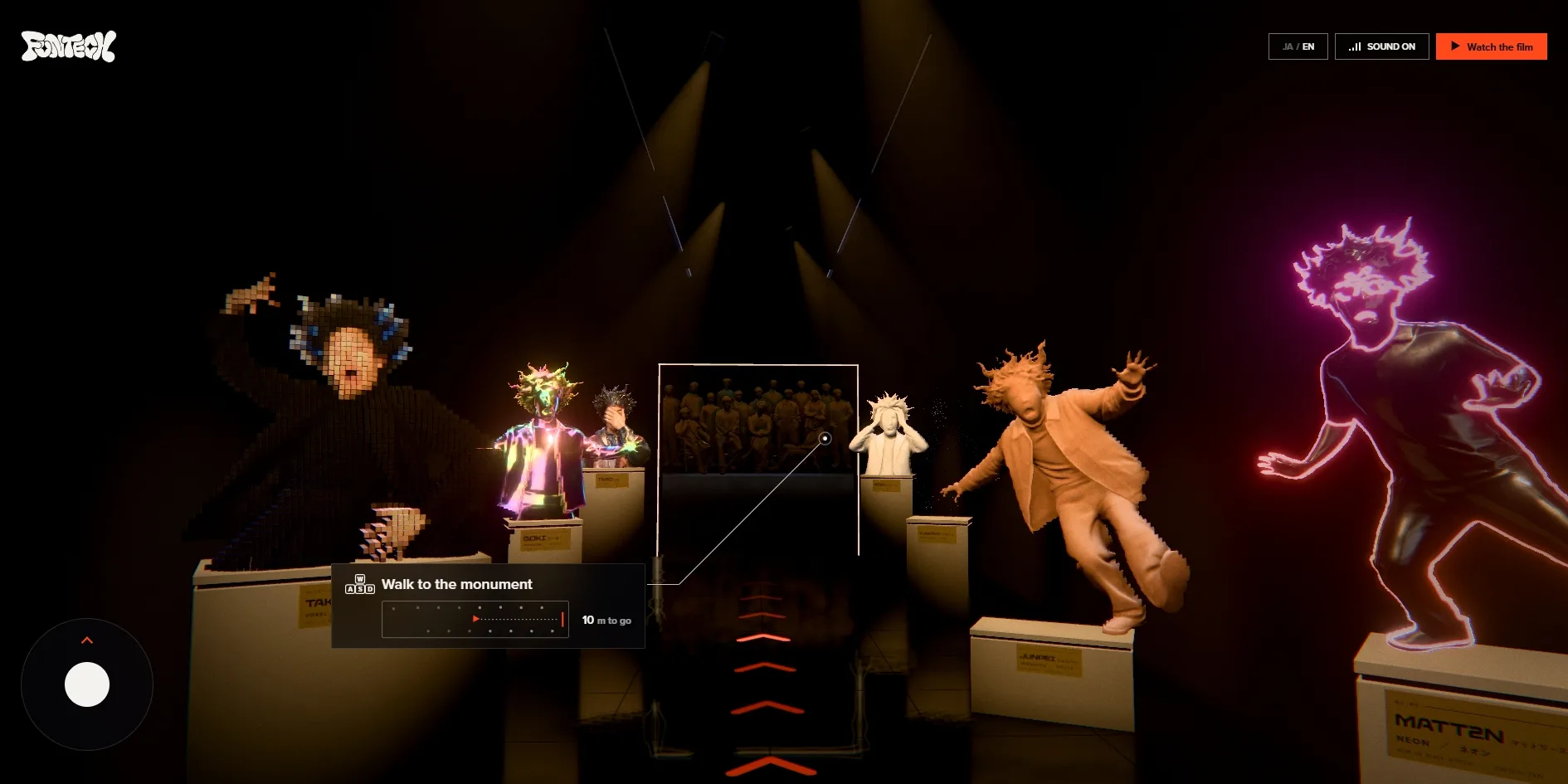
The next two scenes are a museum with two galleries, one after the other. The first is called Gallery 01, and the wall reads FUNTECH のひとびと, the people of FunTech. Busts of fifteen staff members stand on plinths, each in a different material such as chrome, carved wood, neon tubing and soft vinyl, with a plaque giving the name and the material. The visitor walks forward with the W, A, S and D keys, drags to look around and can click a bust to change its material, and after about 23 metres reaches the second gallery. There a group statue of the whole staff stands on a base that reads WE ARE FUNTECH., and five clicks call down lightning, after which the next scene begins.
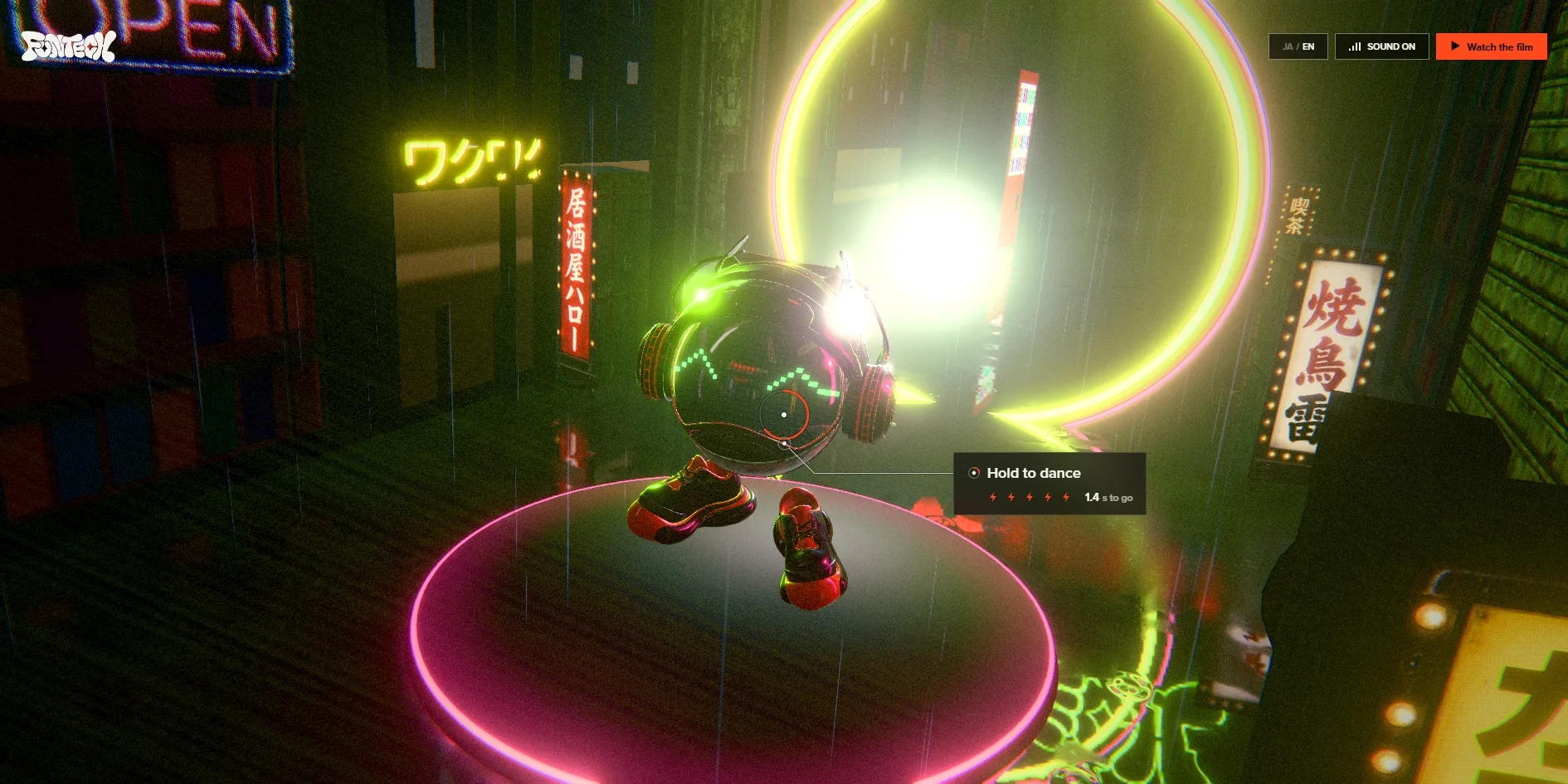
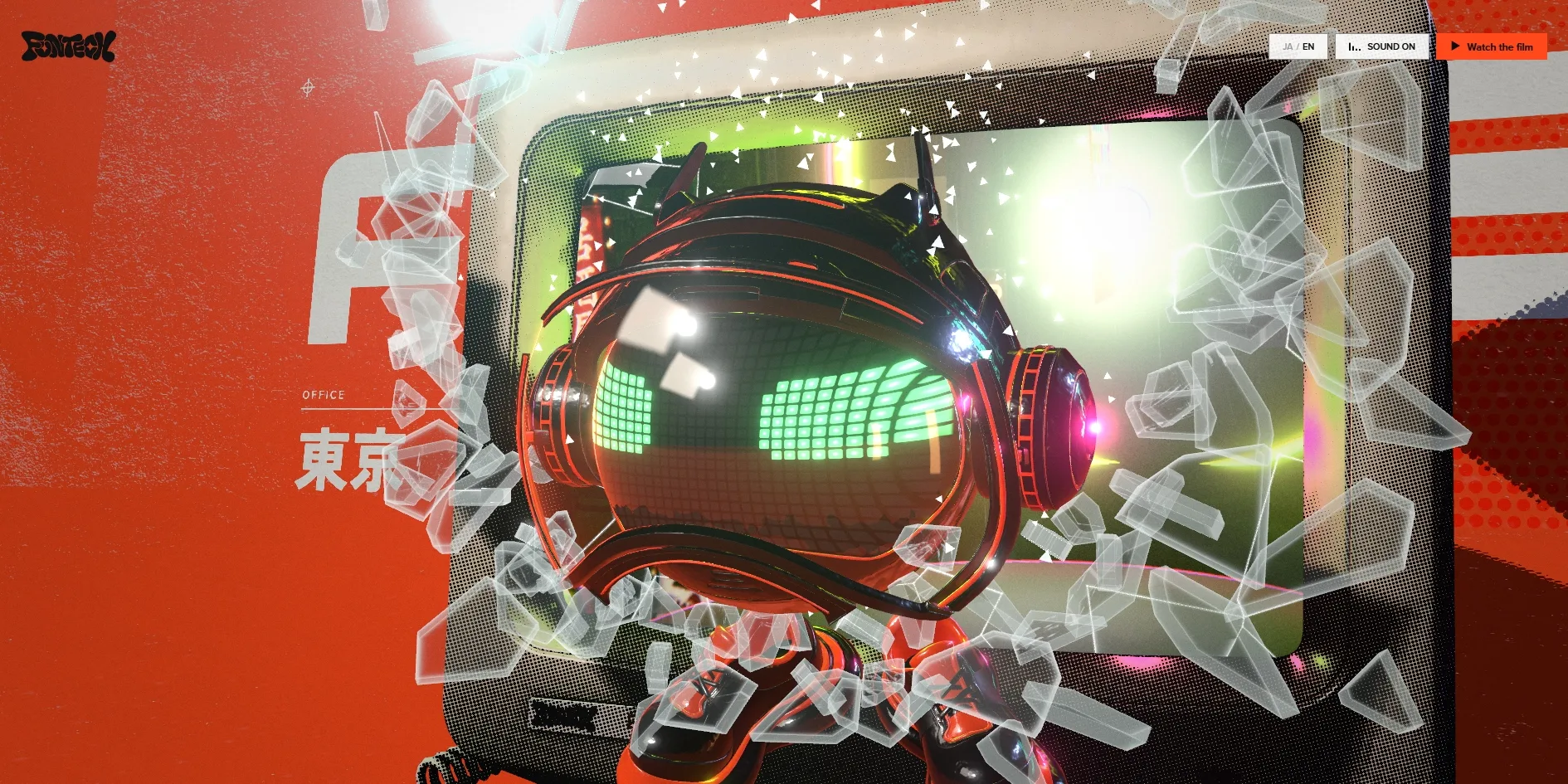
After the museum, Fun-kun arrives in a Tokyo-style neon alley with signs reading izakaya, yakitori and thunder in Japanese, and when the visitor holds the mouse down for four seconds Fun-kun starts dancing on a glowing round stage. The scene after that is a printed-looking orange film poster that reads FUNTECH, 東京, 2026.10 and ワクワクを、実装する。, with a beige old computer in the middle and Fun-kun trapped inside its screen. The visitor knocks on the screen three times, コンッ sound-word stickers pop up and the glass cracks, and with the last knock Fun-kun smashes through and jumps out.
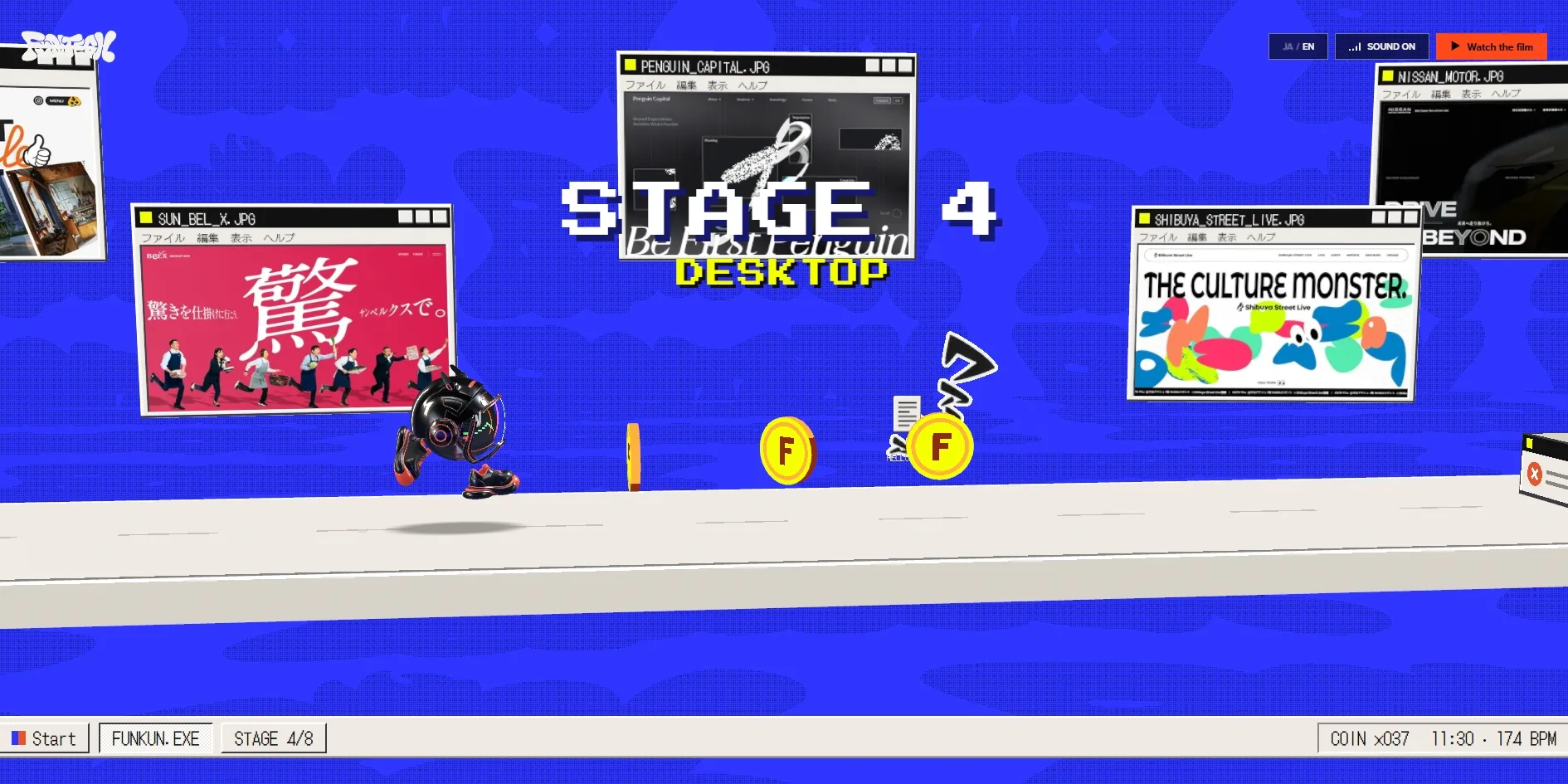
Once out of the computer, Fun-kun enters a side-scrolling runner called STYLE RUN, with eight stages. Fun-kun runs forward by itself, and the visitor presses Space or clicks to jump over crates and collect coins. A single mistake restarts the stage, and the screen then marks where to jump. Each stage takes on a different era and style of computer graphics, and the first three are black and white manga, ASCII text art and 8-bit pixels. The later stages move on to a computer desktop, Y2K-era 3D and glitch art, and the last stage ends with the words SIGNAL LOST. In the desktop stage, FunTech lays out websites it has made for clients as windows on the desktop.
After the eight stages, Fun-kun's face appears on a television with no signal, the screen cracks and turns white, Fun-kun's visor shows HELLO WORLD, and finally the whole picture shatters into flying pieces. The last scene is a FUNTECH logo made of inflated black letters, covered in the stickers seen earlier, with Fun-kun standing beside it, and a click slaps on one more sticker. Three buttons below offer to play again, watch the film or go to FunTech's own website. Following the hints all the way from the boot to this scene takes several minutes.
02Design
The site gives every scene a different visual style, and what ties them together is Fun-kun and a small set of recurring elements. From the graffiti wall and the dim museum to the neon alley and the printed poster, the scenes have almost nothing in common visually. Yet Fun-kun is in every one, FunTech's orange-red shows up in most of them, Japanese sound words pop up in several, and the final logo is covered in those stickers.
Fun-kun itself is a very simple character, and that simplicity is what lets it take on so many styles. It has no body, only a round head with headphones and a pair of red and black sneakers, and its face is a screen with green pixel eyes and a grin like a row of shark teeth. The head runs through five rendering layers in the boot scene, is glossy red in the lightning scene and turns to black glass inside the computer. In the runner it takes on each stage's style, yet the pixel eyes and the teeth always stay recognisable.
Each scene's lettering matches the kind of picture the scene imitates. The boot screen uses the green pixel monospace of an old computer terminal, and the readouts across the top of the runner use two pixel typefaces. The poster uses large sans serif lettering with Chinese characters, Japanese and English mixed together like a real film poster. Only the hints and buttons of the interface keep to one sans serif throughout, so visitors can always read what they are meant to do.
The interface layer barely changes across the ten scenes and takes up very little room. The FUNTECH graffiti logo sits at the top left, and the language switch JA / EN, the sound toggle and the orange Watch the film sit at the top right. Each scene's job is written on a small translucent hint card, linked by a thin line to the object to act on. The card carries a mouse or key icon, a row of small dots and how many are left, so visitors know how far they are from the next scene without reading any instructions.
03Motion
Every change to Fun-kun happens right at the moment the visitor triggers it. In the boot scene each click switches the whole character and the wall behind to the next layer at once, and in the see-through layer the hint card adds that dragging the picture will spin Fun-kun round. A sticker lands where the click was, and in the computer scene the broken glass flies out towards the camera with light glinting on every piece. The whole experience is 3D rendered live rather than pre-recorded video, so the picture follows wherever the visitor clicks or walks.
In the museum, the monument and the neon alley, the camera follows what the visitor does as well. In the museum the camera moves forward as the visitor holds the keys, and dragging the picture looks left and right. In the monument scene, once the five bolts have struck, the camera pulls all the way back from the group statue up to the moon in the sky. Then the whole picture flashes white and hands over to the next scene. In the neon alley, while the visitor holds the mouse down, Fun-kun dances on the stage and the camera circles it from changing angles.
With the system setting for reduced motion turned on, the site tones down the harshest moment a little. The white flash at the end of the monument scene becomes a greyish white rather than a full screen of glaring light, though the lightning bolts themselves still strike.
Two complete playthroughs from boot to finish held all ten scenes at 60 frames per second with hardly a single stalled frame, including the busiest moments such as the runner and the flying glass. This appears to be thanks to the ten seconds before the boot. The terminal reports line by line that the shader programs and models for all ten scenes are compiled and warmed up then, which leaves nothing to prepare during play.
04Engineering
All of the site's pictures are drawn by the 3D graphics library three.js using WebGPU, the newer graphics interface in browsers. According to the site's own notice, browsers that support either WebGPU or the older WebGL2 can show the experience, and only browsers with neither fall back to the notice and the film.
Before the visitor presses boot, the site has already downloaded about 18.7 MB, and every texture, model and sound for the ten scenes has arrived by then. Textures account for about 8.9 MB, 3D models and scene data for about 6.2 MB and sound effects for about 1.8 MB, and the largest single file is a 3D model in the poster scene at about 1 MB. Because of this, almost nothing new is downloaded from the boot to the finish, and visitors never wait between scenes.
All the waiting happens before the boot, about ten seconds of it, and those ten seconds are the time the old computer spends starting up line by line. The server starts sending the page almost instantly, and the first content appears on screen at 0.72 to 1.05 seconds, under Google's suggested 1.8 seconds, in the form of those first lines of terminal text. While the scenes warm up, the page occasionally freezes for a moment, never for more than 0.2 seconds, and the boot button appears between the ninth and the eleventh second. The picture barely jumps during all this, with measuring tools reading 0.05 against a suggested limit of 0.1.
Some of the scenes can be played from the keyboard, but the site is designed mainly for the mouse. On the boot screen the Tab key stays on the boot button, and pressing it starts the boot. Inside the scenes, the Tab key reaches only the three buttons at the top right, and the scene actions rely on keys of their own. The arrow keys switch rendering layers in the boot scene, and the hint card in the lightning scene says outright that Enter calls lightning and S slaps a sticker. The museum uses W, A, S and D for walking, and the runner uses Space for jumping. In the monument, the neon alley and the computer scene, the hint cards mention only clicking and holding the mouse.
For screen reader users, the site gets two things right. The page holds a piece of text meant only for screen readers that states what the current scene asks for and how many steps remain, and it updates with progress. Once the film window is open, Esc closes it and focus returns to the button that opened it.
05Scores and Team
| Award | Source | Date | Score |
|---|---|---|---|
| FWA of the Day | The FWA | 2026-10-09 | 89 POINTS |
The FWA gave Experience FunTech Creativity 89 points as FWA of the Day. The FWA files it under three categories, namely art, illustration and exhibition, then design and production studios, and finally AI. The team's description calls it an immersive website for experiencing FunTech's creativity. In it, visitors play ten real-time 3D scenes with the official character Fun-kun, switching his looks, calling down lightning, dancing in a neon alley and knocking until he breaks out of a CRT. Everything in that description is on the site, and switching his looks most likely refers to the five rendering layers in the boot scene.
| Credit | Who they are | Track record |
|---|---|---|
| FunTech Inc. | A creative studio in Shibuya, Tokyo, that says it works at the intersection of design and AI, pairing advanced technology with a refined aesthetic to tell stories, move people and help businesses grow | FWA of the Day 3, including this one. Awwwards HM 2 |
FunTech is credited on the FWA under the studio's name alone, with no individual roles listed, and the track record counts up to the time of writing. FunTech had already won FWA of the Day twice, for its company website in 2024 and for its brand identity website in June 2026, both with 81 points. The 89 points this time are its best result on the FWA. On Awwwards, both of those earlier sites received Honorable Mentions.
06Archive
- Award date
- 2026-10-09
- Awards
- The FWA FOTD 2026-10-09
- Site
- https://experience2026.funtech.inc/
- Credits
- FunTech Inc.
- Design
- cinematic
- Build
- realtime
- The FWA
- 89 POINTS, DAYS 3. https://thefwa.com/cases/experience-funtech-creativity
- Stack
- three.js r186 (WebGPU), Adobe Fonts
- Total assets
- About 18.7 MB before the boot, including about 8.9 MB of textures, about 6.2 MB of 3D models and scene data and about 1.8 MB of sound effects, with almost nothing added during play
- Speed
- FCP 720–1052 ms, boot button after about 9 to 11 s, CLS 0.05. All ten scenes at 60 fps