The Watch
The Watch is a one-page site that the French creative development studio 60fps made for an automatic watch called the FS 60P, a name built from the letters of the studio's own. The site has no price, no way to buy and no links at all, and 60fps describes it on the FWA as their own take on "showing a luxury watch at its best". Its theme is a real-time 3D watch as the lead of the whole page, which passes through giant type, comes apart into its parts and changes into four colourways as the visitor scrolls.
60fps designed and built the site itself, and it won FWA of the Day and then Awwwards Site of the Day.
01Concept
60fps is a studio in Nancy, France, that has been making 3D experiences for the web for brands and agencies since 2013. The studio's FWA profile says it was founded by the developer Sylvain Tran and that its team is made up of developers, 3D modellers, project managers and technical directors. According to the profile, the studio often works as a production partner for agencies, building complex high-end experiences. The profile also says that what sets the studio apart is its use of 3D technology in the browser. The Watch has no client, since 60fps did everything from the design and modelling of the watch to the website, so the site shows exactly the kind of 3D experience the studio delivers on client projects. In its FWA description 60fps calls the FS 60P their take on "showing a luxury watch at its best" and adds that it is a real-time WebGL piece that interacts with the content around it.
The site treats the watch as an actor rather than as a product photo. The page runs to about 40 screens in 14 parts, the watch stays in the picture from start to finish, and each part gives it a new camera position and a new way of being presented. The content follows roughly the order of a product brochure. Visitors first see the whole watch, then the watch taken apart, then a few details of its exterior, and finally they choose a colourway and look at the specifications. The site sets its pace with light and dark. The first and last stretches of the page are pale grey, while the two parts about the movement in the middle turn completely black, making them the darkest and quietest parts of the site.
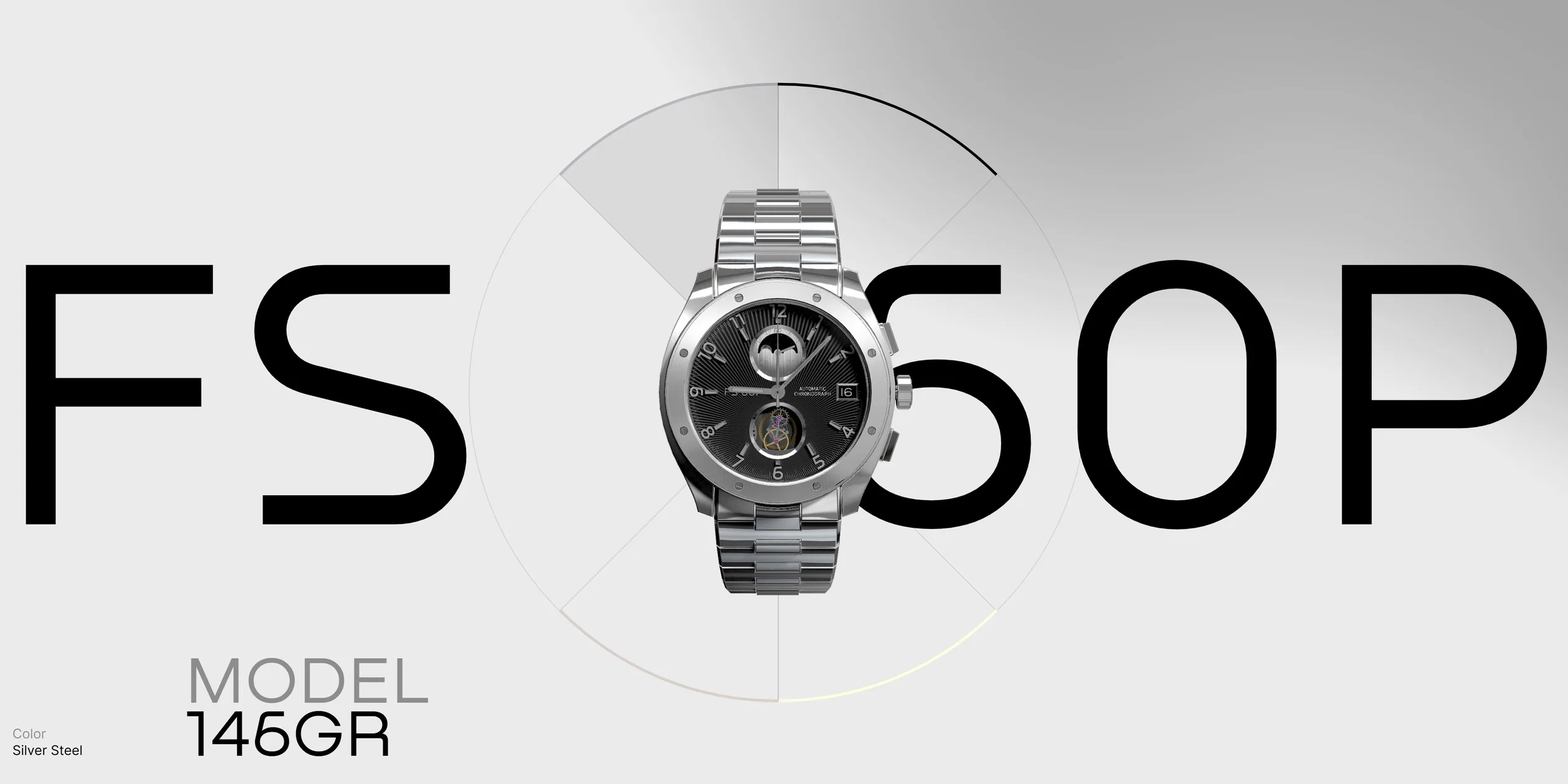
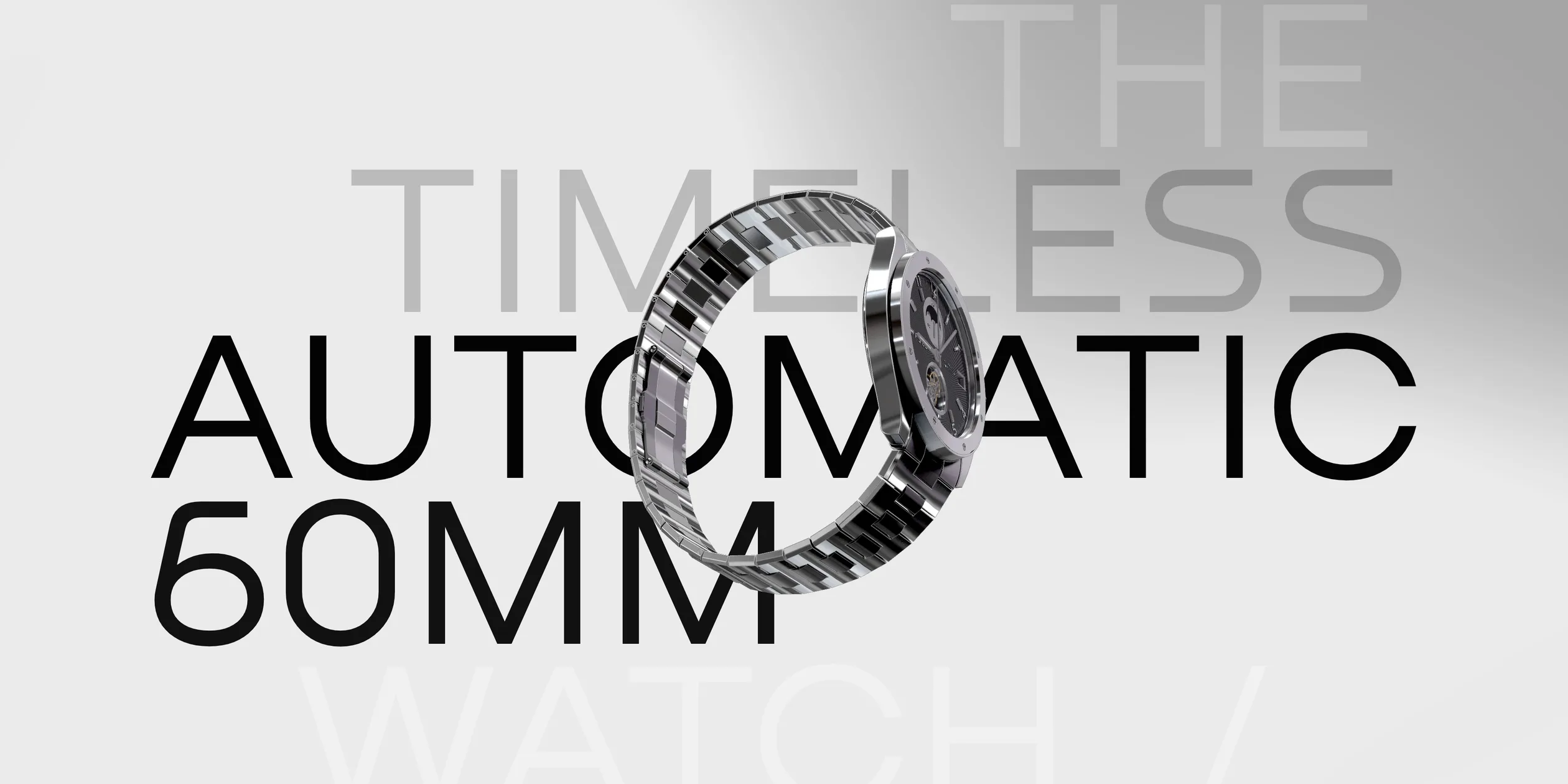
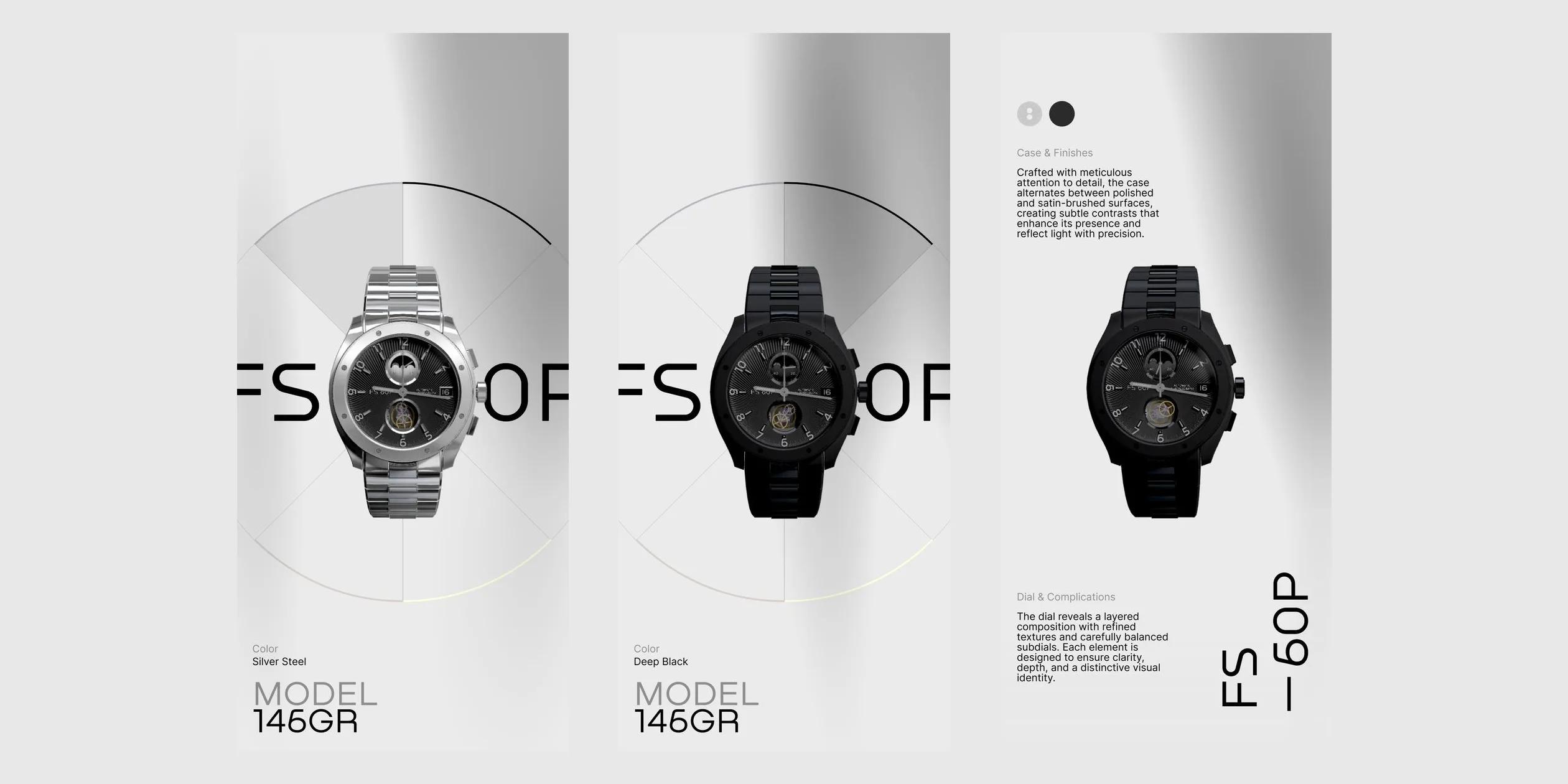
The first screen visitors see is a giant line of FS 60P with the watch standing in the middle and a ring divided into four parts behind it. Each part of the ring stands for one colourway, and when visitors click a part, the watch changes to that colour and the colour name at the lower left changes with it. As visitors scroll down, the giant type changes to the line THE TIMELESS AUTOMATIC 60MM WATCH, and the watch passes at an angle through the middle of the words. Two short texts beside it introduce the chronograph and the automatic movement, and the next part turns FS 60P into giant vertical type and talks about the finishing of the case and the layers of the dial.
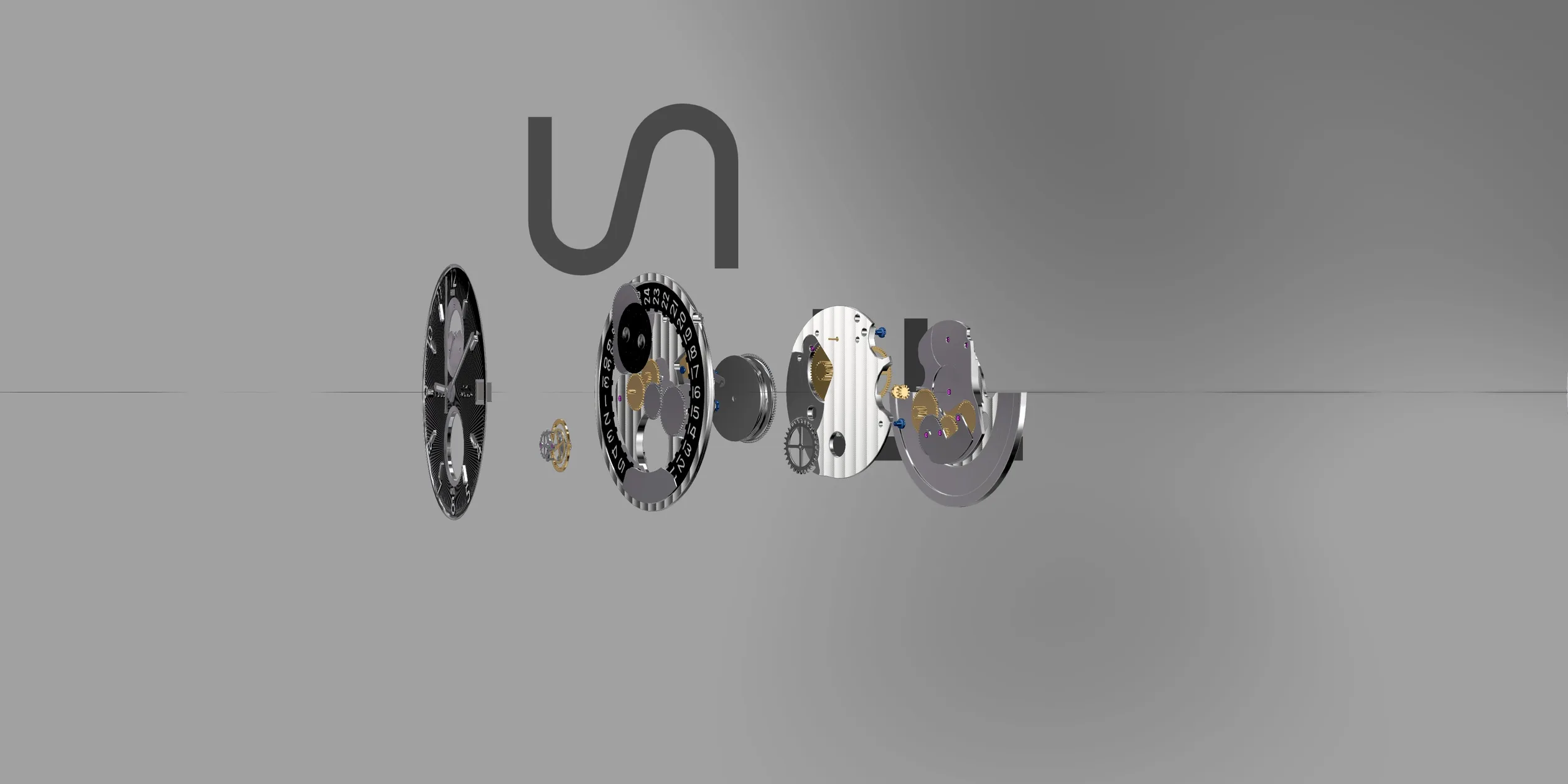
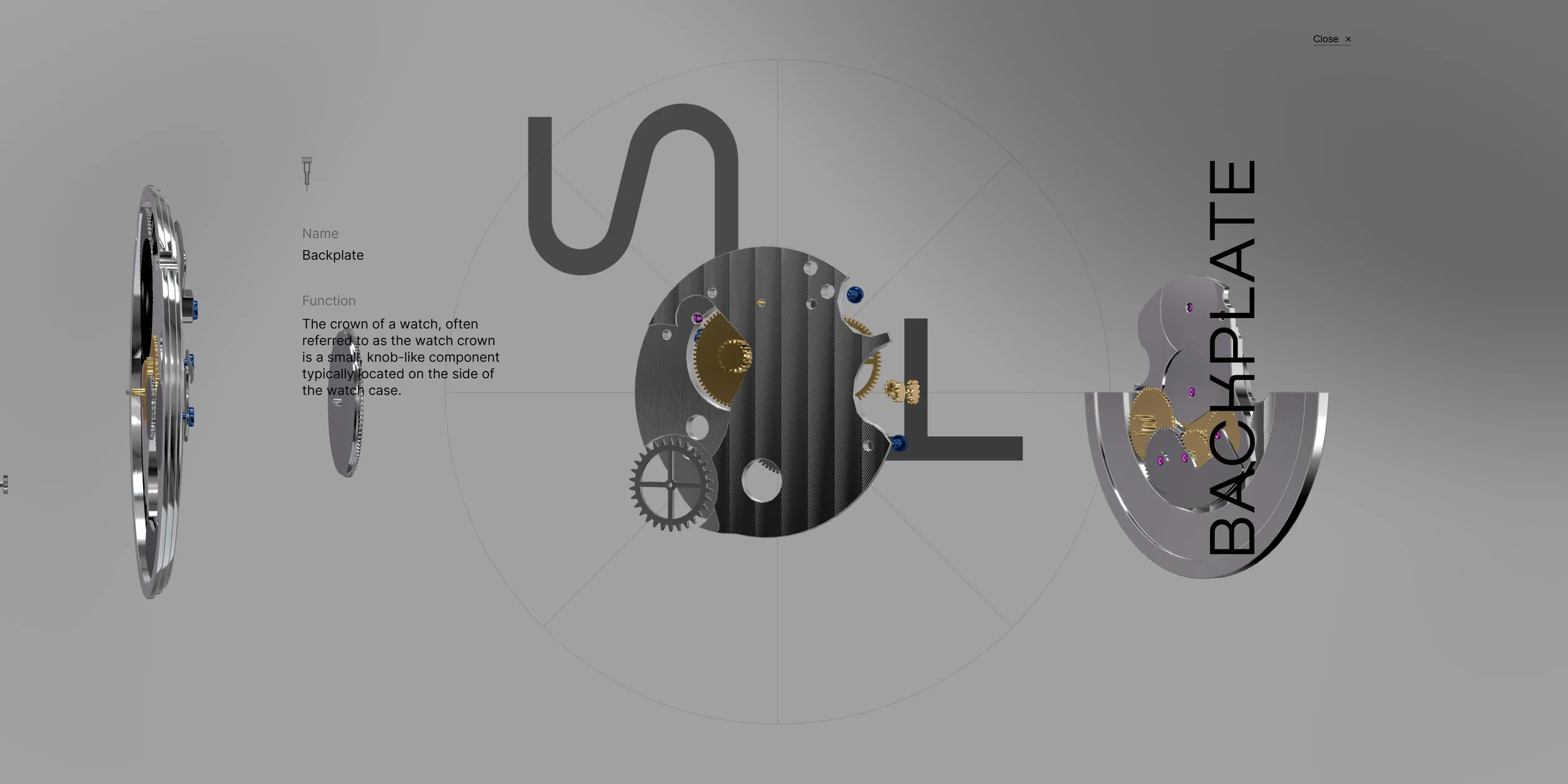
The fourth part takes the watch apart into a row of parts, and it is the part that gives visitors the most to do. From left to right the parts are the dial, the tourbillon, the mainplate, the barrel, the backplate and the oscillating weight. Here the cursor becomes a circle reading HOLD TO EXPLORE, which tells visitors they can hold the mouse button down. When visitors click one of the parts, the camera moves up to it, and a vertical line with the part's name appears together with a panel giving its name and function. Visitors can use the left and right halves of the screen to step to the previous or next part. However, the function text of all six parts is the same passage, which describes the crown, even for the backplate and the weight, so it is most likely placeholder copy that was never replaced.
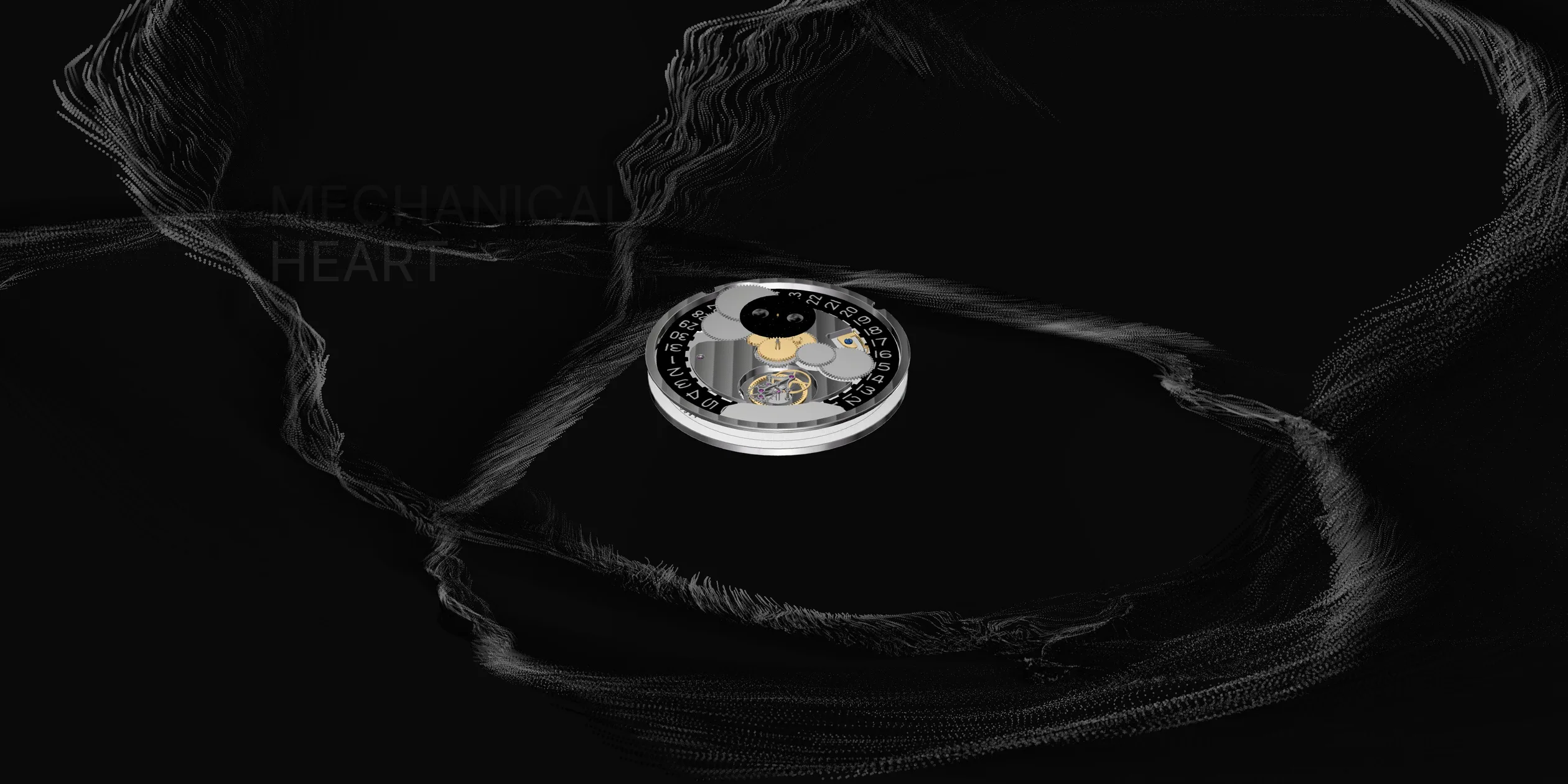
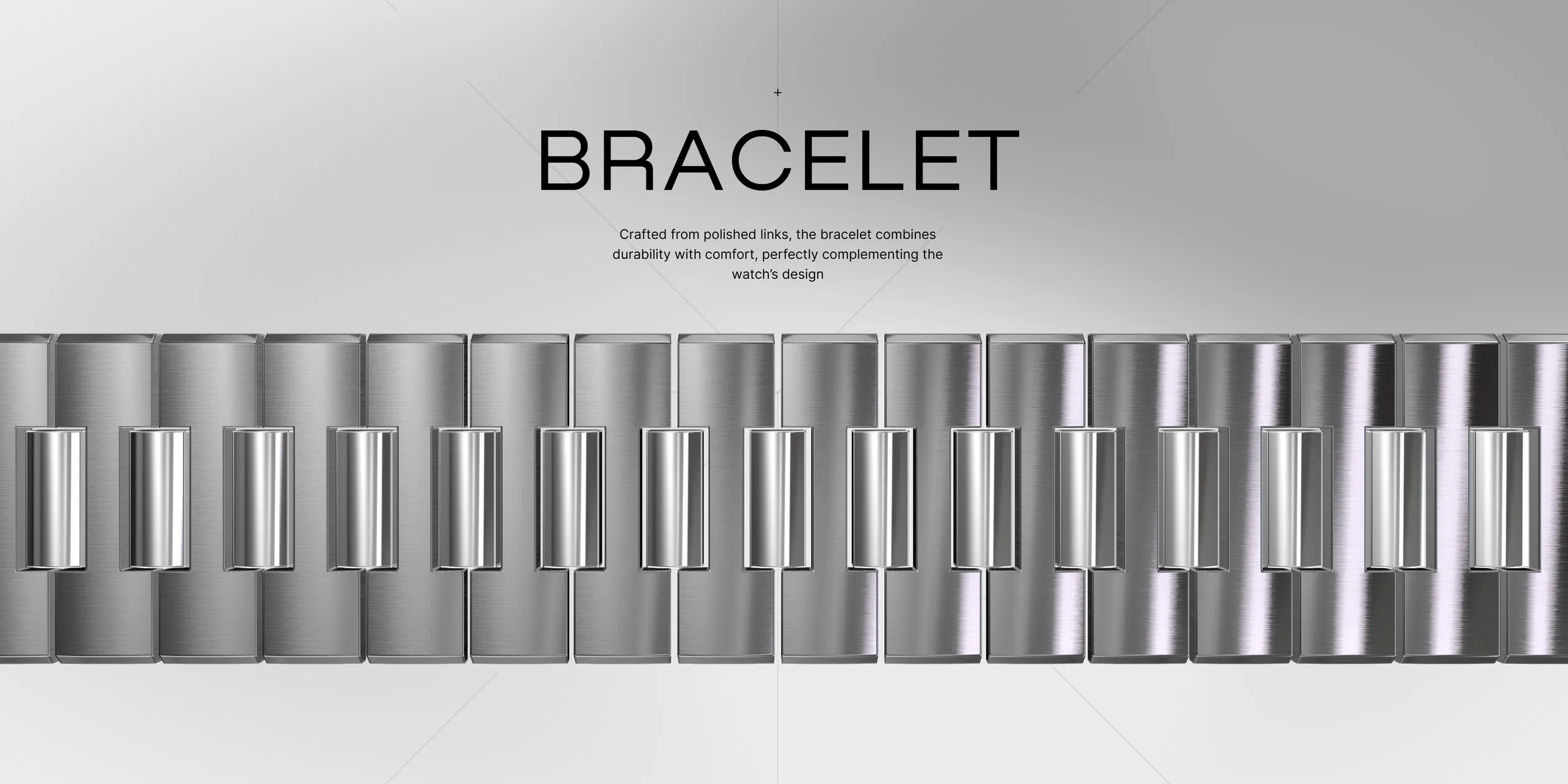
After the parts, the page moves into the black Mechanical Heart part. The movement hangs in the middle of the picture, ringed by white particles that look like smoke, and a very large number at the lower right shows which second the seconds hand has reached. The part right after it reads THE HIGHLY PRECISE AUTOMATIC MOVEMENT and introduces self-winding and reliability. The page then returns to pale grey and uses four parts to enlarge the contours of the dial, the dial and hands, the side of the case and the bracelet, each with a large heading and one line of text. In the bracelet part, the scattered links first gather into a straight bracelet, and as visitors leave the part, the links pull apart again to both sides.
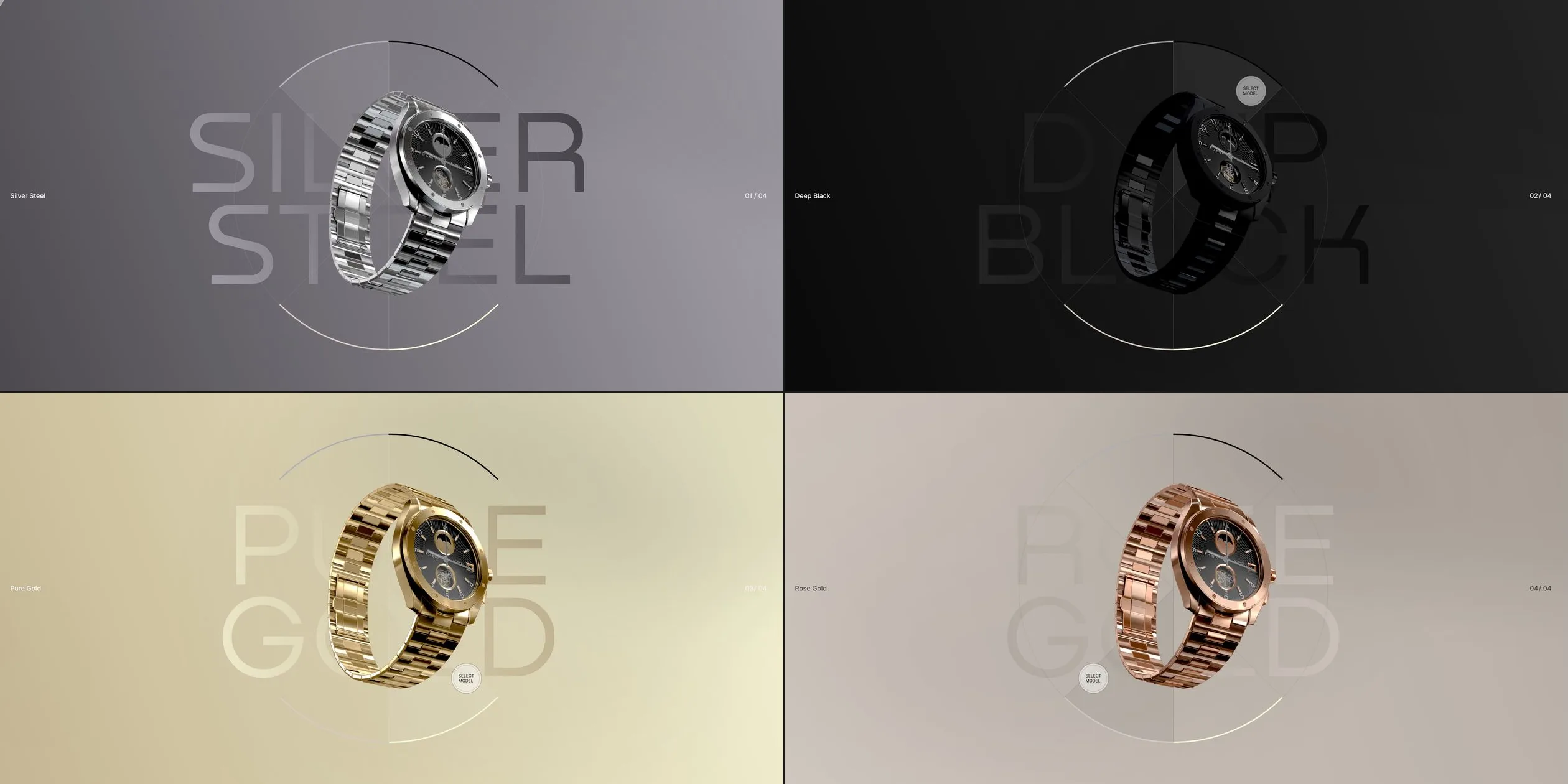
The last few parts bring visitors back to choosing and comparing. These parts start with a set of watch pictures alongside short texts on two models, Classic Edition and Sport Chronograph. The colourway part follows, where the ring is the same as on the first screen and each of the four colourways has its own background colour and a colour name that fills the picture. Further down comes the parts list of MODEL 146GR, in which ten items, the dial, hands, crystal, bezel, lugs, strap, buckle, crown, caseback and movement, each carry a weight between 1 and 34 grams. The footer sets the watches in all four colourways side by side under FS 60P, and when visitors click one, the site takes them back to the first screen in that colourway. The page has no contact details and no link back to 60fps, so from the footer visitors can only go back to the start.
02Design
The site's visual rule is to give almost all of the colour to the watch. The page has pale to mid grey backgrounds, the text uses only black, white and a few greys, and the watch's metal, gold gears and blue screws are the brightest and most layered parts of the picture. The background is a slowly flowing grey smoke, so there is always some light and shade around the watch and its metal always has something to reflect. There are two main exceptions, as the two parts in the middle turn completely black and the colourway part changes its background to match the colourway.
The site uses only two typefaces, Nekst for display and Inter for labels, both only in their regular weight. Nekst is a wide sans serif with even strokes, and it sets the FS 60P on the first screen, the large heading of each part and the part names in the list. Each letter of FS 60P on the first screen is about a quarter of the screen width tall, while the labels and texts are only a dozen or so pixels tall, with almost nothing in between. These two very different sizes make the giant type the frame of the layout and push the texts into the corners, so the reader's eye is not pulled away by blocks of copy.
The layout's other rule is that the watch and the type overlap. On the first screen the watch covers part of the 6, in the second part the watch passes between two lines of giant type, and in the third part the vertical FS 60P stands behind the watch. The 3D watch therefore shares one space with the type on the page, which matches 60fps' line about interacting with the content around it.
The whole layout scales continuously with the screen width. The site sets the base for type and spacing as a fixed fraction of the screen width. The widest range uses a 1600 pixel wide layout as its reference, and the narrower ranges switch to reference layouts 1440, 1024, 768 and 320 pixels wide. Within each range, type and spacing therefore keep the same proportion to the screen width. The giant type on the first screen is about 467 pixels tall on a 1920 pixel wide screen and about 332 pixels on a 1366 pixel wide one.
The site has very few interface elements, the main ones being the four-part ring and the round cursor that the site draws itself. The ring appears once on the first screen and once in the colourway part, each of its parts stands for one colourway, and a short black arc outside the selected part marks the current choice. The cursor is normally a small 40 pixel circle, and it shows different words in different places. Over a part of the ring it reads SWAP. Beside the row of parts it grows into a translucent circle reading HOLD TO EXPLORE. In the colourway part it reads SELECT MODEL, and once a part is open it turns into left and right arrows or a cross for closing. In this way the cursor does the work of button labels, so the page needs no separate hints.
The art direction of the watch is the look of metal in a photo studio. The case and bracelet alternate brushed and polished surfaces, the movement's plates carry Geneva stripes (a parallel curved finishing pattern), the gears are gold and the screws are blue. The numerals on the dial are also set in Nekst, the same typeface as the giant type on the page, so the 3D model and the layout are tied together even in the details. The hour and minute hands always stay at ten past ten, and only the seconds hand moves.
The colourway part turns the four colourways into four complete pictures. Silver comes with a dark grey to light grey background (#2B282E to #B9B6BD), and black with an almost black background (#000000 to #2B2B2B). Gold comes with cream (#B3A07C to #FFFFE1), and rose gold with a slightly pink beige (#D7CFC8 to #B3A99F). The name of each colourway is set in pale giant letters that look cut out of the background behind the watch, with the colour name on the left and a number such as 01 / 04 on the right. When visitors change the colourway, the watch, the background and the giant name behind it change together, and so does the mood of the whole picture.
On phones the layout becomes one column and the site's own cursor is removed. The FS 60P on the first screen is wider than the screen, so the letters at both ends are cut off by its edges. The ring and the watch sit in the middle, and the colour name and MODEL 146GR move to the bottom. The texts are split into an upper and a lower block around the watch in the middle, and the vertical FS 60P stays at the lower right. The part with the row of parts turns the part names vertical and sets them along the bottom of the screen.
03Motion
Every movement on the site follows the scroll position, and all of it carries a long glide. When visitors turn the wheel once, the page takes several seconds to come to a full stop, and when they scroll back, every movement plays in reverse. The text and the watch catch up with the scroll at different speeds. The text follows more closely, and the watch arrives a beat later. In every part the words therefore settle first and the watch slides in after them, which makes the whole page feel heavy and steady, like a scene in slow motion.
The opening is an animation that does not follow the scroll. After the thin circle of the loading screen fades out, the watch moves back from a position almost touching the camera and turns from an angle to face the front. It lands in its place on the first screen in about 2 seconds, fast at the start and slow at the end. During this time the letters of FS 60P turn from pale grey to black, and the ring and MODEL 146GR at the bottom appear after them. Only when the opening ends does the watch start to turn gently toward the cursor. Whichever way the cursor moves, the watch leans a little that way, and the smoke in the background drifts toward the cursor as well.
As visitors scroll down, the watch changes its position and angle between parts. It first passes at an angle through the giant type, then turns sideways to reveal the vertical FS 60P, and then its parts move apart to both sides along a horizontal line until they form the row of parts. When the page enters the Mechanical Heart part, the whole picture darkens until only the movement and the particles around it remain. In the parts that follow, the camera moves close to the dial, circles to the side of the case and looks down at the bracelet. The links of the bracelet start out scattered and tilted, and they gather into a straight bracelet with the scroll, fast at the start and slow at the end. When visitors keep scrolling, the links speed up as they pull apart to both sides.
The row of parts responds to the cursor. As the cursor moves left and right over the row, the parts closest to it spread furthest apart and turn the most, while parts further away barely move. The small pieces inside each part also spread out a little in depth. It looks as if a force follows the cursor and pushes a gap open between the parts. When visitors click a part, the camera moves up to it in about 2 seconds, slow at both ends and fast in the middle. The picture on either side darkens at the same time, and the panel fades in after that. When visitors close the panel, the camera returns to the row in about 1.6 seconds.
The long press works across the whole page. When visitors hold down the mouse button, the effect starts after about half a second and then builds to its full strength over about 2 seconds, slow at both ends and fast in the middle. During this time the page stops scrolling, the camera moves in closer, the gears and seconds hand inside the watch spin faster and faster, and the parts of the row spread further apart. When visitors let go, all of these changes reverse and the page can scroll again. The gesture leaves the decision to look more closely to the visitor, so the longer they hold, the closer they get.
The watch is always running. Like the seconds hand of a mechanical watch, its seconds hand moves in 8 small steps every second, and the escapement's pallet fork swings left and right with it. The large number at the lower right of the Mechanical Heart part reads this very seconds hand, so the number changes in exactly the rhythm of the hand in the picture. The particles around the movement keep flowing slowly and leave fading trails behind them, and the view of the particles also shifts slightly with the cursor.
When the colourway changes, several things change at once. After visitors click a part of the ring, the colour, roughness and shine of the watch's metal change smoothly over about 1 second, so the watch never flashes into a different one. In the colourway part, the two background colours also fade to the new colourway over about 1.2 seconds, slow at both ends and fast in the middle. The footer's transition is longer, as after visitors click one of the watches, a panel sweeps up across the screen and the letters of the colour name rise one after another. At the moment the panel covers the screen, the site jumps the page back to the top, and the panel then keeps sliding up and away. The whole sequence takes about 2.5 seconds, and what visitors see at the end is the first screen in the colourway they just chose.
On phones, hovering gives way to tapping. Visitors tap a part of the ring to change the colourway and tap a part once to open its panel, while dragging a finger does not open a part. The parts spreading apart around the cursor only happens on desktop, and on phones the row of parts does not spread apart under the finger.
04Engineering
All of the site's picture is drawn by one WebGL canvas fixed behind the page, using three.js. The page itself only sets the type and reserves space, and the element of each part names the 3D scene it drives in a data-webgl attribute, with nine scenes across the page, from Intro, Disassembly and Particles through to Footer. Each scene has a GSAP timeline, and the site converts the scroll position into the progress through the part of the page that the scene occupies and then sets that progress directly on the timeline. How the watch moves and turns in each part is therefore a set of keyframes on a timeline, and scrolling only drags the playhead.
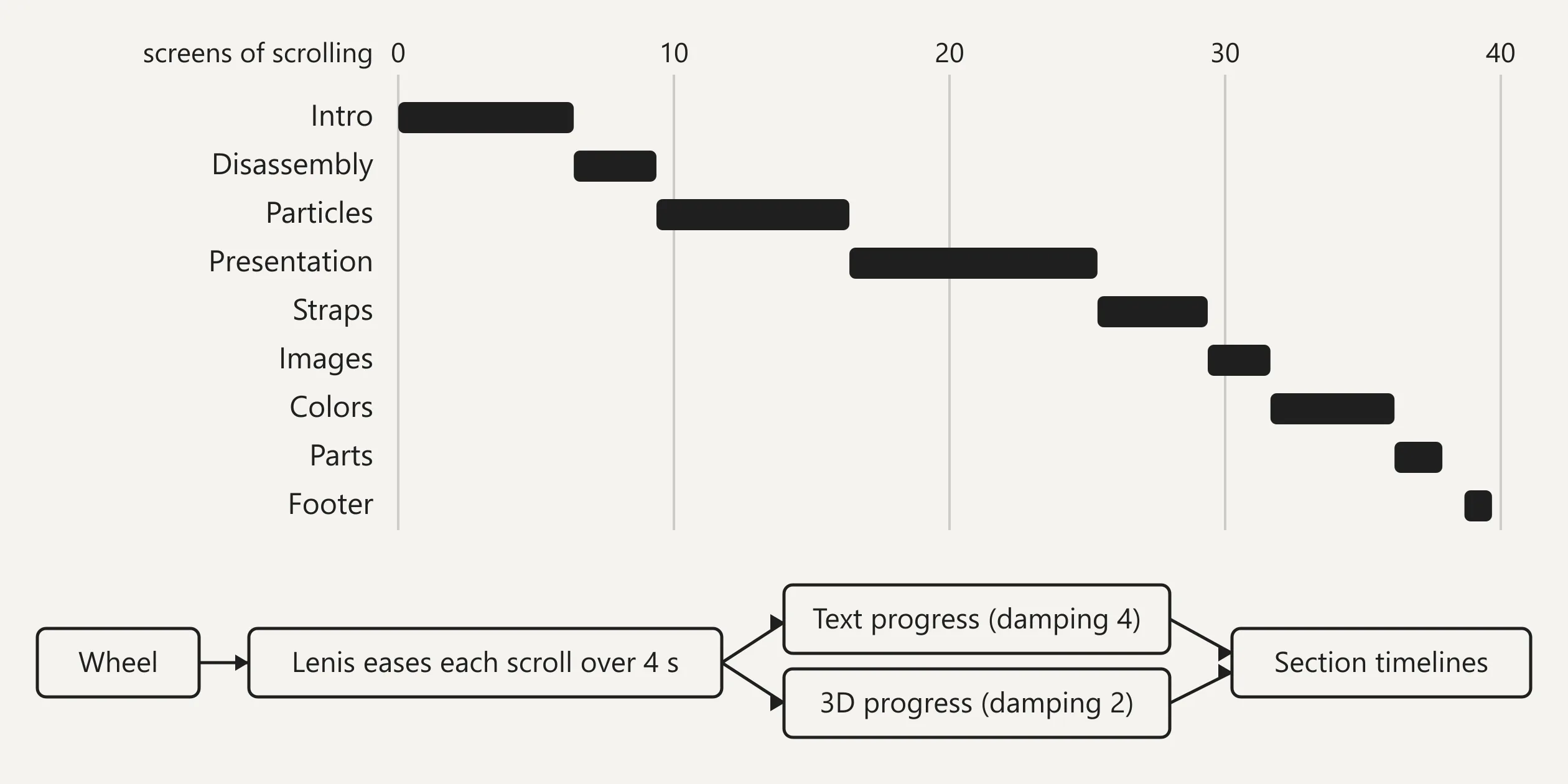
The long glide described earlier comes from three layers of smoothing stacked on top of each other. The site hands scrolling to the smooth scrolling library Lenis with its duration set to 4 seconds, so every wheel input takes 4 seconds to play out along an exponential curve. The site then derives two catch-up values of its own from the Lenis scroll position. The site gives the catch-up value for the text animations a damping factor of 4 and the one for the 3D scenes a factor of 2. Both are calculated from the time between frames, so the frame rate does not change how fast they catch up. The value with the smaller factor catches up more slowly, which is why the watch always arrives a beat after the text. At the moment the footer jumps back to the top, the site briefly multiplies the speed of both catch-up values by 5, so that the scenes catch up with the new position while the panel covers them.
The watch's material is a physically based shader that 60fps wrote itself, not one of the materials built into three.js. It is lit only by images, with no lights at all: an environment map in the EXR format provides the main reflections, and a second EXR environment map added on top gives the metal extra highlights. Ambient occlusion, roughness and metalness are packed into the three channels of one texture, and normal maps provide the detail of the brushing and the stripes. The shader leaves a set of named insertion points, so each scene can insert its own calculations at fixed places. For example, when the page enters Mechanical Heart, one parameter lowers the brightness of the environment maps to 15% of the original, and the picture darkens. The scenes also rotate the direction of the environment map, so as the watch turns, bands of light sweep across its surface. When the colourway changes, the site uses GSAP to tween the colour, roughness, metalness and shine of each material to the values of the new colourway, which is the smooth change of colour described earlier.
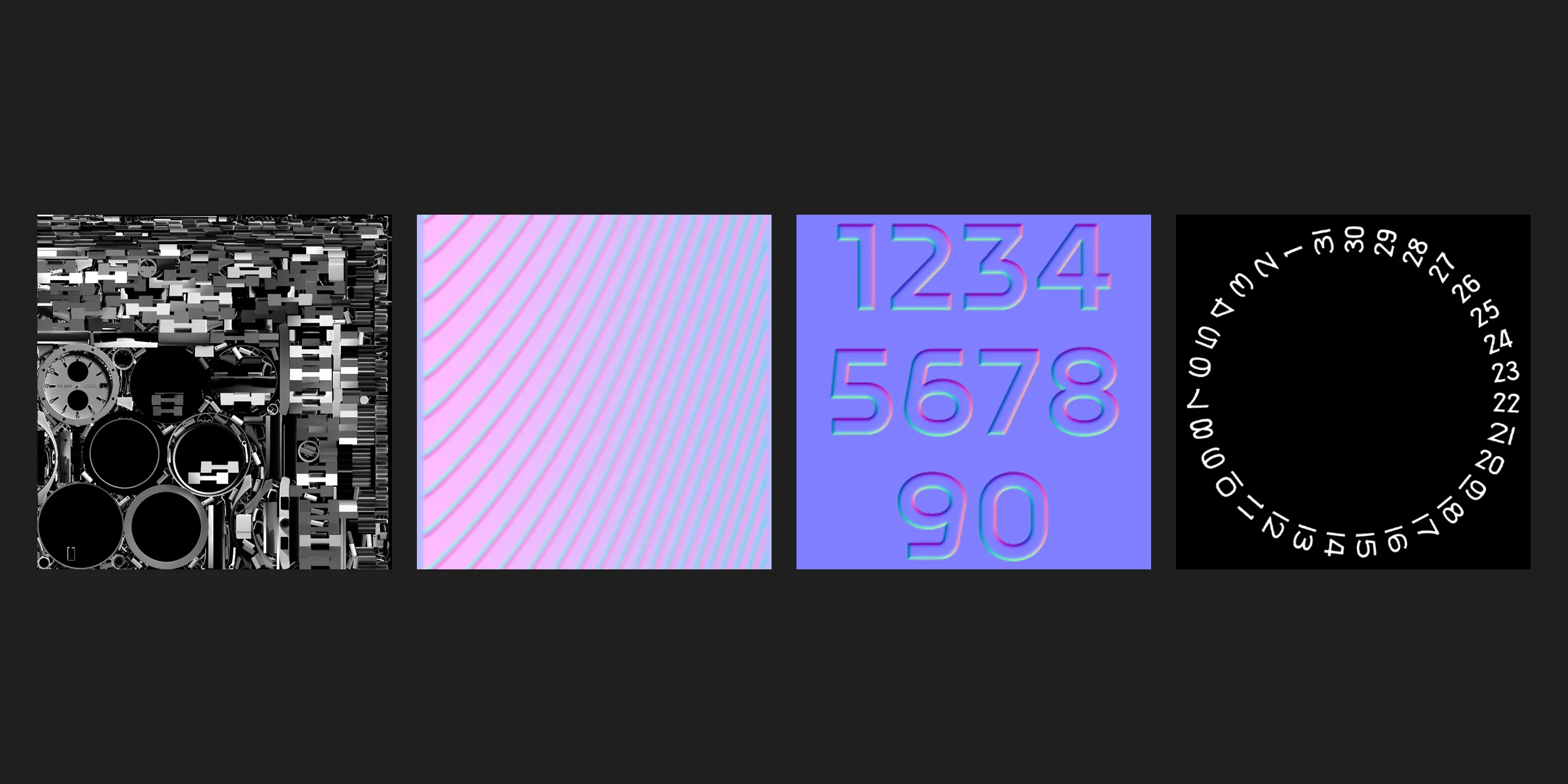
The watch model is a glb file with 107 meshes and about 165,000 triangles in total, and its crystal is made into glass with glTF's transmission extension. The geometry in the model uses no compression such as Draco, and most of the download goes on the geometry, while the 17 textures embedded in it come to only about 1.7 MB. Among these textures are a 2048 pixel baked ambient occlusion atlas, a small Geneva stripe normal map, the colour and normal maps for the dial numerals, and a date ring printed with 1 to 31. The links in the bracelet part are drawn with two instanced meshes (one draw call for many copies of the same shape), one for the I-shaped links and one for the centre links. The timeline of that part drives the position and angle of each link. The parts of the model that turn were given custom properties when the model was built, recording how long each one takes to turn once, and the site reads these properties and sets those parts turning automatically. The site updates their angles only every 0.125 seconds, which is where the 8 small steps of the seconds hand described earlier come from, and during a long press it updates them every frame instead and adds extra speed.
The last post-processing pass of the site's picture also draws the background. The 3D scenes are first drawn into an offscreen texture, and a final full-screen shader reads it, raises the contrast to 1.15 times and sets the gamma to 1.6. Where the scene is transparent, the shader layers several sine waves into grey light and shade, with time and the cursor position added to their inputs. This is how the flowing smoke described earlier is calculated in real time without any background image.
The particles of the Mechanical Heart part are a separate scene with their own camera. The scene draws 20,000 points whose look comes from a noise texture and a gradient texture, and its camera shifts with the cursor while slowly circling a small loop. The particles are drawn into two offscreen textures used in turn, and every frame lays the previous frame back on top and fades it slightly, so every point drags a fading trail of smoke behind it.
Each of the interactions is driven by one small value. A single component handles the long press, the half second delay and 2 second build described earlier are its parameters, and its curve is power3.inOut. The component pushes a strength from 0 to 1, and the camera distance, the speed of the gears and the stopping of the scroll all read this same strength. The spreading of the parts around the cursor applies a Gaussian curve to the horizontal distance on screen between the cursor and each part, which gives how far each part should be pushed and how much more it should turn. On phones and tablets the height of this curve is set to 0, which switches the effect off. The site uses raycasting to tell which part a visitor clicked, and every part carries a mesh used only for this test.
The main cost of this approach is the download. The first visit downloads about 11.7 MB, of which the watch model is about 8.8 MB and the two EXR environment maps about 1.8 MB, and phones download the same files as desktops. Visitors also wait longer because of this. The thin circle of the loading screen appears within half a second, and the loading screen starts to fade after about 3 seconds. By the time the opening animation ends and the first screen can be used, about 5.5 seconds have passed. On phones the site caps the canvas pixel ratio at 2 to reduce the drawing load on high-resolution screens.
Visitors who use only a keyboard or a screen reader can barely use the site's interactions. The keyboard can scroll the page, but changing the colourway, opening a part and the long press all need a mouse or a finger. The Tab key only moves focus between two invisible, unnamed large buttons, with no focus outline shown on screen. The watch pictures on the page are all marked as decorative, with empty alternative text (a written description of an image), so screen readers skip them. The giant headings are split into single letters, so a screen reader reads FS 60P as a string of separate letters. The site also ignores the system setting for reduced motion, and with it switched on, the opening, the smooth scrolling and every animation play as usual.
05Scores and Team
| Award | Source | Date | Score |
|---|---|---|---|
| Site of the Day | Awwwards | 2026-08-17 | 7.59. Design 7.51 / Usability 7.48 / Creativity 7.74 / Content 7.90 |
| Developer Award | Awwwards | 2026-08-17 | 7.07 |
| Honors (Product) | Awwwards | July 2026 | — |
| FWA of the Day | The FWA | 2026-06-30 | 84 POINTS |
Of the four Awwwards categories, Content is the highest (7.90) and Usability the lowest (7.48). Of the Developer Award categories, Animations is the highest (8.00) and Accessibility the lowest (6.20).
| Credit | Role | Record (as of 16 November 2026) |
|---|---|---|
| 60fps | A French creative development studio whose Awwwards account gives Nancy as its location, making 3D experiences for the web for brands and agencies since 2013 | Awwwards works 37, SOTM 1, SOTD 23, HM 37. FWA 40 |
Both platforms credit only 60fps, and this is the studio's own project.
06Archive
- Award date
- 2026-08-17
- Awards
- Awwwards SOTD 2026-08-17, Awwwards DEV 2026-08-17, The FWA FOTD 2026-06-30
- Site
- https://thewatch.60fps.fr/
- Credits
- 60fps
- Design
- spatial
- Build
- scroll
- Awwwards
- 7.59 / 10. Design 7.51 / Usability 7.48 / Creativity 7.74 / Content 7.90. Developer Award 7.07. https://www.awwwards.com/sites/the-watch
- The FWA
- 84 POINTS. https://legacy.thefwa.com/cases/the-watch
- Stack
- Svelte, three.js r162, GSAP, Lenis 1.0.42, glTF (with transmission), EXR environment maps
- Total assets
- About 11.7 MB on first visit, of which the watch model is about 8.8 MB, the same on phones
- Speed
- FCP 0.43 to 0.48 s (loading screen), first screen usable after about 5.5 s, CLS 0.03. Continuous scroll 60 fps