illoca
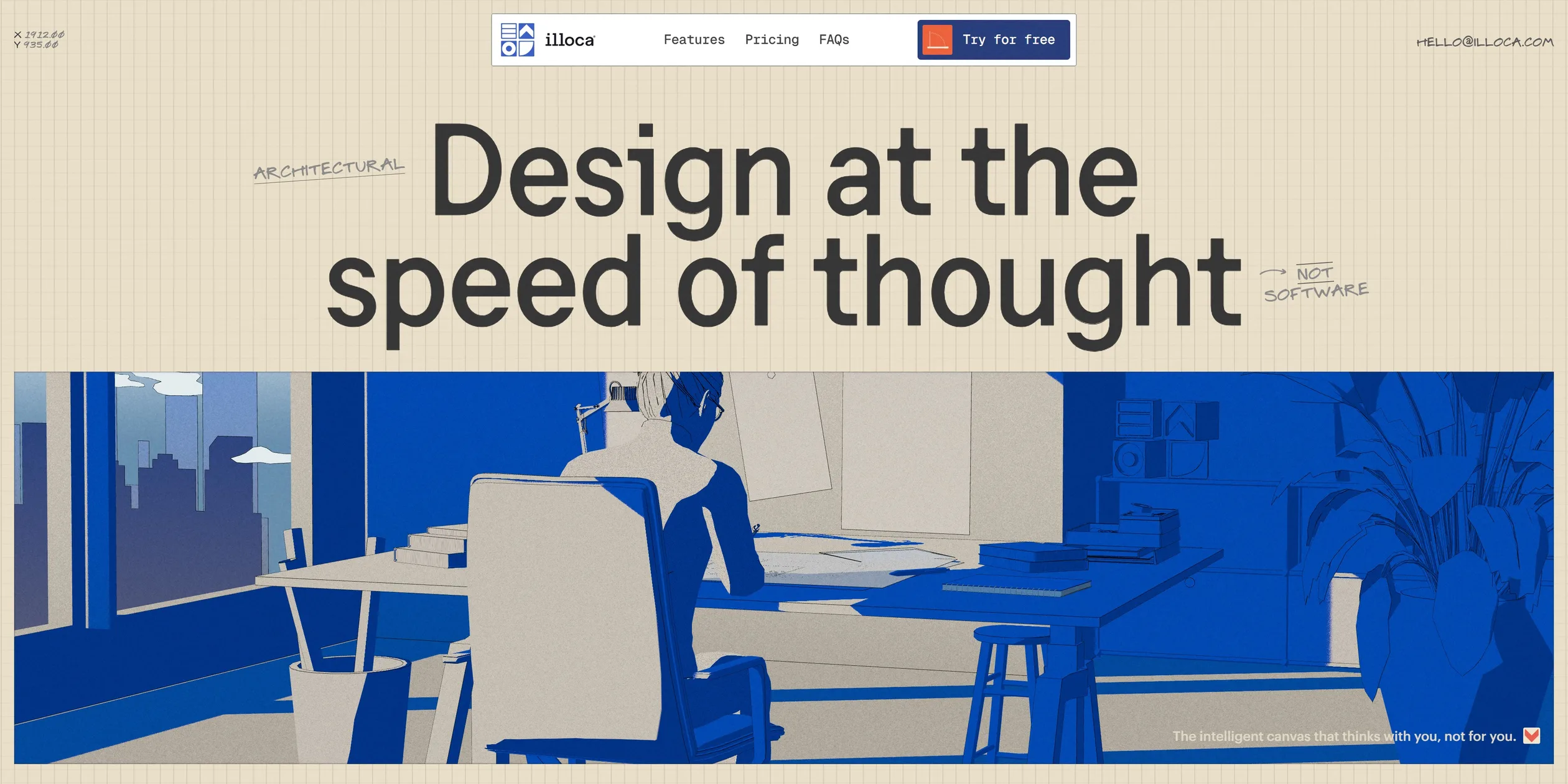
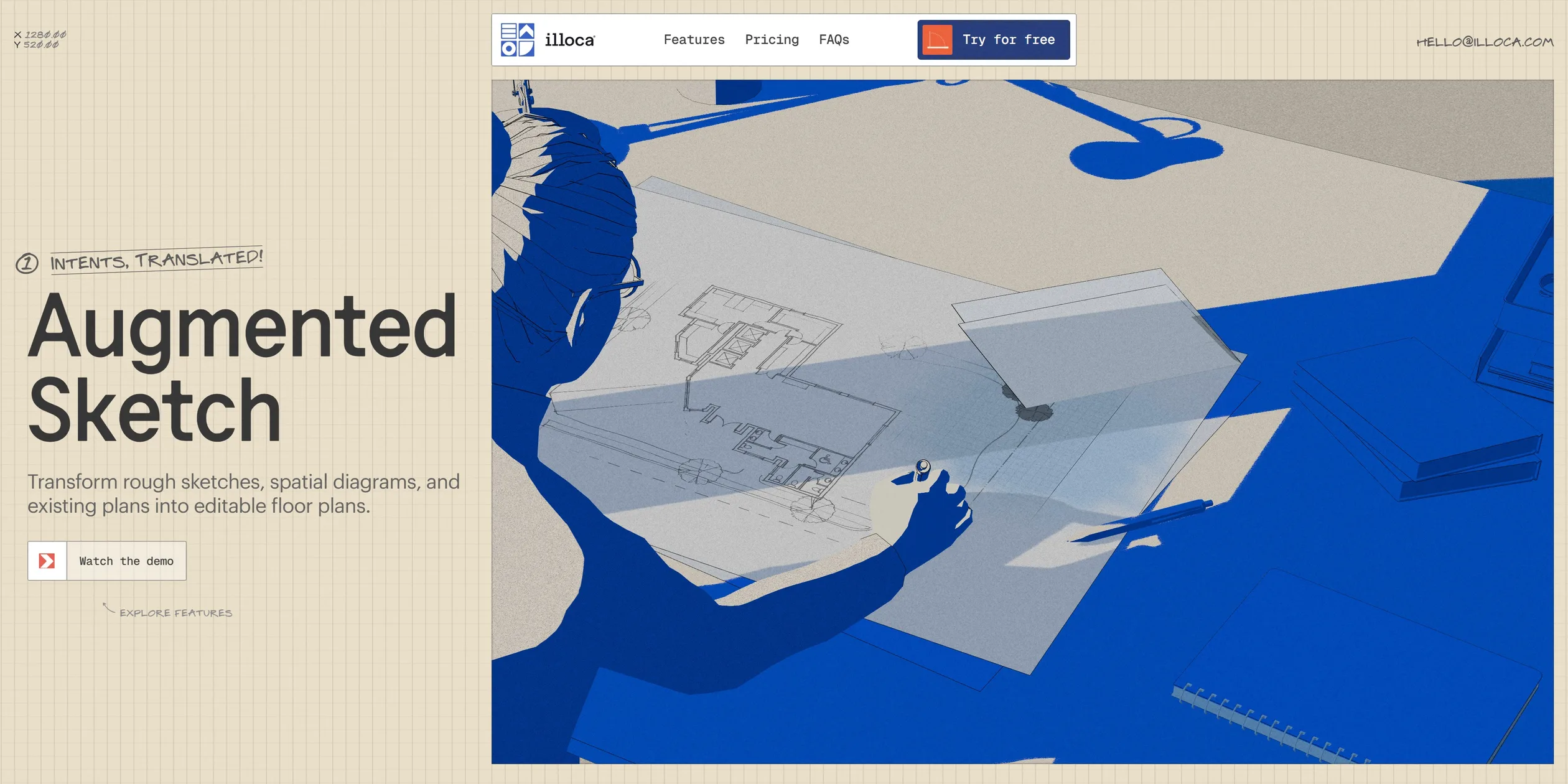
This is the launch site that the California startup illoca made for its first product, Tracing Paper, and most of it is one unbroken camera shot that moves as the visitor scrolls, always pointed at an architect's desk. As the visitor scrolls down, the camera pushes from behind the architect onto the desk, where a pencil sketch on tracing paper turns into a clean floor plan and the plan then rises off the paper as a building. The product's five features sit along this path, and the building is cut open, furnished and refaced as each one comes up. The whole scene is drawn in beige and cobalt alone, like a printed illustration.
The site was designed and built by Unseen Studio in Bristol, England. It won FWA of the Day on 13 August 2026, then Awwwards Site of the Day and the Developer Award on 4 September.
01Concept
Tracing Paper is an AI design tool for architects, who can use sketches, red-pen markups and a written description to generate floor plans and 3D models they can keep editing. On 6 May 2026 illoca announced a $13 million seed round led by Bessemer Venture Partners and launched the product at the same time. One of its two founders, Chin-Yi Cheng, came from Google DeepMind and the Autodesk AI Lab, and the other, Chiaowei Yu, led the building information modelling team at Tesla. Unseen Studio made illoca's brand, website and motion. The studio's project page says the whole brand starts from paper, from stacked drawings, the translucency of trace overlays and the marks a pencil leaves. So when the site introduces the features, the main picture is an architect's desk rather than the software interface, and the five features are acted out as one person going from a sketch to a whole building. Screen recordings of the software appear only in the panels that the buttons open.
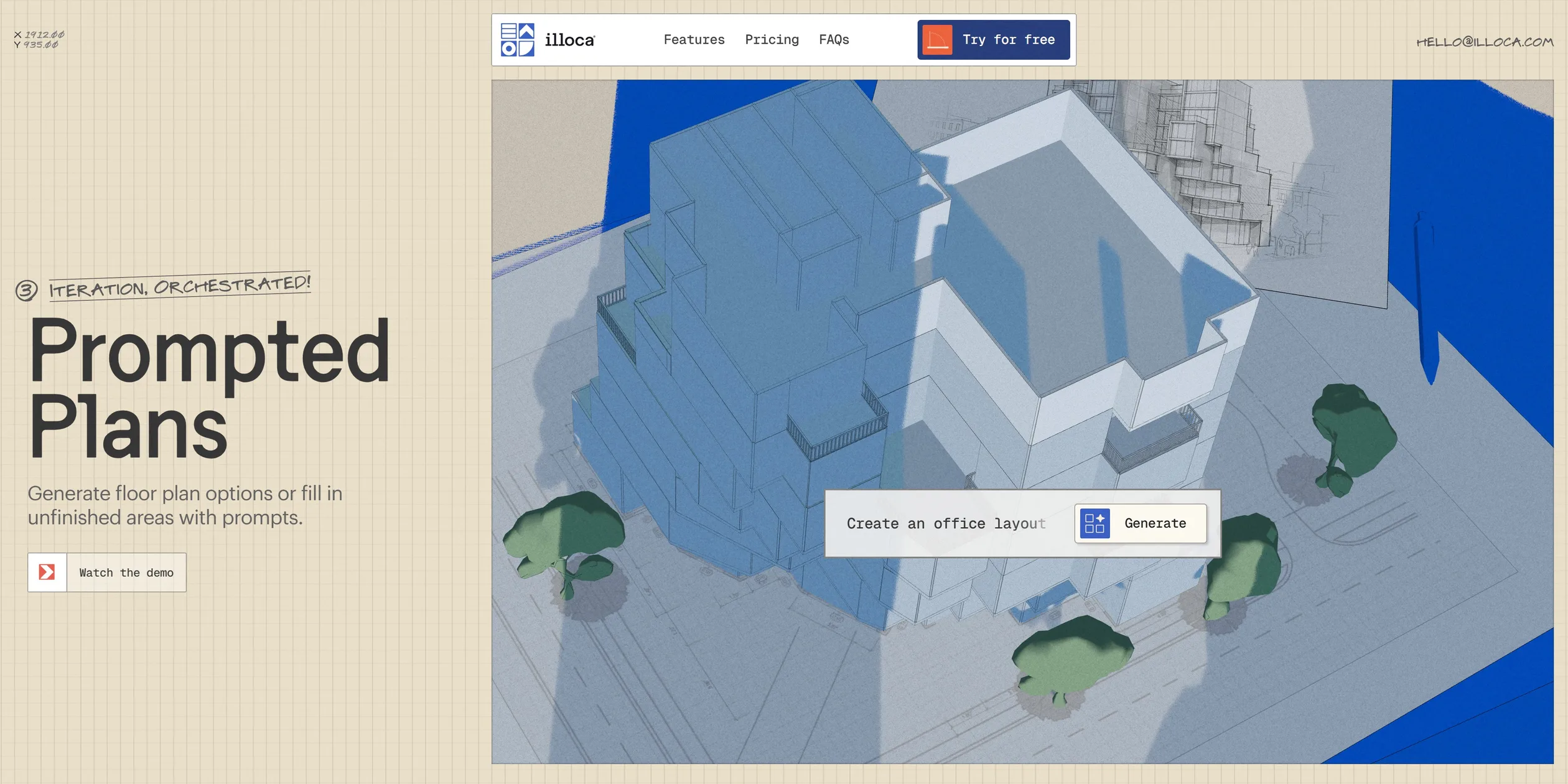
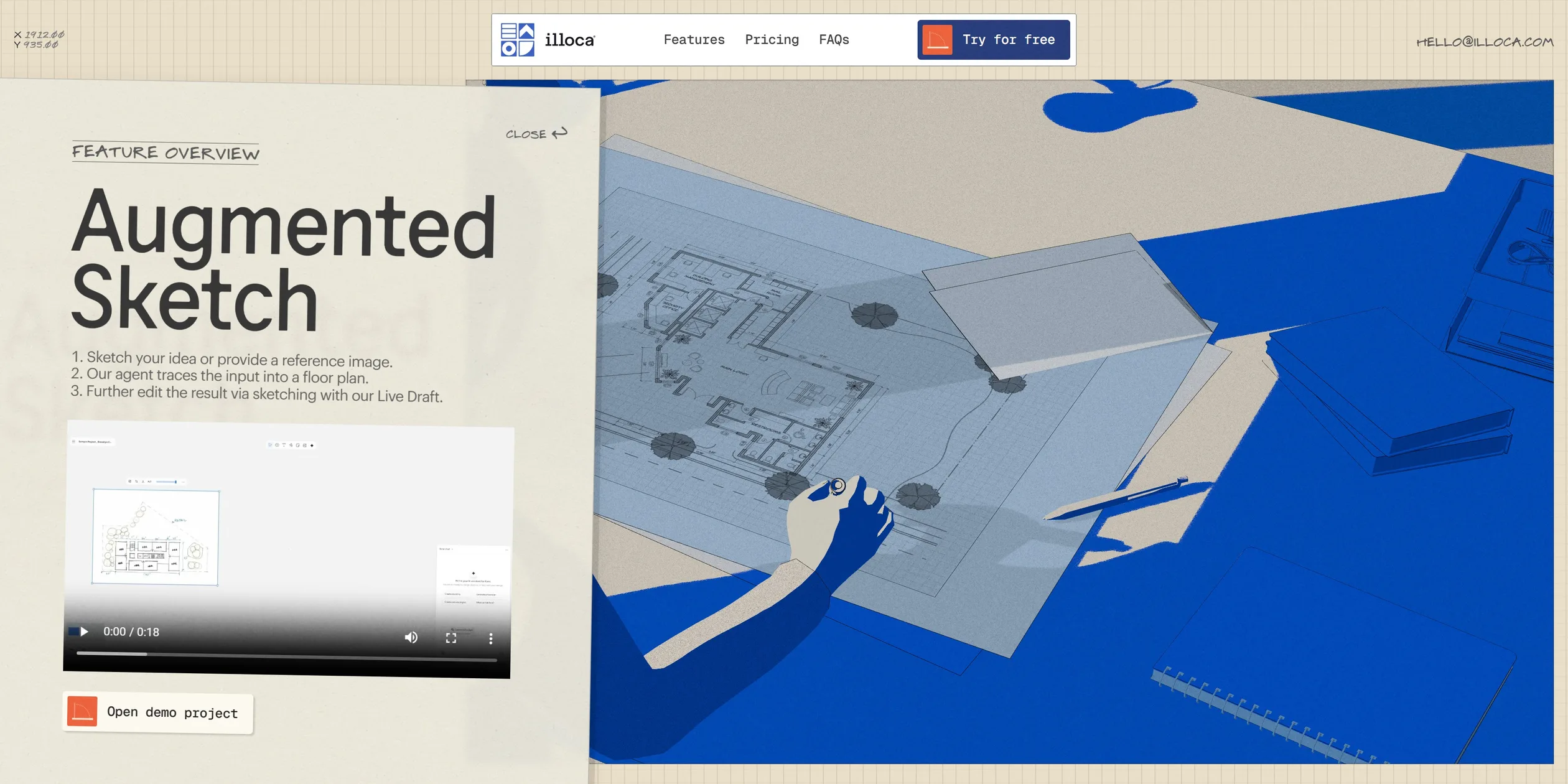
The visitor's path follows that process. After the first screen, the five features appear in the order an architect would actually use them. Augmented Sketch traces a sketch into a floor plan, Adaptive Massing pushes the plan up into the mass of a building, and Prompted Plans generates an office layout from one sentence. Agentic Refinement lets the architect circle what should change in red pen and has the system make the edits, and Instant Facades tries out facade options. Each feature has a number, a handwritten slogan (Intents, Translated!, Ideas, Shaped! and so on), a line of description and a Watch the demo button. The button opens a sheet of paper with two or three steps, a screen recording of a little under twenty seconds, and an Open demo project button that takes the visitor to a sample project in the real illoca app.
The site's single page is about forty screens long, and the story takes up about thirty-three of them. The longest stretch lies between the first two features, about eight screens from the moment the Augmented Sketch text appears to the moment the Adaptive Massing text does. Here visitors first watch the sketch become a plan on the paper themselves, then see the plan fade and the building rise from the paper storey by storey. These two steps are the product's core uses, and the site gives them the most scrolling, probably on purpose. After that, the text of each feature is four to seven screens from the next.
The camera also lingers differently from feature to feature. When the text of the middle three features appears, the camera stops completely for a while and moves on once the visitor has read it. In the first feature it only moves very slowly, and in the last it keeps moving.
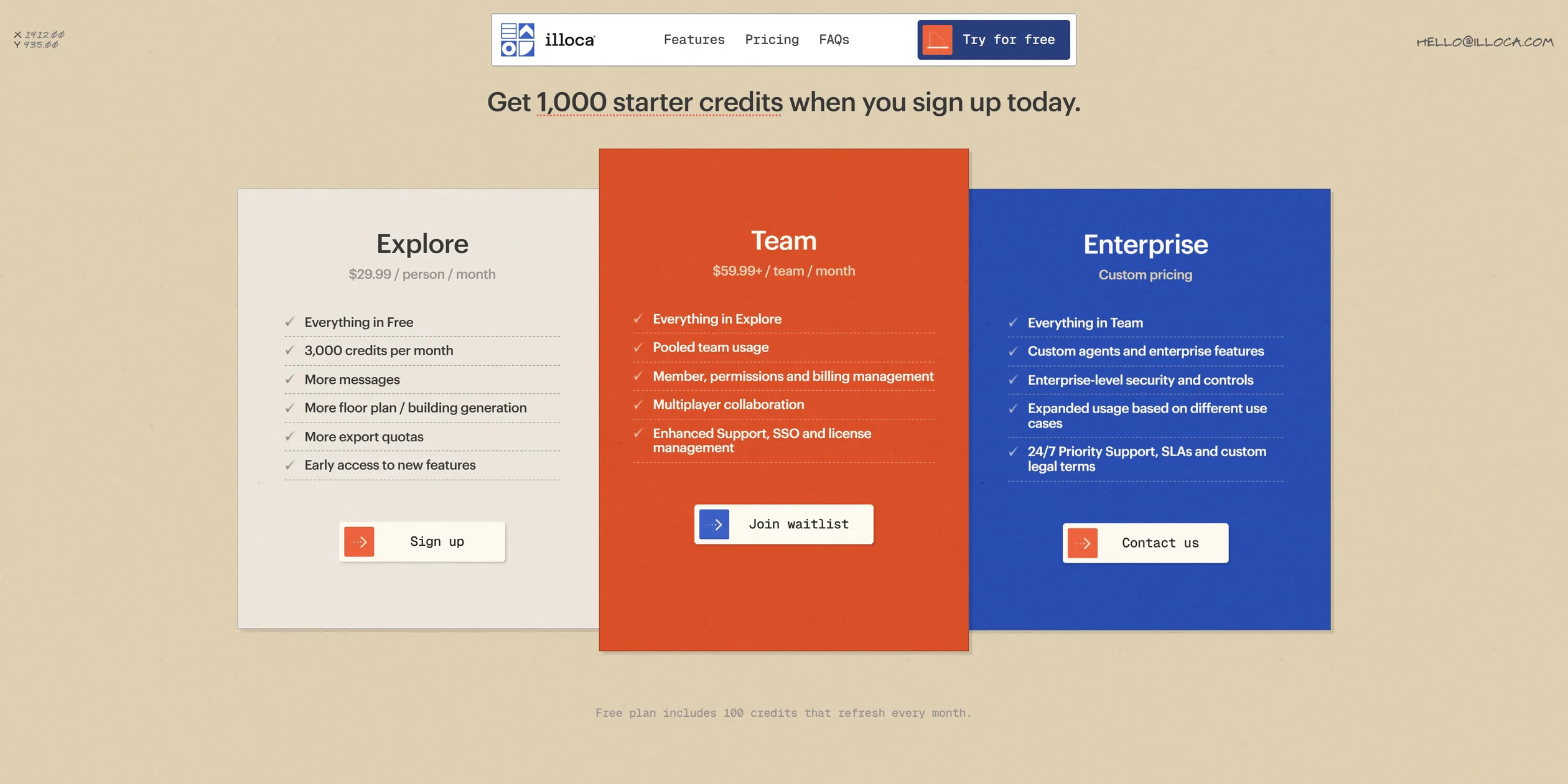
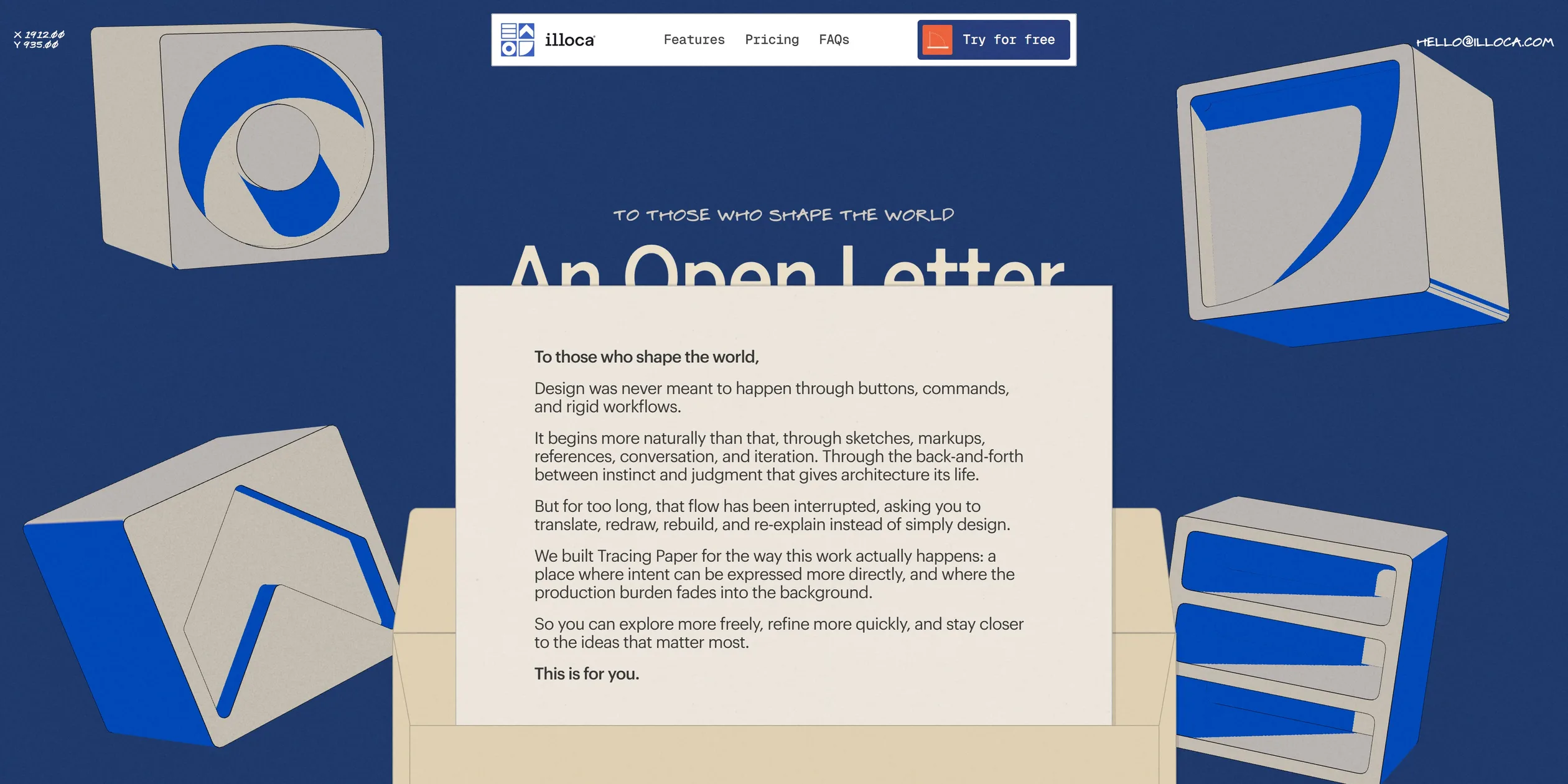
When the story ends, the page turns into a navy closing section. An open letter slides out of an envelope, starting with To those who shape the world. It says design has always begun with sketches, markups and conversation, and that Tracing Paper was built for that way of working. Pricing, FAQs and the footer follow the letter. The Try for free button stays in the navigation the whole way down, and the three pricing tiers lead to a sign-up page, a waitlist form and a contact email.
02Design
The rule over the whole site is a sheet of grid paper. The page background is a beige #EADFC9 covered in a fine 16-pixel grid, with vertical lines in #D3C9B5 a little darker than the horizontal lines in #E3D9C3, like the drafting paper an architect uses. The 3D picture sits in a window cut into this sheet, and all four edges of the window are placed by counting grid cells. On the first screen the window sits two cells in from each side, and its top edge is twenty-eight cells down, just below the headline. In the feature sections the window gives up thirty-eight cells of width on one side to the text column. As a result the text, the window and the background grid always line up on the same cells, and the web page and the 3D scene look as if they were drawn on the same sheet.
The 3D scene inside the window uses only two colours. Surfaces that face the light are a warm grey beige, #C2BBB0, and surfaces turned away from it or lying in shadow are cobalt, #0248B6, with a hard line between the two and no gradient. Shadow edges break up into fine grains like the edge of a spray-painted shape, the surfaces carry a layer of paper grain, and outlines are traced in thin black lines. Together these make a real-time 3D scene look like a two-colour printed illustration, and they also echo the blue of architectural blueprints. The building and the trees are the two clear exceptions. The building uses a lighter steel blue (#ABBBCB, shadow #5D85AC) so it stands out from the deep blue of the desk, and the trees use a greyish green.
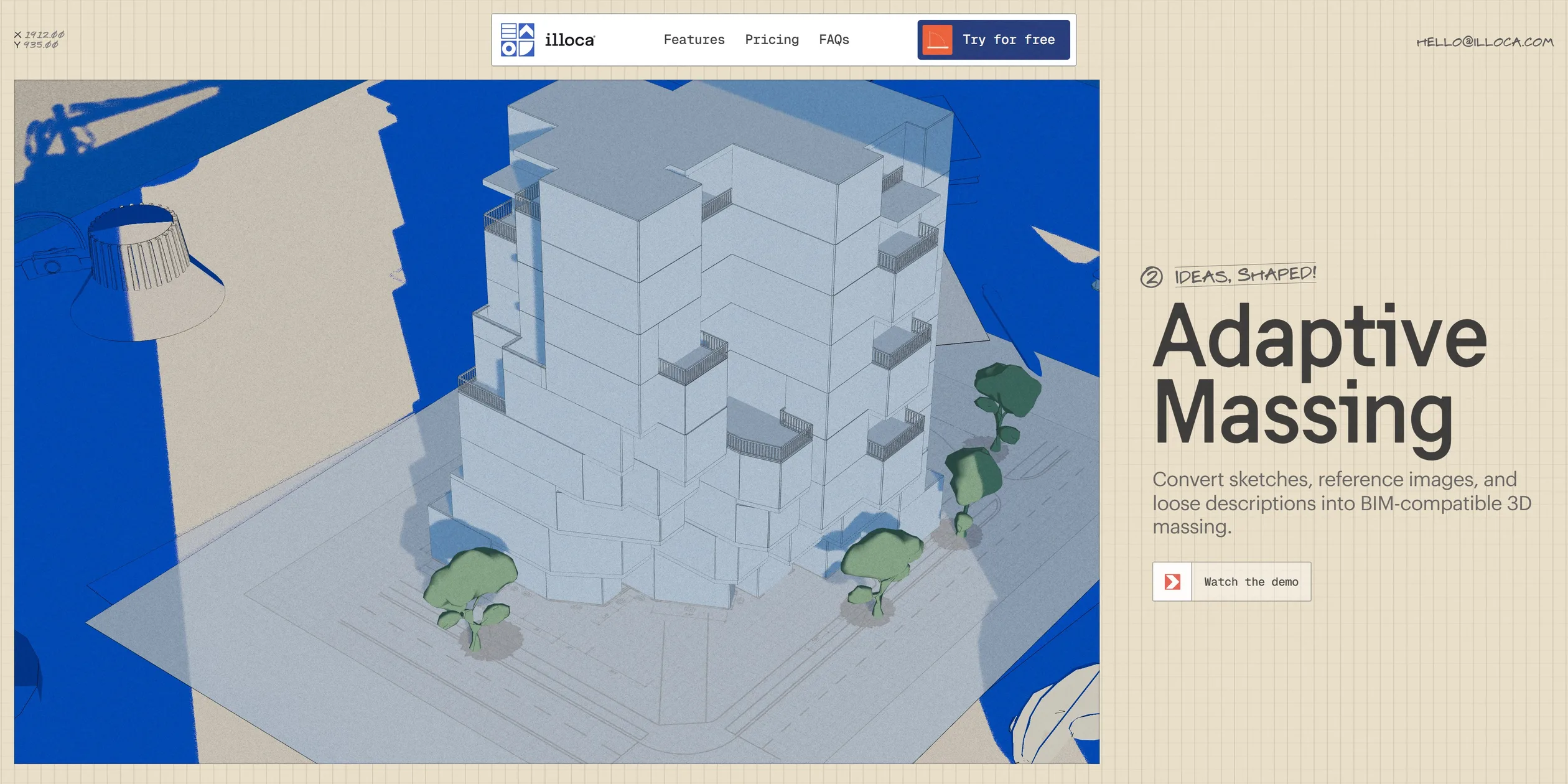
The typefaces split into four roles. Headlines are set in F37 Analog, and the first-screen headline is 148 pixels on a 1920-pixel-wide screen, about seven times the body text, with feature titles at about 100 pixels. Descriptions and FAQs use Graphik, with body text at 20 pixels. The navigation, buttons and other controls use the monospaced Geist Mono, which reads like software. A handwriting face, Architect Pro, carries the feature slogans, the coordinate readout in the top-left corner, CLOSE and the email address, like notes an architect writes in the margin of a drawing. Headline and body sizes scale with the width of the screen, so on a 1366-pixel laptop the first-screen headline is about 105 pixels.
The small parts along the top and in the corners of the page look like the interface of a drawing program. The navigation is a white card in the middle of the top edge. The illoca logo on its left is made of four small tiles (lines, a triangle, a circle and a quarter circle), and the navy #283F7D Try for free button on its right has a small orange #EC633D icon tile set into its left side. When the cursor hovers, the navigation links turn blue and gain a dotted underline, while Try for free turns a brighter blue, its orange tile turns dark blue and the icon inside changes shape. The handwritten coordinates in the top-left corner show the cursor's pixel position live, like the coordinate bar in the corner of a drawing program, and the top-right corner holds the contact email in the same handwriting.
The parts in the middle of the page look like papers and folders on the desk. The Watch the demo button is white with a red arrow tile on its left. The panel it opens is an off-white sheet of paper that stays tilted by about one degree when it settles, like a page dropped on the desk. Pricing sits in a manila folder with a PRICING tab, holding three cards in white, orange and blue, and the FAQs sit in another folder. The open letter section switches to a navy background, where the four tiles of the logo become four solid blocks floating around the envelope.
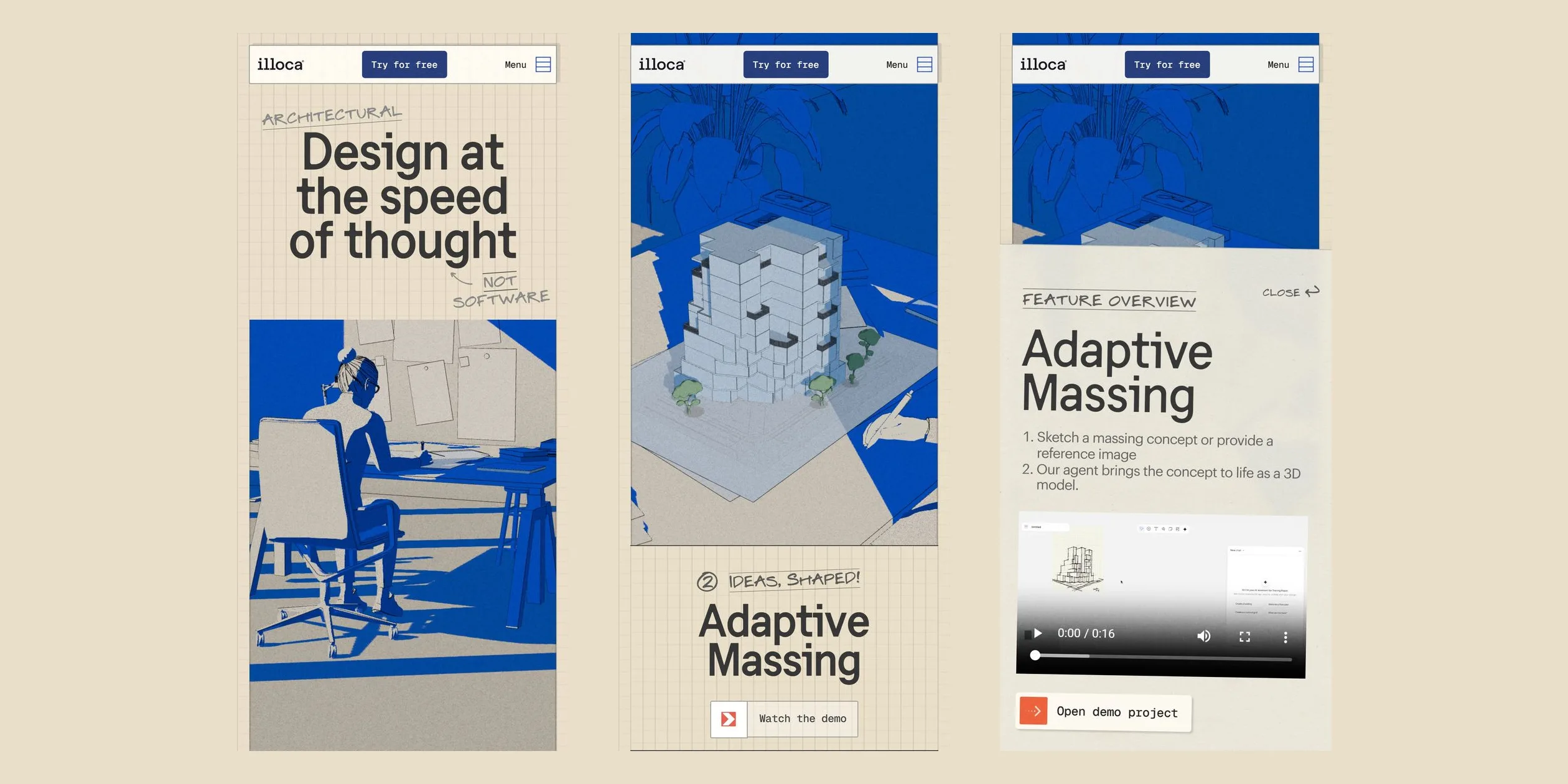
The same layout is stacked vertically on phones and tablets. The navigation card keeps only the illoca name, the Try for free button and a Menu button, the first-screen headline is centred on three lines, and the window fills the tall screen. Each feature's text moves below the window and is centred, and the demo panel sits against the bottom of the screen, covering about the lower two thirds, though it still swings in from the side. On screens narrower than 1024 pixels the camera switches to a separate animation made for portrait screens, so the architect and the building stay in the middle of the frame.
03Motion
Nearly every movement uses the same easing. The team defined its own curve that starts fast and takes a long time to settle, made it the site-wide default and set the default duration to 0.8 seconds. The window opening at the start and the navigation hovers use a second curve that is slow at both ends and fast in the middle. Text entrances follow one method too, with titles, slogans and descriptions split into single letters or words that fade in one after another, each only a few hundredths of a second behind the last. The large headlines arrive in two layers, first a pale grey draft and then the dark letters a few tenths of a second later, like a sketch inked over.
While the page loads, the four tiles of the logo keep changing shape in the middle of the page. After about two and a half seconds, a small slit opens in the centre of the paper. All four edges pull back at once and open it into the first-screen window over 1.8 seconds, while the camera pushes in towards the desk. The headline's pale draft starts appearing letter by letter 0.3 seconds after the window starts to open, and the dark letters start at 0.7 seconds, each 0.04 seconds behind the one before. The handwritten notes on either side are drawn in afterwards with their underlines and arrow. Only at 1.6 seconds does the site let the visitor scroll.
After the opening, everything in the picture follows the scroll position frame by frame, so it stops when the wheel stops and plays backwards when the visitor scrolls up. Smooth scrolling makes the page cover only a small part of the remaining distance each frame, so after the wheel is released the camera keeps gliding for a while before it settles. From the first screen to the footer, the picture holds 60 frames per second.
The camera, the window and the text column take turns moving as the visitor scrolls. Scrolling down, the window first grows upwards to just under the navigation, the headline moves away, and the camera pushes from behind the architect onto the desk. At each feature the window closes in towards one side and the text column swings in from off screen, starting at a 45-degree tilt and ending exactly level, and the camera stops or slows down at that moment. When the visitor scrolls on after reading, the window opens up again and the camera moves on. The building on the desk hangs on the same scroll timeline. Its storeys rise from the paper one at a time, then the roof is cut away, furniture appears and the facades change, and each step happens only when the visitor scrolls to it.
The site's signature interaction happens on the tracing paper. In the Augmented Sketch section, when the cursor moves onto the paper, the pencil sketch in a circle around the cursor turns into a clean floor plan with the grid showing underneath. Inside the circle, the trees change from pencil rings into solid dark circles. The edge of the circle is ragged like ink bleeding into paper. The circle also does not stick to the cursor, because each frame it covers only part of the distance to it, so it trails slightly behind when the cursor moves. When the cursor leaves the paper, the circle grows over 0.75 seconds until it covers the whole sheet, and when the cursor comes back it shrinks again over 0.5 seconds. Scrolling further, the circle grows on its own until the whole sheet shows the plan, and then a rough-edged boundary sweeps across the paper and fades its drawing to half strength, just as the building starts rising from it. Phones and tablets don't get this interaction, and there the paper changes only with scrolling.
The other movements in the story also follow the scroll. In the Prompted Plans section, a prompt box in front of the building types out Create an office layout letter by letter as the visitor scrolls. Once it has finished, desks and chairs appear in the cut-open floors and change from the building's grey blue to the brand's cobalt. Just before the Agentic Refinement section, red-pen markups on another drawing on the desk are drawn stroke by stroke as the visitor scrolls, and they disappear stroke by stroke when the visitor scrolls back up.
Responses to clicks and hovers are short. The demo panel that Watch the demo opens swings in from the lower left, starting at a 20-degree tilt and reaching one degree after 0.8 seconds, where it stays without straightening. When it closes, it flings off screen in 0.6 seconds, starting slowly and speeding up. When a navigation link is hovered, a blue copy of the same word slides in from the left, the original word rolls up and away, and the dotted underline slides in from the right, all within 0.4 seconds.
The open letter at the end uses two different movements. When the story ends, the letter section covers the desk from the bottom of the screen upwards, with a slanted leading edge that flattens as it nears the top, like a sheet of paper being pushed up from below. The four blocks around the envelope bob gently up and down. When the cursor sweeps across one, the block is knocked in the direction the cursor was moving and tumbles a little, then sways back to its place as if hung on a spring, settling in about three seconds.
04Engineering
A single full-screen three.js WebGL canvas carries the whole story, and the window seen on the page is not the canvas edge. The canvas always fills the screen, fixed behind the page, and the window is the gap left by four beige page panels that cover the canvas from each side with clip-path. GSAP tweens the four panels' clip values together, which is all it takes to open and close the window or shift it to one side. The canvas itself never changes size when the window moves, so the renderer never has to be resized. The four panels also carry the same grid as the page, so there is no visible seam between the page and the picture.
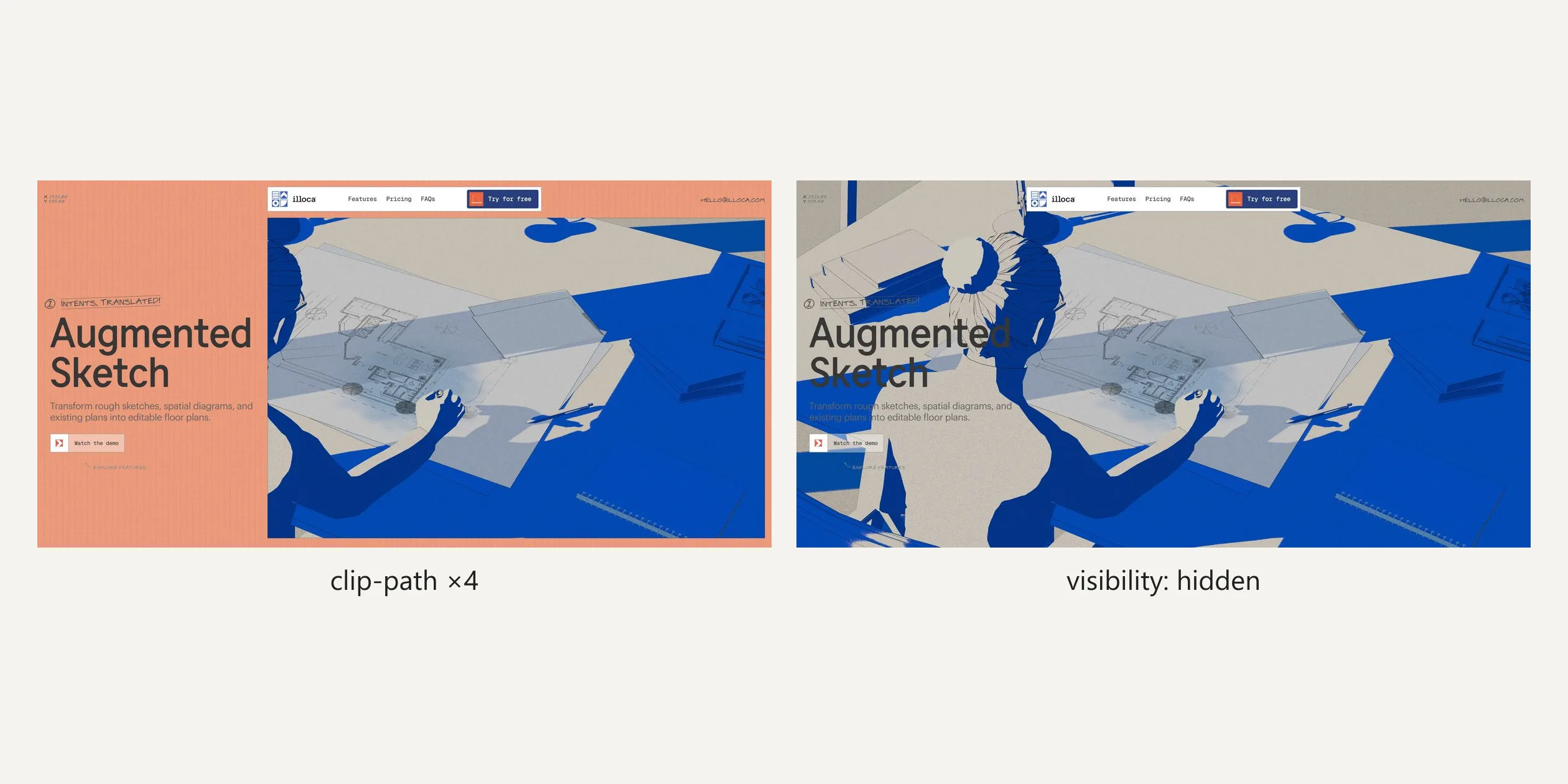
The canvas stays sharp because it is rendered with more pixels than the screen has. The pixel ratio is clamped between 1.5 and 2, so even on standard-density screens the scene is rendered at 1.5 times and scaled down. Together with the browser's built-in multisample antialiasing, this keeps the fine outlines and drawing lines free of jagged edges. The site's framework also builds a composer with FXAA, chromatic aberration, barrel distortion, vignette and noise passes, but every frame is drawn straight to the screen without going through the composer, so the whole look comes from the materials themselves.
The two-colour print look comes from a custom toon shader that the people, furniture, papers and building in the desk scene all share. The shader first takes the angle between the surface and the light. Once that passes a very low threshold (0.1, with a transition only 0.1 wide), it jumps straight from the shadow colour to the base colour, which is why light and dark meet at a hard line. Two directional lights cast PCF shadows, and the soft edge of each shadow is multiplied by a spray mask made from a Voronoi noise texture, so shadow edges break into grains. A paper-grain noise is laid over everything last with an overlay blend. Outlines are line segments generated with EdgesGeometry, black and 0.6 thick across the whole scene. Each object's base and shadow colours are shader parameters that the team tuned one by one in the Theatre.js editor and saved, and tone mapping is switched off, so the colours on screen are exactly the colours chosen while tuning.
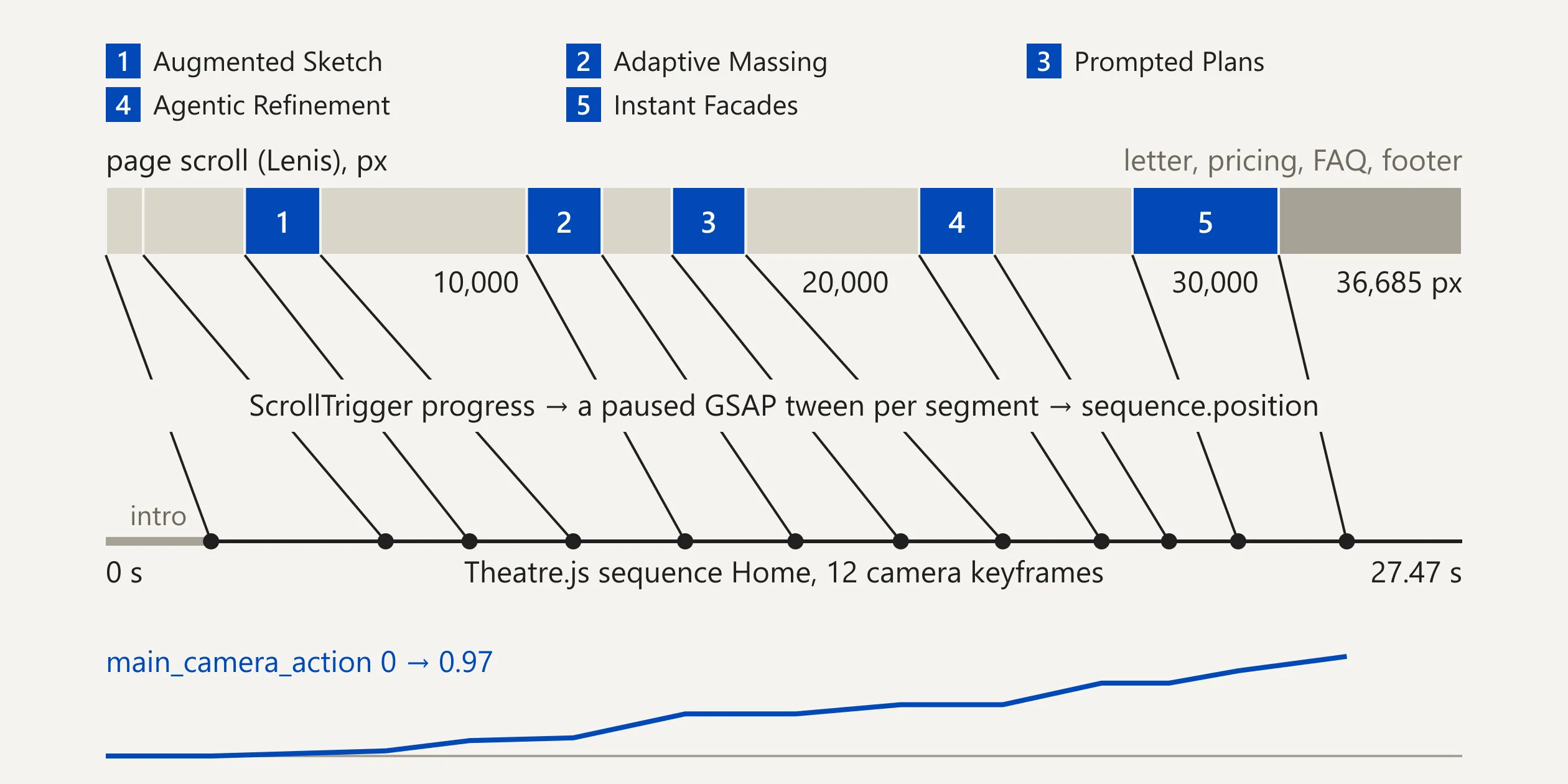
Every animation in the 3D picture sits on one Theatre.js timeline. The camera route is a pre-made animation stored with the models in the glb file, in one version for computers and one for narrow screens. A Theatre.js track treats the progress of that camera animation as a number from 0 to 1 and keys it twelve times along a 27.5-second sequence. The people's animations, the rising storeys, facade visibility, shader parameters and the positions of the two lights are all keyed on the same sequence. The Theatre.js editor interface loads only in development with a ?gui parameter, and the live site loads just the playback core and the animation data bundled into the script.
Lining that timeline up with page scrolling comes down to a simple split. The site wraps each stretch between two neighbouring keyframes on the camera track in its own paused GSAP tween, and each section of the page has a ScrollTrigger that hands its scroll progress to the matching tween. The length of a section on the page therefore decides how slowly that stretch of camera moves, so the layout can change without the camera drifting out of step with the text. The stretch where the camera moves from the first feature to the second, for example, lasts only about 2.3 seconds on the timeline but gets about 5,600 pixels of scrolling. That is twice the length of the stretch just before the first feature, and most of the building's rise happens within it. On screens narrower than 1024 pixels the site switches to the narrow-screen camera animation, which has its own set of keyframes in Theatre.js at slightly different times. Scrolling itself is handled by Lenis with lerp at 0.06, so each frame the page covers only 6% of the remaining distance, which is why the glide is so long.
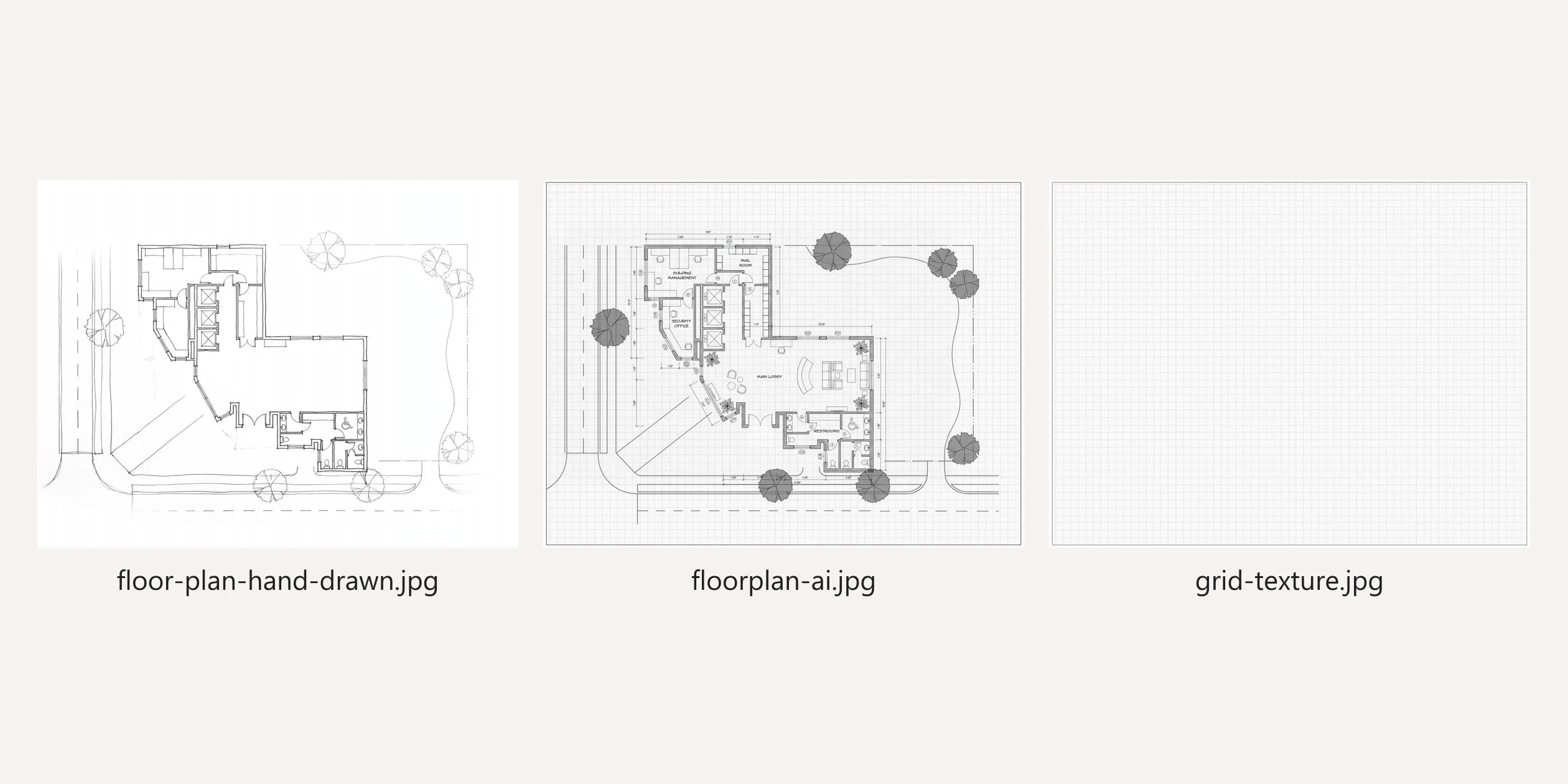
The effects on the paper each take a shortcut. The tracing paper's shader reads three images at once, the pencil sketch, the clean floor plan and the grid. The site raycasts to find the point where the cursor lands on the paper, and the shader draws a circle around that point, roughens its edge with Perlin noise and shows the plan inside it. The red-pen markups don't use video, but 49 JPEG frames. The site picks a frame from the scroll progress, draws it into a 2D canvas and updates that canvas as a texture on the paper, so scrolling backwards stops exactly on any frame.
The two closing scenes take shortcuts too. The open letter transition renders the letter scene into an offscreen render target, puts it on a plane directly in front of the main camera and reveals it from the bottom up with a slanted mask. As soon as the transition finishes, the site stops the desk scene and turns off the shadow map, so the last few screens draw only the two tiny scenes for the letter and the footer. The blocks around the envelope use simple damped springs, one for position and one for rotation, and the first time the cursor touches a block it gets an impulse in the direction the cursor is moving.
This approach means downloading about 8.4 MB first. The largest share is the 3D models at about 5 MB, of which the rising building takes 3.7 MB and the desk scene about 1.3 MB. The models are DRACO-compressed, and the site hosts the decoder itself. Textures are KTX2 (Basis Universal compression) and come to about 1 MB in total, with the transcoder another 230 KB or so. Most of the rest is about 0.65 MB of scripts and about 1 MB of JPEG images, including the markup frames and the pricing and footer images.
Phones, tablets and computers all download the same assets, and narrow screens change only the camera animation and the layout. The site reads the graphics card's name, and on an entry-level Intel integrated GPU it drops the shadow map from 2048 to 512. Two parts of these downloads go unused. The site's home page requests styles for six Google Fonts families, of which only Geist Mono is used, although browsers never download the font files that go unused. The orbit controls, transform controls and model drag-and-drop used during development are bundled into the same script of about 76 KB as the scene's base code, so visitors download them too.
The site's page itself opens quickly, with something on screen within 0.4 to 0.5 seconds and almost no layout shift. Visitors wait about 4.5 to 5 seconds for the full first screen, though, because the logo's loading animation has to finish before the window starts to open. The page freezes for about 1.2 seconds in total while loading, the longest single freeze being close to half a second.
A keyboard can get through the whole site, every link and button has a visible focus ring, PageDown and Space move the whole story along, and pressing Tab scrolls the page to the next feature's button. When a demo panel opens, focus is trapped inside it, Esc closes it, and focus then returns to the button that opened it. Screen readers get the feature titles and descriptions, along with the open letter, pricing and FAQs later on, but everything the camera shows lives on the canvas with no text description. The site also ignores the system's reduced motion setting, so with it switched on, the camera and the letter-by-letter animations play as normal.
05Scores and Team
| Award | Source | Date | Score |
|---|---|---|---|
| FWA of the Day | The FWA | 2026-08-13 | 86 POINTS, DAYS 3 |
| Site of the Day | Awwwards | 2026-09-04 | 7.44. Design 7.33 / Usability 7.43 / Creativity 7.70 / Content 7.36 |
| Developer Award | Awwwards | 2026-09-04 | 7.55 / 10 |
illoca's first award was FWA of the Day on 13 August, with 86 points, and FWA filed it under Architecture & Design, Promotional and AI. On 4 September it won Awwwards Site of the Day with a total of 7.44, along with the Developer Award the same day. Of the four Awwwards categories, Creativity is highest at 7.70, perhaps because the features are acted out in one unbroken shot of a desk and visitors watch a sketch turn into a plan under their own cursor. Design is lowest at 7.33, and the fact that all five features share the same text column and window layout, while the pricing and FAQs after the story are laid out conventionally, may have pulled it down.
The developer jury gave it 7.55, with Animations highest at 8.40 and Semantics lowest at 6.80. That matches the Engineering chapter, where the camera work and transitions are thorough but the story lives entirely in the 3D picture, leaving little readable structure on the page. Responsive Design scored 7.60, which fits what happens on phones, where narrow screens switch to a portrait camera animation and a stacked layout and the demo panel sits against the bottom of the screen.
| Credit | Role | Record |
|---|---|---|
| Unseen Studio | A brand, digital and motion studio, whose FWA introduction says it creates refreshingly unexpected ideas and striking visuals for bold brands. The account lists Bristol, United Kingdom | Awwwards works 51, SOTM 3, SOTD 36, HM 50. FWA 39 (FOTD 37, FOTM 2) |
Unseen Studio is a regular winner on both platforms, and the figures in the table run to 24 October 2026. Both platforms credit only Unseen Studio, with no individual names. Unseen Studio has offices in Bristol and London, and in a Codrops spotlight the studio says it was founded by three friends fourteen years ago and now works across brand, digital and motion. Unseen Studio made the brand identity, website and motion for this project, the client is illoca, and the project page dates it to May 2026, the month illoca announced its funding and launched the product. Because the brand and the site came from the same team, the language of paper, tracing paper and pencil carries from the logo through to the site's navigation, buttons, demo panels and folders.
06Archive
- Award date
- 2026-09-04
- Awards
- Awwwards SOTD 2026-09-04, Awwwards DEV 2026-09-04, The FWA FOTD 2026-08-13
- Site
- https://illoca.unseen.co/
- Credits
- Unseen Studio
- Design
- cinematic
- Build
- scroll
- Awwwards
- 7.44 / 10. Design 7.33 / Usability 7.43 / Creativity 7.70 / Content 7.36. Developer Award 7.55. https://www.awwwards.com/sites/illoca
- The FWA
- 86 POINTS, DAYS 3. https://thefwa.com/cases/illoca
- Stack
- Nuxt 3, three.js r183, Theatre.js 0.7.2, GSAP (ScrollTrigger, SplitText, CustomEase), Lenis 1.3.23, DRACO, KTX2 (Basis Universal), Netlify, F37 Analog, Graphik, Geist Mono, Architect Pro
- Total assets
- About 8.4 MB, of which 3D models are about 5 MB (the largest is the 3.7 MB building) and compressed textures about 1 MB
- Speed
- FCP 384 to 504 ms, full first screen about 4.5 to 5 seconds, CLS 0.0001. Continuous scroll 60 fps